PALWHEEL
Quick Action Wheel for Palworld
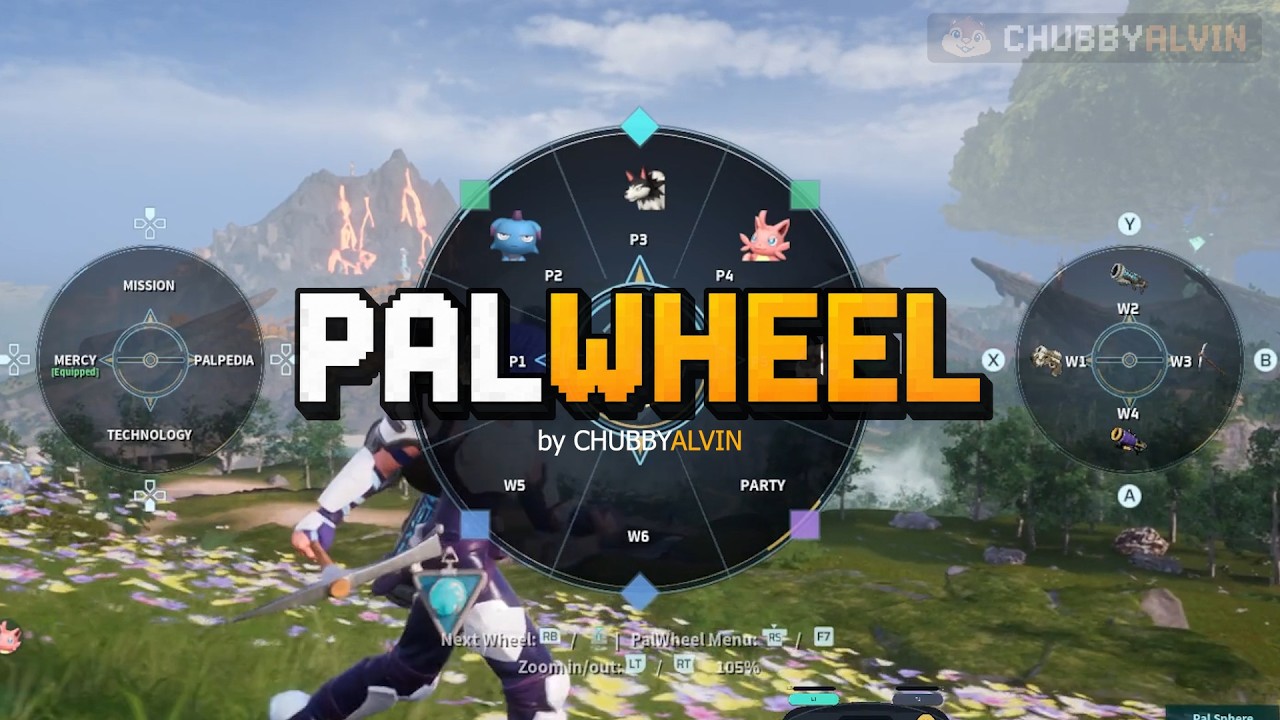
PalWheel is a customizable radial quick-action wheel for Palworld.
It lets you reach commonly used actions faster by putting them on configurable wheels instead of digging through menus or remembering many hotkeys.
PalWheel v2.0 adds a fuller quick-access system with up to 3 Main Wheels, AUX I / AUX II, a separate Sphere Wheel, and a complete in-game PalWheel Menu.
MAIN FEATURES
- Up to 3 Main Wheels
- 36 saved Main Wheel assignments — 12 per wheel
- 4–12 visible slots per Main Wheel
- AUX I and AUX II for direct quick-use shortcuts
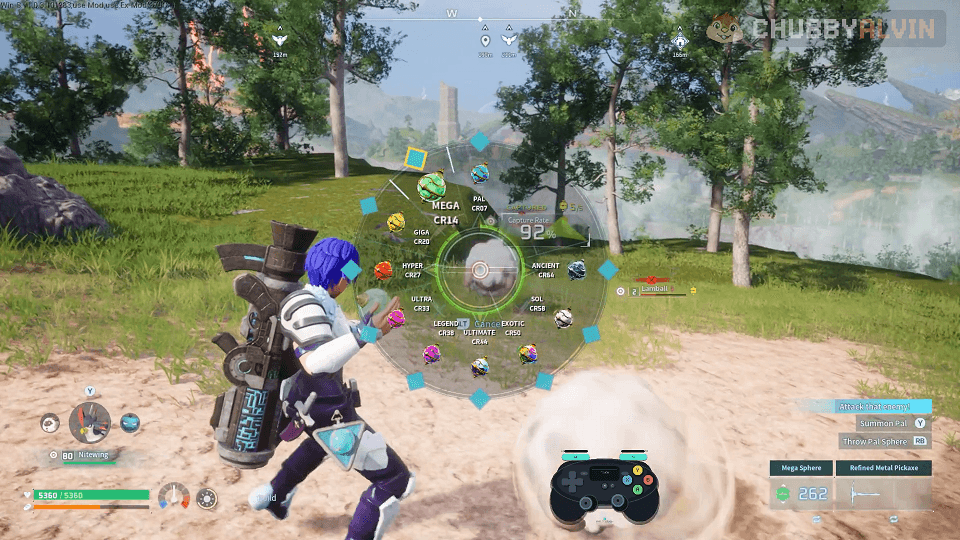
- Separate Sphere Wheel with configurable sphere order
- Controller, keyboard, and mouse support
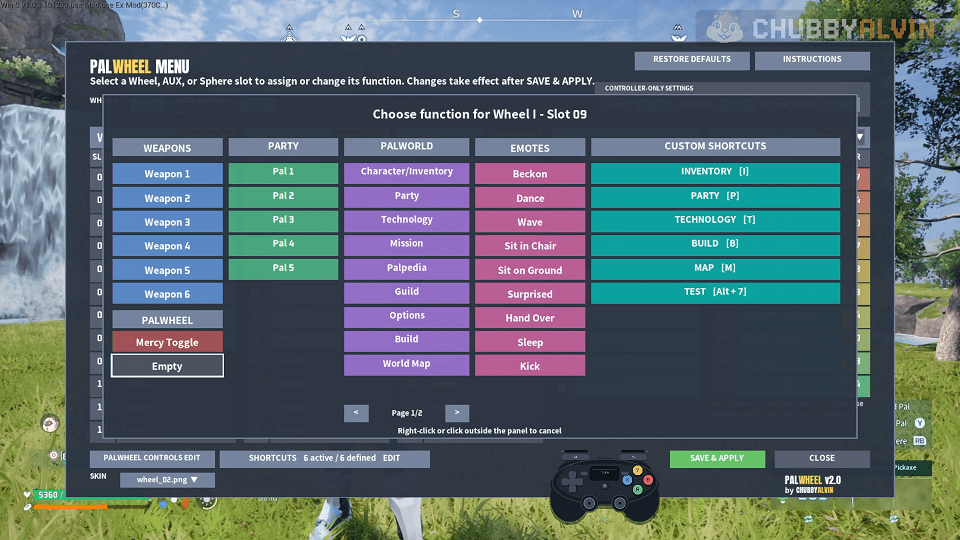
- F7 PalWheel Menu for assignments and settings
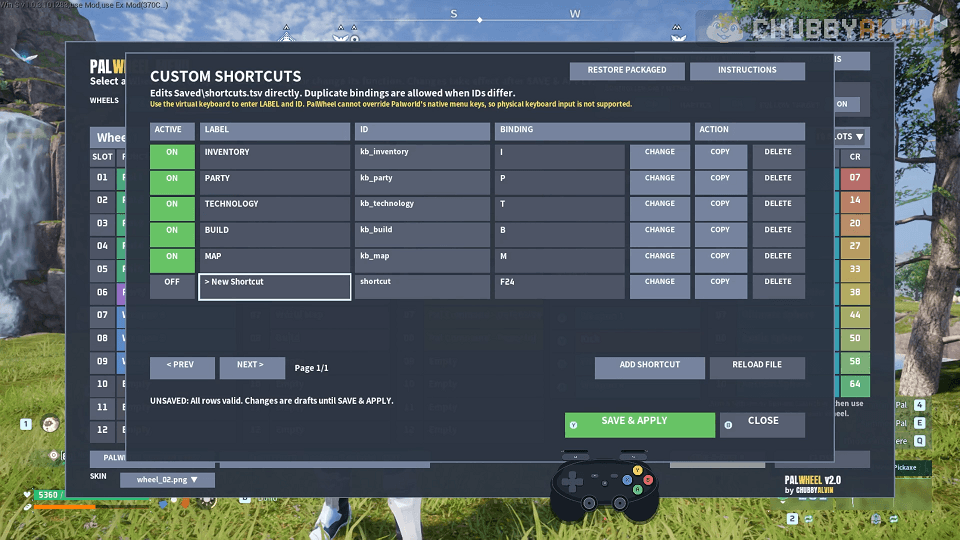
- Custom Shortcuts for Palworld and other mod hotkeys
- Expanded-party support when another mod increases local party capacity
- Mercy Toggle support
- Selectable wheel skins
- Optional Slow Motion, Controller Zoom, Haptics, and Sphere Follow Target
ASSIGNABLE ACTIONS
Party Pals
Pal 1–5 normally, plus Pal 6+ when expanded party capacity is detected
Weapons
Weapon 1–6
Palworld Menus
Inventory • Party • Technology • Mission • Palpedia • Guild • Options • Build • World Map
Pal Actions
Feed Pal • Pet Pal • Photo Mode • Pal Command — Peaceful / Defensive / Aggressive
Emotes
Beckon • Dance • Wave • Sit in Chair • Sit on Ground • Surprised • Hand Over • Sleep • Kick
Custom Shortcuts
User-defined keyboard shortcuts for Palworld and other mods
DEFAULT CONTROLS
Controller
- Hold L1 / LB — Open Main Wheel
- Right Stick — Select a Main Wheel slot
- Release L1 / LB — Activate selected slot
- R1 / RB — Next Main Wheel
- R3 / RS while the wheel is open — Open the PalWheel Menu
Keyboard / Mouse
- Hold Caps Lock — Open Main Wheel
- Mouse — Select a Main Wheel or AUX slot
- Left Click — Activate selected slot
- Middle Mouse — Next Main Wheel
- F7 — Open or close the PalWheel Menu
PALWHEEL MENU
Press F7 to open the PalWheel Menu.
From there you can:
- Assign Main Wheel slots
- Assign AUX slots
- Change sphere order
- Choose how many Main Wheels are active
- Set visible slot counts for each Main Wheel
- Set Sphere Wheel slot count
- Change PalWheel controls
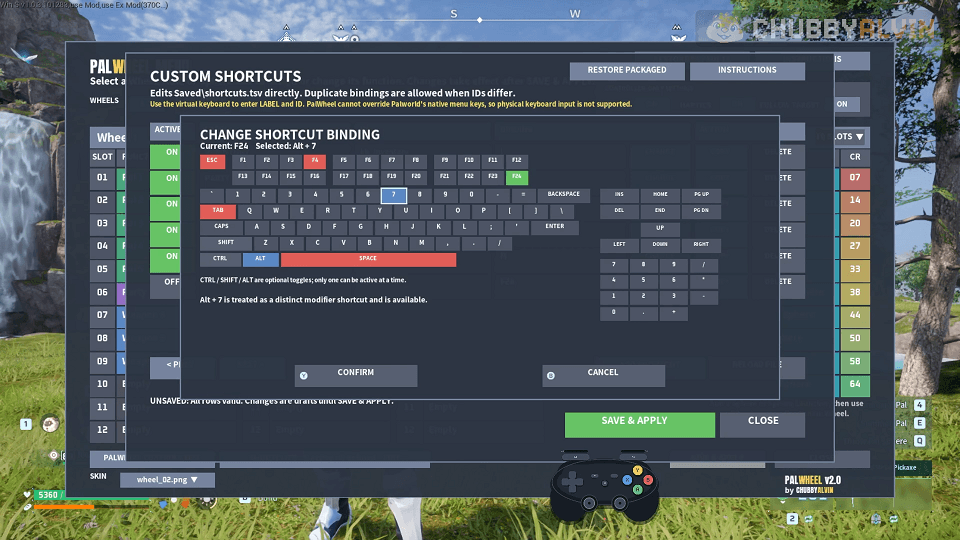
- Manage Custom Shortcuts
- Change wheel skin
- Adjust PalWheel options
Changes stay in draft until you select SAVE & APPLY.
CUSTOM SHORTCUTS
PalWheel can generate and use:
PalWheel\Saved\shortcuts.tsv
You can manage shortcuts in-game from the PalWheel Menu, or edit the TSV manually while the game is closed.
Custom Shortcuts can be used for:
- Palworld keyboard actions
- Hotkeys from other mods
- Your own named shortcut actions
The first 36 valid active shortcuts are available in the assignment picker.
EXPANDED PARTY SUPPORT
If another compatible mod increases the local party capacity, PalWheel automatically exposes matching Pal slots such as Pal 6, Pal 7, and beyond.
If expanded capacity later becomes unavailable, those extra assignments remain saved and become usable again automatically when the added capacity returns.
INSTALLATION
UE4SS is required.
- Install UE4SS for Palworld.
- Download PalWheel.
- Extract the archive.
- Place the PalWheel folder in either:
Pal\Binaries\Win64\ue4ss\Mods
or
Palworld\Mods\NativeMods\UE4SS\Mods
- Start Palworld and enter a world.
PalWheel creates its user files in:
PalWheel\Saved\
including:
settings.lua
shortcuts.tsv
REQUIREMENTS
- Palworld for Windows
- UE4SS for Palworld
PERMISSIONS
PalWheel © 2026 CHUBBYALVIN. All Rights Reserved.
Do not redistribute, reupload, repackage, publish modified versions, or incorporate PalWheel into another project without permission.
PalWheel includes PalworldKeyInjector, distributed under the MIT License.
DISCLAIMER
PalWheel is an unofficial community mod and is not affiliated with or endorsed by Pocketpair.
Game updates, Palworld changes, or UE4SS changes may affect compatibility.
Use game modifications at your own risk and back up important save or configuration data when appropriate.
SUPPORT
All of my mods are free. If you enjoy PalWheel and would like to support my modding work, you can do so through Patreon or Ko-fi.
Support is completely optional.