PALBOX QUICK BROWSE
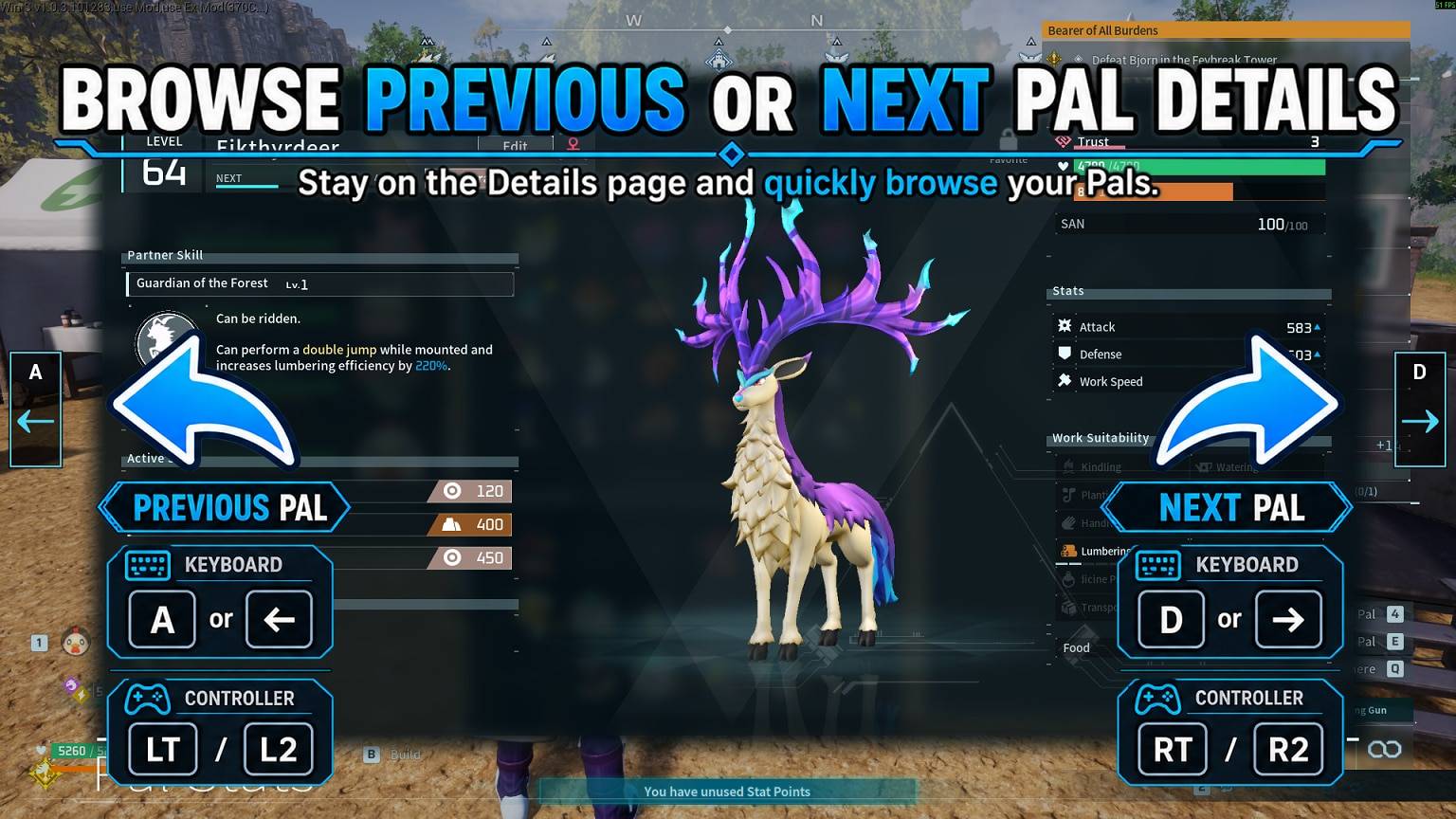
Quickly Browse Pal Details Without Going Back to the List
Ever been frustrated with Palworld's vanilla Pal Details menu?
When checking several Pals, you normally have to open a Pal's details, go back to the list, select another Pal, open their details, and repeat the process over and over.
Palbox Quick Browse makes this much faster by letting you browse directly through your Pals while keeping the Pal Details page open.
MAIN FEATURES
- Browse the previous or next Pal without leaving the Details page
- Full keyboard and controller support
- Use A / D or the Left / Right Arrow Keys with keyboard
- Use LT / L2 or RT / R2 with controller
- Clickable on-screen navigation controls for mouse users
- Automatically skips empty Palbox slots
- Previous/Next controls automatically disappear when you reach the first or last available Pal
- Works with Palbox Pals
- Works with Base Pals
- Works with Party Pals accessed through the Palbox
- Works directly from Palworld's separate Party menu
- Supports expanded Party sizes dynamically
- Lightweight UE4SS mod
- No configuration required
CONTROLS
Keyboard
A / Left Arrow — Previous Pal
D / Right Arrow — Next Pal
Controller
LT / L2 — Previous Pal
RT / R2 — Next Pal
You can also click the navigation controls displayed on the left and right sides of the Pal Details screen.
INSTALLATION
UE4SS is required.
Standard UE4SS Installation
- Install UE4SS for Palworld.
- Download Palbox Quick Browse.
- Extract the archive.
- Place the PalboxQuickBrowse folder in:
Pal\Binaries\Win64\ue4ss\Mods
The result should look similar to:
Pal\Binaries\Win64\ue4ss\Mods\PalboxQuickBrowse
- Start Palworld.
Steam NativeMods UE4SS Installation
If you use the Steam-style UE4SS installation under Palworld's NativeMods directory, place the PalboxQuickBrowse folder in:
steamapps\common\Palworld\Mods\NativeMods\UE4SS\Mods
The result should look similar to:
steamapps\common\Palworld\Mods\NativeMods\UE4SS\Mods\PalboxQuickBrowse
The mod folder should contain:
PalboxQuickBrowse
├── enabled.txt
└── Scripts
    └── main.lua
USAGE
- Open your Palbox or Party menu.
- Open a Pal's Details page.
- Use A / D, Left / Right Arrow, LT / L2, RT / R2, or the on-screen controls to browse directly between Pals.
Palbox Quick Browse automatically follows the active list and skips empty slots.
COMPATIBILITY
Currently supported:
- Palbox Pals
- Base Pals
- Party Pals accessed through the Palbox
- Party Pals from Palworld's separate Party menu
- Expanded Party layouts
SOURCE CODE
Palbox Quick Browse is open source under the MIT License.
The source code is available on GitHub.
Palbox Quick Browse on GitHub
PERMISSIONS
Palbox Quick Browse © 2026 CHUBBYALVIN.
This project is released under the MIT License.
You may use, modify, and redistribute the source code in accordance with the MIT License. The copyright and license notice must be retained as required by the license.
Credit to CHUBBYALVIN as the original author is appreciated when sharing or building upon the mod.
DISCLAIMER
Palbox Quick Browse is an unofficial community mod and is not affiliated with or endorsed by Pocketpair.
Game updates, Palworld changes, or UE4SS changes may affect compatibility.
Use game modifications at your own risk and back up important save or configuration data when appropriate.
SUPPORT
All of my mods are free. If you enjoy Palbox Quick Browse and would like to support my modding work, you can do so through Patreon or Ko-fi.
Support is completely optional.