⚠️ Read this first if you run a dedicated server
Palworld requires the Palworld-specific build of UE4SS. The standard/generic UE4SS build will crash your dedicated server.
Download it here: https://github.com/Okaetsu/RE-UE4SS/releases/tag/experimental-palworld
Palworld ships a modified engine, and the generic UE4SS build reads the game's internal data at locations that don't line up with it. The catch is that it looks like it's working — UE4SS loads, mods start, the log prints normally — but any mod that reads or writes pal data can take the whole server down with no error message. This is not something a mod can protect against or detect for you.
How to check which build you have: open your server's UE4SS.log and look at the first few lines:
UE4SS - v3.0.1 Beta #0 - Git SHA #c838a8ac    <- correct (Palworld-specific)
UE4SS - v3.0.1 Beta #0 - Git SHA #c2ac246     <- WRONG (generic build)
If the SHA isn't the Palworld one, replace UE4SS before troubleshooting anything else. Symptoms of the wrong build include: server crashing shortly after EXP is shared, mod output never appearing in your server console, and EXP reaching only one or two pals instead of your whole box.
After any Palworld game update, mods can start crashing while still looking correctly installed, because the update changes the game binary. Check that release page for a rebuilt version before assuming a mod broke.
Description
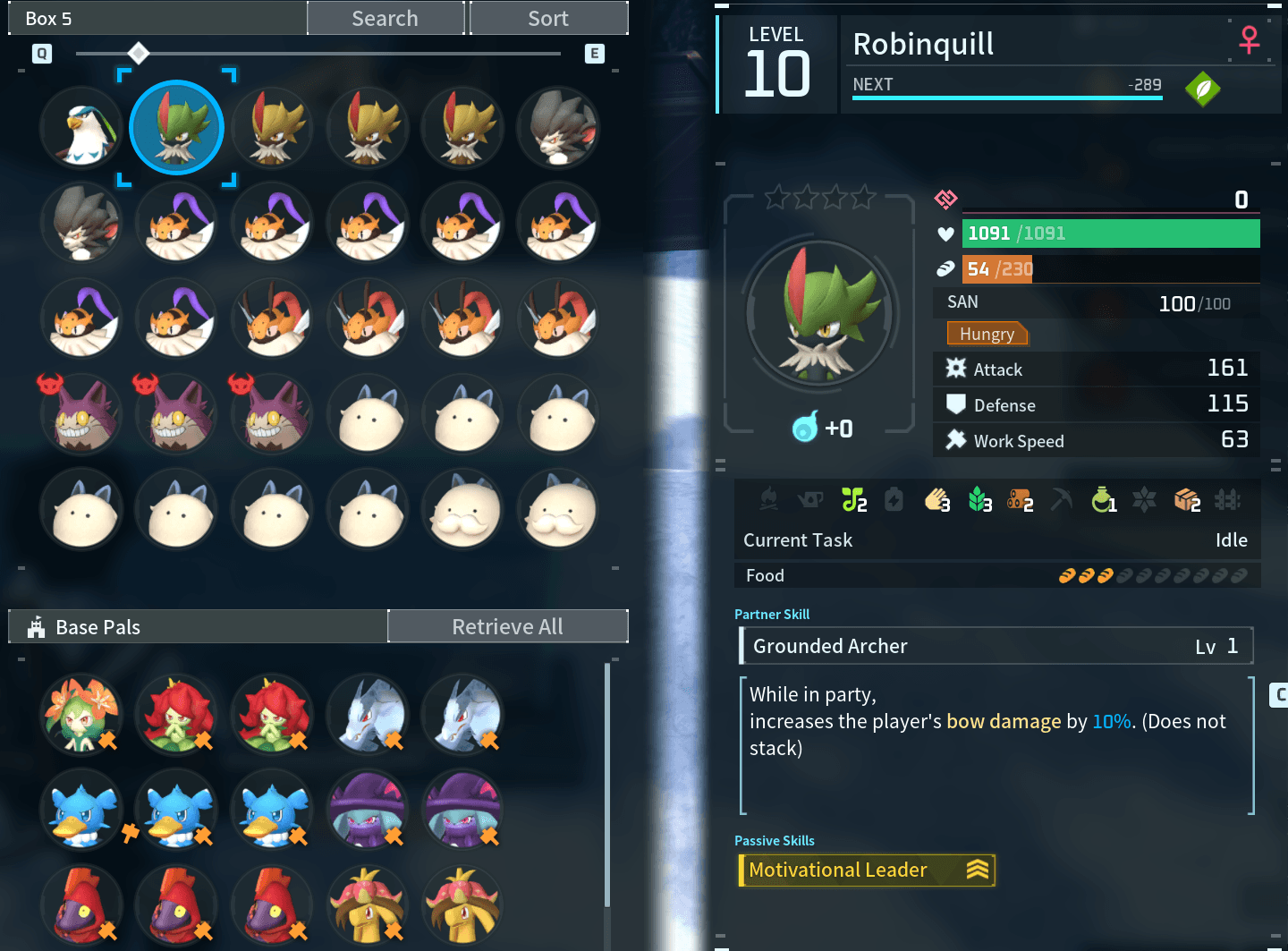
Vanilla EXP sharing only rewards the pals actively following you in your party — everything sitting in your Palbox gets nothing until you manually take it out and grind it up yourself. Better EXP Share fixes that: whenever your party gains EXP, every other pal you own gets the same amount too, Palbox included, and levels up immediately as it earns enough — no more pulling pals out one at a time just to level them up.
Features
- Automatic, no setup required. Just install it and play — the mod watches your party's EXP in the background and mirrors any gain across your whole collection.
- Boxed pals level up automatically. No need to pull a pal out of storage first — as soon as it's earned enough shared EXP, its Level updates immediately, right there in the Palbox.
- Applies to every pal you own, not just a handful — tested with 250+ owned pals updating correctly in a single pass.
- Works properly on dedicated servers as of v1.5 — see the changelog.
- Multiplayer-safe. Each player's EXP gains are only ever applied to that same player's own pals. On a server with multiple people online, nobody's grinding boosts anyone else's collection, and nothing stacks or multiplies based on player count.
- Light on the server. Sharing is spread across a few frames rather than done all at once, so large Palboxes don't cause a hitch.
How it works (player-facing)
- Kill something, gain EXP with your party like normal — Better EXP Share takes it from there and applies the same amount to your other pals automatically, including a full Level recalculation, so a boxed pal that racks up enough shared EXP levels up immediately without needing to be taken out of storage first.
- Works for EXP from combat and from catching pals alike.
- Any pal found with corrupted EXP (extremely rare, from a bug in older versions) is automatically repaired the next time it's checked, so leveling resumes normally.
Requirements
Installing on a Dedicated Server
This is a client-side-installable Lua mod (enabled.txt + Scripts/main.lua, no Info.json), so it needs UE4SS's classic manual setup on the server — not the newer Info.json/Workshop auto-deploy system. Where exactly the mod folder goes depends on how UE4SS was installed on your server:
-
If UE4SS core files sit directly in Pal/Binaries/Win64/ (same layout as a normal client install): put this mod in
Pal/Binaries/Win64/Mods/BetterExpShare/
-
If UE4SS was installed in an ue4ss subfolder (common with some host panels, e.g. AMP): put this mod in
Pal/Binaries/Win64/ue4ss/Mods/BetterExpShare/
Either way, add a line to that same folder's mods.txt (create it if it doesn't exist yet):
BetterExpShare : 1
Important — this mod must be installed on the server itself for real multiplayer, not just your own client. Palworld's dedicated server holds the authoritative save data; a connecting player's client only ever sees a synced copy of it. If you install this only on your own client while joining someone else's dedicated server that doesn't also have it installed, the mod will simply have no effect — it won't break anything or cause desyncs, it just won't be able to make any change stick, since it isn't running where the real data lives. For it to work in that situation, ask the server owner to install it on the server too.
Singleplayer and self-hosted ("Host a Game") play both work out of the box with no extra steps, since your own game is the authority in those cases.
Troubleshooting
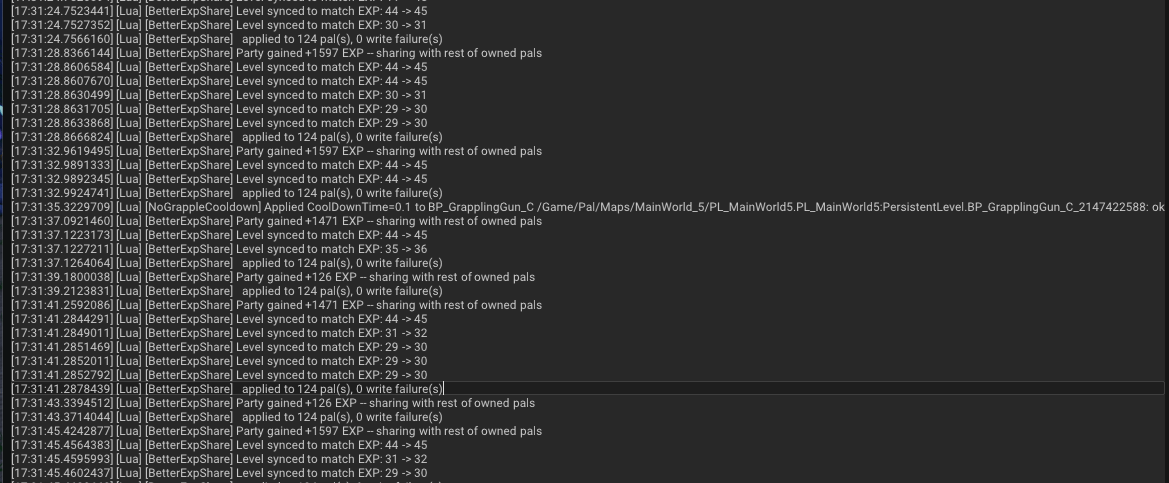
Your server's UE4SS.log is where this mod reports what it's doing. On a correctly-configured server you should see lines like:
[BetterExpShare] Level table cached: 80 levels, 32 validation checks, 0 mismatches.
[BetterExpShare] Sharing +84 EXP -- applying in <=20ms slices
[BetterExpShare]   applied to 63 pal(s) over 960 slot(s), 0 write failure(s) -- 15ms of work spread across 3 tick(s)
[BetterExpShare]   profile: resolve 10ms | owner 0ms | read 0ms | write 0ms | level 1ms | other 4ms
[BetterExpShare] Level synced to match EXP: 36 -> 37
The profile: line is timing information and is completely normal — it's there so that if anyone ever reports a performance problem, the numbers needed to diagnose it are already in the log. It costs nothing and can be ignored.
applied to 1 pal(s) (or a number far lower than your collection) — you're on an older version; update to v1.5.- No output at all after a kill — check the UE4SS build (see the warning at the top). If the log shows
A player is being skipped, that message says which part failed.
- Output appears on your own client but not the server — the mod isn't installed server-side; see the section above.
- Messages appear only for one player on a multiplayer server — update to v1.5, which fixes party detection failing intermittently for other players.
Known / not yet verified
- Level-capped parties. If every pal in your party is at max level and therefore no longer gaining EXP, there's no gain for the mod to detect and mirror. This hasn't been confirmed either way and would only affect fully-capped endgame parties.
- The World Tree. One report suggested sharing stops working after reaching it. A safeguard is in place that restarts the mod's internal loop if it stalls across a map transition, but this hasn't been verified first-hand.
If either affects you, a log snippet would genuinely help.
Notes
- Safe to add to an existing save — it only ever adds EXP, it never removes or resets anything.
- No config file or console command needed; there's nothing to tune.