ZexiCore C · 辙隙核心C
- By
Wheel tracks are the trails stories leave behind; the rift is the gap between trails — and that thin gap is the bond that ties every story back together. Scattered travelers meet again in the lamplight.
ZexiCore C · 辙隙核心C
车辙,是故事走过的轨迹;辙隙,是轨迹与轨迹之间的缝隙——那一线空隙,正是把每条故事重新牵到一起的纽带。散落的旅人,由此在灯火里重逢。
Wheel tracks are the trails stories leave behind; the rift is the gap between trails — and that thin gap is the bond that ties every story back together. Scattered travelers meet again in the lamplight.
Minecraft 26.3 · NeoForge 26.3+ · Version v1.1.5 · English / 中文
English Version
✦ What Is This Mod?
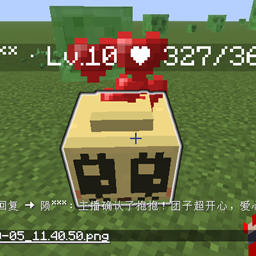
A NeoForge server-side mod built for periodically resetting servers, plus a fun block that lets you "pack up a piece of terrain" — the Terrain Cube.
✦ Installation
- Install NeoForge 26.3+ on both server and client.
- Place the mod in the server's
mods/folder. - Players are recommended to install the same mod on their client — the Terrain Cube's progress bar, range border, and Chinese item names depend on it. Without it, the game still works, but you won't see the floating progress.
The server config is generated at config/zexi_core_c.toml on first launch. Changes made in-game take effect immediately, no restart needed.
✦ Feature 1: Dimension Reset Engine
A scheduled reset system designed for servers that "restart weekly, overhaul monthly".
What it does:
- Per-dimension reset — Overworld / Nether / End (and dimensions from other mods) each have their own toggle. Resetting one never touches the others.
- Fresh seed per dimension — each reset dimension gets its own new seed, recorded in the world save; seed history is logged.
- Schedules with units — write
6h,1d,1w,1mofreely, and different dimensions can have different cycles (Nether resets daily, Overworld weekly — no problem). - Warning & low-peak execution — a countdown broadcast before the reset; you can also set it to run only when nobody is online.
- Auto restart — after reset, the server stops and relaunches (back within 10 seconds), or it can just stop and let your panel handle it.
How it works (two stages):
Minecraft 26.3 no longer supports safely destroying and rebuilding a dimension while the server is running, so the engine uses "clear on stop + regenerate on start":
- On shutdown, delete the target dimension's region / poi / entities save data and write the new seed into the world generation settings.
- On the next startup, vanilla regenerates that dimension with the new seed — fully through vanilla's load path, with no half-dead dimension left behind.
What it absolutely does not do:
- ❌ Never touches player inventory, XP, status effects, attributes, advancements, or any player save data.
- ❌ After a reset, it only does one thing: if a player happens to be standing in the cleared dimension, place them on a safe patch of ground nearby (position only).
✦ Feature 2: Terrain Cube
An admin-distributed "terrain relocation (regenerated version)" block. Note: releasing it regenerates terrain according to world generation rules — it does not copy blocks one-to-one. The mountain is still that mountain; trees grow back on their own.
① Distribution (admin only)
/zexicc cube give <player> <length> <width> <height> <storage dimension> <release dimension>
Example: /zexicc cube give @a 64 32 64 minecraft:overworld minecraft:the_nether
(each side 1–1024 blocks). Size and both dimensions are permanently locked to the item and visible in its tooltip; sensitive info like seeds is never shown to players.
② Storage (player)
Carry the cube to the storage dimension and place it — a particle border marks the affected area. Right-click with an empty hand to start storing, and the progress is shown above the cube in real time.
- Duration scales with size, roughly 3–30 minutes (capped at 30 minutes for an effective side length of 348 blocks).
- Breaking the block during storage cancels it: the cube drops normally, locked properties unchanged.
When full, the cube automatically drops as an item, recording the source dimension, coordinates, and seed of that terrain. It cannot be stored into again.
③ Release (player)
Carry the stored cube to the release dimension and place it — the terrain's edge range is shown. Right-click with an empty hand to start generating, and the progress is shown above the cube in real time (red).
- Generation takes about one-third of the storage time (minimum 30 seconds, maximum 10 minutes), growing layer by layer from the bottom up.
- Two checks are performed before generation (see Safety Design); if they fail, it refuses and tells you the location.
- You can break the block to reposition before starting; once generation begins, breaking it terminates immediately with no drop.
- When generation completes, the cube disappears with no drops.
✦ Commands
All commands require admin permission (level 3), with the unified prefix /zexicc.
| Command | Effect |
|---|---|
/zexicc status |
View the reset engine's current status |
/zexicc plan |
Preview how the next reset seed will apply to each dimension |
/zexicc reset [delay] |
Manually trigger a reset, optionally delayed (e.g. 30m, 1h) |
/zexicc cancel |
Cancel a pending reset |
/zexicc preset <full\|nether\|gentle\|custom> |
Apply a preset in one click |
/zexicc schedule on\|off |
Enable / disable scheduled resets |
/zexicc schedule <interval> |
Set the default interval (must include a unit: 6h/1d/1w/1mo…) |
/zexicc schedule dim <dimension> <interval> |
Set an independent interval for a single dimension |
/zexicc seed <dimension> |
View the current seed assignment for a dimension |
/zexicc dims list |
List all server dimensions and whether they participate in resets |
/zexicc dims add\|remove <dimension> |
Add / remove a dimension from the reset list |
/zexicc dims only <dimension> |
Reset only this dimension |
/zexicc dims protect\|unprotect <dimension> |
Set / unset "never reset under any circumstances" protection |
/zexicc dims all\|none |
Check all / none in one click |
/zexicc config list\|get\|set\|reset <key> |
View or change any config in-game; saved immediately |
/zexicc cube give … |
Distribute a Terrain Cube (see above) |
/zexicc repair |
Manually scan and repair advancement reachability |
/zexicc log |
View the tail of the mod log |
/zexicc reload |
Reload the config file |
Dimension parameters are forgiving: the
minecraft:prefix can be omitted, common dimensions can be written in Chinese ("下界", "末地"), and trailing semicolons or slashes pasted from chat are cleaned automatically.
✦ Config
Location: server config/zexi_core_c.toml. Supports manual hot-editing and in-game /zexicc config set. Key entries:
| Key | Default | Description |
|---|---|---|
general.enabled |
true |
Master switch for the reset engine |
dimensions.overworld / nether / end |
false/true/true |
Whether each dimension participates in resets |
dimensions.extra |
[] |
Extra dimension IDs to reset, supports modname:* wildcards |
dimensions.protected |
[] |
"Fuse" dimensions that are never reset |
seed.mode |
PER_DIMENSION |
Seed strategy: per-dimension / shared / fixed / unchanged |
schedule.enabled / interval |
false / 6h |
Scheduled reset switch and default interval (must include a unit) |
schedule.per_dimension |
[] |
Per-dimension intervals, e.g. "minecraft:the_nether=1d" |
schedule.warn_seconds |
60 |
How many seconds before the reset to broadcast a warning |
schedule.only_when_empty |
false |
Only run when nobody is online (low-peak window) |
restart.mode |
STOP_AND_RELAUNCH |
Stop & relaunch / stop only / skip and retry next time |
protect.* |
on | Post-reset safe landing related (position only, no data touched) |
advancements.* |
true |
Auto-repair advancement reachability after reset |
cube.protection_check |
true |
Ask claim/protection mods per chunk before cube generation |
cube.blocks_per_tick |
4096 |
Max blocks written per tick during cube generation (anti-lag) |
✦ Three Presets
/zexicc preset <name> applies in one click (Chinese names also work):
| Preset | Content |
|---|---|
full (三界全换) |
All three dimensions reset every time with fresh seeds, restart immediately after, default 6h cycle |
nether (下界循环) |
Only Nether and End reset with fresh seeds; Overworld untouched; runs only when nobody is online |
gentle (温和维护) |
No terrain deleted; only a maintenance safety restart + advancement repair |
custom (自定义) |
Keep current config and fine-tune item by item, back to manual mode |
✦ Safety Design
These are hard constraints that never step on landmines — written into the code or enabled by default:
- Clearance check (100%, cannot be relaxed) — before cube generation, not a single block may exist within the affected area. Only air, water, lava, and replaceable blocks that terrain would naturally overwrite (such as
minecraft:lightplaced by other mods) are allowed. Even one blocking block (say, someone's wall) causes refusal with the location reported. - Claim detection as a "passerby" — the check uses a non-admin, non-OP fake player to fire placement events at claim/protection mods. Asking as an admin makes protection mods allow everything, which is exactly why "no claim could stop it" happened before. Every chunk column along the path is asked; any single denial refuses.
- Illegal block filtering — regenerated per world generation rules plus blacklist cleaning, so blocks like bedrock that are unobtainable in survival can never be washed out through the cube.
- Zero changes to player data — the reset engine only deletes dimension terrain and rewrites generation settings; inventory, XP, status effects, attributes, and advancements are all saved by vanilla itself.
- Range rendering follows the actual affected area — the particle border is always drawn around the real storage/generation range centered on the cube block, never following the player.
✦ Known Limitations
- Dimension switching requires one restart (two-stage principle, see above) — this naturally matches the "scheduled reset → restart" server rhythm, but cannot hot-swap dimensions while running.
- Single-player / integrated server can trigger the reset flow, but the "auto restart" part degrades to clearing without restarting; you need to re-enter the world yourself.
- Terrain Cube release is terrain regenerated from the recorded seed + coordinates; the landscape matches what you saw when storing, but structures (villages, strongholds, etc.) refresh per generation rules and are not guaranteed to be pixel-perfect.
- The source dimension must use regular terrain generation (Overworld, Nether, etc.); pure void / special-generation dimensions are not supported yet.
✦ Author & Credits
- Author: @Dzwmhyk (陨莫)
- Homepage: https://bd.dzwmhyk.top/
Above the rift, we are joined as one.
辙隙之上,联结为一。
中文版本
✦ 这是个什么模组?
一款面向 周期性重置服务器 的 NeoForge 服务端模组,附带一个可以把一片地形"打包带走"的趣味玩法方块——地形魔方。
✦ 安装
- 服务端与客户端都安装 NeoForge 26.3+。
- 把模组放进服务器
mods/文件夹。 - 建议玩家客户端也装同一个模组——地形魔方的进度条、范围边框和中文物品名都依赖它。不装也能玩,但看不到悬浮进度。
首次启动会在服务端 config/zexi_core_c.toml 生成配置文件,游戏内改完即存盘生效,不用重启。
✦ 功能一:维度重置引擎
为"一周一重启、一月一大换血"这类服务器设计的定时重置系统。
它做什么:
- 按维度独立重置:主世界 / 下界 / 末地(以及其他模组的维度)各自开关,单维重置绝不动其他维度。
- 逐维度换新种子:每个被重置的维度拿独立新种子,写进存档;历史种子会记录在日志里。
- 带单位的计划周期:
6h、1d、1w、1mo随便写,不同维度还能各自周期——下界一天一刷、主世界一周一换都没问题。 - 预警与低峰执行:到点前先倒计时广播,也可以设置"等没人在线时才真正执行"。
- 自动重启:重置完停服并拉起新进程(10 秒内恢复),也可以只停服交给面板处理。
它怎么做(两阶段原理):
Minecraft 26.3 已不支持在服务器运行中安全地销毁并重建一个维度,因此引擎采用"停止时清空 + 重启时重生成":
- 关服时删掉目标维度的 region / poi / entities 存档数据,并把新种子写进存档生成设置;
- 下一次开服时,原版按新种子重新生成该维度——完全走原版读档路径,不会留下"半死不活"的维度。
它绝对不做什么:
- ❌ 不碰玩家背包、经验、状态效果、属性、成就等任何玩家存档数据;
- ❌ 重置后只做一件事:若玩家恰好站在刚被清空的维度里,在原地附近找一块安全地面把他放下去(只挪位置)。
✦ 功能二:地形魔方
一个由管理员定向发放的"地形搬运(重生成版)"方块。注意:释放时是按世界生成规则重新长出的地形,不是把方块原样搬过去——山还是那座山,树会重新自己长。
① 发放(仅管理员)
/zexicc cube give <玩家> <长> <宽> <高> <存储维度> <释放维度>
例如:/zexicc cube give @a 64 32 64 minecraft:overworld minecraft:the_nether
(单边 1~1024 格)。尺寸与两个维度随物品永久锁定,物品提示里能看到全部属性;种子等敏感信息不会显示给玩家。
② 存储(玩家)
拿着魔方到存储维度放下——方块周围会出现粒子边框标出影响范围。空手右键开始存储,魔方上方将实时显示存储进度。
- 时长随范围大小约 3~30 分钟(等效边长 348 格封顶 30 分钟);
- 存储期间破坏方块 = 取消存储,魔方正常掉落,锁定属性不变。
存满后魔方自动掉落成物品,内部记录了这片地形的来源维度、坐标和种子,且不能再次存储。
③ 释放(玩家)
把存好的魔方带到释放维度放下,会显示地形的边缘范围;空手右键开始生成,魔方上方将实时显示生成进度(红色)。
- 生成耗时约为存储的三分之一(最少 30 秒,最多 10 分钟),地形自下而上逐层生长;
- 生成前会做两道检查(见 安全设计),不合格会拒绝并告诉你位置;
- 开始前可以破坏方块挪位置;一旦开始生成,中途破坏会立即终止且魔方无掉落;
- 生成完成后魔方消失,无掉落物。
✦ 指令一览
全部指令需要管理员权限(等级 3),统一前缀 /zexicc。
| 指令 | 作用 |
|---|---|
/zexicc status |
查看重置引擎当前状态 |
/zexicc plan |
预览"下次重置每个维度的种子会怎么生效" |
/zexicc reset [延迟] |
手动触发一次重置,可带延迟(如 30m、1h) |
/zexicc cancel |
取消待执行的重置 |
/zexicc preset <full\|nether\|gentle\|custom> |
一键切换预设方案 |
/zexicc schedule on\|off |
开启 / 关闭定期重置 |
/zexicc schedule <周期> |
设置默认周期,须带单位(6h/1d/1w/1mo…) |
/zexicc schedule dim <维度> <周期> |
给单个维度设独立周期 |
/zexicc seed <维度> |
查看某维度当前种子分配情况 |
/zexicc dims list |
列出服务器所有维度及是否参与重置 |
/zexicc dims add\|remove <维度> |
把维度加入 / 移出重置名单 |
/zexicc dims only <维度> |
只重置这一个维度 |
/zexicc dims protect\|unprotect <维度> |
设 / 解"无论如何都不准重置"的保护 |
/zexicc dims all\|none |
一键全勾 / 全不勾 |
/zexicc config list\|get\|set\|reset <项> |
游戏内查改任意配置项,改完即存盘生效 |
/zexicc cube give … |
发放地形魔方(见上文) |
/zexicc repair |
手动扫描并修复成就可达性 |
/zexicc log |
查看模组日志尾部 |
/zexicc reload |
重新读取配置文件 |
维度参数很宽容:
minecraft:前缀可省略,常用维度可直接写中文("下界"、"末地"),从聊天栏粘贴带的分号、斜杠尾巴也会被自动清掉。
✦ 配置文件
位置:服务端 config/zexi_core_c.toml。支持手改热生效,也支持游戏内 /zexicc config set。重点项:
| 配置项 | 默认 | 说明 |
|---|---|---|
general.enabled |
true |
重置引擎总开关 |
dimensions.overworld / nether / end |
false/true/true |
各维度是否参与重置 |
dimensions.extra |
[] |
额外重置的维度 id 列表,支持 modname:* 通配 |
dimensions.protected |
[] |
永不重置的"保险丝"维度 |
seed.mode |
PER_DIMENSION |
种子策略:逐维度独立 / 共用一个 / 固定 / 不换 |
schedule.enabled / interval |
false / 6h |
定期重置开关与默认周期(须带单位) |
schedule.per_dimension |
[] |
逐维度周期,如 "minecraft:the_nether=1d" |
schedule.warn_seconds |
60 |
提前多少秒预警广播 |
schedule.only_when_empty |
false |
只在无人在线时执行(低峰窗口) |
restart.mode |
STOP_AND_RELAUNCH |
停服自启 / 只停服 / 不重启下次补做 |
protect.* |
开 | 重置后玩家安全落点相关(只挪位置,不碰数据) |
advancements.* |
true |
重置后自动修复成就可达性 |
cube.protection_check |
true |
魔方生成前向领地/保护模组逐区块询问 |
cube.blocks_per_tick |
4096 |
魔方生成时每 tick 写块上限(防卡服) |
✦ 三套预设
/zexicc preset <名字> 一键套用(也可直接用中文名):
| 预设 | 内容 |
|---|---|
full(三界全换) |
三界每次都重置、各换新种子,重置完立即重启,默认 6h 一轮 |
nether(下界循环) |
只重置下界与末地并换新种子,主世界不动,仅无人在线时执行 |
gentle(温和维护) |
不删任何地形,只做维护性安全重启 + 成就修复 |
custom(自定义) |
保持现有配置逐项微调,回到手动模式 |
✦ 安全设计
这些是"绝不踩雷"的硬约束,写死在代码里或默认开启:
- 腾空检查(100%,不可放宽):魔方生成前要求影响范围内一格方块都不能有——只允许空气、水、岩浆以及会被地形自然覆盖的替换类方块(如其他模组散放的
minecraft:light)。哪怕只挡了一格(比如别人家的一堵墙),都会拒绝生成并报出位置。 - 领地探测用"路人身份":检查时用的是一个非管理员、非 OP 的假玩家去向领地/保护模组发放置事件——用管理员去问,保护模组都会直接放行,这正是以前"什么领地都拦不住"的根源。经过的每一个区块列都会问一遍,任何一处被否决即拒绝。
- 非法方块过滤:按世界生成规则重新生成 + 黑名单清洗,绝不会通过魔方把基岩等生存不可获取的方块洗出来。
- 玩家数据零改动:重置引擎只删维度地形、只改写生成设置文件;背包、经验、状态效果、属性、成就全部由原版自己保存。
- 范围渲染以实际影响区为准:粒子边框永远以魔方方块为中心画出真实的存储/生成范围,不会跟着人跑。
✦ 已知限制
- 维度切换依赖一次重启(两阶段原理,见上文)——这与"定时重置→重启"的服务器节奏天然吻合,但做不到"运行中热换维度"。
- 单人/内置服务器可以触发重置流程,但"自动重启"部分会退化为只清档不重启,需要自己重进一次世界。
- 地形魔方的释放结果是按当时记录的种子+坐标重新生成的地形,与存储时看到的地貌一致,但结构(村庄、要塞等)会按生成规则正常刷新,不保证分毫不差。
- 来源维度必须是常规地形生成类型(主世界、下界这类);纯虚空/特殊生成的维度暂不支持。
✦ 作者 & 鸣谢
- 作者:@Dzwmhyk(陨莫)
- 主页:https://bd.dzwmhyk.top/
辙隙之上,联结为一。
Above the rift, we are joined as one.
ZexiCore C · 辙隙核心C Team