298b37f7987689d330259a0d382e852257c3883c.png
de1e89e6ccf2fd1efbada2fad90adb81939f1f44.png
9d29be44ea0ec0194a20feb2cd83bf2c8cc991bf.png
659389f1dc6d5dc86fcd3c08657132e6fe4aaaf0.png
61be51fb3a6fe81468847000809ee9a89d442b2e.png
xMrShadyx_ | World PIN Lock
Create a server, get 25% off your first month

Description
World PIN Lock
Keep curious siblings, children, friends, and other people who share your computer out of your Minecraft worlds.
Tired of someone opening your carefully built world, moving your items, changing settings, or leaving your character in danger? World PIN Lock adds an optional six-digit PIN gate to local worlds. A protected world asks for its PIN before loading and cannot be shared through Minecraft's LAN or online options.
Features
- Optional six-digit PIN when creating a world.
- PIN prompt before a protected world begins loading.
- Masked fields with no copy or cut support.
- Salted secure hash storage instead of plaintext PIN storage.
- Manage PIN in Select World and World PIN Settings in the in-game Pause menu.
- Add a PIN to an existing world, including worlds created without a PIN.
- PIN change or removal only after the current PIN is verified.
- Protected-world deletion only after the current PIN is verified.
- Persistent progressive cooldown after repeated failures.
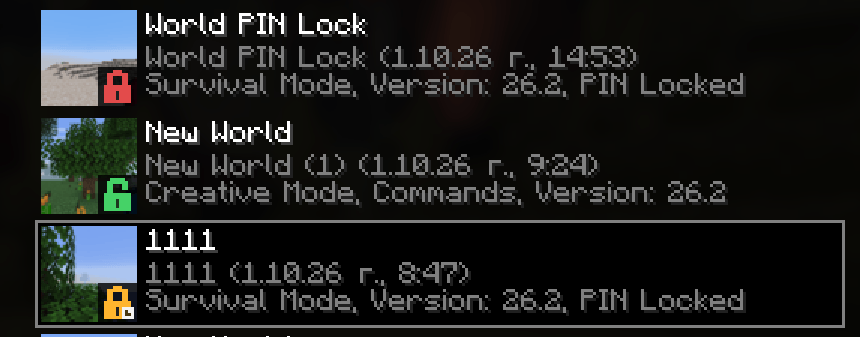
- Green, red, and amber world-list status badges.
- A
PIN Lockedlabel in protected-world information. - LAN, friends/online, TCP listener, and non-owner login blocking.
- English and Bulgarian interface translations.
- Fail-closed handling of missing, damaged, oversized, or unsupported records.
Protecting a new world
- Configure a new world normally and select Create New World.
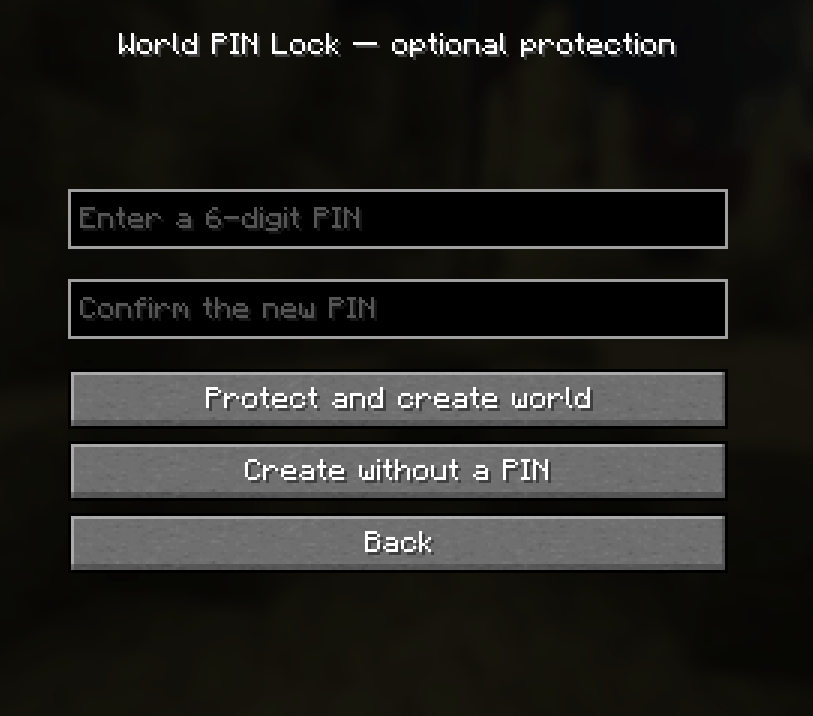
- On the World PIN Lock screen, enter exactly six digits. Leading zeroes are allowed.
- Enter the same digits in the confirmation field.
- Select Protect and create world.
Choose Create without PIN to leave that world open. If the protection record cannot be stored safely, world creation stops instead of silently continuing with incomplete protection.
Opening, changing, or removing protection
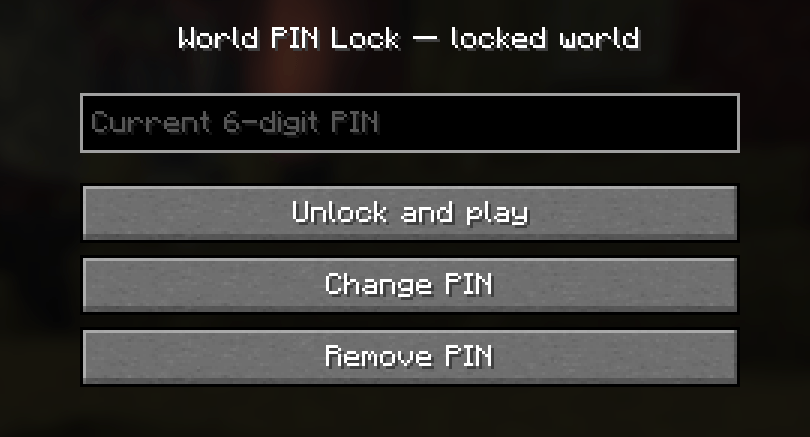
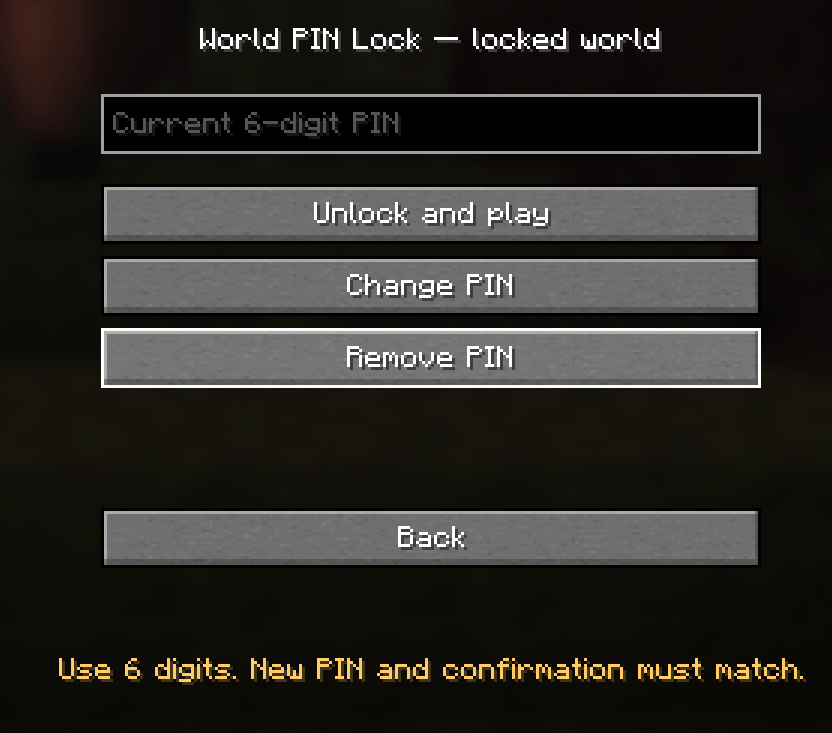
To play, select the protected world, enter its PIN, and select Unlock and play. The world does not start loading before successful verification. A wrong PIN keeps the world closed and counts as a failed attempt.
To change it, select Change PIN, enter the current PIN, enter and confirm the new six-digit PIN, then select Save new PIN and play. The previous PIN stops working immediately after a successful change.
To remove protection, enter the current PIN and select Remove PIN. Standard LAN and online controls return the next time the unprotected world loads.
To delete a protected world, use Minecraft's normal Delete action and enter the current PIN first. After successful verification, Minecraft shows its standard final deletion confirmation. Wrong attempts use the same progressive cooldown as world unlocking.
Progressive cooldown
Failures are counted per world and persist after Minecraft restarts.
| Consecutive failed attempts | Cooldown |
|---|---|
| 3 | 1 minute |
| 6 | 2 minutes |
| 9 | 4 minutes |
| 12 | 8 minutes |
| Each next group of 3 | Previous cooldown × 2 |
No further attempts are accepted while the countdown is active. A correct PIN resets the failed-attempt count and the escalation level.
World-list indicators
| Badge | Meaning |
|---|---|
| Green open lock | No PIN |
| Red closed lock | PIN protected |
| Amber lock with a clock | Cooldown active after too many failures |
Protected worlds also show PIN Locked at the end of their mode and version line. Badges have tooltips and narrator descriptions, and their state refreshes once per second.
LAN and online restrictions
For a protected world, the mod disables multiplayer and friends controls and blocks the integrated server from publishing either supported LAN/online mode, opening a TCP listener, accepting the Minecraft 26.2 friends/online channel, or logging in anyone other than the local owner. A dedicated server also refuses to start a protected world.
How the PIN is stored
The PIN is never written to disk or logged. Each protected world stores its credential at:
saves/<world>/world-pin-lock/credentialThe credential uses PBKDF2-HMAC-SHA256 with 600,000 iterations, a random 256-bit salt, and a 256-bit hash. Records are strictly validated and replaced atomically. Cooldown data is stored separately in the same world-specific directory.
If the protection directory exists but its credential is missing, damaged, too large, symlinked, or unsupported, access is blocked. The mod never silently resets the PIN.
Security scope and limitations
World PIN Lock is a local access gate, not world encryption.
- A Fabric mod cannot make its own
.jarphysically undeletable. - If the mod is removed, vanilla Minecraft can open the world without a PIN check.
- Someone with filesystem access can remove protection data, modify the mod, or copy the world elsewhere.
- A six-digit PIN has one million combinations and can be attacked offline by someone who obtains the credential.
- There is no forgotten-PIN recovery or back door. Keep secure world backups.
- Mods that replace or deliberately bypass protected Minecraft methods may be incompatible.
- A Minecraft mod cannot prevent another program from copying or uploading world files.
For stronger separation on a shared computer, use separate operating-system accounts, suitable file permissions, and disk encryption. Keep the mod installed in every Minecraft instance used for protected worlds.
Version history
New release notes are added above older entries. Previous notes remain in place.
Version 1.1.0 — 7 October 2026
- Added Manage PIN.
- Added World PIN Settings to the in-game Esc/Pause menu for local worlds.
- Added and confirmed exactly six-digit PINs for old worlds and worlds created without protection.
- Required current-PIN verification before management of protected worlds, with the existing persistent cooldown.
- Added authenticated PIN changes and a separate confirmation before PIN removal.
- Supported adding a PIN again after previous removal without replacing damaged protection records.
- Preserved salted PBKDF2 hash storage, masked input, and LAN/online/TCP/login guards.
- Blocked in-game management while a world is already shared; newly added protection takes effect immediately.
0.4.1 — 30 September 2026
- Added mandatory current-PIN verification before Minecraft can delete a protected world.
- Kept Minecraft's standard final deletion confirmation after successful PIN verification.
- Applied the existing persistent progressive cooldown to incorrect deletion PIN attempts.
- Added English and Bulgarian deletion-authentication text and runtime coverage for the deletion gate.
0.4.0 — 30 September 2026
- Added the official voxel-style project icon.
- Embedded the icon in Fabric metadata for launchers and mod lists.
- Added this complete English installation, usage, security, troubleshooting, and build guide.
- Preserved the full release history in the mod's own README.
0.3.0 — 30 September 2026
- Added green open-lock, red closed-lock, and amber cooldown badges to world icons.
- Added
PIN Lockedonly to protected worlds. - Added tooltip and narrator descriptions and one-second status refreshes.
- Extended the runtime test to render the real Select World screen.
0.2.0 — 30 September 2026
- Simplified the default unlock screen to the current-PIN field.
- Added expandable PIN change controls and separate PIN removal.
- Added persistent cooldowns of 1, 2, 4, 8 minutes and onward after groups of three failures.
- Reset failure and escalation state after a correct PIN.
- Added the countdown and automated cooldown coverage.
0.1.1 — 30 September 2026
- Lowered the Fabric API minimum from
0.161.0+26.2to0.160.0+26.2. - Confirmed compilation and tests with Fabric API
0.160.0+26.2. - Kept the PIN data format and protected-world behavior unchanged.
0.1.0 — 30 September 2026
- First test release for Minecraft Fabric 26.2.
- Added optional PIN setup, confirmation, and a pre-load unlock screen.
- Added masked fields, salted PBKDF2 hashing, and atomic credential storage.
- Required the old PIN before changing or removing protection.
- Added fail-closed damaged-data handling and a second startup authorization check.
- Blocked LAN/online publishing, network ports, and other-player login.
- Added Bulgarian and English translations, unit tests, and a runtime smoke test.
- Documented limitations involving mod removal, filesystem access, and other mods.

World PIN Lock Team