editor.webp
readme-7a65723465d0.png
readme-8eb19e5d3c16.png
xMrShadyx_ | SP Loot Manager
Create a server, get 25% off your first month

Description
SP Loot Manager
A standalone, server-authoritative GUI for configuring monster and animal death drops by entity type. Edit individual vanilla items, add custom drops, and save one global configuration for all worlds on the installation. The visual system is adapted from this repository's SP Shop: dark panels, gold borders and buttons, paginated lists, and editable forms. SP Shop and SP Coins are not required.
In-game editor
Open /lootedit or /sploot. The editor requires Minecraft's gamemaster command permission (normally OP level 2 on a dedicated server, or enabled cheats in singleplayer).
- Search for an entity ID and open its settings. The catalog includes registered
Mobentities, including monsters, passive animals, water mobs, and golems. Modded mobs and items are included when registered on the server. - Toggle Vanilla drops: ON/OFF. ON adds your custom rows to normal death loot; OFF suppresses the normal death loot table, special death loot, and dropped equipment for that entity type.
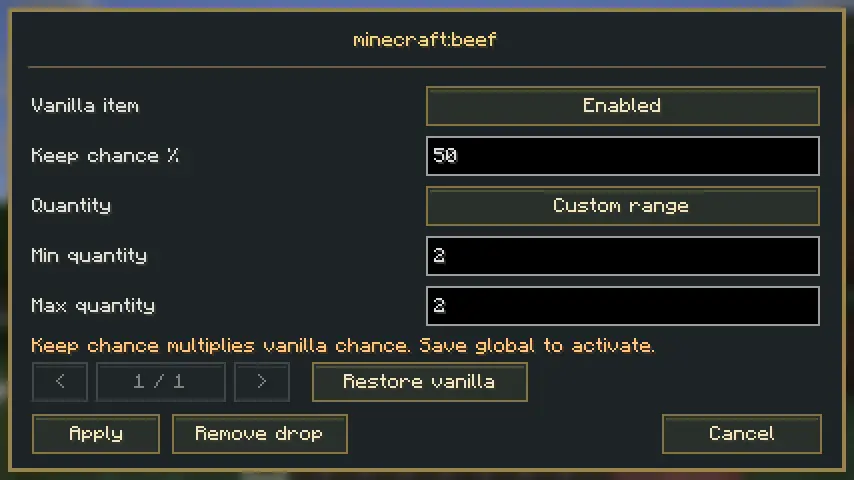
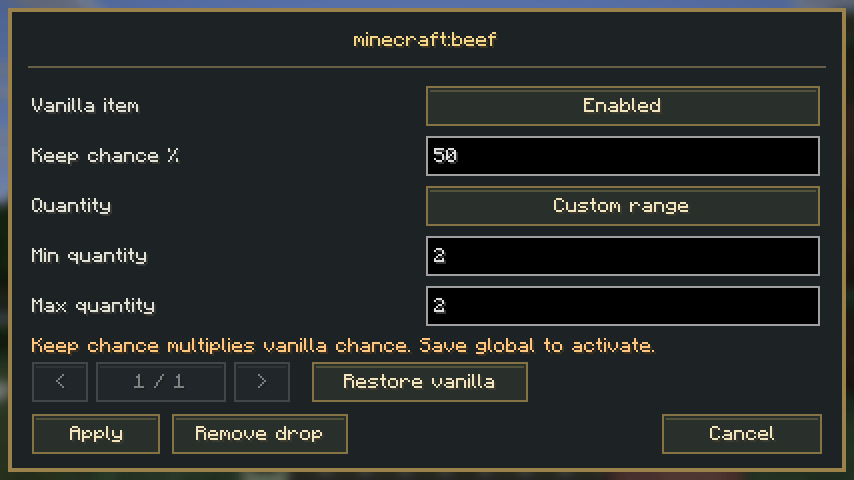
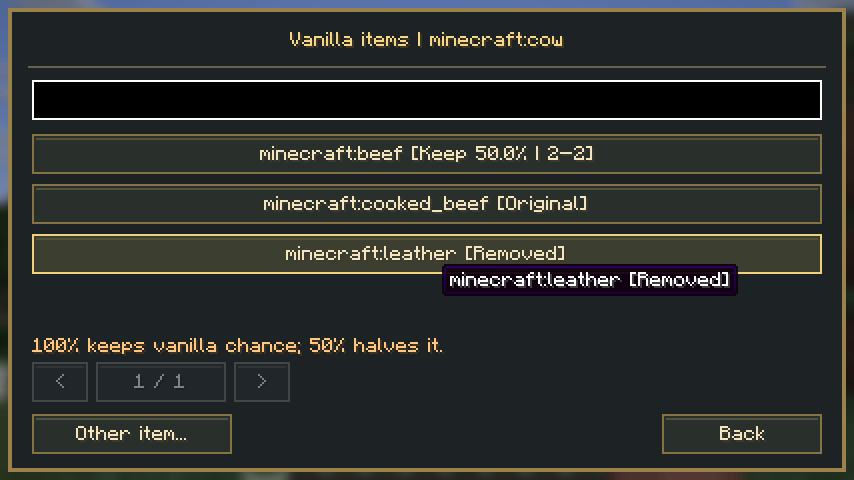
- Use Edit vanilla items to view items from the loaded loot tables. Select an item to remove it, reduce its Keep chance %, or switch from Vanilla quantity to your own min/max range. Restore vanilla removes that item's override. Other item… lets you select equipment, special drops, or transformed items that are not listed automatically.
- Use Add item for an independent custom row. Enter a registered item ID or select one with Choose item, then set Min quantity, Max quantity, and Drop chance %. Open an existing custom row to edit or remove it.
- Click Apply to update the draft, return to the main screen, then click Save global. The server validates and persists the complete draft before activating it. A success message confirms the global save.
Reset entity removes its rule and restores normal Minecraft behavior. Reload asks before discarding the draft and fetching the current server settings. Closing a changed draft also asks for confirmation. Changes in forms remain local until Save global succeeds.
Editing vanilla items
Keep chance is a multiplier on Minecraft's successful drops. 100% preserves the original chance; 50% keeps half the successful cases; 0% or Remove drop suppresses that item. For example, a vanilla 20% drop with Keep chance 50% becomes approximately 10% overall. Minecraft's conditions still run first: the editor does not pretend that complex loot tables have one unconditional percentage.
The keep decision is rolled once per item ID per death, even when Minecraft emits several stacks. Vanilla quantity retains the rolled amounts. Custom range replaces the total quantity of that item for that death, only if vanilla actually produced it. Looting and other vanilla conditions still affect whether the original drop occurs; the replacement quantity uses your configured range. Item components such as names and enchantments are retained from the first matching vanilla stack. The result splits into legal stack sizes.
For an absolute per-death chance, remove the vanilla item and add a custom row for the same ID. Custom rows are independent of vanilla-item filters.
The catalog follows nested loot tables and item tags and lists common cooked variants separately. It refreshes after successful datapack reloads; reopen or Reload the editor to see the new catalog. Code-generated equipment, special drops, and arbitrary modded transformations may need Other item…. Filters match the final item ID: raw beef and cooked beef are separate settings. They also apply to equipment emitted through the normal death-drop path.
Each custom row rolls independently once per death. The chance can be fractional (for example, 37.5); 0% never drops and 100% always rolls successfully. Quantity is uniformly selected from the inclusive min/max range. A result of zero creates no item. Quantities larger than the item's stack size split into legal stacks. Duplicate custom rows are allowed and roll independently.
Configuration and behavior
Settings are stored in config/sp-loot-manager.json under the game's or server's installation directory. They apply to every existing and future world and every dimension on that installation, surviving world changes and restarts. On multiplayer servers, the server's global configuration is authoritative; a player's local client settings do not override it. Separate launch profiles, computers, and server installations each have their own config directory; this is not cloud synchronization.
Upgrading from 1.0.x
If no global configuration exists, the first opened world's legacy <world>/sp-loot-manager.json is validated, upgraded, and copied into the global location. The original world file is preserved. If that world has no legacy file, a default global file is created. Once the global file exists, later worlds' old files cannot overwrite it. Open the world whose old settings you want to keep first, or, with the game/server stopped, copy that legacy file into the global location before startup. Schema 1 is upgraded automatically to schema 2. Back up any existing global file before replacing it manually.
{
  "schemaVersion": 2,
  "entities": {
    "minecraft:cow": {
      "vanillaDrops": true,
      "vanillaItems": {
        "minecraft:leather": { "enabled": false, "keepChance": 100, "overrideQuantity": false, "min": 1, "max": 1 },
        "minecraft:beef": { "enabled": true, "keepChance": 50, "overrideQuantity": true, "min": 2, "max": 2 }
      },
      "items": [
        { "item": "minecraft:emerald", "min": 2, "max": 4, "chance": 37.5 }
      ]
    }
  }
}
An entity without a configured rule keeps its normal behavior. Custom rows apply to deaths from players and environmental causes, including baby mobs. Custom quantities are fixed by your configured range; Looting, fire cooking, and player-kill conditions do not modify custom rows. Vanilla items retain Minecraft's normal conditions before any configured retention filter or quantity replacement. The global vanilla toggle OFF takes precedence over individual vanilla-item settings. Custom drops respect mobDrops. XP and the rest of Minecraft's death processing remain under their normal rules.
The scope is item drops on death. Shearing, milking, gifts, interactions, block loot, player inventories, and XP configuration are outside this version. Custom rows create plain registered items; arbitrary NBT/components are not edited. Vanilla filters preserve existing item components. Loot independently spawned by another mod outside Minecraft's normal death-loot/spawn-at-location calls is not intercepted.
Saving and recovery
- Permissions are checked on every request, including after OP is revoked.
- Editing sessions carry a token and revision. A stale save is rejected and retains the draft; use Reload to review the current server settings before editing again.
- Invalid item/entity IDs, air items, nonfinite chances, invalid ranges, and excessive configuration sizes are rejected.
- Limits: 512 entity rules, 64 custom rows and 64 vanilla-item overrides per entity, 0–4096 quantity, 0–100% chance, 240 KB configuration. Compressed network packets also have strict size limits.
- Saves use a temporary file and an atomic replacement; the previous configuration becomes
sp-loot-manager.json.bak. A failed save does not activate the draft. - A corrupt, unsupported, or unloadable global configuration disables this mod's drop overrides for the running server and preserves the original file; it never silently falls back to a different world's settings. Vanilla drops continue; inspect the server log, fix or restore the backup while the server is stopped, then restart. Invalid legacy data is also preserved and does not create a new global file.
- Manual file edits are loaded on server startup. GUI Reload fetches the live server configuration; it does not reread a manually edited file.
Version history
1.1.0 — 2026-10-07
Added per-item vanilla removal, chance retention, quantity overrides, and restore-to-vanilla, with a searchable catalog from loaded loot tables. Moved settings to installation-wide config/sp-loot-manager.json, shared by all worlds, with one-time migration of the first world's legacy settings. Added protocol/schema versioning, migration and filter tests, and integration checks across two independent worlds.
1.0.1 — 2026-10-07
Added a custom pixel-art mod icon: a gold-trimmed loot chest with an emerald and bone on a dark background, matching SP Shop's visual style. Registered the icon in Fabric metadata and included it in the JAR. Loot behavior is unchanged.
1.0.0 — 2026-10-07
First release: per-entity vanilla drop control, searchable entity/item catalogs, add/edit/remove custom rows, inclusive min/max quantities, fractional drop chances, and world-scoped persistence. Includes SP Shop-style GUI, server permission and revision checks, atomic saves with backup, unit tests, and an opt-in Minecraft integration runner. Existing mods are unchanged.

SP Loot Manager Team