Wolf Helper
- By
Wolf Helper gives you a clean UI to manage all your tamed wolves in one place. See HP, names, and control them instantly — teleport, sit/stand individually or globally, and reassign ownership. Default key: V - Required on client + server.
Screenshot 2026-05-29 at 8.15.34â¯AM.png
Screenshot 2026-05-29 at 8.15.46â¯AM.png
Description
Wolf Helper — Minecraft Fabric Mod
Manage all your tamed wolves from a single, clean UI. No more running across your world hunting for sitting wolves — see them all in one panel and control every one with a click.
Required on both client and server.
Features
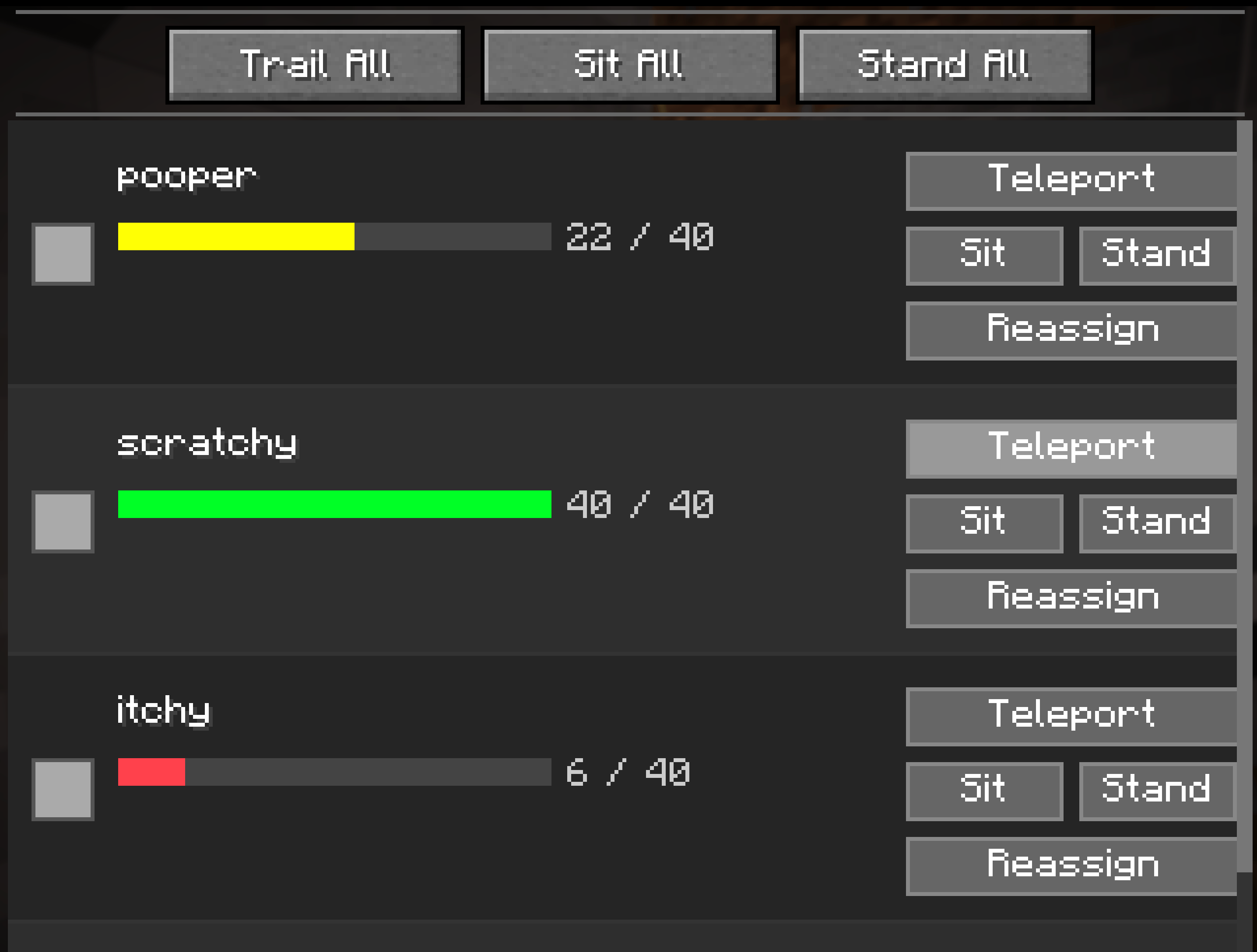
- Wolf list panel — all your tamed wolves in one place, with names, HP bars, and HP numbers
- Per-wolf actions — teleport, sit, or stand any individual wolf
- Global actions — command all wolves at once with a single click
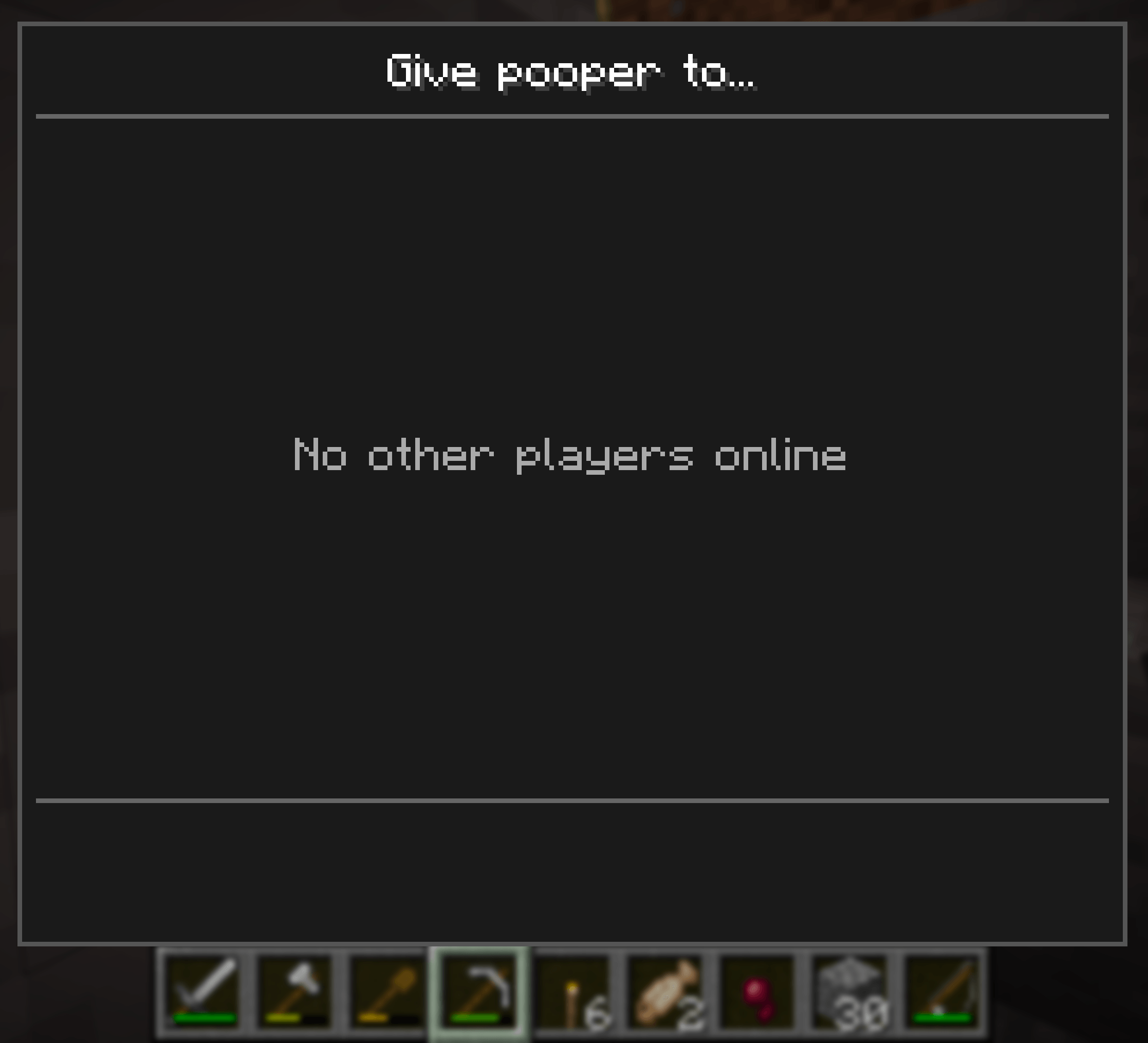
- Wolf reassignment — give ownership of a wolf to another online player
- Scrollable list — handles any number of wolves
- Configurable keybind — default
V, rebindable in Options → Controls → Wolf Helper
How to Use
- Press
Vto open the Wolf Manager (rebindable in Options → Controls) - Your tamed wolves in loaded chunks are listed automatically
- Use the global buttons at the top to command all wolves at once
- Use the per-wolf buttons next to each entry for individual control
- Click Reassign on any wolf to transfer ownership to another online player
Global Actions
| Button | Action |
|---|---|
| Trail All | All wolves follow you (un-sit) |
| Sit All | All wolves sit in place |
| Stand All | All wolves stand up |
Per-Wolf Actions
| Button | Action |
|---|---|
| Teleport | Teleports the wolf to your location |
| Sit | Commands this wolf to sit |
| Stand | Commands this wolf to stand (follow) |
| Reassign | Opens a player picker to transfer ownership |
Wolf Reassignment
Clicking Reassign on any wolf opens a player-picker panel listing all currently online players. Click a player's name to transfer ownership of that wolf to them. The wolf list refreshes automatically after reassignment.
UI Overview
┌────────────────────────────────────────────────────────┐
│                  Wolf Manager                           │
├────────────────────────────────────────────────────────┤
│    [ Trail All ]     [ Sit All ]    [ Stand All ]       │
├────────────────────────────────────────────────────────┤
│  [icon]  Fang    ████████░░  8/10   [ Teleport ]        │
│                                    [ Sit ] [ Stand ]    │
│                                    [ Reassign ]         │
├────────────────────────────────────────────────────────┤
│  [icon]  Shadow  █████░░░░░  5/10   [ Teleport ]        │
│                                    [ Sit ] [ Stand ]    │
│                                    [ Reassign ]         │
└────────────────────────────────────────────────────────┘
Important Limitations
- Loaded chunks only. Wolves in unloaded chunks will not appear in the list. This is a vanilla Minecraft constraint — entities outside loaded chunks are not in memory.
- Same dimension only. Wolves left in a different dimension will not appear.
- Requires mod on both sides. Must be installed on both the client and the server (or integrated singleplayer server). Client-only installs will not work.
Installation
- Install Fabric Loader and Fabric API
- Drop
wolf-helper-<version>.jarinto yourmods/folder on both client and server - Launch the game
Compatibility
| Component | Version |
|---|---|
| Minecraft | 26.1.2 |
| Mod loader | Fabric |
| Fabric API | 0.149.1+26.1.2 |
| Java | 25+ |
Planned
- [ ] Wolf icon — render actual wolf sprite (placeholder colored square currently)
- [ ] Wolf name editing from the UI
- [ ] Refresh button (currently fetches once on open)
- [ ] Multi-dimension wolf tracking
License
MIT — feel free to use, fork, and improve.
The Wolf Helper Team