Walkie-Chat
- By
This mod adds a proximity chat system. It also includes a "Walkie-Talkie" item for long distance communication, as long as they are on the same frequency channel.
Improve the text chat experience
Create a server, get 25% off your first month

• Walkie-Chat
Walkie-Chat adds proximity-based text chat to Minecraft, making distance matter during conversations.
Players can normally send and receive messages only when they are close enough to each other, adding more immersion to survival worlds, multiplayer servers, RPGs and adventure modpacks.
For long-distance communication, players can use the Walkie-Talkie.
• Walkie-Talkie
The Walkie-Talkie allows players to communicate from farther away through frequency channels.
As long as both players are using a Walkie-Talkie and are tuned to the same frequency, they can continue talking even when they are outside the normal proximity-chat range.
Crafting Recipe
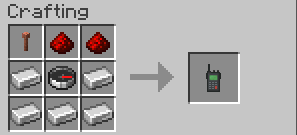
• Using the Walkie-Talkie
- Hold the Walkie-Talkie in your hand.
- Right-click to open its frequency menu.
- Choose a frequency channel.
- Make sure the other player is tuned to the same frequency.
- Keep the Walkie-Talkie in hand and send a message in chat.
Players using matching frequencies can communicate over long distances.
• Configuration
Server administrators can change the normal proximity-chat range with:
/walkietalkie setrange <value>Default proximity range: 35 blocks
This allows servers and modpacks to adjust how close players need to be for regular chat.
• Compatibility
| Minecraft | Forge | Fabric | NeoForge |
|---|---|---|---|
| 1.19.2 | ✅ | ✅ | — |
| 1.20.1 | ✅ | ✅ | — |
| 1.21.1 | ✅ | ✅ | ✅ |
Fabric builds require Fabric API.
Walkie-Chat is designed for multiplayer and focuses entirely on improving Minecraft's text-chat experience.
• Recommended For
Walkie-Chat works especially well in:
- Survival servers
- Adventure modpacks
- RPG servers
- Exploration-focused gameplay
- Immersive multiplayer worlds
• Credits
Walkie-Chat was inspired by Flaton's Walkie-Talkie mod.
View the original Walkie-Talkie project on CurseForge
Created by Theus452 · Contributor bielzinrxx
Walkie-Chat Team