Dynamic Chest Loot
- By
Dynamic Chest Loot allows server administrators and modpack creators to customize, randomize, and dynamically populate chest loot across containers in Minecraft with an intuitive modern in game UI
Description
Dynamic Chest Loot
Dynamic Chest Loot is a Minecraft mod that allows you to randomize and customize the loot of existing containers in the world, providing a simple yet powerful way to create loot systems for maps, modpacks, adventures, and servers.
The idea is simple: you can take an already-built map - such as a city, dungeon, adventure world, or custom map filled with containers - and turn those containers into sources of dynamic loot, including items added by other mods.
How Does It Work?
The process is simple:
1. Create a loot category
Create a category that defines a set of possible items and generation rules.
2. Add items to the category
Add the items that can appear and configure their individual properties, quantities, weights, enchantments, effects, and other options.
3. Configure the category
Choose the generation rules and use the Chest Preview to see how the loot may appear inside containers.
4. Set the category weight
Each category has a Weight that determines its relative chance of being selected when randomizing a container.
5. Generate the loot
When a valid container is found, a category is selected according to its weight, and the configured items are randomly generated into the container's slots.
This allows, for example, an entire city from an existing map to have its containers filled with items from a modpack without manually editing every container.
Protection Against Item Loss
To prevent players from losing their items, loot is not generated in containers placed by players or in containers that have already been opened.
The system is designed primarily to work with containers that already exist in the world and have not yet been opened.
Main Menu
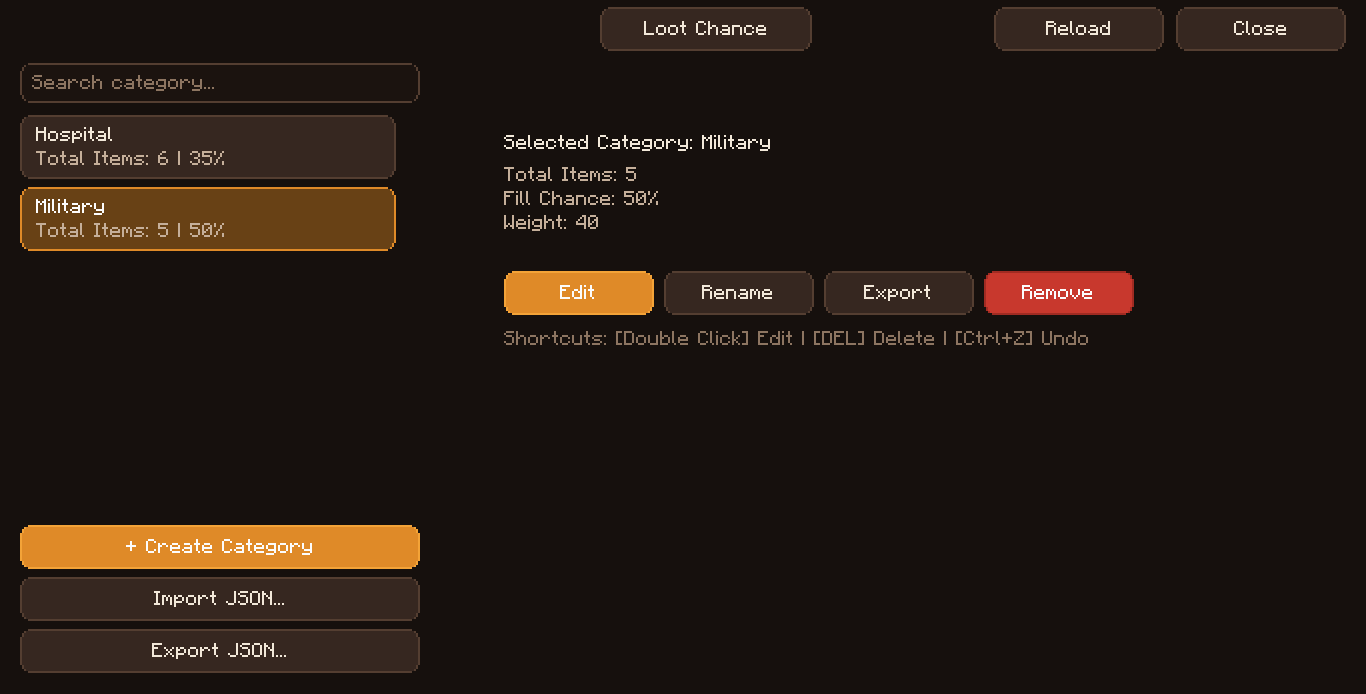
The main menu is the starting point for managing your loot configurations.
Loot Chance
Defines the overall chance of loot generation.
You can control the probability of a container receiving loot through the mod's system, preventing every container from necessarily being filled.
Create Category
Create a new loot category.
Categories allow you to separate different types of loot, such as:
- Common Loot
- Rare Loot
- Dungeon Loot
- City Loot
- Resource Loot
Each category can have its own rules and items.
Import
Import existing loot categories or configurations.
This makes it easier to share configurations between different worlds, maps, or modpacks.
Export
Export your categories so they can be reused or shared.
This is especially useful for map and modpack creators who want to keep their loot configurations organized or distribute presets.
Edit Category
Open an existing category to modify its settings, items, and generation rules.
Edit Category
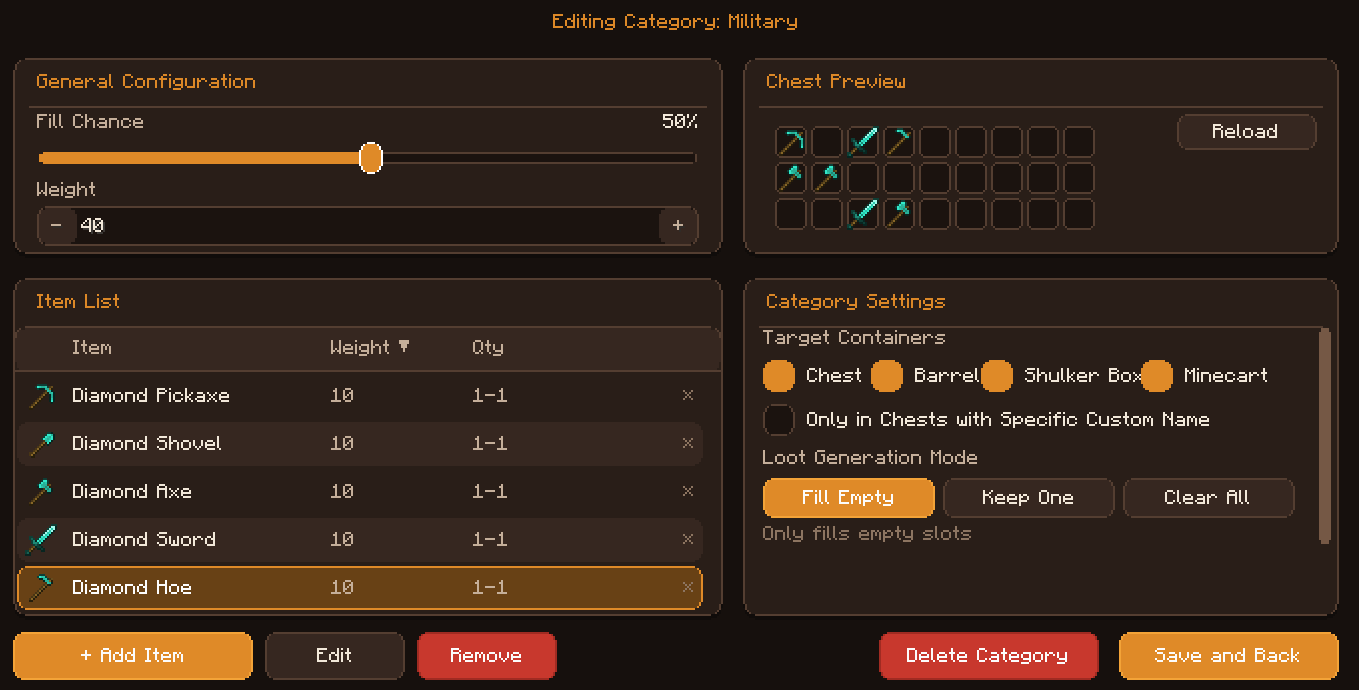
When editing a category, the mod organizes its configuration into different sections to make loot management easier.
General Configuration
General settings for the category.
Here you can define the chance for an item to be generated in each slot and the weight of the category being selected.
Fill Chance
Defines the chance of an item being generated in each container slot.
The higher the percentage, the greater the chance that the slot will receive an item.
Weight
Defines the category's weight when selecting loot.
Categories with higher weights have a greater relative chance of being selected when randomizing a container.
This section acts as the central configuration point for the category.
Item List
The Item List defines which items can appear in the loot.
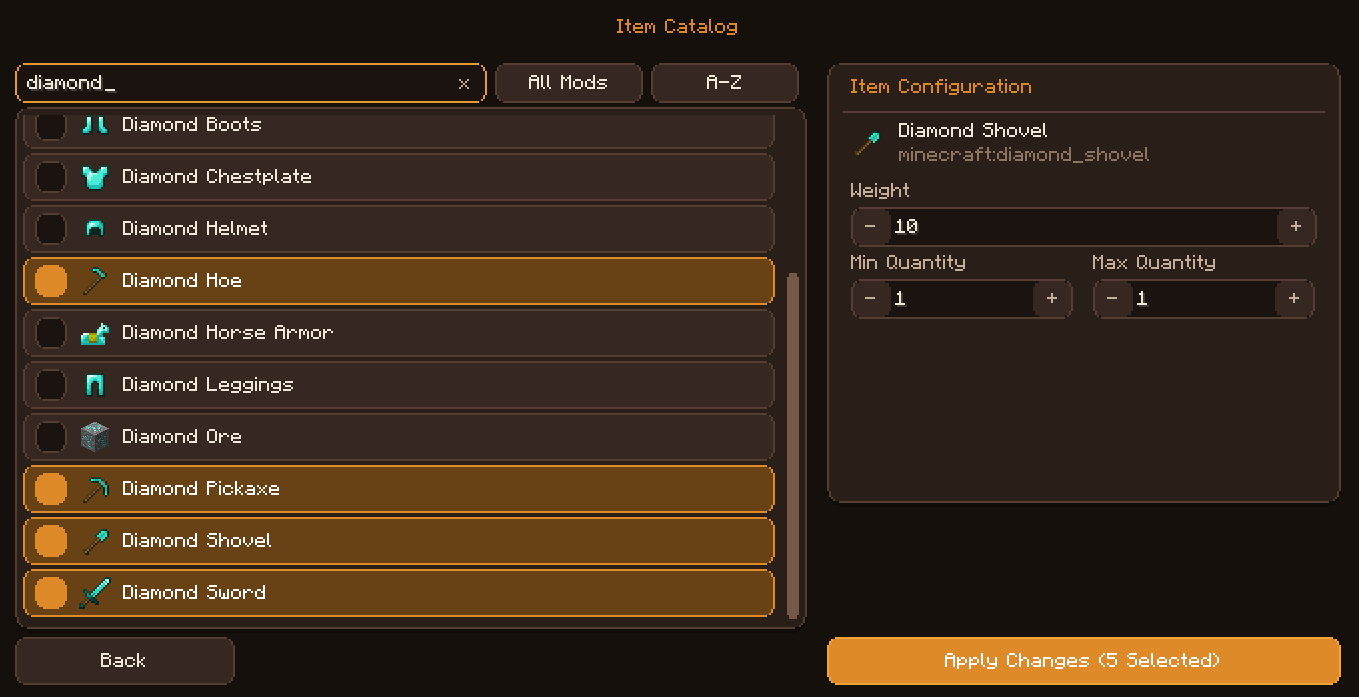
Each item can be individually configured with different properties:
- Item Weight - controls the item's relative weight/chance compared to other items in the category.
- Min Quantity - minimum quantity that can be generated.
- Max Quantity - maximum quantity that can be generated.
This allows you to create anything from a simple container with food and tools to fully customized items.
Item Edit
- Item Weight
- Min Quantity
- Max Quantity
Enchantments
Add enchantments registered in the game, including enchantments added by other mods.
You can configure:
- Enchantment
- Min Level
- Max Level
- Fixed Level
- Add / Remove Enchantment
For example, a sword could receive Sharpness with a random level, while another item could always receive a specific enchantment.
Custom Name & Lore
Customize the appearance of generated items using:
- Custom Name - custom item name.
- Lore - multi-line custom description.
- Colors - custom text colors.
- Formatting - text formatting.
This is particularly useful for quest items, special weapons, artifacts, and RPG systems.
Effects
Configure effects for items that support them, such as potions and consumables.
You can define:
- Effect Type
- Duration
- Amplifier
Duration can be configured in ticks or seconds, giving you greater control over generated effects.
Raw NBT / Data Components
For advanced users, custom data can be defined using NBT/SNBT and Data Components.
This allows you to work with properties specific to other mods, such as:
- Equipment data
- Custom item properties
- Ability
- Custom datapack systems
The system also includes syntax validation to help prevent malformed configurations.
Chest Preview
The Chest Preview allows you to see in real time how a category may appear inside a container.
Instead of having to generate a world or open multiple containers to test your configuration, you can preview the potential item distribution beforehand.
This makes creating, testing, and balancing loot much easier.
Category Settings
Category Settings control when and how a category participates in loot generation.
Container Types
You can configure which types of containers the category can be used with, such as:
- Chest
- Barrel
- Shulker Box
- Minecart with Chest
- Containers with custom names
This allows you to create categories specifically designed for different types of containers found throughout the world.
Loot Generation Mode
Choose how items are added to the container.
Fill Empty
Generates items only in empty slots.
Any items that already exist in the container are preserved.
Keep One
Generates items in the container and can replace existing items in slots, while preserving at least one existing item.
This mode is useful when you want to add randomized loot while keeping part of the original container contents.
Clear All
Removes the existing items and generates new loot according to the category's configuration.
This mode allows you to completely replace the container's contents.
How Does Loot Generation Work?
Dynamic Chest Loot uses your configured categories and items to determine the contents generated inside containers.
In simplified form:
Container → Loot Check → Category Selection → Item Selection → Apply Properties → Final Loot
The system uses item weights to determine their relative frequency.
For example, imagine a category containing:
| Item | Weight |
|---|---|
| Bread | 50 |
| Iron | 25 |
| Diamond | 5 |
Bread will be much more common than Diamond, while Iron will fall somewhere between the two.
Item quantities can also be randomized. If an item is configured with:
Min Quantity: 2
Max Quantity: 8
the container can receive a quantity anywhere within that range.
This allows you to create much more varied loot tables than simply using a fixed list of items.
Mod Compatibility
One of the main features of Dynamic Chest Loot is its ability to work with items registered by other mods.
This means a modpack can create categories using items from multiple installed mods.
For example:
Minecraft + Technology Mod + Magic Mod + Adventure Mod
You can create a category that combines items from all of these mods and allow them to naturally appear in containers throughout the world.
Made for Maps
Imagine downloading a map of an abandoned city containing hundreds of containers already placed by the map creator.
Normally, adding custom items to these containers would require manually editing the map.
With Dynamic Chest Loot, you can create a configuration such as:
Abandoned City
- Food
- Tools
- Materials
- Weapons
- Technology Items
- Magic Items
- Rare Items
The mod can then use these configurations to dynamically fill the containers.
The map stays the same - but the contents of its containers can be different.
Perfect For
- Adventure Maps
- City Maps
- Dungeons
- RPGs
- Modpacks
- Custom Maps
- Servers
Create Your Own Loot System
Dynamic Chest Loot transforms existing containers in your world into a flexible, randomized, and fully configurable loot system.
Create categories, define probabilities, customize items, add enchantments and effects, use data from other mods, and let the world handle the rest.
Your map. Your rules. Your loot.
Compatibility
- Mod Loaders: Forge / Fabric
- Side: Server only
- Client-side: optional for the in-game configuration interface
Dynamic Chest Loot is primarily server-side. The mod can be configured directly through the server's configuration files without requiring the client-side interface.
However, installing the mod on the client is recommended if you want to use the in-game configuration interface to easily create, edit, preview, import, and export loot categories.
The Dynamic Chest Loot Team