TweakletMC Waypoints
- By
Save places in your worlds and find your way back with an on-screen compass and in-world markers.
Description
Save the places that matter in your worlds and find your way back to them, with a compass across the top of the screen and markers in the world.
Compass
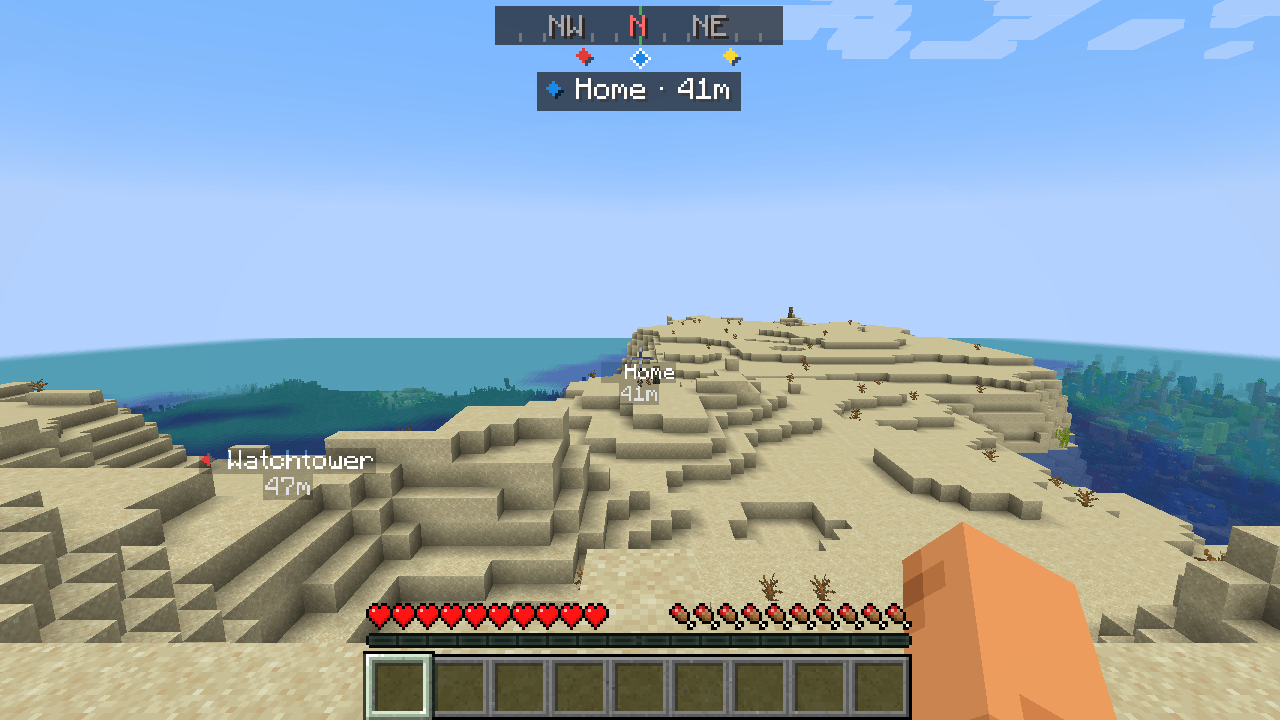
- A compass strip at the top of the screen shows north, east, south and west and the directions in between, and turns with you.
- Your waypoints in the current dimension appear on the compass in their own colors. Waypoints in the same direction are stacked in rows (up to three) instead of hiding each other.
- Navigation target: select a waypoint in the list and choose Set as Target. The compass highlights it and shows its name and distance below the strip.
- When the target is behind you, its marker stays at the edge of the compass with an arrow showing which way to turn.
- When the target is in another dimension, the compass shows which dimension it is in.
- Only one waypoint is the target at a time; choosing another replaces it, and deleting it clears the target.
- The compass sits below boss bars and stays clear of the top-right notification area (scaled screen width of 426 pixels or more). It hides while the debug screen (F3), the player list (Tab) or the hidden HUD (F1) is shown, and it can be turned off.
Waypoints
- Press B to add a waypoint where you stand. A name ("Waypoint 1", "Waypoint 2", …) and a color are chosen automatically.
- Press J to open the waypoint list: rename, change color, hide or show, delete (with confirmation), and set or clear the navigation target.
- Markers in the world: a colored icon, the name and the distance. Markers face you, show through walls and keep the same size on screen at any distance. They fade out within about 5 blocks, and a setting limits how far away they are shown.
- Death point: when you die, a waypoint is created where it happened. Only the latest death point is kept, and it can be set as the navigation target like any other waypoint. Can be turned off.
- Each singleplayer world and each server has its own list. The Overworld, the Nether and the End each show only their own waypoints.
- Both keys can be changed in Options → Controls → Key Binds under the TweakletMC category.
Settings (Mod Menu)
Markers in the world on/off, compass on/off, maximum marker distance (16 to 100,000 blocks; the compass always shows the navigation target) and death point on/off. Saved in config/tweaklet-waypoints.json.
Where waypoints are saved
<game folder>/tweaklet/<world>/waypoints.json: one file per world or server, with all dimensions inside. Nothing is written for a world until it gets its first waypoint.
Requirements
- Minecraft Java Edition 1.21.1
- Fabric Loader 0.16.0 or newer
- Fabric API
- TweakletMC Core 0.2.1 or a newer 0.2.x version. Waypoints does not start with Core 0.2.0.
- Java 21
- Optional: Mod Menu, for the settings screen
Waypoints runs on the client only. It works on servers without installing anything on the server.
Known limitations
- Realms is not supported.
- Renaming a singleplayer world's save folder starts a new waypoint list for that world.
- When you join a LAN world from another computer, its port can change each time the world is opened, and the list changes with it.
- A server's list is shared only between spellings of the same address (letter case, a trailing dot, an explicit default port 25565). An IP address and a domain name pointing to the same server keep separate lists.
- Automatic names ("Waypoint 1", "Death Point") are written in the game language that was active when they were created.
- Markers in the same direction can overlap; the nearer one is always drawn on top.
- In very small windows (scaled screen width below 426 pixels) the compass can partly overlap top-right notifications, the same area vanilla boss bars use.
- Languages: English and Turkish. Other languages show the English text.
Türkçe
Dünyalarındaki önemli yerleri kaydet ve ekranın üstündeki pusula ile dünyadaki işaretler sayesinde onlara geri dön.
Pusula
- Ekranın üstündeki pusula şeridi kuzey, doğu, güney ve batıyı ve aradaki yönleri gösterir; sen döndükçe o da döner.
- Bulunduğun boyuttaki waypoint'ler pusulada kendi renkleriyle görünür. Aynı yöndeki waypoint'ler birbirini gizlemek yerine alt alta satırlara (en çok üç) dizilir.
- Navigasyon hedefi: listede bir waypoint seç ve Hedef Yap'a bas. Pusula onu belirgin biçimde işaretler, adını ve uzaklığını şeridin altında gösterir.
- Hedef arkanda kaldığında işareti pusulanın kenarında, hangi yöne dönmen gerektiğini gösteren bir okla durur.
- Hedef başka bir boyuttaysa pusula hangi boyutta olduğunu yazar.
- Aynı anda tek bir hedef olur; başkasını seçmek öncekinin yerini alır, hedefi silmek hedefi kaldırır.
- Pusula boss bar'ların altına yerleşir ve sağ üstteki bildirim alanına girmez (ölçeklenmiş ekran genişliği 426 piksel ve üstü). Hata ayıklama ekranı (F3), oyuncu listesi (Tab) veya gizli arayüz (F1) açıkken görünmez; ayardan kapatılabilir.
Waypoint'ler
- B'ye basarak bulunduğun yere waypoint ekle. Ad ("Waypoint 1", "Waypoint 2", …) ve renk otomatik seçilir.
- J ile waypoint listesini aç: yeniden adlandır, rengini değiştir, gizle ya da göster, sil (onaylı), navigasyon hedefi yap ya da hedefi bırak.
- Dünyadaki işaretler: renkli simge, ad ve uzaklık. İşaretler sana dönük durur, duvarların arkasından görünür ve uzaklık ne olursa olsun ekranda aynı boyutta kalır. Yaklaşık 5 bloktan yakında silikleşir; ne kadar uzaktakilerin gösterileceği ayardan sınırlanır.
- Ölüm noktası: öldüğün yerde bir waypoint oluşturulur. Yalnızca son ölüm noktası tutulur ve diğer waypoint'ler gibi hedef yapılabilir. Kapatılabilir.
- Her tek oyunculu dünyanın ve her sunucunun kendi listesi vardır. Overworld, Nether ve End yalnızca kendi waypoint'lerini gösterir.
- İki tuş da Seçenekler → Kontroller → Tuş Atamaları ekranında TweakletMC kategorisinden değiştirilebilir.
Ayarlar (Mod Menu)
Dünyadaki işaretler açık/kapalı, pusula açık/kapalı, en uzak işaret mesafesi (16 ile 100.000 blok arası; pusula navigasyon hedefini her zaman gösterir) ve ölüm noktası açık/kapalı. config/tweaklet-waypoints.json dosyasına kaydedilir.
Waypoint'lerin kaydedildiği yer
<oyun klasörü>/tweaklet/<dünya>/waypoints.json: her dünya ya da sunucu için tek dosya, bütün boyutlar içinde. Bir dünyaya ilk waypoint eklenene kadar o dünya için hiçbir şey yazılmaz.
Gereksinimler
- Minecraft Java Edition 1.21.1
- Fabric Loader 0.16.0 veya üstü
- Fabric API
- TweakletMC Core 0.2.1 veya daha yeni bir 0.2.x sürümü. Waypoints, Core 0.2.0 ile açılmaz.
- Java 21
- İsteğe bağlı: ayar ekranı için Mod Menu
Waypoints yalnızca istemcide çalışır. Sunuculara hiçbir şey kurmadan sunucularda da kullanılabilir.
Bilinen sınırlar
- Realms desteklenmez.
- Tek oyunculu bir dünyanın kayıt klasörü yeniden adlandırılırsa o dünya için yeni bir waypoint listesi başlar.
- Başka bir bilgisayardan LAN dünyasına katılırken dünyanın portu her açılışta değişebilir; liste de onunla birlikte değişir.
- Bir sunucunun listesi yalnızca aynı adresin farklı yazımları arasında paylaşılır (büyük/küçük harf, sondaki nokta, açıkça yazılmış varsayılan port 25565). Aynı sunucuya giden bir IP adresi ile alan adı ayrı listeler kullanır.
- Otomatik adlar ("Waypoint 1", "Ölüm Noktası") oluşturuldukları anda etkin olan oyun dilinde yazılır.
- Aynı yöndeki işaretler üst üste binebilir; yakındaki her zaman üstte çizilir.
- Çok küçük pencerelerde (ölçeklenmiş ekran genişliği 426 pikselden az) pusula sağ üstteki bildirimlerle kısmen çakışabilir; vanilla boss bar'ları da aynı alanı kullanır.
- Diller: İngilizce ve Türkçe. Diğer dillerde İngilizce metin görünür.
TweakletMC Waypoints Team