TweakletMC Minimap
- By
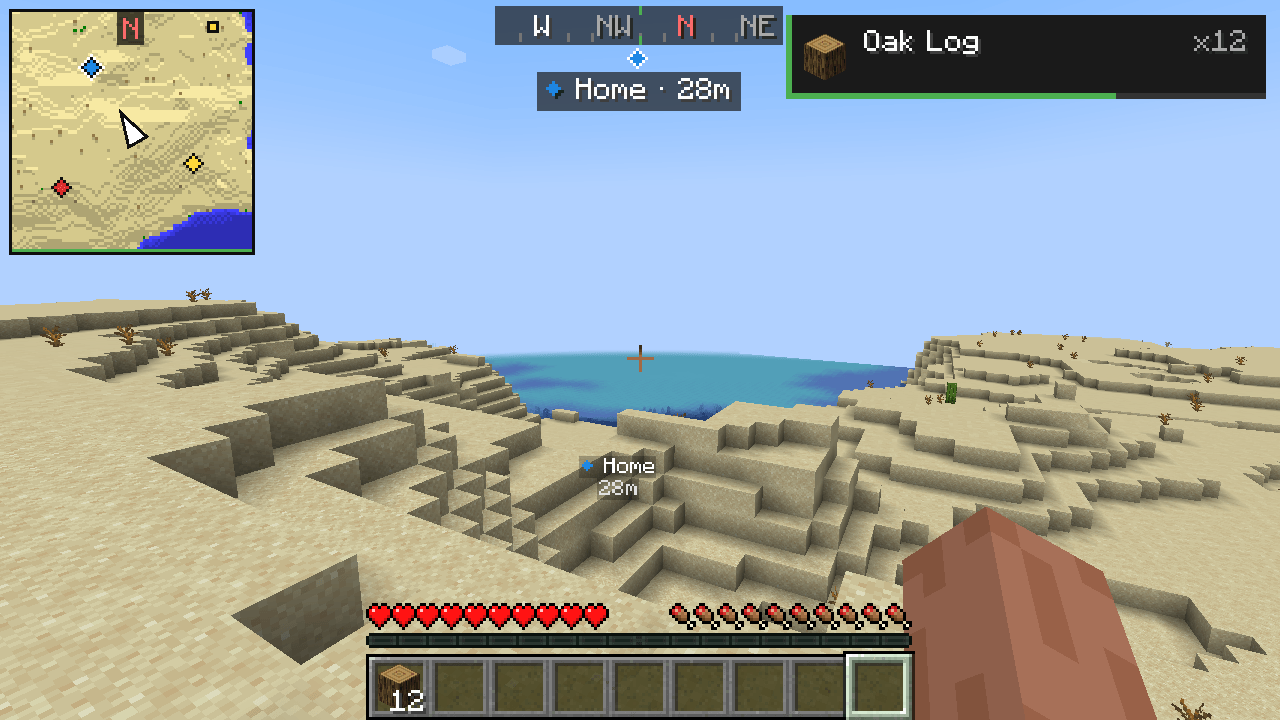
A compact map of the area around you in the corner of the screen, in the colors of Minecraft's own maps.
Description
A compact map of the area around you in the top-left corner of the screen, in the same colors as Minecraft's own maps.
The map
- Shows the terrain around you with the colors and shading of vanilla Minecraft maps: grass, forests, water depth, sand, stone and so on.
- Your position is the arrow in the middle; it points where you are looking. A red N at the edge always shows north.
- North up (default) or turns with you: the map rotates so that the way you are looking is always up.
- Four zoom levels: 0.5×, 1×, 2× and 4×. Use Numpad + and Numpad -, or the settings.
- Three sizes. The map stays clear of boss bars, the TweakletMC Waypoints compass, the notifications in the top-right corner and the chat. It hides while the debug screen (F3), the player list (Tab), the hidden HUD (F1) or the chat input is open.
- Only terrain that the game has already loaded is drawn. The map never loads chunks by itself and never shows places you have not been near.
Dimensions
- The Overworld, the Nether and the End each have their own map; one never shows another's terrain.
- In the Nether the map shows the floor around the height you are at, with the walls at your level drawn darker. In the End the void is dark.
Explored map
- The map you have explored is saved for each singleplayer world, each server and each dimension, and is back when you reconnect.
-
Saved in compact compressed files in
<game folder>/tweaklet/<world>/map/. Nothing is written for a world before there is something to save. - Turn Save Map off to keep nothing: then only the terrain loaded right now is shown and no files are written.
Waypoints (optional)
With TweakletMC Waypoints installed:
- The waypoints of the current dimension appear on the map in their own colors.
- The navigation target is outlined in white and stays at the edge of the map when it is farther away, pointing the way.
- At 2× and 4× zoom, waypoint names are shown next to their markers, without covering each other or your arrow.
- Hidden waypoints are not shown, and the setting Waypoints turns them off on the map.
Without TweakletMC Waypoints, Minimap works on its own.
Nearby players and mobs
- Players (light blue), hostile mobs (red) and other mobs (yellow) near you are marked on the map.
- Choose all, only players, only mobs or none, and how far (8 to 128 blocks). Invisible entities and spectators are never shown.
- Some servers do not allow minimaps that show players or mobs; you can turn the markers off.
Settings (Mod Menu)
Minimap on/off, size, zoom, north up or turning, waypoints on/off, nearby players and mobs, their range, and Save Map. Saved in config/tweaklet-minimap.json. The keys can be changed in Options → Controls → Key Binds under the TweakletMC category; Minimap Show/Hide has no key until you choose one.
Requirements
- Minecraft Java Edition 1.21.1
- Fabric Loader 0.16.0 or newer
- Fabric API
- TweakletMC Core 0.2.1 or a newer 0.2.x version
- Java 21
- Optional: Mod Menu, for the settings screen
- Optional: TweakletMC Waypoints 0.1.0 or newer, to show waypoints on the map
Minimap runs on the client only. It works on servers without installing anything on the server.
Known limitations
- Underground in the Overworld the map shows the surface; there is no cave view.
- In the Nether, places saved at another height keep that look until you see them again.
- The map does not show coordinates.
- If TweakletMC Pickup Toast is set to the top-left corner, it overlaps the map; keep one of them in another corner.
- In very small windows (scaled screen width below 426 or height below 240 pixels) the map shrinks and can partly overlap the chat or boss bars.
- On Realms the explored map is not saved.
- A server's map is shared only between spellings of the same address; an IP address and a domain name pointing to the same server keep separate maps.
- Players and mobs are shown only as far as the server sends them to your game.
- Languages: English and Turkish. Other languages show the English text.
Türkçe
Ekranın sol üst köşesinde, çevrenin Minecraft'ın kendi haritalarıyla aynı renklerde küçük bir haritası.
Harita
- Çevrendeki araziyi vanilla Minecraft haritalarının renkleri ve gölgeleriyle gösterir: çimen, orman, suyun derinliği, kum, taş ve ötekiler.
- Ortadaki ok sensin; baktığın yönü gösterir. Kenardaki kırmızı K her zaman kuzeyi gösterir.
- Kuzey yukarıda (varsayılan) ya da seninle döner: harita, baktığın yön hep yukarıda kalacak şekilde döner.
- Dört yakınlaştırma düzeyi: 0,5×, 1×, 2× ve 4×. Sayısal tuş takımı + ve - tuşlarıyla ya da ayarlardan.
- Üç boyut. Harita boss bar'lara, TweakletMC Waypoints pusulasına, sağ üstteki bildirimlere ve sohbete girmez. Hata ayıklama ekranı (F3), oyuncu listesi (Tab), gizli arayüz (F1) ya da sohbet yazma satırı açıkken gizlenir.
- Yalnızca oyunun zaten yüklediği arazi çizilir. Harita kendiliğinden parça yükletmez ve yakınından geçmediğin yerleri göstermez.
Boyutlar
- Overworld, Nether ve End'in her birinin kendi haritası vardır; biri ötekinin arazisini hiç göstermez.
- Nether'da harita bulunduğun yükseklikteki zemini gösterir; o hizadaki duvarlar daha koyu çizilir. End'de boşluk koyu görünür.
Keşfedilen harita
- Keşfettiğin harita her tek oyunculu dünya, her sunucu ve her boyut için kaydedilir; yeniden bağlanınca yerinde olur.
-
<oyun klasörü>/tweaklet/<dünya>/map/içinde, sıkıştırılmış küçük dosyalara kaydedilir. Kaydedilecek bir şey olmadan bir dünya için hiçbir şey yazılmaz. - Haritayı Kaydet ayarını kapatırsan hiçbir şey saklanmaz: yalnızca o an yüklü arazi gösterilir ve dosya yazılmaz.
Waypoint'ler (isteğe bağlı)
TweakletMC Waypoints kuruluysa:
- Bulunduğun boyutun waypoint'leri haritada kendi renkleriyle görünür.
- Navigasyon hedefi beyaz kenarlıdır; uzaktaysa haritanın kenarında, yönünü göstererek durur.
- 2× ve 4× yakınlıkta waypoint adları işaretlerin yanında, birbirini ve oku örtmeden yazılır.
- Gizlenen waypoint'ler gösterilmez; Waypoint'ler ayarı haritadaki işaretleri kapatır.
TweakletMC Waypoints kurulu değilse Minimap tek başına çalışır.
Yakındaki oyuncular ve yaratıklar
- Yakınındaki oyuncular (açık mavi), saldırgan yaratıklar (kırmızı) ve diğer yaratıklar (sarı) haritada işaretlenir.
- Hepsi, yalnızca oyuncular, yalnızca yaratıklar ya da hiçbiri ve mesafe (8 ile 128 blok arası) seçilir. Görünmez varlıklar ve izleyici moddakiler hiç gösterilmez.
- Bazı sunucular oyuncu ya da yaratık gösteren mini haritalara izin vermez; işaretleri kapatabilirsin.
Ayarlar (Mod Menu)
Mini harita açık/kapalı, boyut, yakınlaştırma, kuzey yukarıda ya da dönen harita, waypoint'ler açık/kapalı, yakındaki oyuncular ve yaratıklar, onların mesafesi ve Haritayı Kaydet. config/tweaklet-minimap.json dosyasına kaydedilir. Tuşlar Seçenekler → Kontroller → Tuş Atamaları ekranında TweakletMC kategorisinden değiştirilir; Mini Harita: Göster/Gizle için sen seçene kadar tuş atanmamıştır.
Gereksinimler
- Minecraft Java Edition 1.21.1
- Fabric Loader 0.16.0 veya üstü
- Fabric API
- TweakletMC Core 0.2.1 veya daha yeni bir 0.2.x sürümü
- Java 21
- İsteğe bağlı: ayar ekranı için Mod Menu
- İsteğe bağlı: waypoint'leri haritada göstermek için TweakletMC Waypoints 0.1.0 veya üstü
Minimap yalnızca istemcide çalışır. Sunuculara hiçbir şey kurmadan sunucularda da kullanılabilir.
Bilinen sınırlar
- Overworld'de yer altındayken harita yüzeyi gösterir; mağara görünümü yoktur.
- Nether'da başka bir yükseklikte kaydedilen yerler, yeniden görene kadar o hâlleriyle kalır.
- Harita koordinat göstermez.
- TweakletMC Pickup Toast sol üst köşeye alınırsa haritayla çakışır; birini başka bir köşede tut.
- Çok küçük pencerelerde (ölçeklenmiş ekran genişliği 426 ya da yüksekliği 240 pikselden az) harita küçülür ve sohbetle ya da boss bar'larla kısmen çakışabilir.
- Realms'te keşfedilen harita kaydedilmez.
- Bir sunucunun haritası yalnızca aynı adresin farklı yazımları arasında paylaşılır; aynı sunucuya giden bir IP adresi ile alan adı ayrı haritalar kullanır.
- Oyuncular ve yaratıklar yalnızca sunucunun oyununa gönderdiği mesafeye kadar gösterilir.
- Diller: İngilizce ve Türkçe. Diğer dillerde İngilizce metin görünür.
TweakletMC Minimap Team