TweakletMC World Map
- By
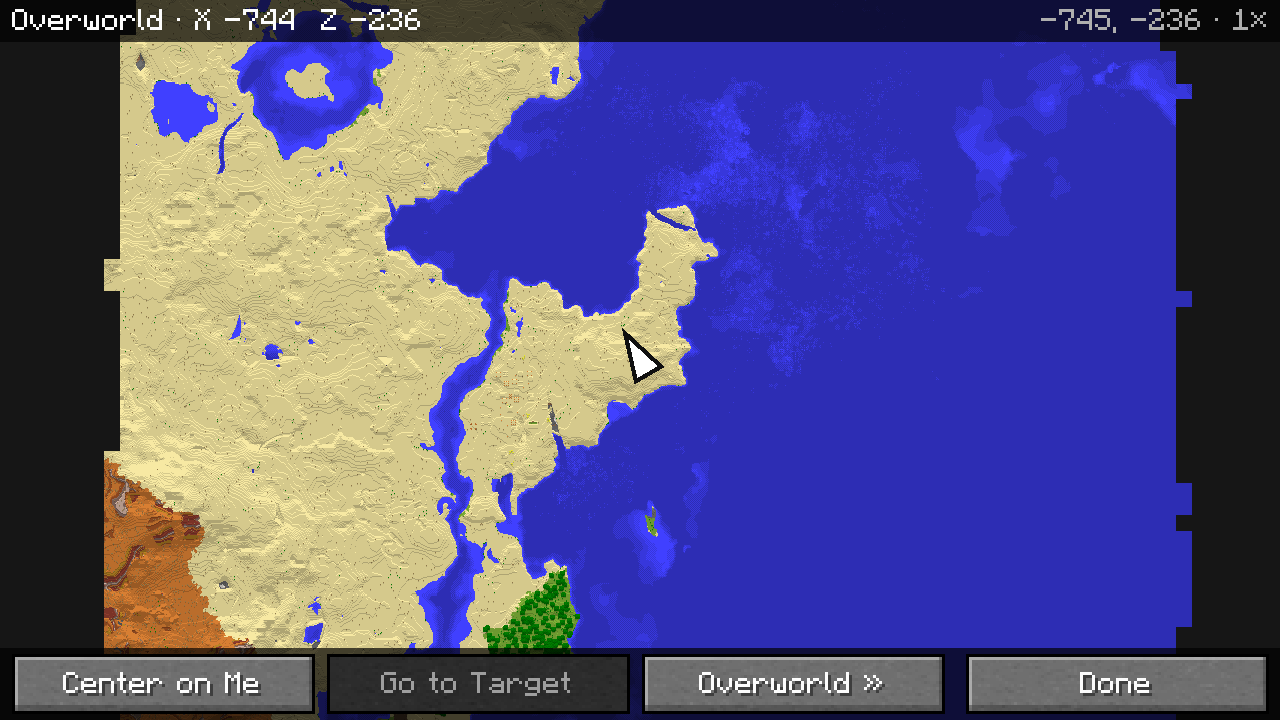
A full-screen map of everything you have explored, in the colors of Minecraft's own maps, with your waypoints.
Description
A full-screen map of everything you have explored, in the colors of Minecraft's own maps, with your waypoints.
The map
- Press M to open the map; M or Esc closes it. Typing m in the chat does not open it, and the map does not pause the game.
- It shows every place you have explored, with the colors and shading of vanilla Minecraft maps. Places you have not explored stay dark: the map never invents terrain.
- Drag with the mouse to move the map. Scroll to zoom in or out; the point under the cursor stays where it is.
- Seven zoom levels from 0.25× to 16×. How far you can zoom out depends on the window size, so the map stays fast: about 3,800 blocks across in a 1920×1080 window.
- An arrow shows where you are and which way you are looking. Center on Me brings the map back to you.
- The top bar shows the dimension, your coordinates, the coordinates under the cursor and the zoom level. Coordinates can be turned off, and they are always hidden when a server limits debug information.
- Changing the GUI scale or the window size keeps the map where it was.
Exploring
- The map is filled in from the terrain the game has already loaded around you, while you walk, fly or sail, also while the map is closed. It never loads chunks by itself, and moving the map does not load anything.
-
What you explore is saved for each singleplayer world, each server and each dimension, in
<game folder>/tweaklet/<world>/map/, and is there again the next time. Nothing is written for a world before there is something to save. - A damaged map file does not crash the game: that area shows as unexplored and the file is kept as a backup. A file saved by a newer version is never overwritten.
Dimensions
- The Overworld, the Nether and the End each have their own map; the map opens on the dimension you are in.
- The dimension button switches between the saved maps of the Overworld, the Nether and the End (and the modded dimension you are in), so you can look at the Overworld from the Nether. Looking at another dimension does not change its map.
- In the Nether the map shows the floor around the height you are at; in the End the void is dark.
Waypoints (optional)
With TweakletMC Waypoints 0.1.0 or newer installed:
- The waypoints of the dimension on the map are shown as diamonds in their own colors. Hidden waypoints are not shown, unless one of them is the navigation target.
- The navigation target has a white outline. When it is outside the visible area, it waits at the edge of the map in its direction.
- Names are written next to the markers without covering each other; a name that does not fit is left out. Waypoint Names can be turned off.
- Markers are never cut off by the toolbar or the edge of the screen: a waypoint right at the edge appears, with its name, as soon as it fits completely.
- Click a waypoint to see its name, coordinates and distance, and to Set as Target or Remove Target. The info box opens in a corner that keeps the waypoint you clicked (and, if there is room, the target) visible. It is the same target that the Waypoints compass shows. Go to Target moves the map to the target.
- Waypoints are added, edited and deleted in the Waypoints list, as before.
Without TweakletMC Waypoints, World Map works on its own.
With TweakletMC Minimap (optional)
- With TweakletMC Minimap 0.1.1 or newer, both mods use the same map: what one explores, the other shows, and only one of them reads the terrain.
- Minimap 0.1.0 cannot be used together with World Map: the game does not start and tells you to update Minimap. Minimap 0.1.1 keeps using the map that 0.1.0 saved.
Settings (Mod Menu)
Waypoints, Waypoint Names and Coordinates can be turned on or off. The map remembers its last zoom level. Settings are saved in config/tweaklet-world-map.json. The key can be changed in Options → Controls → Key Binds under the TweakletMC category.
Requirements
- Minecraft Java Edition 1.21.1
- Fabric Loader 0.16.0 or newer
- Fabric API
- TweakletMC Core 0.2.2 or a newer 0.2.x version
- Java 21
- Optional: Mod Menu, for the settings screen
- Optional: TweakletMC Waypoints 0.1.0 or newer, to show waypoints
- Optional: TweakletMC Minimap 0.1.1 or newer (not 0.1.0)
World Map is a client-side mod: nothing needs to be installed on a server.
Known limitations
- Only places explored while World Map or TweakletMC Minimap was installed are on the map.
- Underground in the Overworld the map shows the surface; there is no cave view.
- How far you can zoom out depends on the window size.
- The saved map of a modded dimension can only be opened while you are in that dimension.
- Waypoints cannot be added or edited on the map, and there is no teleporting.
- On Realms the map is not saved: it keeps what you explore while you play (up to 96 areas of 512×512 blocks), and other dimensions cannot be shown.
- Blocks that change are picked up around you; changes far away appear on the map when you come closer again.
- A server's map is shared only between spellings of the same address; an IP address and a domain name pointing to the same server keep separate maps.
- Languages: English and Turkish. Other languages show the English text.
Türkçe
Keşfettiğin her yerin, Minecraft'ın kendi haritalarının renkleriyle tam ekran haritası; waypoint'lerinle birlikte.
Harita
- Haritayı M ile açarsın; M ya da Esc kapatır. Sohbete m yazmak haritayı açmaz, harita oyunu durdurmaz.
- Keşfettiğin her yeri vanilla Minecraft haritalarının renk ve gölgeleriyle gösterir. Keşfetmediğin yerler koyu kalır: harita hiçbir zaman arazi uydurmaz.
- Haritayı fareyle sürükleyerek kaydırırsın. Tekerlekle yakınlaşır ya da uzaklaşırsın; imlecin altındaki nokta yerinde kalır.
- 0,25× ile 16× arasında yedi yakınlaştırma düzeyi var. Haritanın hızlı kalması için ne kadar uzaklaşılabileceği pencere boyutuna bağlıdır: 1920×1080 bir pencerede yaklaşık 3.800 blok genişlik.
- Bir ok, nerede olduğunu ve nereye baktığını gösterir. Bana Dön haritayı sana getirir.
- Üst çubukta boyut, senin koordinatların, imlecin altındaki koordinatlar ve yakınlaştırma düzeyi yazar. Koordinatlar kapatılabilir; sunucu hata ayıklama bilgisini kısıtlıyorsa her zaman gizlidir.
- GUI ölçeğini ya da pencere boyutunu değiştirmek haritanın baktığı yeri değiştirmez.
Keşif
- Harita, oyunun çevrende zaten yüklediği araziden dolar: yürürken, uçarken, yüzerken; harita kapalıyken de. Kendiliğinden parça yüklemez; haritayı kaydırmak da hiçbir şey yükletmez.
-
Keşfettiklerin her tek oyunculu dünya, her sunucu ve her boyut için ayrı olarak
<oyun klasörü>/tweaklet/<dünya>/map/içine kaydedilir ve bir dahaki sefere yine oradadır. Kaydedilecek bir şey olmadan bir dünya için hiçbir şey yazılmaz. - Bozuk bir harita dosyası oyunu çökertmez: o alan keşfedilmemiş görünür, dosya da yedek olarak saklanır. Daha yeni bir sürümün kaydettiği dosyanın üzerine asla yazılmaz.
Boyutlar
- Overworld, Nether ve End'in her birinin kendi haritası vardır; harita bulunduğun boyutta açılır.
- Boyut düğmesi Overworld, Nether ve End'in (ve içinde bulunduğun modlu boyutun) kayıtlı haritaları arasında geçer; böylece Nether'dayken Overworld'e bakabilirsin. Başka bir boyuta bakmak onun haritasını değiştirmez.
- Nether'da harita bulunduğun yüksekliğin çevresindeki zemini gösterir; End'de boşluk koyudur.
Waypoint'ler (isteğe bağlı)
TweakletMC Waypoints 0.1.0 veya daha yenisi kuruluysa:
- Haritadaki boyutun waypoint'leri kendi renklerinde elmaslar olarak görünür. Gizlenmiş waypoint'ler gösterilmez; biri navigasyon hedefiyse o gösterilir.
- Navigasyon hedefinin beyaz bir çerçevesi vardır. Görünen alanın dışındaysa haritanın kenarında, kendi yönünde bekler.
- Adlar işaretlerin yanına birbirini örtmeden yazılır; sığmayan ad yazılmaz. Waypoint Adları kapatılabilir.
- İşaretler araç çubuğunun altında ya da ekran kenarında yarım kalmaz: tam kenardaki bir waypoint, bütünüyle sığdığı anda adıyla birlikte görünür.
- Bir waypoint'e tıklayınca adı, koordinatları ve uzaklığı görünür; Hedef Yap ya da Hedefi Kaldır ile hedefi değiştirebilirsin. Bilgi kutusu tıkladığın waypoint'i (yer varsa hedefi de) örtmeyen bir köşede açılır. Bu, Waypoints pusulasının gösterdiği hedefin ta kendisidir. Hedefe Git haritayı hedefe götürür.
- Waypoint eklemek, düzenlemek ve silmek eskisi gibi Waypoints listesinden yapılır.
TweakletMC Waypoints olmadan da World Map tek başına çalışır.
TweakletMC Minimap ile (isteğe bağlı)
- TweakletMC Minimap 0.1.1 veya daha yenisiyle iki mod aynı haritayı kullanır: biri neyi keşfederse öteki de onu gösterir; araziyi yalnızca biri okur.
- Minimap 0.1.0 World Map ile birlikte kullanılamaz: oyun açılmaz ve Minimap'i güncellemeni söyler. Minimap 0.1.1, 0.1.0'ın kaydettiği haritayı kullanmaya devam eder.
Ayarlar (Mod Menu)
Waypoint'ler, Waypoint Adları ve Koordinatlar açılıp kapatılabilir. Harita son yakınlaştırma düzeyini hatırlar. Ayarlar config/tweaklet-world-map.json dosyasına kaydedilir. Tuş, Seçenekler → Kontroller → Tuş Atamaları ekranında TweakletMC kategorisinden değiştirilir.
Gereksinimler
- Minecraft Java Edition 1.21.1
- Fabric Loader 0.16.0 veya daha yenisi
- Fabric API
- TweakletMC Core 0.2.2 veya daha yeni bir 0.2.x sürümü
- Java 21
- İsteğe bağlı: ayar ekranı için Mod Menu
- İsteğe bağlı: waypoint'leri göstermek için TweakletMC Waypoints 0.1.0 veya daha yenisi
- İsteğe bağlı: TweakletMC Minimap 0.1.1 veya daha yenisi (0.1.0 değil)
World Map yalnızca istemcide çalışan bir moddur: sunucuya hiçbir şey kurmak gerekmez.
Bilinen sınırlar
- Haritada yalnızca World Map ya da TweakletMC Minimap kuruluyken keşfedilen yerler bulunur.
- Overworld'de yer altındayken harita yüzeyi gösterir; mağara görünümü yoktur.
- Ne kadar uzaklaşılabileceği pencere boyutuna bağlıdır.
- Modlu bir boyutun kayıtlı haritası yalnızca o boyuttayken açılabilir.
- Haritadan waypoint eklenemez ya da düzenlenemez; ışınlanma yoktur.
- Realms'te harita kaydedilmez: oynarken keşfettiklerini tutar (512×512 blokluk en çok 96 alan); öteki boyutlar gösterilemez.
- Değişen bloklar çevrende fark edilir; uzaktaki değişiklikler oraya yeniden yaklaşınca haritada görünür.
- Bir sunucunun haritası yalnızca aynı adresin farklı yazılışları arasında paylaşılır; aynı sunucuya giden bir IP adresi ile bir alan adı ayrı haritalar tutar.
- Diller: İngilizce ve Türkçe. Diğer dillerde İngilizce metin görünür.
TweakletMC World Map Team