Trim Details
- By
Armor icons show their real trim pattern, trim tooltips fit in one line, and smithing templates tell you where they are found. A modern alternative to Better Trim Tooltips and Dynamic Trim.
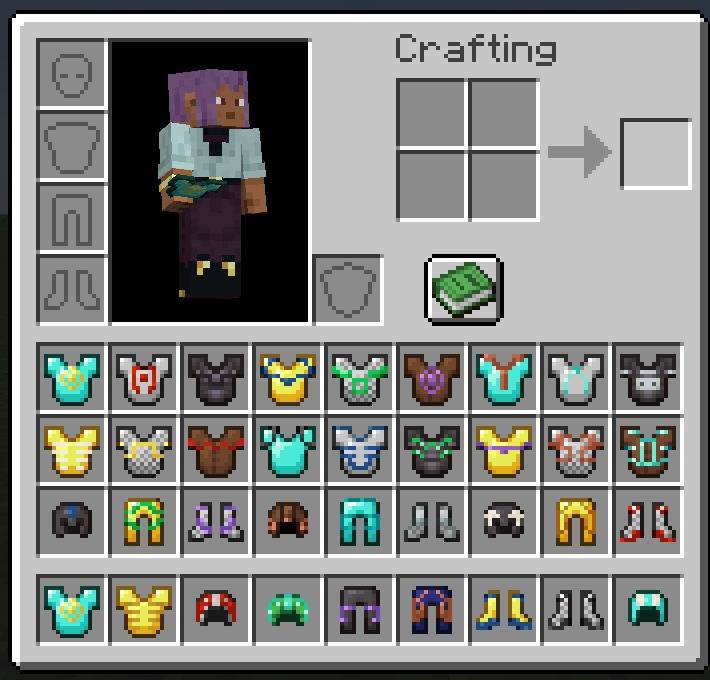
Every armor piece shows its own trim pattern in the material's colour.
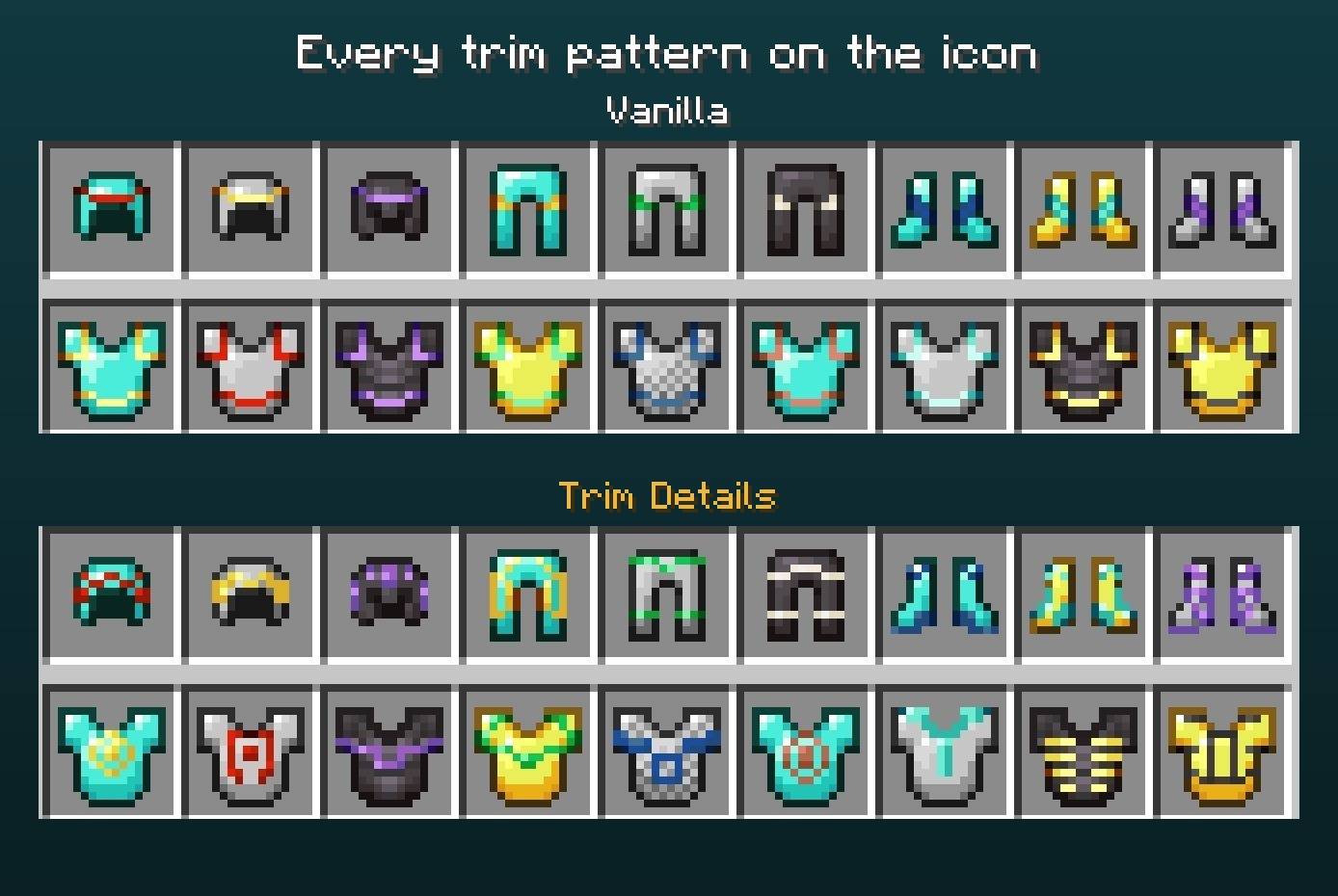
The same trimmed armor without and with Trim Details.
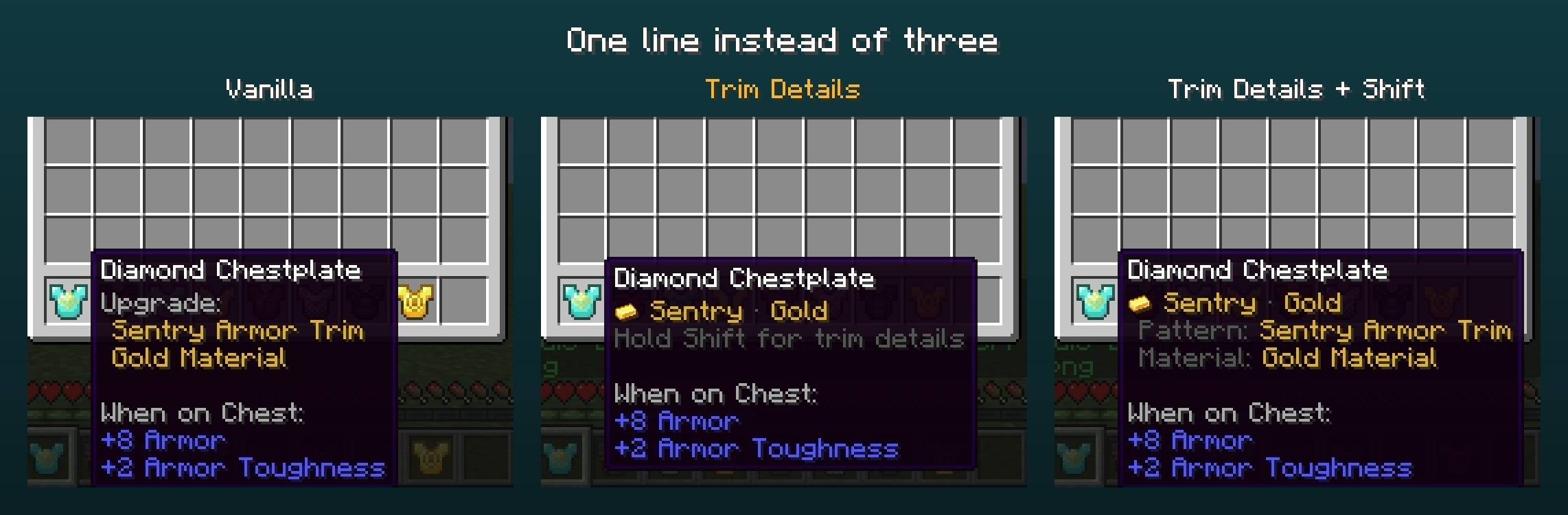
Three vanilla lines, our one line, and the details with Shift.
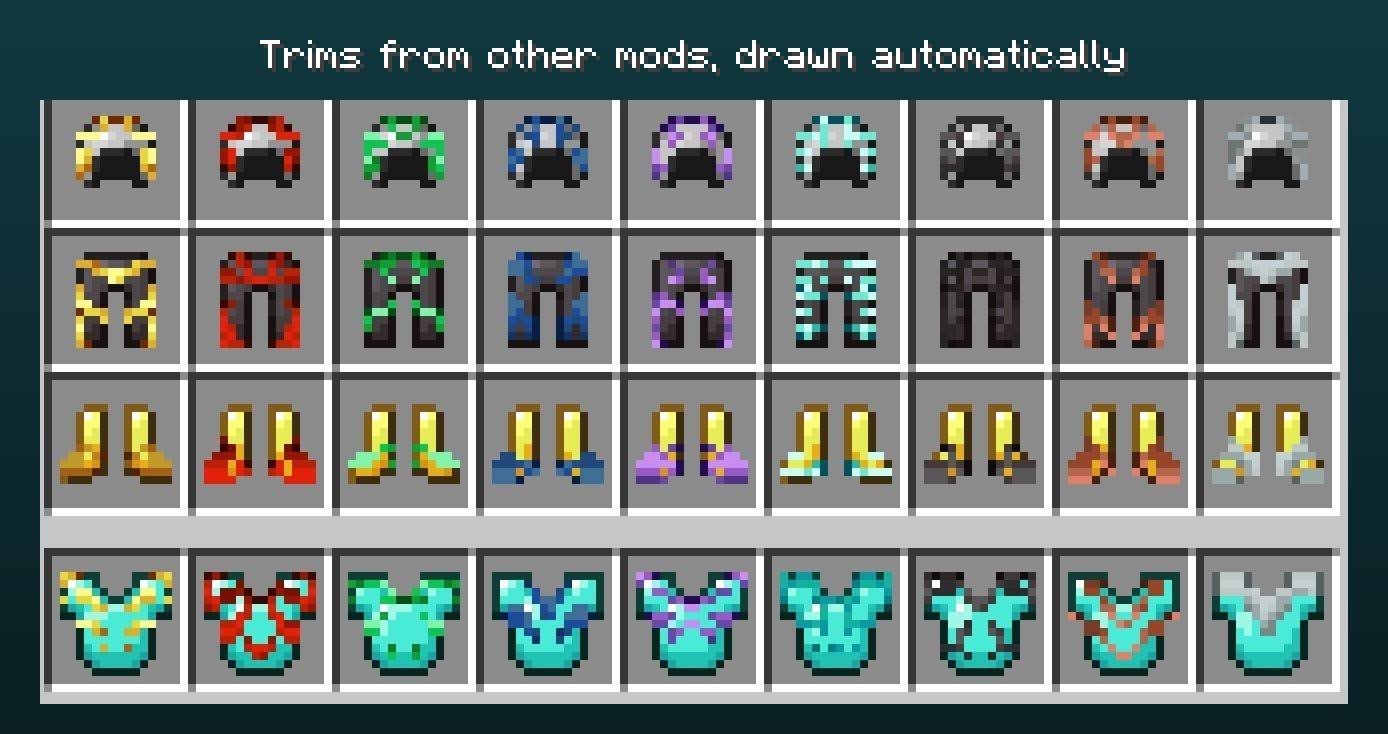
More Armor Trims patterns, with icons drawn automatically from their armor textures.
Description
Trim Details
See your armor trims at a glance: the real trim pattern on every armor icon, and the trim in one short tooltip line.
A client-side mod for Minecraft 26.3, 1.21.11 and 1.21.1 (NeoForge and Fabric) and 1.20.1 (Forge and Fabric). A modern alternative to Better Trim Tooltips and Dynamic Trim, written from scratch, with both features in one mod. Coming from them? Remove them and install this one.
Trim patterns on the icons
In vanilla, every trimmed chestplate shows the same few coloured pixels, whatever the pattern. With Trim Details each armor piece shows its own trim pattern in the inventory, in chests, in your hand and on the ground: Sentry, Dune, Coast, Wild, Ward, Eye, Vex, Tide, Snout, Rib, Spire, Wayfinder, Shaper, Silence, Raiser, Host, and from 1.21 also Flow and Bolt.
- Hand-finished icons in the vanilla style for every vanilla pattern and armor piece (helmet, chestplate, leggings and boots), plus a set fitted to the turtle shell.
- Every modded pattern, automatically. A trim from another mod or a datapack gets its icon the moment the game loads, drawn from its own armor texture. No patch, no list of supported mods.
- Armor from other mods works too, as long as it is a normal armor item with a trim.
- Every material colour, including the darker shade vanilla uses for a trim on armor of the same material (gold on gold, iron on iron...), and trim materials added by other mods.
- Leather (dyed too), chainmail, iron, gold, diamond, netherite and turtle shell, plus copper armor on 1.21.11 and 26.3.
- Built once when the game loads and then cached: no FPS cost, even with a full inventory of trimmed armor.
One line instead of three
Vanilla spends three lines on a trim ("Upgrade:", "Sentry Armor Trim", "Gold Material"). Trim Details shows one: a small icon of the material, then Sentry · Gold in the colour of the material.
- Hold Shift for the full names and, for trims from other mods or datapacks, the mod that added them.
- Works on anything with a trim: armor, and elytras or tools with the mods below.
- On 1.20.1, pieces with several trims from Stacked Armor Trims get one line per trim.
- A trim hidden by the item (for example with
/giveand the hide flags) stays hidden.
Smithing templates, explained
- Where to find it. Every vanilla smithing template tells you where it is found: Pillager Outpost, Ancient City, Trail Ruins, Trial Chambers... The Netherite Upgrade too.
- How to copy it. Seven diamonds and which block: Cobblestone for Sentry, Prismarine for Tide, Netherrack for the Netherite Upgrade...
- See the pattern before you craft. The template shows the four armor pieces wearing its pattern, so you know what you get before spending a material. Templates from other mods get the preview as well.
- Search by structure. The creative search finds templates by where they are found: type "ancient city" and you get Ward and Silence.
Works with other trim mods
| Mod | |
|---|---|
| More Armor Trims | Its 13 patterns get real icons and the short tooltip, and show which mod added them |
| Armor Trim Item Fix | Can stay installed; Trim Details draws the icons |
| Elytra Trims | Trimmed elytras get the short tooltip |
| Tool Trims | Trimmed tools get the short tooltip |
| Better Trims | Its trim effects panel stays as it is, next to ours |
| Naturally Trimmed | Mobs and loot with trims work as usual |
| AllTheTrims, RuntimeTrims, Trimica, Dynamic Trim | These draw their own icons, so Trim Details leaves the icons to them and keeps only the tooltip |
Tested in game on 1.21.1 with ModernFix (dynamic resources on), Sodium, EMI, JEI and Immersive Armors. Not every mod above exists for every Minecraft version: Tool Trims, Better Trims and AllTheTrims have no 26.3 release yet.
Options
From the mods list (NeoForge and Forge) or Mod Menu (Fabric), or in config/trimdetails-client.json:
| Option | Default | |
|---|---|---|
| Trim tooltip | Compact | Compact, Vanilla or Hidden |
| Name order | Pattern first | Or material first |
| "Hold Shift" hint | On | |
| Trim pattern icons | On | Turn off to keep the vanilla icons |
| Smithing template info | On | Where templates are found, how to copy them, and the armor preview |
| Material icon | On | The small material icon in the trim line |
Translated into English, Spanish, Brazilian Portuguese, French, German, Italian, Polish, Russian, Japanese, Korean and Simplified Chinese.
For resource packs and mod makers
- Repaint an icon: put a greyscale mask in
assets/minecraft/textures/trims/item_masks/<piece>/<pattern>.png(16x16, using the grey shades of the vanilla trim palette). The turtle shell has its own folder,turtle_helmet, as it sits one row lower than other helmets. - Icons for your own patterns: nothing to do, they are drawn from your armor texture. To replace that with your own art, use the same path under your namespace,
assets/<namespace>/textures/trims/item_masks/<piece>/<pattern>.png. Pieces arehelmet,chestplate,leggingsandboots. - Short names: add
trimdetails.pattern.<namespace>.<pattern>andtrimdetails.material.<namespace>.<material>to your lang file.
FAQ
Do I need it on the server? No. It only changes what your own game draws, so you can join any server with it, and the server does not need it.
Does it change how armor looks when worn? No. Worn armor keeps the vanilla trim; Trim Details changes the item icons and the tooltip.
My resource pack changes the armor textures. Will the icons clash? Items that a resource pack gives its own model (custom model data or a custom item model) keep that model. You can also turn the icons off and keep only the tooltip.
Is it a port of Better Trim Tooltips or Dynamic Trim? No. It does the job of both, but it is written from scratch, and the vanilla icons are finished by hand.
Will it work with armor or trims from my modpack? Yes for normal armor items and any trim pattern, with no setup. If something cannot be drawn, you keep the vanilla icon, never a missing texture.
Requirements
| Minecraft | 26.3, 1.21.11, 1.21.1 or 1.20.1 |
| NeoForge | 26.3.0.95 or newer (Minecraft 26.3), 21.11 or newer (Minecraft 1.21.11), 21.1 or newer (Minecraft 1.21.1) |
| Forge | 47.1 or newer (Minecraft 1.20.1); the same file works on NeoForge 1.20.1 |
| Fabric | Fabric Loader 0.15.11 or newer (0.14.21 on 1.20.1, 0.17.0 on 1.21.11, 0.19.5 on 26.3) and Fabric API. Mod Menu is optional, for the options screen |
| Side | Client only |
Modpacks
Feel free to include this mod in any modpack on CurseForge or Modrinth.
Credits
Inspired by Better Trim Tooltips by Andrew6rant and Dynamic Trim by Bawnorton and Andrew6rant, which are no longer updated. Trim Details is an independent mod written from scratch; it does not use their code or textures.
Trim Details Team