SVR Inventory [PLUS]
- By
An RPG inventory overhaul with scrolling grid storage, a six-slot tool belt, a radial tool wheel, and configurable crafting.
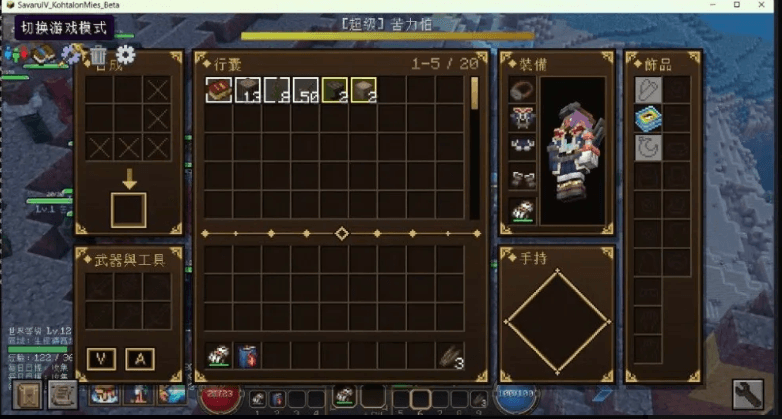
SVR Inventory
Keep your equipment ready and your supplies within reach. SVR Inventory brings scrolling storage, a dedicated tool belt, crafting, and gear management into one inventory screen, styled with dark walnut panels, iron borders, and antique gold details.
Room for the journey
Browse a 9 × 20 storage grid through a scrolling five-row view, alongside your regular inventory and hotbar. Storage follows Grid Inventory's item footprint rules, so larger items occupy multiple cells. The grid provides 180 cells; the number of items it holds depends on their sizes and stack limits.
With overflow pickup enabled, items that cannot fit in your regular inventory can enter this storage when space allows.
Tools ready, hotbar free
A six-slot Arms & Tools belt carries eligible weapons and tools separately from your hotbar. Equip a belt item directly in your main hand, leaving hotbar space available for other supplies.
- Hold Left Ctrl, point at a belt item, and release to equip it.
- Tap the key to keep the wheel open, then click to choose.
- Choose the wheel's center or select a hotbar slot to return to your hotbar.
The Tool Wheel key can be rebound in Controls. If Left Ctrl is also assigned to sprint or another action, change one of the bindings.
Crafting and equipment together
Manage armor, your offhand item, and crafting from the same screen. The crafting panel supports 1–9 open cells, with a 2 × 2 layout enabled by default. Set crafting_cells=9 to enable the full 3 × 3 grid.
When Accessories is installed, supported functional accessory slots appear beside your gear. A shortcut opens its own screen for cosmetic slots. A separate button opens the vanilla inventory to reach buttons added there by other mods.
Configuration and inventory behavior
Settings are stored in config/svr_inventory.properties and read at startup:
crafting_cells=4— number of open crafting cells, from 1 to 9.overflow_pickup=true— send eligible pickup overflow into storage when it fits.
Storage and belt contents persist with the player and are retained after death, including when vanilla keepInventory is disabled. Your regular inventory follows its normal death rules.
Requirements
For Minecraft 1.21.1 on Fabric. Requires Fabric API and Grid Inventory / Savaru Inv 2.2.0 or newer (savaru_inv), with Fabric Loader 0.16.0+ and Java 21+.
Install SVR Inventory and its required dependencies on both the client and server for multiplayer. Accessories and Savaru Dungeon HUD are optional integrations; when the latter is present, it handles the belt display instead of SVR Inventory's separate held-tool indicator.
SVR Inventory [PLUS] Team