Starter Cabin
- By
Starter Cabin is a Minecraft mod that lets you save a player-built structure and automatically place it near the spawn point of any new world.
How to use it in 4 s
teps
1.Build your structure, then place a Spawn Carpet inside it where you want players to appear.
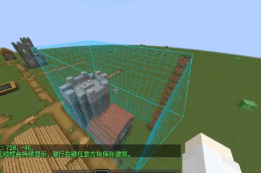
2.Hold the Building Saver item, right‑click one corner of the building, then right‑click the opposite corner – a selection outline appears.
3.Sneak + right‑click any block to save the selected area as a template.
4.When you create a new world, the mod will automatically find a suitable flat spot near spawn, place your building, and set the world spawn to the carpet position.
Key items
Building Saver – a carrot‑on‑a‑stick styled tool for selecting and saving.
Spawn Carpet – a marker block that records the spawn point; it is removed after saving (configurable).
What happens in a new world
- Searches within a radius (default 96 blocks) around the world spawn for a good location.
- Prefers terrain with low height variation (default ≤4 blocks).
- Clears the target area before placing (can be disabled).
- Places the full building, including block entities, chest contents, and (optionally) entities.
- Sets the world spawn and teleports each player on first join (both optional).
Important config options
(config/starter_cabin/template.nbt)
| Option | Effect |
|---|---|
autoGenerate |
Enable/disable automatic generation in new worlds (default: true) |
copyEntities |
Save and place entities inside the selection |
clearGenerationArea |
Clear the target area before placement |
teleportPlayersOnFirstJoin |
Teleport players to the building on first join |
placementSearchRadius |
How far to search from world spawn (default 96) |
maxSurfaceVariation |
Maximum terrain height difference allowed (default 4) |
maxBlocks |
Maximum number of blocks in a saved template (default 262144) |
Notes
- The template is saved to
config/starter_cabin/template.nbt - Each world generates the building only once – delete world data to force regeneration.
- If placement looks off, increase
placementSearchRadiusor lowermaxSurfaceVariation.
Recommended workflow
- Build and save your structure in a test world.
- Create a new world to verify the generation.
- Tweak config values if needed, then re‑save the template after major changes.
https://ifdian.net/a/kuzhi
Starter Cabin Team

Owner