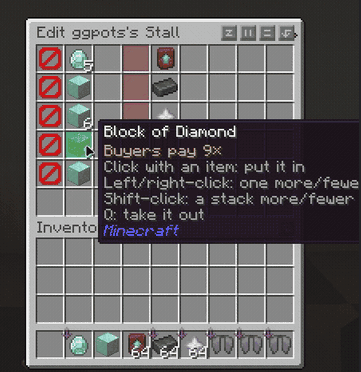
screenshot-2026-10-28_03-57-46_3631915.png
Description

Physical player shops for Minecraft servers, with no client mod




Stall is a player shop system for Fabric dedicated servers on Minecraft 26.3. Players turn an ordinary barrel into a shop, stock it with items, and set up trades that other players buy with a click. Shops are real blocks with real stock, and players on a vanilla client need nothing installed: Stall runs entirely on the server.
Running Paper instead? The Paper plugin is on Modrinth and the GitHub releases, and it reads the same shop files.
How It Works
- Get a Stall token with
/stall token. - Use the token on a barrel you're allowed to open. The barrel becomes your shop, and whatever is inside is your stock.
- Set up offers. Sneak and right-click your shop with empty hands, then click items from your inventory into an offer. Your items stay with you; the menu only holds copies.
- Players buy with a click. Anyone else who right-clicks your shop sees your offers and buys any offer the shop has stock for.
- Move it whenever you like. Break your shop or use
/stall remove, and the token comes back to you.
Key Features
Physical Shops A shop is a vanilla barrel, and its contents are the shop's stock. Payments go into the same barrel.
Two-for-Two Trades Every offer asks for up to two items and gives up to two items, each up to one stack. For example, 1 diamond + 2 gold ingots → 8 iron ingots.
Up to Six Offers One row per offer, all on one page.
Clear Availability Each offer shows whether it's in stock, whether you can afford it, and whether the shop has room for your payment, and lists what's missing.
All-or-Nothing Trades Every trade is checked in full before anything moves. No partial trades and no lost items.
Exact Item Matching Enchantments, names, durability and potion types all count.
Shop Limits by Permission Tiers such as
stall.limit.5, checked through Fabric API's permission API, so LuckPerms works out of the box.Claim Friendly Shops only go where their owner could open the barrel anyway, so protection mods decide where shops can go.
Protected Stock Other players can't break or open a shop, and hoppers can't drain it.
Saved With the World Shops are kept in the world's own folder, so a world backup includes them.
Explosions aren't blocked yet, and barrels are the only shop container so far. Both are coming in later versions.
Requirements
- Minecraft 26.3, Java 25
- Fabric Loader 0.19.3 or newer
- Fabric API
- LuckPerms is optional
Commands
| Command | |
|---|---|
/stall |
Show how shops work and the commands below. |
/stall token [amount] |
Get Stall tokens. |
/stall list |
List your shops and your shop limit. |
/stall info |
Show the owner and offers of the shop you're looking at. |
/stall remove |
Remove the shop you're looking at and give its token back to its owner. |
/stall reclaim |
Collect tokens from shops removed while you were offline. |
/stall preview |
See your own shops the way buyers do. |
/stall admin give <player> [amount] |
Give a player Stall tokens. |
Permissions
| Permission | Default | |
|---|---|---|
stall.use |
everyone | Open shops and buy from them. |
stall.create |
everyone | Turn a barrel into a shop with a token. |
stall.token |
everyone | Use /stall token. |
stall.limit.<n> |
none | Own up to n shops, from 0 to 100. |
stall.limit.unlimited |
op | Own any number of shops. |
stall.admin |
op | Edit and remove any shop, and use /stall admin. |
Players without a stall.limit tier can own 3 shops.
Links
Stall Team