SP VitalView
- By
Huge utility collection. Health bar, what i'am looking at and alot more awesome things.
b9e6e46b3a11ee44e911d63d521ec55eaa87c90b.png
a0faca9e59ab3846adca8191660413f4baf99302.png
8fbcde9f893cf04cce714537d12059b22c46c7f7.png
8daf77283b8ef7f92fd1638d9e175df439b028dc.png
629d4c6fc0bf7620f22ce377c5a47605afc4aa3c.png
xMrShadyx_ | SP VitalView
Create a server, get 25% off your first month

Description
SP VitalView combines health information, combat feedback, value-colored loot and block identification in one configurable utility
See what you hit, what you collect, and what you are looking at — with a consistent dark interface and personal settings.
Settings command: /spvitalview
Features
- Health above monsters, other players and animals: numbers, a smooth bar, or both.
- Numbers fitted inside the bar, configurable dimensions, and fixed head placement with natural distance scaling.
- Actual damage, confirmed critical hits, healing, repeated regeneration and status-effect notifications.
- Readable combat popups with body/head/crosshair anchors, independent size, offsets and screen-edge clamping.
- Separate visibility for players, monsters, land animals and aquatic animals.
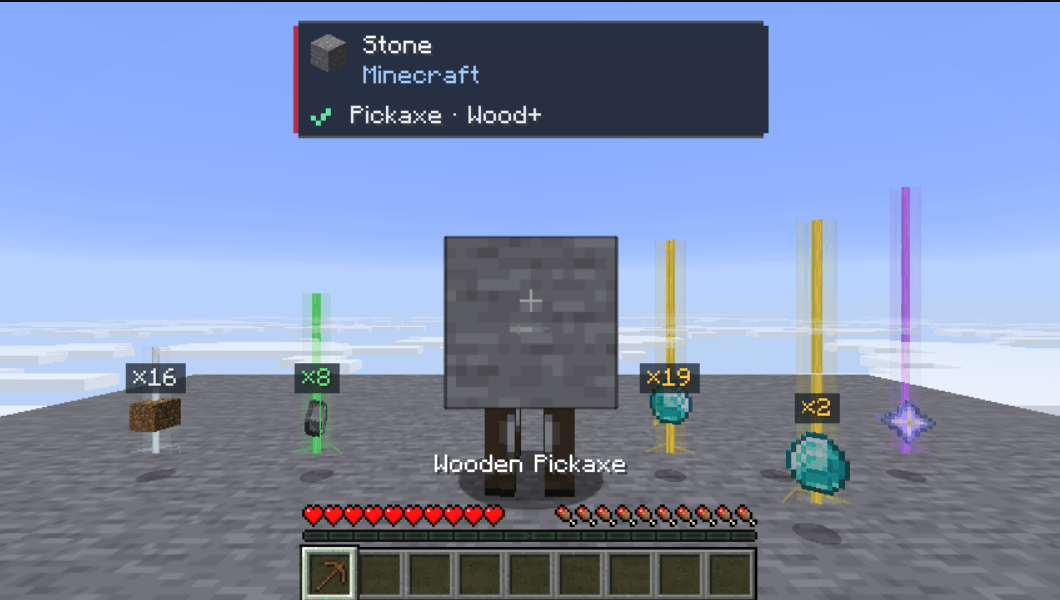
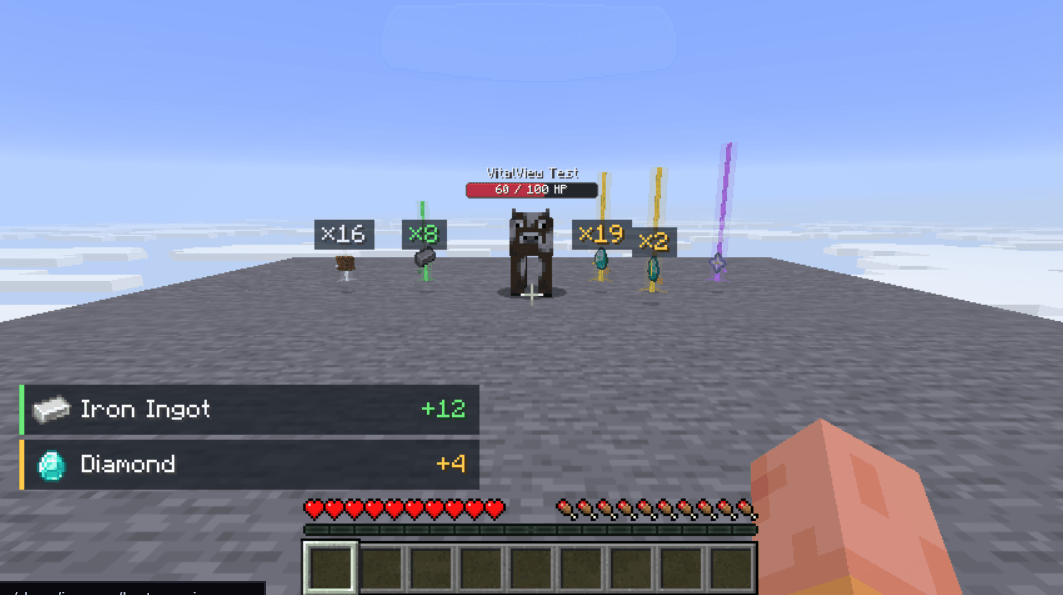
- Four customizable loot tiers: Common → Resources → Valuables → Rare.
- Colored beams, halos, sparkles and per-item category/color overrides.
- Nearby identical stackable drops shown as one visual item with a combined count.
- Exact pickup notifications with icons and names, including partial pickups.
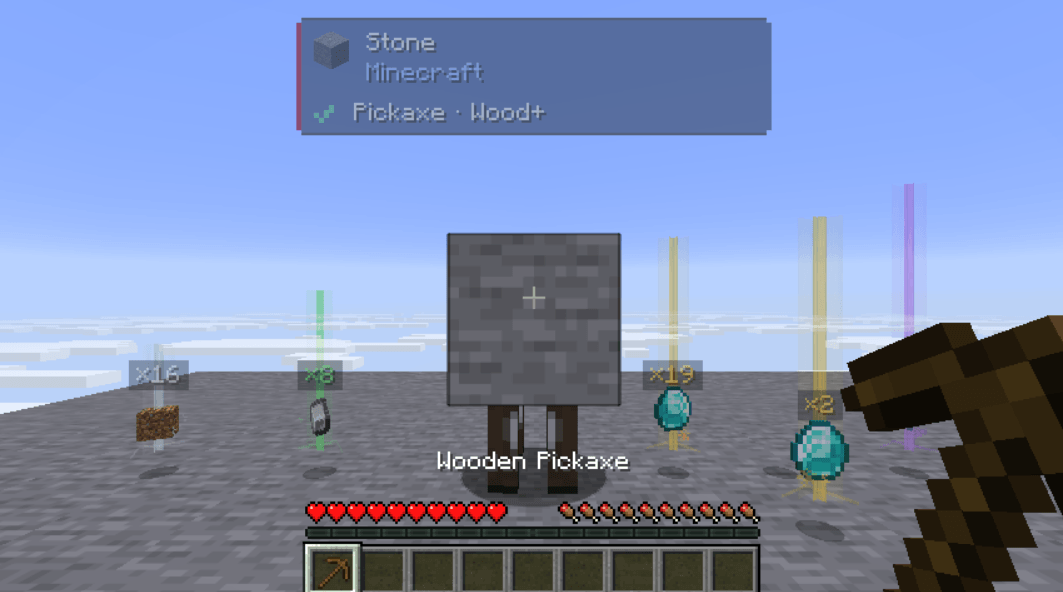
- A targeted-block panel with icon, name, source mod, tool recommendation and minimum tier when known.
- A green check or red cross showing whether the held item satisfies the harvest requirement.
- Draggable pickup and block panels, with size and position controls.
- 0–100% opacity globally and independently for every overlay category.
- English and Bulgarian menus, preview, Save, Cancel and Restore defaults.
This visual utility does not change health, combat, mining requirements, block drops or actual item stacks.
Settings
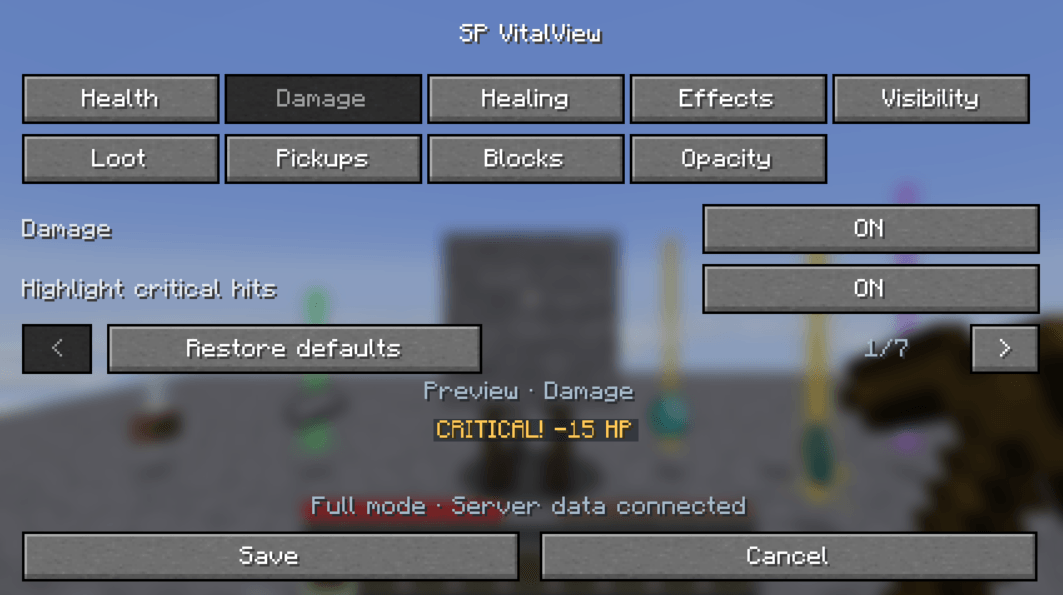
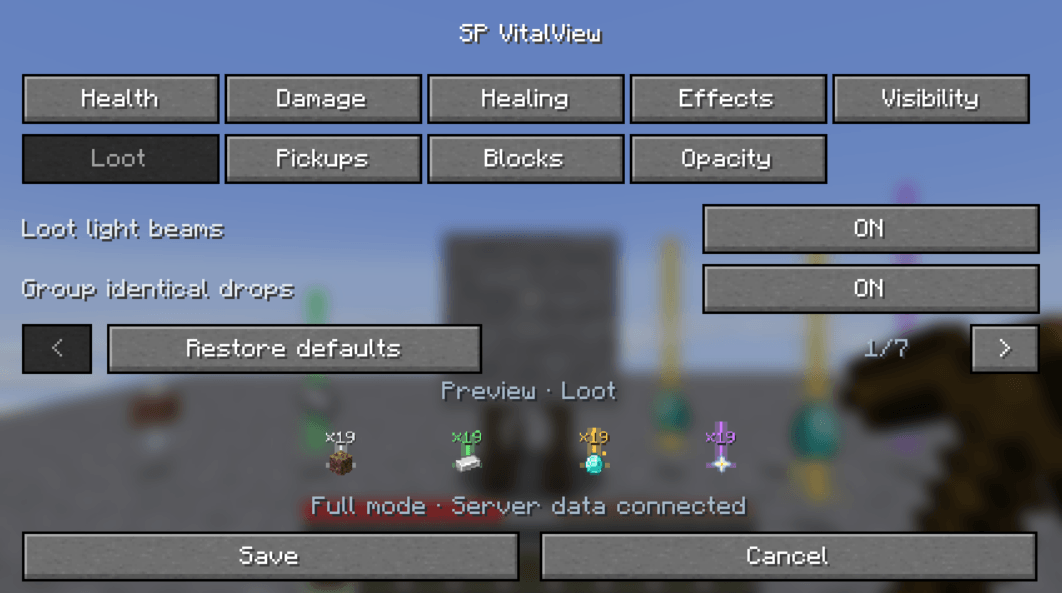
Run /spvitalview. Categories use two rows to remain readable at the default GUI scale. The bottom preview follows the active category and uses unsaved draft settings. Damage shows a hit, Healing a health gain, Effects a potion effect, Visibility entity groups, Loot sample drops, Pickups a pickup feed, and Blocks the real block-panel drawing style. In Opacity, hover or edit a setting to preview that element. Previews fit inside their reserved area and never spawn entities or emit game events.
Requirements
| Component | Version |
|---|---|
| Minecraft Java Edition | 26.2 |
| Fabric Loader | 0.19.5 or newer |
| Fabric API | 0.160.0+26.2, or a compatible newer 26.2 build |
| Java | 25 or newer |
Singleplayer and multiplayer
Singleplayer includes the integrated-server functionality automatically. For complete multiplayer functionality, install the mod and Fabric API on the server and participating clients. Clients without SP VitalView are not sent custom packets. The settings command needs no cheats or operator permissions.
| Capability | Client and server | Client only |
|---|---|---|
| Mob health | Exact server reports | Health synchronized by vanilla |
| Other players' exact health | Supported | Hidden |
| Damage and healing | Individual actual changes | Observed changes; rapid events may combine |
| Confirmed criticals and only-your-damage filtering | Supported | Unavailable |
| Effect notifications and active-effect list | Supported | Unavailable |
| Loot beams, grouping and counts | Supported | Supported |
| Exact pickup notifications | Supported | Unavailable |
| Block information and held-tool check | Supported | Supported |
| Position, size and opacity | Supported | Supported |
The menu indicates whether full server data is connected.
Settings and controls
| Category | Controls |
|---|---|
| Health | Master switch; numbers/bar/both; size, width, thickness, animation, names, percentages, absorption and colors |
| Damage | Damage/criticals; popup anchor, size, offsets, rise, screen clamping, duration, limit and colors; only your damage |
| Healing | Healing/regeneration popups and color |
| Effects | Notifications; up to three active effects; remaining time; color |
| Visibility | Entity categories; independent aquatic animals; combat-only display; range; head gap |
| Loot | Beams, sparkles, grouping, counts, range, radius, beam height, label size, tier colors and item rules |
| Pickups | Notifications, drag placement, position, size, duration and maximum rows |
| Blocks | Panel, drag placement, position, size, source-mod line and tool/status line |
| Opacity | Overall, health/names, damage/critical, healing, effects, loot light, counts, pickup panel and block panel |
- Use − / + for numeric values and page arrows for more controls.
- Save applies and stores the draft. Cancel or Esc in the main menu discards it.
- Restore defaults resets the draft until saved.
- Placement editors return with Done or Esc; press Save in the main menu to keep changes.
- In Loot → Custom item rules, enter an item ID or use the held item, select a tier and optionally enter six hexadecimal RGB digits. Apply to draft, then Save.
Opacity
Each value ranges from 0% to 100%. Overall opacity multiplies the category value: 50% overall and 50% health gives 25% health opacity. At 0%, the selected overlay is hidden. Settings controls remain readable.
Opacity affects complete SP VitalView elements, including text, icons and existing background alpha. Vanilla mobs, blocks, dropped-item models, the hotbar and other mods' interfaces remain unchanged. Damage and criticals share a value; healing and effects have separate values. Existing loot sparkles respond to changes too.
Block and tool information
The panel follows Minecraft's actual crosshair target and disappears when aiming at the sky or an entity. It does not reveal blocks through walls. Names follow the game language. The source line uses installed mod metadata when the namespace matches a mod ID; otherwise it shows the namespace.
The check/cross reports harvest suitability, not guaranteed drops. Silk Touch, loot tables, block state and server rules can affect the result. Blocks needing no specific harvest tool may show a recommended faster tool. Unbreakable blocks are identified separately.
Minimum tiers are derived from which standard tools can harvest the current block. Modded requirements may have no standard tier label, but the held item's normal harvest check is still used. Creative mode does not override this informational Survival check.
Health and popups
Bars stay above heads and shrink with world perspective. Damage/healing/effect popups use an independent GUI size; their shared anchor and offsets do not move the health bar. Screen clamping preserves close-range visibility and shows the newest rows that fit.
Damage reports actual HP lost after defenses. Absorption is displayed separately. Full-health healing creates no popup; overhealing reports only the real gain. Regeneration reports each observed gain.
Loot values and grouping
| Tier | Default color | Examples |
|---|---|---|
| Common | White | Dirt and ordinary items |
| Resources | Green | Iron ingots, coal, redstone, logs, ores |
| Valuables | Gold | Diamonds, emeralds, golden apples |
| Rare | Purple | Nether stars, elytra, enchanted items, ancient debris |
These are configurable value presets, not economy prices. Per-item rules take priority. Beams are visual effects and do not change block lighting.
Grouping affects rendering only. Actual entities, stack limits, ownership, despawning and pickup rules stay unchanged. Only stackable items with identical components group within the selected radius (default 1.5 blocks). Different names/enchantments remain separate; solid obstacles prevent grouping across a wall. Disable grouping to restore vanilla item copies.
The pickup feed reports actual full or partial pickups. Recent identical pickups combine; the newest row appears at the bottom.
Useful ranges
| Setting | Range |
|---|---|
| Health / loot distance | 4–64 blocks |
| Health size | 25–200% |
| Bar width / thickness | 40–120 / 4–16 local units |
| Popup size | 50–200% |
| Popup X / Y offsets | −300 to 300 / −200 to 200 GUI pixels |
| Popup duration | 10–100 ticks |
| Group radius | 0.25–2 blocks |
| Beam height | 25–200% of tier height |
| Pickup / block panel size | 50–150%, fitted to the viewport |
| Pickup / block position | 0–100% of available screen space |
| Pickup duration / rows | 20–400 ticks / 1–8 rows |
| Opacity | 0–100% |
At normal speed, 20 ticks equal one second. Bar units represent 0.025 blocks at 100% size; combined mode adds space for its numbers.
Configuration and compatibility
Settings are stored in config/sp-vitalview.json across worlds in the same profile. Invalid files are preserved, defaults are used and the menu shows a notice. A successful Save writes valid settings. RGB configuration colors use decimal integers from 0 to 16777215; the item-rule editor accepts hexadecimal RGB.
Overlays respect F1 and line of sight. Health excludes the local player, spectators and entities invisible to the player. Hostile aquatic mobs remain under Monsters. Standard modded health/effect systems are supported; mods bypassing vanilla methods may need integration.
Health snapshots run every five server ticks; individual changes are sent each tick. Processing is bounded to 256 nearby living entities/events and 256 nearby drops. Excess notifications may be omitted under extreme load.
Changelog
0.4.3
- Store shared settings in a dedicated
config/sp-vitalviewfolder, with automatic migration and first-launch creation. - Preserve existing settings and keep preferences shared across worlds and servers in the same instance.
0.4.2
- Added the official pixel-heart and health-bar icon to Fabric metadata.
- All gameplay features and compatibility requirements remain the same as 0.4.1.
0.4.1
- Replaced the always-visible Zombie health sample with category-specific live previews.
- Made the Opacity preview follow the visible/hovered/edited setting.
- Kept previews isolated from live settings and clipped to the available menu area.
0.4.0
- Styled block panel with icon, source mod, tool recommendation, minimum tier and held-tool check.
- Draggable block placement, size and line visibility controls.
- Global and per-element opacity, including icons, beams, halos and sparkles.
- Two-row settings categories and refreshed English/Bulgarian translations.
- Sharing-ready documentation with real screenshots.
0.3.0
Configurable close-range popups; value-colored loot; visual grouping/counts; exact pickups; drag placement; per-item rules.
0.2.0
Perspective-correct head anchors, outlined bars, inside-bar numbers, aquatic visibility and expanded size controls.
0.1.0
Initial health, damage/critical, healing/regeneration, effect and command-opened settings release.

SP VitalView Team