Screenshot 2026-10-07 082828.png
Screenshot 2026-10-07 082155.png
Screenshot 2026-10-07 082119.png
Screenshot 2026-10-07 082105.png
Screenshot 2026-10-07 082101.png
xMrShadyx_ | SP Cobble GEN
Create your game server with 

Description
SP Cobble GEN
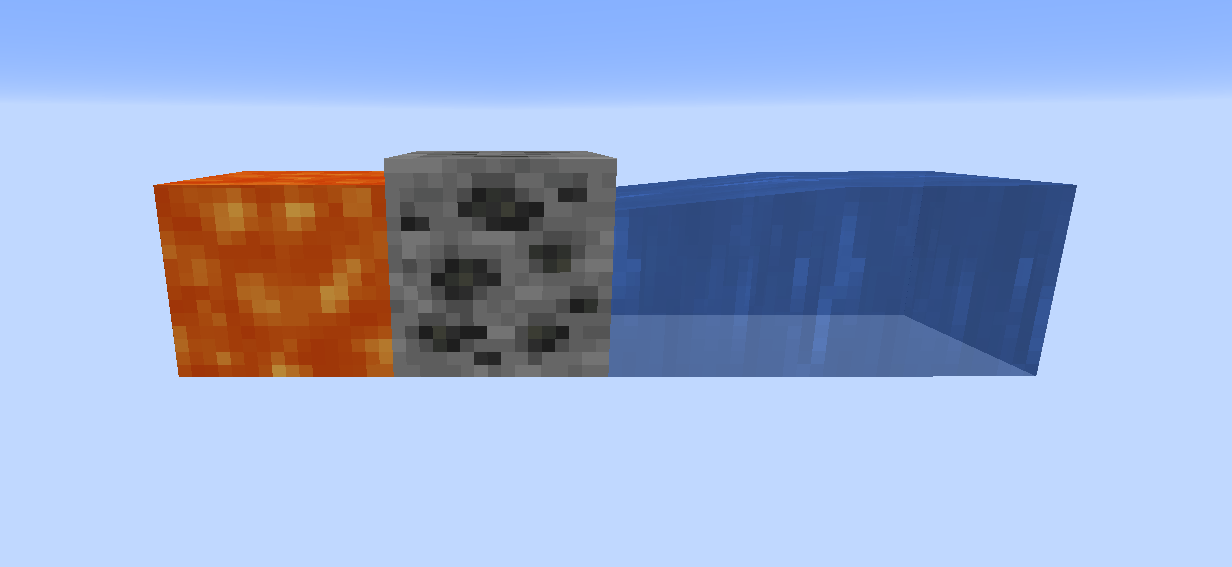
SP Cobble GEN turns an ordinary water-and-flowing-lava cobblestone generator into a configurable ore and treasure generator. Each output position automatically levels up as players mine the blocks it produces.
Build a generator, unlock better ores, and discover surprise chests — with the balance controlled from inside the game.
Features
- Random weighted block outputs from normal cobblestone generation.
- Automatic levels with editable cumulative mining thresholds.
- Separate progress for each output position and dimension.
- Mining progress in both Survival and Creative.
- In-game level, ore, weight, chest and loot editors.
- Searchable selection of installed vanilla and modded blocks/items.
- Independent chest appearance and item appearance chances.
- Configurable minimum and maximum loot quantities.
- Read-only
/sgeninformation, available without cheats. - RPG-style
/slvlskill menu with five upgrade branches, rank icons and server-checked purchases. - Renewable Survival skill points and configurable point/material costs.
- Ore luck, treasure chance, double drops, recipe-based auto-smelting and rare resource blocks.
- Creative-only
/sresetwith a second-command confirmation. - A nearby-generator progress bar with adjustable visibility radius and editable labels.
- Distinct sound and particle celebrations for generated chests and level-ups.
- Creative/cheats-only access to world settings.
- Shared settings across worlds, with separate per-world progression.
Settings access and multiplayer scope
Shared settings and world-specific progress (0.4.1)
All settings now live in config/sp-cobble-gen/settings.json, relative to the Minecraft instance/server directory. This includes generator levels and thresholds, ores and weights, chest loot/chances, HUD labels/radius, effects, skill ranks, prices, prerequisites and resource mappings. The in-game Save for all worlds button updates this shared file and the current world's active settings. Other worlds load the same file when opened. Separate launcher instances or server installations have their own config directories; copy this file to share the configuration between installations.
Only earned state remains in <world>/sp-cobble-gen.json: generator positions, mined counts, pending outputs, point counters and purchased ranks. No points or purchases transfer between worlds. Points still belong to the generator, as in 0.4.0; this update does not introduce a personal wallet.
When upgrading, if the shared file does not yet exist, the first world opened supplies its old settings. Open the world with your preferred configuration first. If the first world is new, defaults are created. Once the shared file exists, later worlds use it and cannot overwrite it with their old settings.
Before converting each old world to progress-only format 2, its complete original file is preserved as <world>/sp-cobble-gen.legacy-backup.json. To choose another old configuration later, close the world and copy just the backup's config object into the shared settings.json file. Do not copy the entire world-data wrapper. Invalid files disable loading without silently replacing them with defaults.
Editing settings does not spend, refund or transfer earned progress. As before, changing thresholds recalculates displayed levels, and changing rank effects changes the effect of already purchased ranks. Remote players use the server's settings, not their own client config. Settings permissions are unchanged.
This release provides world-settings editing for the single-player world owner, including a world hosted to LAN. The editor is only visible/accessible in Creative mode or with Minecraft's game-master command permission (enabled cheats/operator privileges). Survival without cheats cannot open or save settings. Rights are checked again on the server before saving. Remote players cannot edit the owner's settings. A dedicated-server configuration editor is not included. The separate player skill menu uses client/server packets and is available to remote players with the mod installed on both sides.
| Context | Settings menu | /sgen and nearby progress bar |
|---|---|---|
| Local Survival, cheats off | Hidden | Available |
| Local Creative | Available | Available |
| Local Survival with cheats/game-master permission | Available | Available |
| Remote multiplayer player | No remote editor | Available when the server runs the mod |
Generator progress is shared by players mining the same output position. The HUD independently selects the nearest generator for each player. World PIN Lock has its own restrictions: a PIN-protected world remains subject to that mod's LAN/online blocking.
Skills and upgrades: /slvl
Stand within 32 blocks of an active generator and run /slvl. The dark, gold-framed menu shows five rows of rank icons, the generator's coordinates and level, available skill points, the selected branch's current/next effect, costs and an Upgrade button. Hover a rank icon for its name. Select any icon in a branch to view its next purchasable rank. Ranks are bought sequentially. The footer tracks mining toward the next skill point.
The menu stays bound to the original generator while open. Moving out of range, changing dimension, disabling generation or resetting that generator closes it on the next refresh. Leaving the area does not erase progress. Building at another coordinate starts a separate generator; there is no progress-transfer item.
Default upgrade effects
| Branch | Ranks 1–5 | Meaning |
|---|---|---|
| Ore luck | 10 / 20 / 30 / 40 / 50% | Reduces the weight of minecraft:cobblestone, increasing other outputs after normalization |
| Treasure hunter | +10 / 20 / 30 / 40 / 50% | Relative increase to the current level's chest chance |
| Double drop | 2 / 4 / 6 / 8 / 10% | Doubles eligible generated-block drops after vanilla Fortune |
| Auto-smelt | 20 / 40 / 60 / 80 / 100% | Uses installed furnace recipes to smelt the mined drops |
| Resource jackpot | 0.1 / 0.2 / 0.3 / 0.4 / 0.5% | Replaces one matching drop with its configured resource block |
Effects in the table are the total effect at that rank, not added together. Treasure hunter turns a 1% base chest chance into 1.5% at rank 5; it does not enable chests at levels with a 0% base. Chest chance is capped at 100%. /sgen includes the upgraded effective generation percentages and unspent points.
Auto-smelting runs first, doubling second, then the resource jackpot replaces at most one eligible item per mined block. For example, with all three effects triggered, one raw iron becomes two iron ingots, then one of those ingots becomes an iron block. Default mappings cover iron, gold, copper and netherite ingots. A jackpot requires a matching drop; raw iron needs auto-smelting before it matches the default iron-ingot mapping.
Normal tool and harvesting requirements still apply. Silk Touch bypasses these drop transformations and preserves the block. Generated chests and other block entities are excluded, so their inventories are never doubled or smelted. Hand-placed blocks, explosions and automatic mining do not receive skill bonuses.
Points and prices
By default, every 100 tracked Survival breaks earns one point, and a generator level-up caused by Survival mining earns one extra point. Points continue to accrue at maximum generator level. Successful tracked breaks count even if the tool yields no drop. Creative breaks still advance the generator's level but earn no points.
| Rank | Point cost* | Material cost* | Required generator level |
|---|---|---|---|
| 1 | 1 | None | 1 |
| 2 | 2 | 16 iron ingots | 1 |
| 3 | 3 | 32 iron ingots | 2 |
| 4 | 4 | 48 iron ingots | 2 |
| 5 | 5 | 64 iron ingots | 3 |
*Resource jackpot instead costs rank + 1 points and 2 × rank diamonds, and requires Auto-smelt rank 1. Creative players can test upgrades without paying or meeting level/prerequisite requirements.
Points and purchased ranks belong to the generator and are shared by its miners. Material costs come from the purchasing player's main inventory/hotbar, excluding equipment and offhand. The server checks range, current rank, prerequisites, level, points and inventory again before applying an upgrade. Purchases and resets are saved immediately. Stale or repeated purchase requests cannot buy the same rank twice.
Configure skills in game

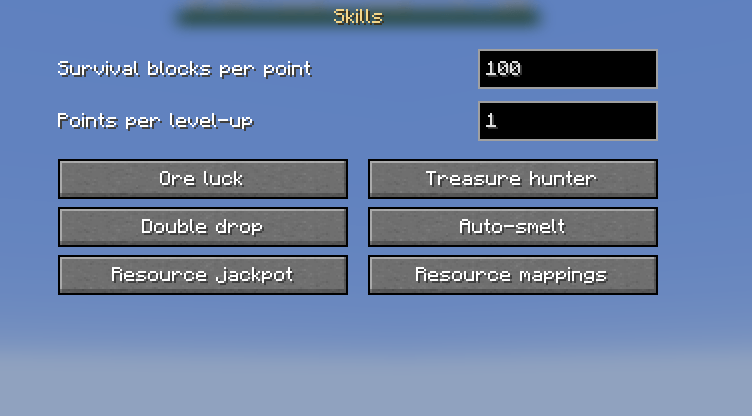
Open Esc → SP Cobble GEN → Skills:
- Set Survival blocks per point and points rewarded for a level-up.
- Select a branch; use arrows to select a rank and + / − to add/remove the final rank (1–10 ranks).
- Edit the total percentage effect, point cost, material quantity and required generator level.
- Select the cost-item button to search all registered items, including installed mods.
- Cycle the prerequisite button and set its required rank. Dependency cycles are rejected when saving.
- Under Resource mappings, add an input item and then the output item. Select an existing mapping to change its output, or × to remove it.
- Return to the main editor and Save for all worlds. Root Cancel discards the draft.
Effects must be nondecreasing between ranks and within 0–100%. Costs allow 0–100,000 points and 0–2,304 items; level requirements allow 1–128. There may be up to 128 resource mappings. Set material quantity to zero for a points-only upgrade. Modded smelting recipes are used automatically; modded compression mappings and costs can be selected from the registry picker.
Existing generators keep their level, mined count, pending output and settings when updating. New skills start at rank 0 with zero points: old counts cannot reliably distinguish Survival from Creative, so points are earned going forward. Reducing a branch's rank count caps its active effect; restoring ranks re-enables previously purchased ranks. Settings changes do not refund prior purchases.
Reset: /sreset
Creative mode only, even when a Survival player has cheats enabled. Run /sreset within 32 blocks of a generator, read its coordinates in chat, then type /sreset again within 15 seconds.
Confirmation resets only that originally selected generator's mined count, level, unspent points, skill-point mining counter and purchased skills. It does not erase world settings, other generators or the existing output block/chest, and it does not refund spent materials. The current generated block remains eligible for the next counted break. The second command cannot silently switch to a different nearby generator. If confirmation expires, another command starts a new confirmation.
Player information: /sgen
Run /sgen in chat to see the nearest active generator in loaded chunks in your current dimension:
- Coordinates, level number and level name.
- Total mined blocks, the next cumulative threshold, and remaining blocks.
- Each available block's overall generation percentage, including the chest roll.
- The surprise chest percentage.
This is a read-only command available in Survival without cheats. The generator owns the level, rather than the individual player. If several generators are nearby, the nearest is selected. The command can describe a loaded generator outside the HUD radius; it does not load distant chunks. A removed generator is ignored when it has neither a tracked output nor adjacent water and lava.
Unavailable mod blocks are excluded, duplicate entries are combined, and fallback cobblestone is included when necessary. For example, a 10% chest chance with 80:20 block weights reports 72% cobblestone, 18% coal ore, 10% chest.
Nearby progress bar
A green bar at the top of the screen shows the nearest active generator within 20 blocks by default. Distance is measured in three dimensions from the player to the output block's center. It shows progress within the current level, resets at a level-up, and displays a full MAX bar at the highest level.
The bar updates twice per second and disappears when you leave the radius, change dimension, remove the generator, or disable the mod. Each player has their own nearest-generator display.
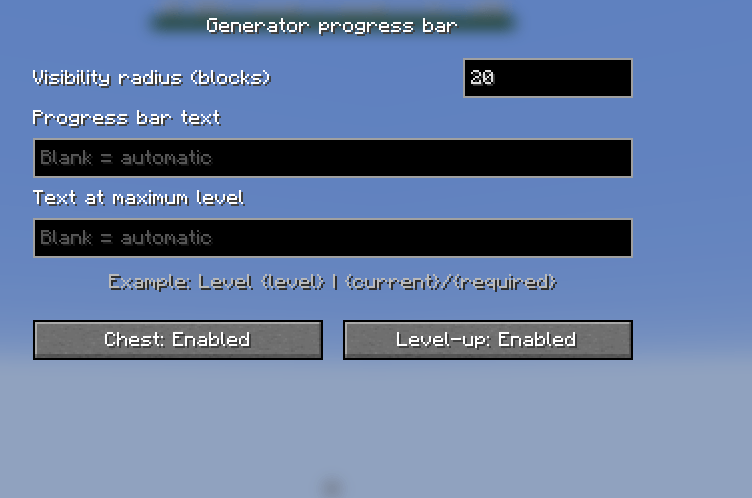
Authorized editors can use Esc → SP Cobble GEN → Progress bar to set a radius of 0–256 blocks. 0 hides the bar. Click Apply, then Save for all worlds. The radius is a shared setting; old 0.1.0 worlds automatically default to 20 blocks without losing their configuration or mining progress.
How it works
Custom progress bar text
Open Esc → SP Cobble GEN → Progress bar. In addition to the radius, this screen has editable Progress bar text and Text at maximum level fields. Each accepts up to 160 single-line characters. Leave a field blank to keep the original translated label for that state.
You can use plain text, dynamic fields, or both:
My generator | Level {level} | {current}/{required}| Field | Meaning |
|---|---|
{level} |
Current level number, starting at 1 |
{name} |
Configured level name |
{current} |
Blocks mined since reaching the current level |
{required} |
Blocks needed to complete the current level; 0 at maximum |
{total} |
Lifetime mined-block count for this generator |
{remaining} |
Blocks remaining until the next level; 0 at maximum |
For the maximum-level field, a useful example is {name} | MAX | Total: {total}. Keep labels short enough to fit your screen. Unknown tokens remain literal text. Select Apply, then Save for all worlds; Cancel discards the edits. Both labels are shared across worlds and update automatically as progress changes.
Chest and level-up effects
- Chest appears: a short burst of white end-rod sparkles and an amethyst chime, emitted after the generated chest has been placed and filled.
- Generator levels up: green happy-villager particles and Minecraft's player level-up sound at the generator when a counted break crosses a level threshold.
The Chest and Level-up buttons in the progress-bar settings independently enable or disable each event's sound and particles together. Both start enabled. They follow the same Apply/Save and Creative/cheats authorization rules as other settings.
Effects use nearby vanilla particle/sound delivery, independent of the HUD visibility radius. Sound volume follows Minecraft's Blocks sound category. They do not grant XP or change loot. Opening an existing chest, ordinary mining within one level, editing thresholds, and reloading a world do not replay the celebrations.
Existing saves keep their settings and progress: missing label fields default to automatic translated labels, and the new effects default to enabled.
Generation and mining
Build a normal cobblestone generator. When vanilla Minecraft would turn flowing lava into cobblestone, SP Cobble GEN chooses a configured block or a chest instead. Lava sources still create obsidian; vanilla stone and basalt conversion paths are unchanged.
There is no special generator block or crafting recipe. The location where the output appears is the generator identity, including its dimension. Rebuilding at the same position keeps its progress; building elsewhere starts a separate generator. All players mining the same position share its progress.
Successful player breaks of tracked generated blocks count in both Survival and Creative. The game-mode restriction applies to editing settings, not to earning generator progress. Ordinary hand-placed blocks, explosions, and piston/automatic mining do not award progress. Moving a generated block does not transfer progress. Chest generation or opening alone does not count; breaking the generated chest does.
Ore mining uses normal Minecraft tool and harvesting rules. Purchased skills can transform ordinary loot after Fortune; Silk Touch bypasses those transformations. The progress counter counts a successful block break, even if the wrong tool yields no item.
Configure everything in game
- Open Esc → SP Cobble GEN.
- Enable or disable the mod for this world.
- Select a level, or add a new one.
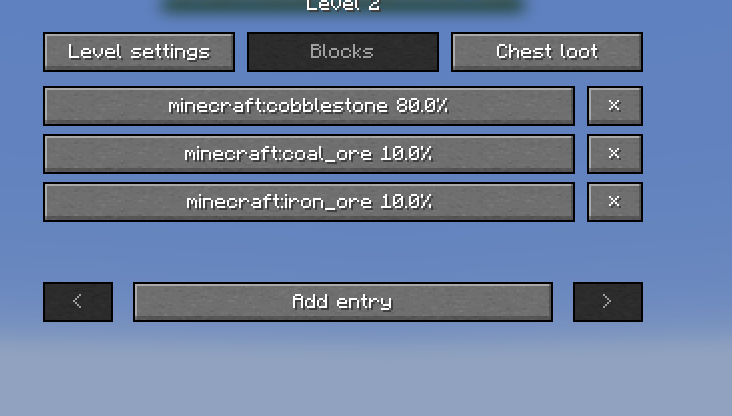
- Under Level settings, edit its name, cumulative mined-block threshold, and chest chance.
- Under Blocks, add/remove blocks and edit their relative weights.
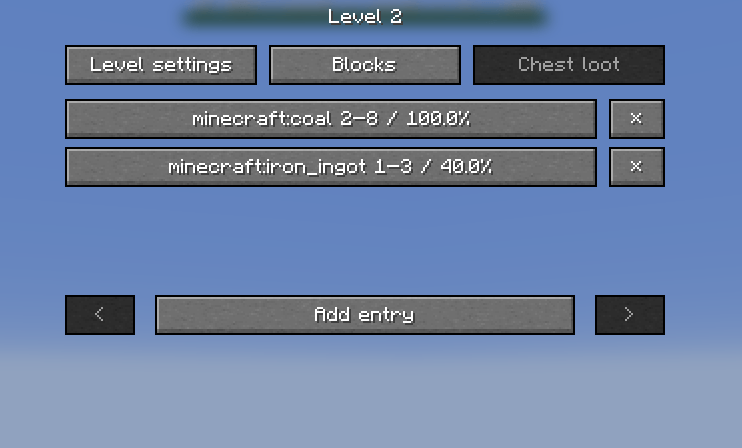
- Under Chest loot, add/remove items and edit minimum/maximum quantities and individual appearance chances.
- Return to the main editor and choose Save for all worlds.
Changes are a draft until Save for all worlds succeeds. Cancel discards the whole draft. An entry's Apply only updates the draft. Settings apply to subsequent generation immediately; already generated blocks/chests keep their existing contents. Mining progress is retained when settings change and the level is recalculated from the new thresholds.
The first level always starts at zero. Later thresholds must strictly increase. Thresholds mean total mined blocks, not additional blocks since the previous level. The main editor shows the nearest known generator's coordinates, total mined count and current level.
Editor limits
| Setting | Allowed values |
|---|---|
| Configured levels | 1–128 |
| Level name | 1–60 characters |
| First threshold | 0 |
| Later thresholds | Strictly increasing, nonnegative cumulative counts |
| Block entries per level | 1–512 |
| Weight per block entry | Greater than 0, at most 1,000,000 |
| Chest chance / item chance | 0–100% |
| Chest item entries per level | 0–27; at least one when chests are enabled |
| Item quantity range | 1–64, minimum no greater than maximum |
| HUD radius | 0–256 blocks; 0 hides the bar |
| HUD text / maximum-level text | Up to 160 single-line characters; blank uses the translated default |
| Chest / level-up effects | Independently on or off; each toggle controls sound and particles |
Invalid values are rejected before saving. The per-item stack-size limit can reduce a configured quantity, for example for items that only stack to one.
Default levels
| Level | Total mined | Block pool | Chest chance |
|---|---|---|---|
| 1 | 0 | Cobblestone, coal ore | 0% |
| 2 | 100 | Cobblestone, coal ore, iron ore | 1% |
| 3 | 500 | Cobblestone, coal ore, iron ore, copper ore, gold ore | 2% |
| 4 | 1500 | Cobblestone, coal ore, iron ore, gold ore, redstone ore, lapis ore, diamond ore, emerald ore | 3% |
Each default block pool assigns 80% of its weight to cobblestone and splits the remaining 20% equally among its ores. Levels have independent pools; a later level does not implicitly inherit an earlier level's entries.
Block weights and chest probability
Weights are relative and do not have to total 100. Weights 80 and 20 give an 80:20 ratio; weights 4 and 1 give the same ratio. The Blocks screen shows normalized percentages.
Chest probability is rolled first. With a 10% chest chance and block weights 80:20, the overall results are 10% chests, 72% of the first block and 18% of the second block.
Set chest chance to 0 to disable chests for that level, or 100 to generate only chests.
Chest contents
Each configured item entry gets an independent percentage roll. On success, one stack is placed in a randomly selected unused chest slot, with a uniformly selected quantity between its minimum and maximum inclusive. Quantity is capped at the item's own maximum stack size.
For example, coal at 100% with quantity 2–8 always appears in generated chests; diamonds at 10% with quantity 1–2 appear only on successful diamond rolls.
A chest can be empty when all its item rolls fail. To guarantee a nonempty chest, include an available item with a 100% chance. Up to 27 entries fit a chest. This version supports item IDs and quantities, not custom enchantment/NBT/component editing.
Other mods
The picker reads the actual running game's block/item registries. Search by registry ID, such as tin_ore or anothermod:, and choose a loaded block or item. No hardcoded list of vanilla ores limits the picker. Installing a compatible ore mod makes its registered content available automatically, but you decide which levels use it.
Air, fluids, block-entity blocks, bedrock, barriers and end portals are excluded from the block-output picker. Surprise chests use their own dedicated settings. Prefer stationary mineable solid blocks; arbitrary mod blocks can have their own placement or neighbor-update behavior.
If an ore mod is removed, its unavailable block entries are skipped and remaining weights are renormalized; an entirely unavailable pool falls back to cobblestone. Missing chest items are skipped. Original entries stay saved so reinstalling the mod restores their availability. Before saving new edits, remove unavailable entries or reinstall their mod.
Mods that replace the same vanilla lava conversion method may require compatibility work.
Saved data
Settings live in config/sp-cobble-gen/settings.json; position-based progress lives in <world>/sp-cobble-gen.json. Progress is saved with world saves and shutdown; changing shared settings saves immediately. Writes use a temporary file and atomic replacement where supported.
Settings are shared across worlds in the same Minecraft instance; earned progression remains independent per world. Malformed saved data disables generation for that world and exposes an error through the editor; the original file is preserved rather than overwritten with defaults.
0.4.1 — 2026-10-07
- Store all settings in
config/sp-cobble-gen/settings.jsonfor reuse across worlds. - Keep earned progression, points and purchases in each world's separate data file.
- Migrate the first opened legacy world's configuration when no shared file exists.
- Preserve each migrated legacy file in a backup and prevent later worlds from overwriting shared settings.
- Clarify the save button's scope and add cross-world, migration and failure-path tests.
0.4.0 — 2026-10-01
- Add the five-branch RPG skill menu through
/slvl, with server-authoritative purchases. - Add renewable Survival points, configurable costs/ranks/prerequisites and modded-item selection.
- Add ore luck, relative treasure bonuses, double drops, recipe-based smelting and configurable resource jackpots.
- Preserve Silk Touch, ordinary mining and chest inventories.
- Add Creative-only, position-bound
/sresetconfirmation. - Preserve old generator progress and start new skill accounting without retroactive point grants.
- Extend English/Bulgarian translations and automated unit/real-client coverage.
0.3.0 — 2026-10-01
- Add editable progress-bar and maximum-level labels with dynamic level, name and mining-counter fields.
- Add a sparkle burst and amethyst chime when a generated chest appears.
- Add green particles and a level-up sound when mining unlocks a new generator level.
- Add independent chest/level-up effect switches to the in-game HUD settings.
- Preserve existing world settings and progress with backward-compatible defaults.
- Extend tests for label expansion, saved UI settings, and actual sound/particle emission and suppression.
0.2.2 — 2026-10-01
- Add the approved Minecraft-style icon: water and lava create a mystery block marked with a question mark, beside a player holding a stone pickaxe.
- Use a transparent PNG background and embed the icon in Fabric metadata for launchers and mod lists.
- Display the icon in this README.
- Keep generation, progression, settings and saved data compatible with 0.2.1.
New release notes are added above older entries. Previous notes remain in place. The current source corresponds to 0.4.1; earlier release folders contain the preserved binaries for those versions.
0.2.1 — 2026-10-01
- Fix the mined-block counter remaining unchanged when testing generators in Creative: successful player breaks now count in Creative as well as Survival.
- Keep settings-menu authorization unchanged.
- Verify repeated real water/lava conversion and mining in both modes, updated HUD progress and persisted counts after reopening.
- Preserve existing world settings and progress. Breaks skipped by previous versions cannot be reconstructed retroactively.
0.2.0 — 2026-09-30
- Restrict the settings menu to Creative mode or enabled cheats/game-master permissions.
- Recheck authorization on the server when opening and saving settings.
- Add the read-only Survival-accessible
/sgencommand for generator level, progress and effective drop percentages. - Add a per-player native HUD progress bar for the nearest active generator.
- Add an in-game visibility radius setting: default 20 blocks, configurable 0–256, with 0 disabling the HUD.
- Retain existing 0.1.0 settings and generator progress.
- Extend unit and real-client checks for permissions, command access, weighted percentages, HUD distance boundaries and radius persistence.
0.1.0 — 2026-09-30
- Initial Fabric 26.2 release.
- Weighted block generation from vanilla flowing-lava/water cobblestone conversion.
- Automatic per-position levels from successful Survival mining.
- Per-world in-game editor for levels, cumulative thresholds and block weights.
- Per-level surprise chest probability and independent item chances/quantity ranges.
- Searchable registry picker for installed vanilla and modded content.
- World-specific persistent configuration and progress.
- English and Bulgarian interface.
- Unit tests and an isolated real-client integration runner.

SP Cobble GEN Team