Command Binds is a client-side mod that sends a chat command or a plain chat message from a key or a mouse button. It is useful for /home, /spawn, warps, and short phrases you would otherwise type by hand.
How to use:
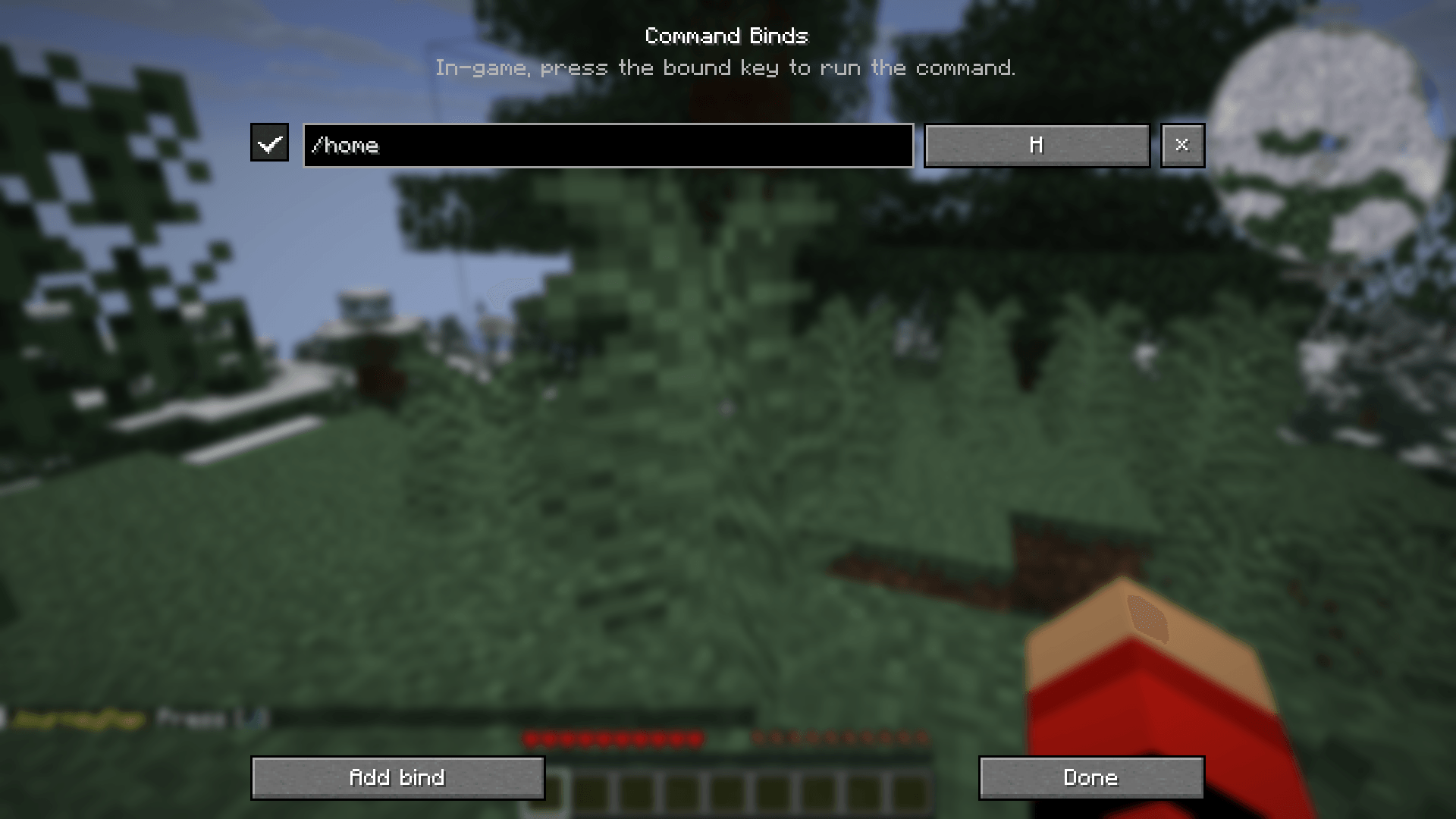
- Join a world and press K. The panel key can be changed in Controls, under Command Binds.
- Click Add bind, type the text, then click the key button.
- Press the key or mouse button you want. Esc clears the bind.
- In game, with no screen open, that button sends the text.
A line that starts with / is sent as a command. Anything else is sent as a normal chat message. The panel can also be opened from the mod's config button in the mod list.
Features:
- As many binds as you want, six per page.
- Keyboard keys and mouse buttons.
- A checkbox disables a bind without deleting it.
- Binds are saved in
config/binds.json and persist across restarts.
- Client-side only. The server does not need this mod.
Installation:
- Install NeoForge for Minecraft 26.3.
- Put the jar in your
mods folder.
- Launch the game.