ã¹ã¯ãªã¼ã³ã·ã§ãã 2026-07-21 003141.png
Description
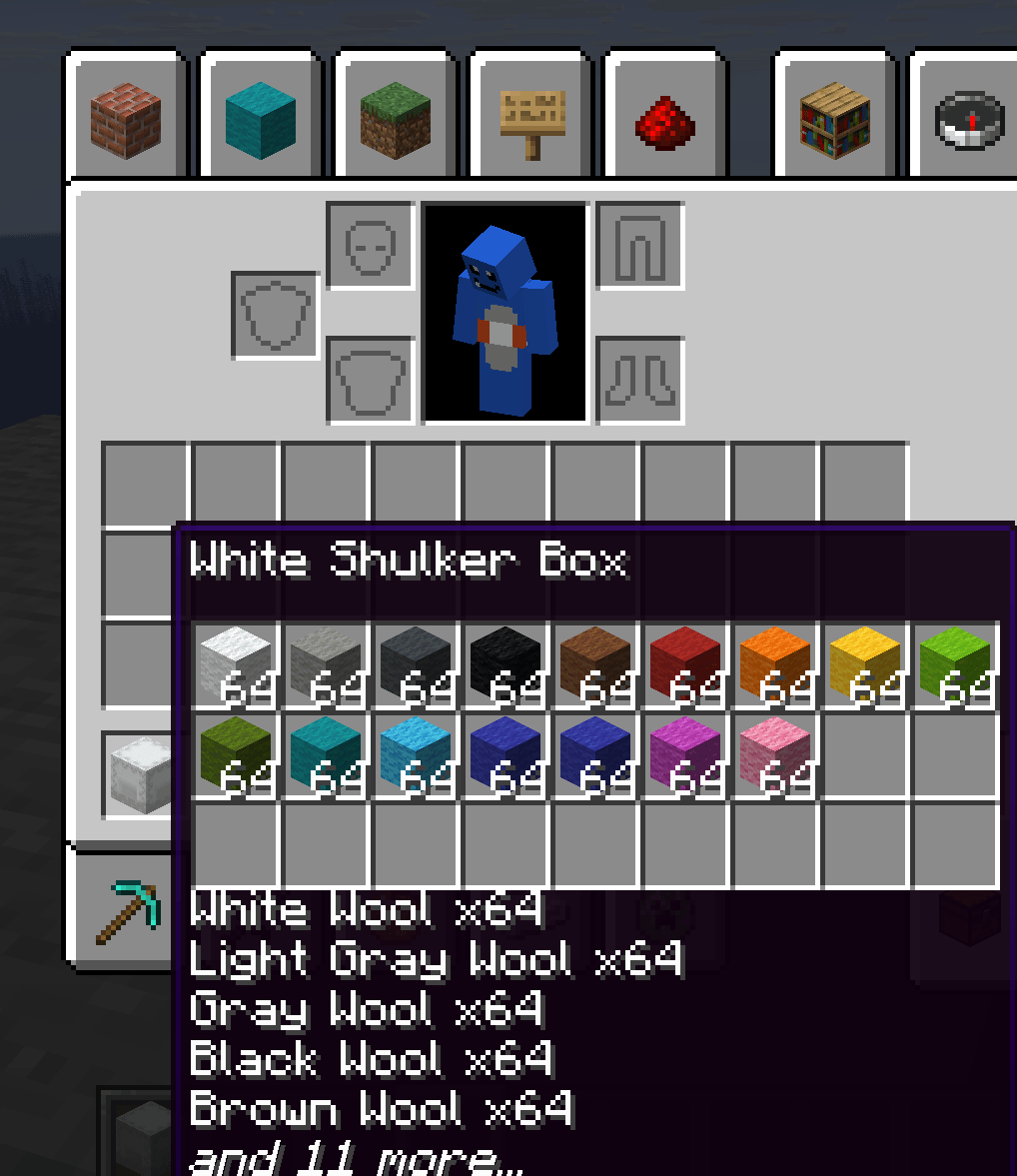
ShulkerPreview adds a rich tooltip to every Shulker Box (any color) that shows its contents the moment you hover your cursor over it — in your inventory, a chest, a shop display, anywhere. The preview grid uses the exact same 9×3 slot layout and background as the real Shulker Box screen, so it looks and feels like a natural extension of vanilla Minecraft.
Features
- Instant preview — hover over a Shulker Box to see its contents, no clicking or placing required.
- Authentic look — item icons, stack counts, and the slot background all match the real Shulker Box GUI.
- Zero setup — no config, no keybinds. Install it and it just works.
- Lightweight & client-side only — safe to add to any modpack or server; other players don't need it installed.
How it works
Simply hover your mouse over any Shulker Box item — in your hotbar, inventory, a container, or even in Creative/JEI/REI search — and the tooltip will expand to show a full grid of what's stored inside.
Supported versions
| Loader | Minecraft versions |
|---|---|
| Forge | 1.20.1, 1.20.2, 1.20.4, 1.20.6, 1.21.1, 1.21.3, 1.21.4, 1.21.5, 1.21.8 |
(Forge does not publish builds for 1.21.10/1.21.11 — those versions are NeoForge-only upstream.)
Installation
- Install Minecraft Forge for your target Minecraft version.
- Download the matching ShulkerPreview jar from the Files tab.
- Drop the jar into your
modsfolder. - Launch the game — that's it, no configuration needed.
Compatibility
- Client-side only — does not need to be installed on servers, and won't conflict with server-side mods.
- Works with vanilla Shulker Boxes and any modded block that extends the vanilla Shulker Box item.
FAQ
Does this work on empty Shulker Boxes? An empty box has no contents to preview, so the extra grid is skipped — you'll just see the normal vanilla tooltip.
Does this affect multiplayer or need to be installed by everyone? No — it's purely a client-side rendering feature. Only players who want the preview need to install it.
Can I use this alongside inventory mods like JEI or invtweaks? Yes, it doesn't touch any inventory logic — it only adds to the tooltip rendering, so it's compatible with virtually everything.
ShulkerPreview Team