Bulk Craft Guard
- By
Prevents accidental Shift-click crafting of non-stackable items, with a deliberate shortcut for bulk crafting.
ã¹ã¯ãªã¼ã³ã·ã§ãã 2026-10-27 194535.png
Description
Bulk Craft Guard
Stop an accidental Shift-click from turning your ingredients into a pile of tools.
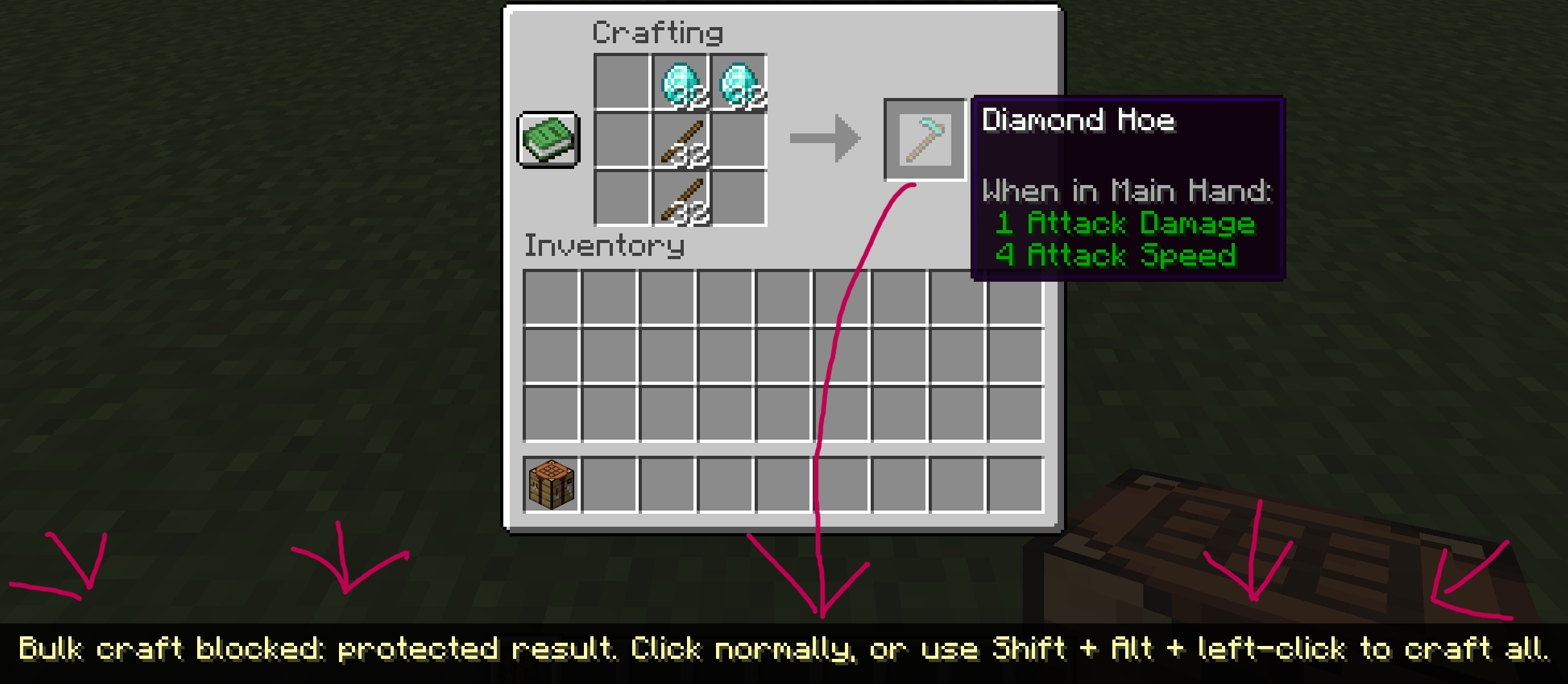
Bulk Craft Guard is a small, client-only Minecraft mod that blocks Shift-click crafting of non-stackable results by default. Normal crafting stays unchanged, and a deliberate shortcut lets you bulk craft when you want to.
How it works
In the vanilla 2×2 inventory crafting grid and 3×3 crafting table:
- Shift-click a non-stackable result: the crafting action is blocked, with a brief warning.
- Shift + Alt + left-click: allow that fresh click's bulk-crafting action, without holding Ctrl or Super.
- Normal left/right-click: craft as usual.
- Shift-click a stackable result: unchanged by default.
“Non-stackable” means the result's current maximum stack size is 1. Protection applies to Shift-click's QUICK_MOVE action even when you only have enough ingredients to craft once. The mod does not estimate how many times an arbitrary recipe can run.
The shortcut is a one-action bypass, not a toggle or a timed unlock. One permitted bulk-crafting action can still produce multiple items. It requires a fresh left-click in a supported vanilla screen; simply holding Alt does not unlock future actions. Operating-system shortcuts or other input mods may intercept the key combination.
Installation
Choose a file matching both your exact Minecraft version and your loader. The alpha.3 candidate set covers 23 Minecraft releases from 1.20.1 through 26.3, with 67 Minecraft-and-loader combinations:
| Loader | Candidate combinations | Important limits |
|---|---|---|
| Fabric | 23 | Fabric Loader 0.20.1 is the validation pin; Fabric API is not required. |
| NeoForge | 23 | Eight target lines have beta-only loader builds; legacy NeoForge 1.20.1 is also marked higher risk. |
| Forge | 21 | No candidates for Minecraft 1.20.5 or 1.21.2: no official build was found in the metadata and indexes checked for this release. |
See the companion release index, RELEASE_INDEX_JA.txt, and RELEASE_MANIFEST.json for each candidate's exact Minecraft version, loader build, Java requirement, filename and validation status. The mod uses separate per-target JARs, not one universal JAR.
| Minecraft versions | Java |
|---|---|
| 1.20.1 through 1.20.4 | 17 |
| 1.20.5 through 1.21.11 | 21 |
| 26.1, 26.1.1, 26.1.2, 26.2 and 26.3 | 25 |
The two missing Forge targets are an availability limitation of the checked sources, not a claim that no historical artifact ever existed.
Build pins and declared dependency ranges are different. Fabric metadata declares Loader 0.20.1 or later, but the checked loader pin is 0.20.1. NeoForge metadata pins the exact listed loader build. Forge metadata declares a range from the listed build up to, but not including, the next loader major version; only the exact listed build pin was checked. A declared range does not mean every version within it was tested. Beta-only and legacy NeoForge targets remain higher-risk alpha candidates, not broadly verified runtime support.
Put one matching JAR in your client's mods folder. Do not install multiple loader variants together. No server installation is required.
Optional configuration
The file config/bulkcraftguard.json is created/read on the first interaction with a supported, nonempty crafting result. Close Minecraft before editing, then restart it.
{
  "protectedItems": [],
  "exemptItems": []
}
- Add item IDs to
protectedItemsto protect extra outputs, including stackable items. - Add item IDs to
exemptItemsto allow ordinary Shift-click for those outputs, including non-stackable items. - Use full lowercase IDs such as
minecraft:torchorminecraft:wooden_pickaxe. Do not put the same ID in both lists.
There is no settings GUI or live reload. An invalid configuration is rejected as a whole: the mod falls back to default non-stackable protection and logs a warning. Custom stackable protections and exemptions from an invalid file are not retained.
Scope and compatibility
Protection targets the output slots of the exact vanilla inventory and crafting-table menu implementations. Custom crafting menus, automated crafting, and other mods that send their own inventory packets are outside the supported scope. Modded items and recipes using the supported vanilla menus follow the same item rule, but compatibility with every mod or server is not guaranteed.
This is an accident-prevention aid, not an undo system or a server-side security feature. It does not change recipes or refund ingredients after crafting.
Languages
Warning messages follow Minecraft's language setting. This release includes 10 locale variants across 9 languages: English, Japanese, German, French, Spanish, Brazilian Portuguese, Chinese (Simplified and Traditional), Korean and Russian. The eight added locale translations have not received native-speaker or in-game display review.
Alpha status
All 67 candidate builds in this alpha.3 set have passed per-target build, unit-test, resource/archive, runtime-namespace, production-JAR transformation, interception-ordering and source-rebuild checks. These are automated and static checks, not full client startup or gameplay tests.
These checks establish automated build, test and artifact evidence only. No alpha.3 candidate has received gameplay, full client startup, GUI, multiplayer or modpack testing. Production transformation and ordering checks do not substitute for launching a full client or testing in game.
The only reported real-game confirmation is default non-stackable Shift-click protection on the earlier Fabric 1.21.1 alpha.1 build. That result does not establish alpha.3 runtime behavior or validate the bypass, configuration, other Minecraft versions or other loaders.
Use a test world or back up your world before trying an alpha build.
Bulk Craft Guard Team