DuraView
- By
A lightweight HUD mod that displays real-time durability for your armor and items.
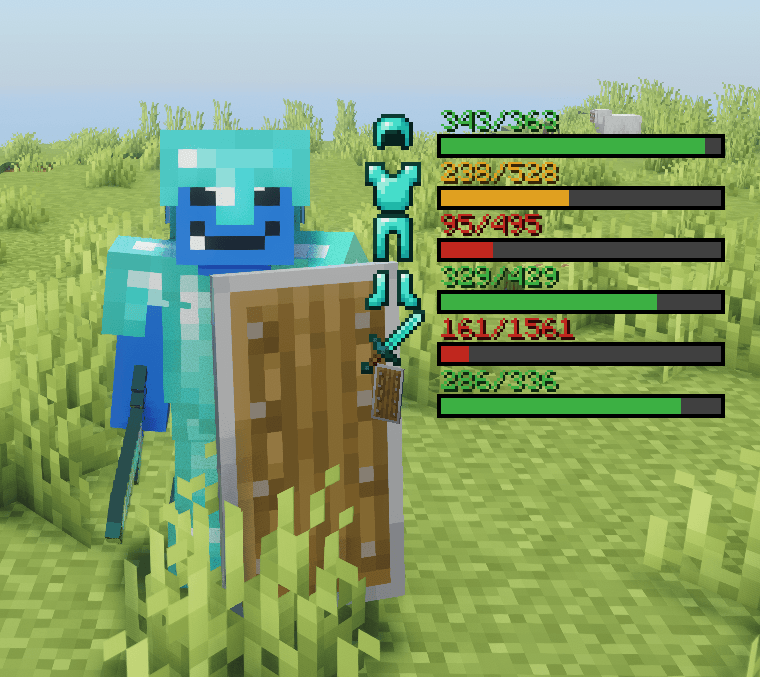
ã¹ã¯ãªã¼ã³ã·ã§ãã 2026-07-05 063439.png
ã¹ã¯ãªã¼ã³ã·ã§ãã 2026-07-06 185321.png
ã¹ã¯ãªã¼ã³ã·ã§ãã 2026-07-06 185325.png
Description
DuraView
DuraView is a lightweight client-side mod that provides a clean and intuitive way to monitor your equipment's durability in real-time.
Features
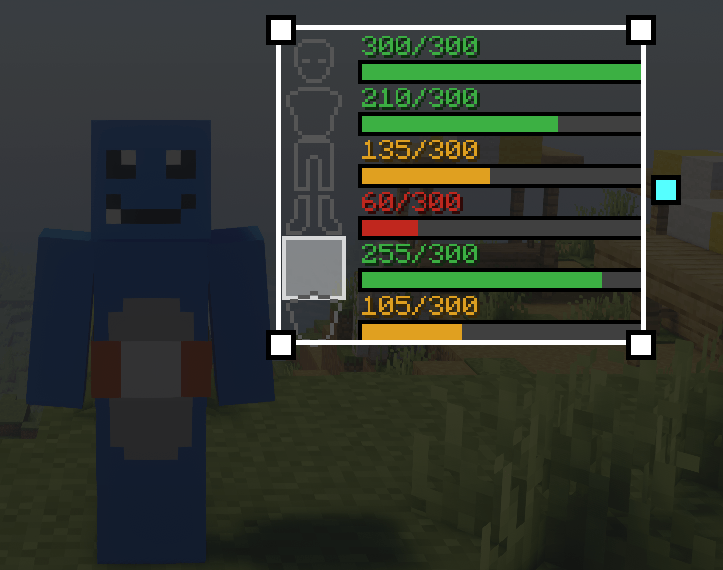
- Real-time Durability Display: Shows durability bars for all six equipment slots — helmet, chestplate, leggings, boots, main hand, and off hand
- Smart Layout: Only shows slots with a damageable item equipped, and the display automatically compacts with no gaps as you swap gear in and out
- Clean HUD Design: Minimalist icon + bar + number layout that doesn't clutter your screen
- Color-coded Warnings: Bars change color as durability decreases (green → yellow → red)
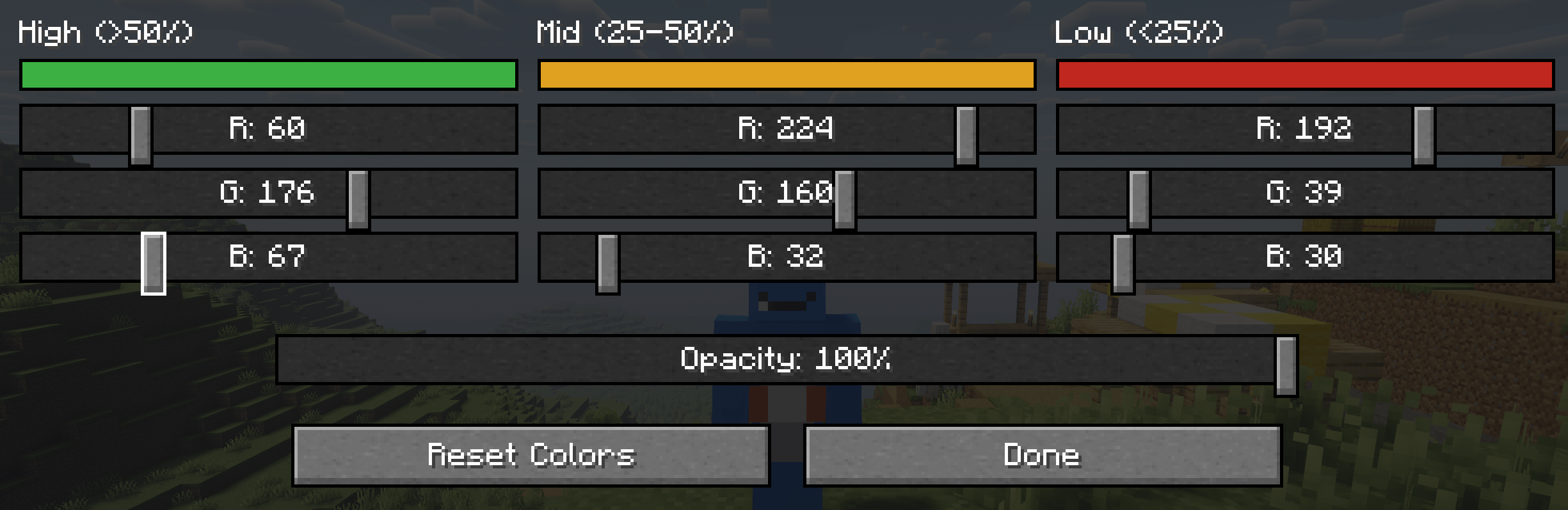
- Fully Customizable Colors: Set your own color for each durability threshold (high/mid/low) with RGB sliders — handy for horror/atmospheric modpacks that want muted colors
- Adjustable Opacity: A global transparency slider lets you blend the HUD into your interface exactly how you like it
- Drag-and-Drop Editor: An "editing software"-style config screen — drag the whole display to move it, drag a corner to resize everything at once, drag the handle on the right to change bar length, and scroll the mouse wheel over the icon, number, or bar to resize each individually
- Snapping Guides: Guide lines appear when you drag near the center or edges of the screen, so lining things up is effortless
- Easy Access: Open the configuration menu with a simple key press (default: K)
- Lightweight Performance: Minimal impact on game performance
- Client-side Only: No server installation required — install it and it just works, even on servers that don't have it
How It Works
DuraView displays durability information directly on your HUD, making it easy to see when your equipment needs repair at a glance. The mod automatically detects all equipped items and updates the display in real-time as you play.
Press K (configurable) to open the settings menu where you can:
- Toggle the HUD on/off
- Drag to move the display, or drag a corner to resize it
- Scroll over the icon, number, or bar to resize each independently
- Open the color screen to customize the high/mid/low durability colors and overall opacity
Perfect For
- Players who want to avoid unexpected equipment breakage
- Survival mode enthusiasts who need to manage resources carefully
- Anyone who prefers visual feedback over checking inventory manually
- Modpack authors who want a durability HUD that matches their pack's exact color palette
Wide Version & Loader Support
DuraView is built for Forge, NeoForge, and Fabric across a very wide range of Minecraft versions, from 1.12.2 all the way up through the latest releases — check the Files tab for the full list.
All my mods are completely free to use. If you'd like to support development, consider buying me a coffee! ☕ https://ko-fi.com/nekozame_garo
DuraView Team