lets you preview ur seed map
Description
Seedscape
See the world before you make it.
Minecraft asks you to commit to a seed with nothing to go on but a number. You type it in, press Create, and find out what you got twenty minutes later — by which point you have already started building.
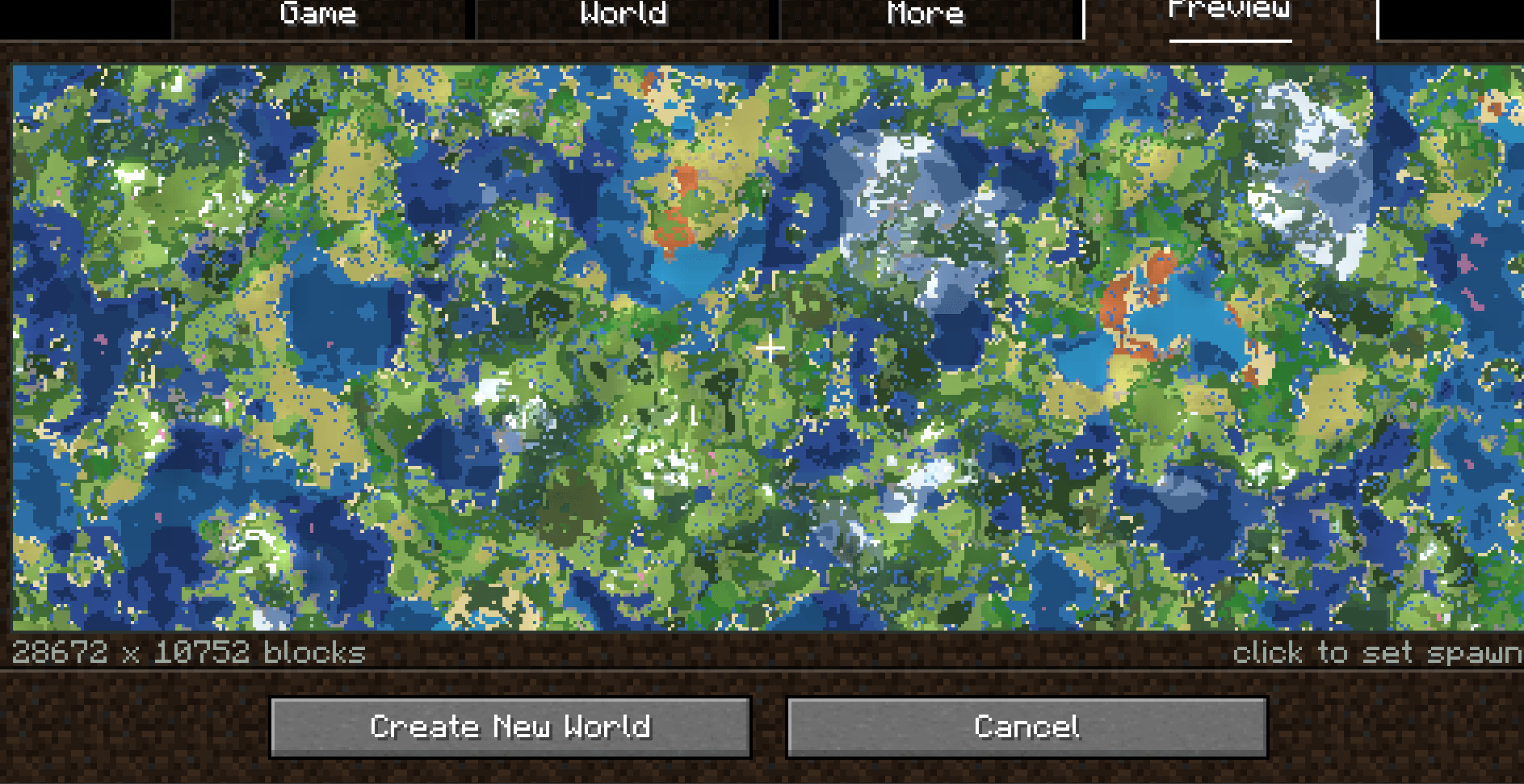
Seedscape puts a real map of that seed on the world creation screen. Not a guess and not a stock image: the actual biome layout, with the actual shape of the land drawn over it. Change the seed and the map redraws. Scroll out and see where the mountains are, where the ocean starts, how far the desert runs. When you find a world you like, click the spot you want to start in and make it.
It adds a Preview tab alongside Game, World and More. Nothing vanilla is replaced or moved, so it drops into a modpack without fighting anything else.
The map
Real biomes, from the real seed. The preview is sampled from the same worldgen the game is about to use, so what you see is what you get. Biomes are coloured the way an atlas colours them — forests reading darker than plains, deserts pale, oceans by depth — rather than by flat block colour, so the layout reads at a glance instead of needing to be decoded.
Terrain relief. This is the part most seed previews leave out. Seedscape samples the surface height as well as the biome and shades the map by slope, so ridgelines, valleys, river cuts and coastlines are all visible as shape. A plains biome that happens to be a cliff no longer looks the same as a plains biome that is flat.
Water by depth. Shallow water reads lighter and deep ocean darker, the way a chart draws it, so you can tell a bay from open sea without zooming in.
Getting around
Drag to pan. Grab the map and move it. Panning is free — the map does not stutter or reload while you drag.
Scroll to zoom. Seven steps, from 448 blocks across at the closest to nearly 30,000 at the widest. Close in to check whether that village site is actually flat; pull out to see the shape of a whole continent.
Space to recentre. Snaps back to world 0, 0 after you have wandered.
Hover to identify. Put the cursor anywhere on the map and it names the biome under it and gives you the world coordinates. The size of the area you are looking at is printed under the map at all times.
Choose where you start
Click anywhere on the map to set that spot as the world spawn. The marker moves there, the coordinates are shown, and when the world is created you begin exactly where you pointed.
Knowing there is a cherry grove two thousand blocks north is interesting. Starting in it is useful.
The height is taken from the real terrain once the world exists, not from the preview, so you always land on solid ground. The choice only ever applies to the seed it was made for, and is forgotten as soon as it is used.
Modded biomes are supported. A biome Seedscape does not recognise is drawn in its own foliage colour rather than being left blank, so a modded world still maps cleanly.
It tells you when it cannot help. Superflat and other non-noise world types have no terrain to shade, and the map says so on screen instead of quietly drawing a flatter world than it promised.

SeedScape Team