Savau's Trading
- By
A server-authoritative player marketplace, quick-sell, and secure direct-trading system with Savaru Inv and Numismatic Overhaul integration.
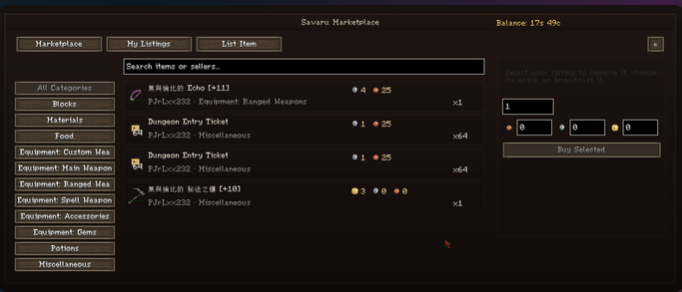
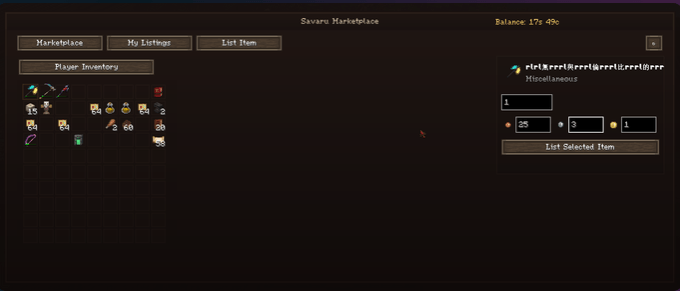
Savaru Trading adds a complete player-driven economy to Minecraft. Browse server listings, sell items directly from your inventory, or securely exchange items and currency with another player through a dedicated trade interface.
Player Marketplace
- Open the marketplace with
Mor/market. - Browse and search listings by item name, seller, or category.
- Buy one item or select a larger quantity from stackable listings.
- List items from either the vanilla inventory or Savaru Inv.
- Set separate bronze, silver, and gold prices.
- Review, update, remove, and advertise your own listings.
- Sale broadcasts use a two-minute cooldown and a maximum of three broadcasts per 24 hours.
Quick Sell
- Hover an item in a supported inventory screen and press
Gto sell it immediately. - Default values support common, rare, and epic item tiers.
- Item tooltips can display both the quick-sell value and marketplace average price.
- Currency is delivered only after the server validates the sale.
Secure Player Trading
- Invite another player with
/trade <player>. - The invited player must accept before the separate trade screen opens.
- Both players can offer an item and currency.
- Offers are locked before final confirmation and cannot be changed silently.
- Empty offers cannot be confirmed.
- Cancelled or interrupted trades safely return escrowed items.
Currency and Inventory Integration
- Uses Numismatic Overhaul bronze, silver, and gold coins by default.
- Supports purse balances and loose coins stored in the player inventory or Savaru Inv.
- Currency registry IDs and economy values can be configured by server administrators.
- Marketplace listings and pending returns are stored as world-persistent server data.
Administration
Administrators can remove listings, update prices, reload settings, and change the configured currency items through /market admin commands.
Requirements
- Minecraft 1.21.1
- Fabric Loader
- Fabric API
Optional Integrations
- Numismatic Overhaul
- Savaru Inv
- Savaru Affixology
Savau's Trading Team



![Savaru's Worldology [Fabric/NeoForge] project image](https://media.forgecdn.net/avatars/thumbnails/1737/833/256/256/639106303403804965.png)