SAnnounce
- By
SAnnounce is a lightweight server announcement mod featuring automatic scheduled messages, independent intervals, in-game management, Minecraft & color codes, persistent configuration, multilingual support, and optional client installation.
Description
SAnnounce
SAnnounce is a lightweight and configurable announcement system for Minecraft Fabric servers.
It allows server administrators to create and manage automatic announcements through a responsive in-game interface, configure independent intervals for each message, choose between multiple announcement types, use Minecraft color and formatting codes with &, and keep everything persisted across server restarts.
Requirements
| Requirement | Version |
|---|---|
| Minecraft | 1.20.1 & 1.21.1 |
| Mod Loader | Fabric |
| Fabric Loader | 0.18.4 or newer |
| Fabric API | Required |
| Java | Java 17/21 |
| Server | Required |
| Admin Client | Required for the management menu |
| Regular Players | Client installation not required |
Client and Server Support
SAnnounce must be installed on the server.
Regular players do not need SAnnounce installed on their Minecraft client to receive announcements or join the server.
However, administrators who want to use the graphical /adminannounce management interface must also have SAnnounce installed on their client.
Recommended Setup
Server:
SAnnounce-1.0.1.jar

Administrator Client:
SAnnounce-1.0.1.jar

Regular Players:
Not required
The same JAR is used on both the server and administrator client.
For modpacks or LAN worlds, SAnnounce can also be installed on every client.
Main Features
- Automatic server announcements
- Responsive administration interface
- Chat announcements
- Title announcements
- Hotbar announcements
- Multiple independent announcements
- Individual interval for every announcement
- In-game creation and editing
- In-game deletion
- Paginated announcement list
- Minecraft
&color codes - Minecraft formatting codes
- Persistent configuration
- Automatic loading of existing announcements
- Seven included languages
- Regular players do not need the mod installed
Administration Menu
The main administration interface can be opened with:
/adminannounceAdministrators can also use:
/adminannounce guiBoth commands open the SAnnounce administration menu.
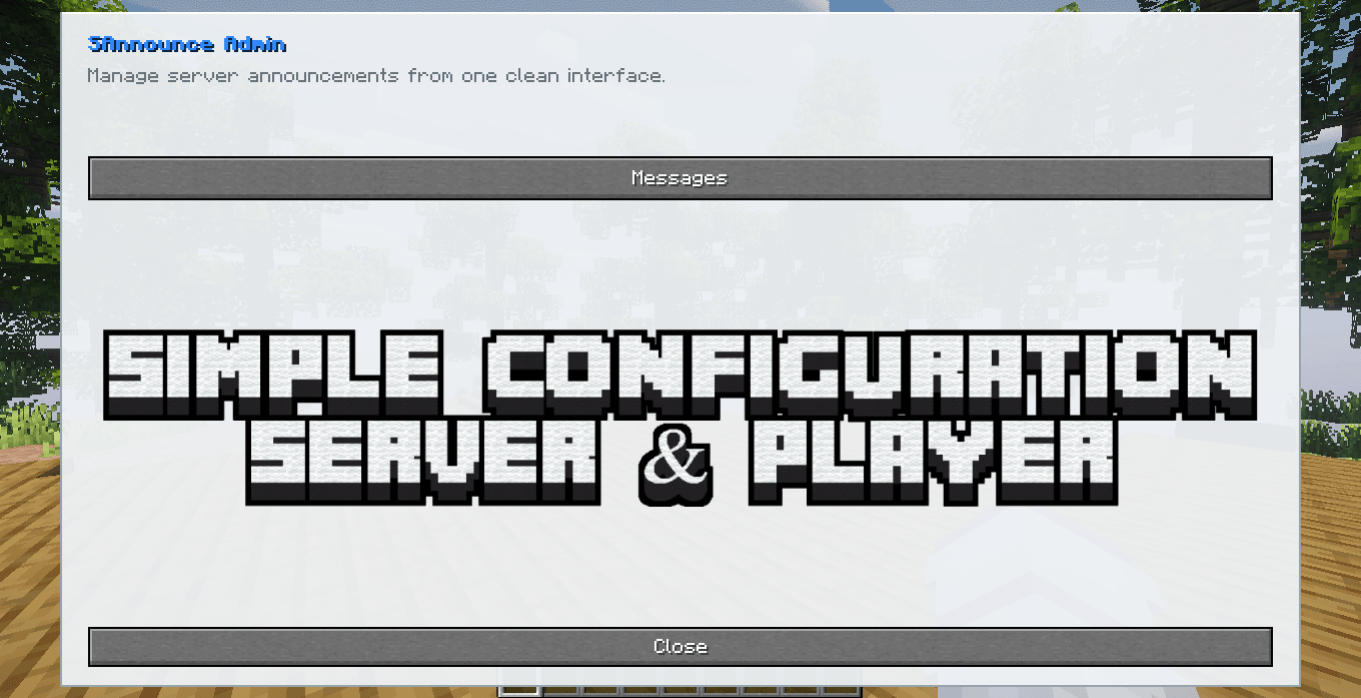
The interface contains a Messages section where all configured announcements can be managed.
Messages Menu
Inside the Messages menu, administrators can:
- Create a new announcement
- View configured announcements
- Edit existing announcements
- Delete announcements
- View the announcement type
- View the configured interval
- Navigate larger lists using pagination
The announcement list automatically uses multiple pages when necessary.
The interface is responsive and adapts to different Minecraft GUI resolutions.
Creating Announcements
New announcements are normally created through the graphical interface.
Open:
/adminannounceThen select:
Messages
↓
Create Announcement
Administrators can also open the creation editor directly using:
/adminannounce createThis command opens the graphical announcement editor.
It does not start a text-based creation process in chat.
Announcement Types
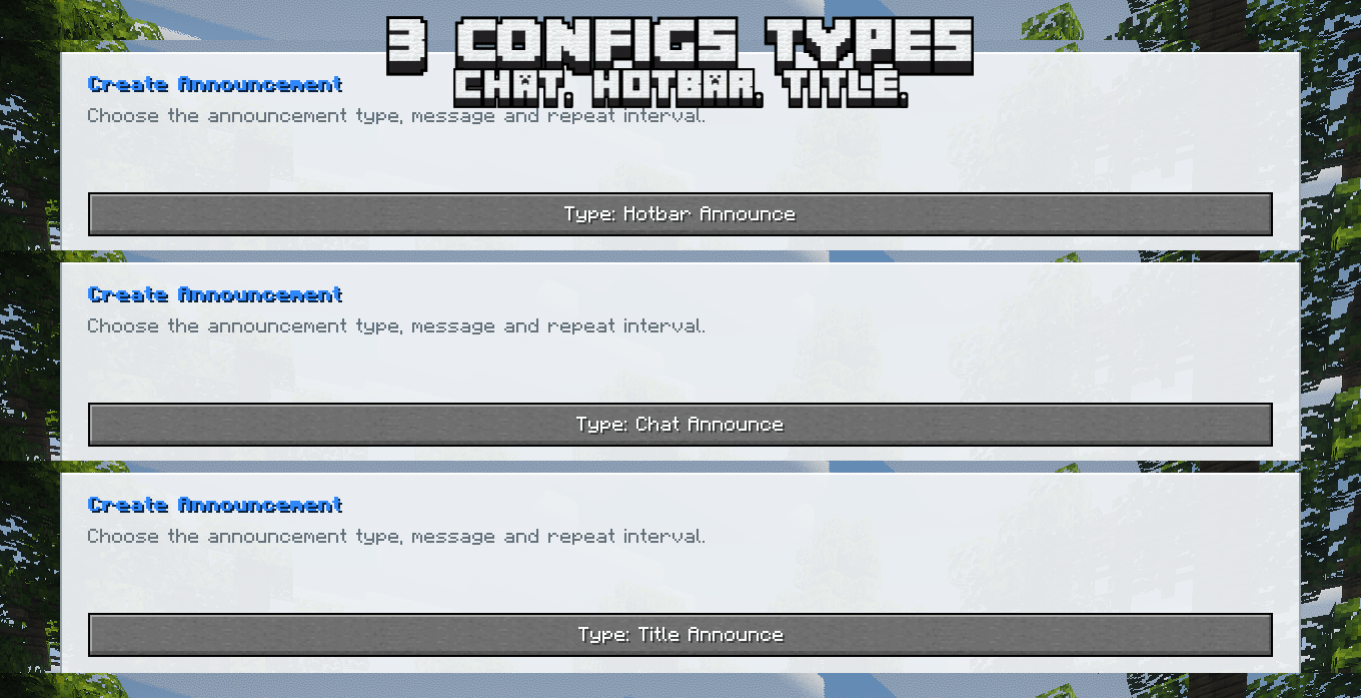
SAnnounce 1.0.1 supports three announcement types.
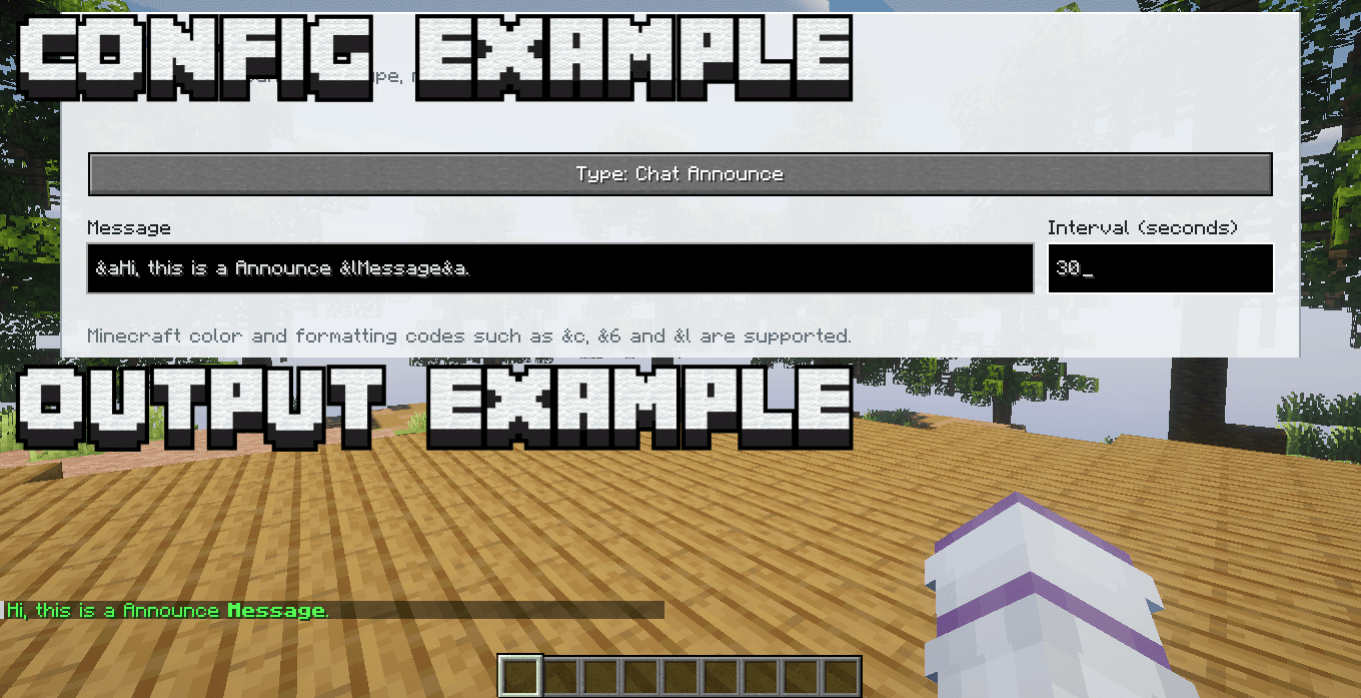
Chat Announce
Displays the announcement directly in the Minecraft chat.
Example:
&6&lSERVER &8» &fWelcome to our server!The result is sent to every online player through normal Minecraft chat.
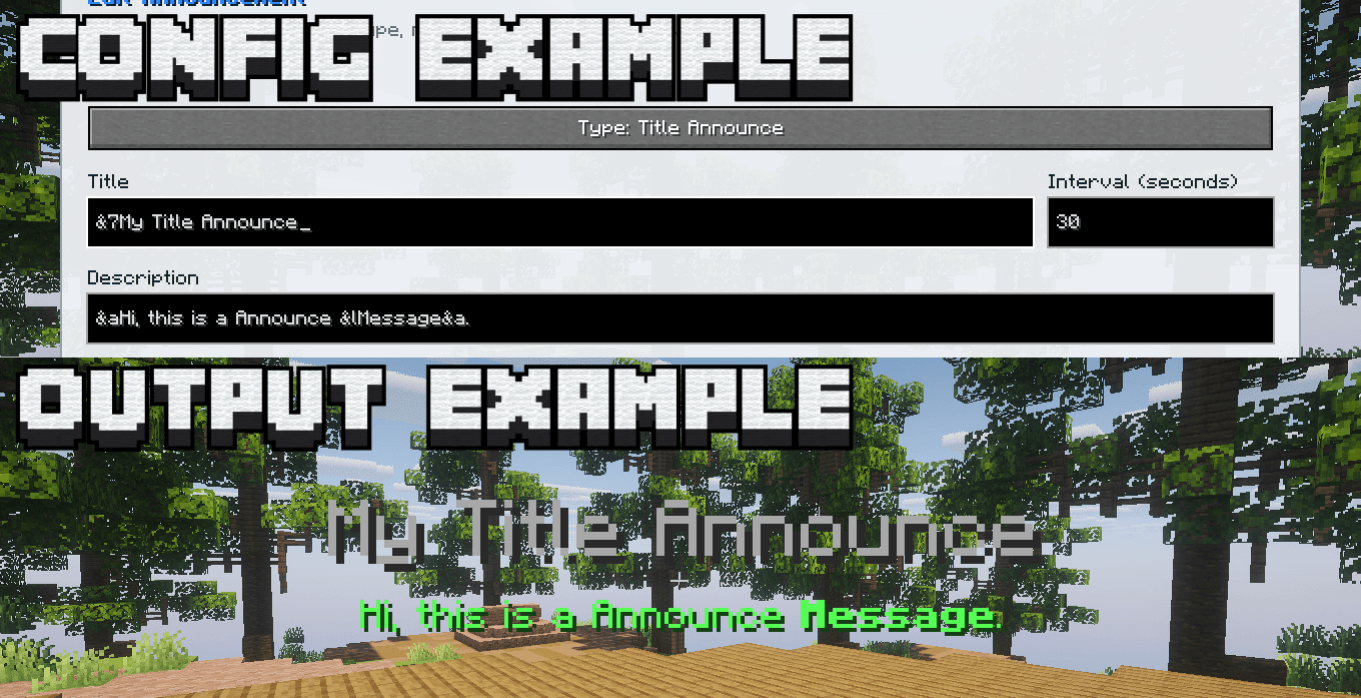
Title Announce
Displays a large Minecraft title in the center of the player's screen.
A Title Announce contains two editable fields:
Title
Description
Example:
Title:
&c&lWARNING

Description:
&eServer restart in 5 minutes!
The title appears as the large main text while the description is displayed underneath it as a subtitle.
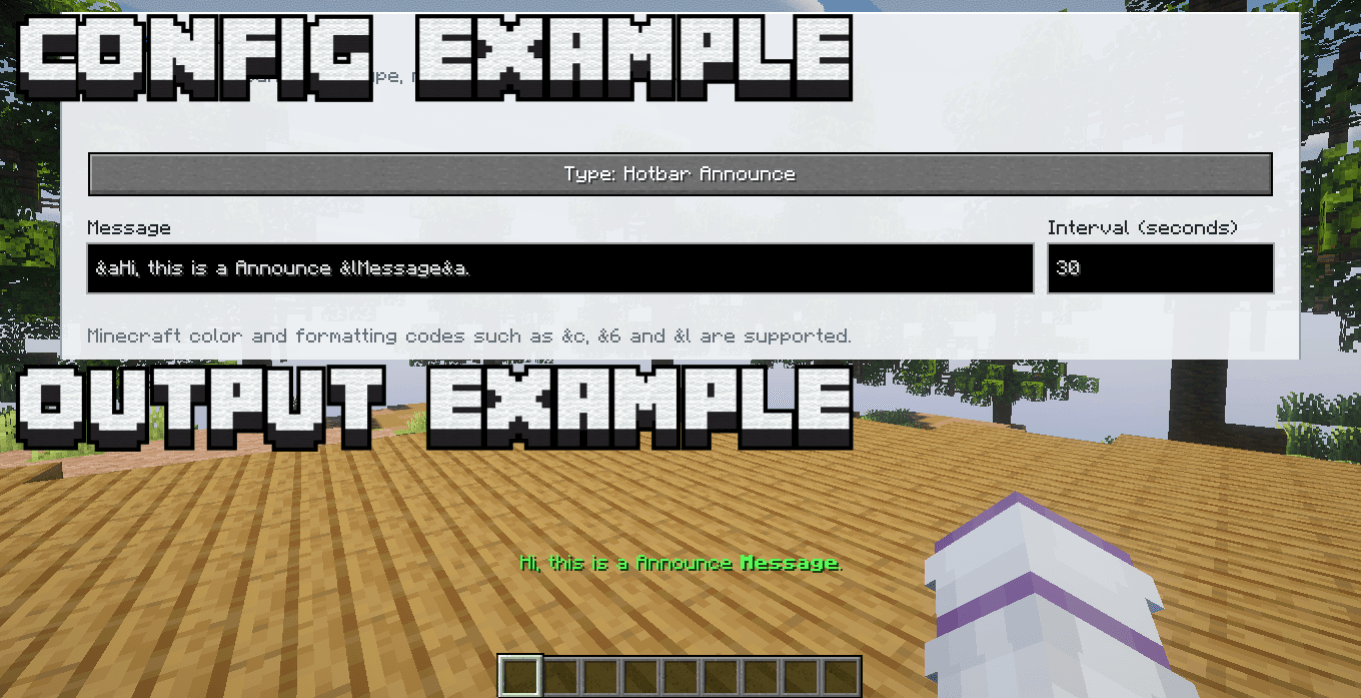
Hotbar Announce
Displays the message above the player's hotbar.
This is useful for short notifications that should be visible without filling the chat.
Example:
&aRemember to claim your daily reward!Announcement Editor
The announcement editor allows administrators to configure:
- Announcement type
- Main message
- Title description when using Title Announce
- Interval in seconds
- Minecraft colors
- Minecraft formatting
Each announcement is configured independently.
For example:
Chat Announcement:
300 seconds

Title Announcement:
900 seconds

Hotbar Announcement:
120 seconds
Each message keeps its own timer.
Automatic Announcements
Announcements are sent automatically according to their configured interval.
For example:
Announcement A: Every 300 seconds
Announcement B: Every 600 seconds
Announcement C: Every 1800 seconds
Changing one announcement does not affect the timing of the others.
Color & Formatting Support
SAnnounce supports classic Minecraft formatting codes using the & character.
Example:
&aWelcome to the server!Another example:
&6&lSERVER &8» &fRemember to read the rules!Color and formatting codes can be used in:
- Chat announcements
- Title text
- Title descriptions
- Hotbar announcements
Color Codes
| Code | Color |
|---|---|
&0 |
Black |
&1 |
Dark Blue |
&2 |
Dark Green |
&3 |
Dark Aqua |
&4 |
Dark Red |
&5 |
Dark Purple |
&6 |
Gold |
&7 |
Gray |
&8 |
Dark Gray |
&9 |
Blue |
&a |
Green |
&b |
Aqua |
&c |
Red |
&d |
Light Purple |
&e |
Yellow |
&f |
White |
Formatting Codes
| Code | Formatting |
|---|---|
&k |
Obfuscated |
&l |
Bold |
&m |
Strikethrough |
&n |
Underline |
&o |
Italic |
&r |
Reset |
Codes can be combined.
Example:
&b&lDISCORD &8» &fJoin our community!Example:
&c&lWARNING &8» &eRestart in 5 minutes.Editing Announcements
Existing announcements can be edited directly through:
/adminannounceOpen the Messages section and select the desired announcement.
The editor allows the administrator to change:
- Announcement type
- Message
- Description
- Interval
Changes are saved directly to the server configuration.
Removing Announcements
Announcements can be deleted from the graphical editor.
They can also be removed using a command:
/adminannounce remove <id>Example:
/adminannounce remove 3This removes announcement ID 3.
Command Reference
| Command | Function |
|---|---|
/adminannounce |
Opens the main administration menu |
/adminannounce gui |
Opens the administration menu |
/adminannounce create |
Opens the graphical creation editor |
/adminannounce remove <id> |
Removes an announcement by ID |
Command syntax remains in English for consistency across servers.
Responsive Interface
SAnnounce uses a custom responsive administration interface.
The layout adapts according to the available Minecraft GUI size.
It includes:
- Consistent buttons
- Responsive field positioning
- Announcement list pagination
- Compact navigation controls
- Separate creation and editing screens
- Large message fields
- Dedicated interval field
Pagination controls are positioned beside the Back button to keep the interface compact and consistent.
Persistent Configuration
Announcements are stored in:
config/sannounce.jsonStored information includes:
- Announcement ID
- Announcement type
- Message
- Title description
- Interval
- Scheduling information
Announcements remain available after the server restarts.
Compatibility with Existing Announcements
Existing SAnnounce announcements without an announcement type are automatically treated as:
Chat AnnounceThis allows older configurations to continue working after updating to SAnnounce 1.0.1.
Multilingual Support
SAnnounce includes automatic language support for:
| Language | Minecraft Code |
|---|---|
| English | en_us |
| Portuguese, Brazil | pt_br |
| Spanish | es_es |
| Japanese | ja_jp |
| Simplified Chinese | zh_cn |
| Hindi | hi_in |
| Arabic | ar_sa |
The administration interface follows the language selected in the Minecraft client.
Custom announcement messages are displayed exactly as written by the administrator.
Server-Side Announcements
Announcements themselves are sent using normal Minecraft functionality.
This means regular players do not need SAnnounce installed locally to receive:
- Chat messages
- Titles
- Subtitles
- Hotbar messages
Only administrators who want to use the graphical management interface need the client-side installation.
Installation
Server
- Install a Fabric server for Minecraft 1.20.1 or 1.21.1.
- Install Fabric API.
- Place
SAnnounce-1.0.1.jarinside the servermodsfolder. - Start the server.
Administrator Client
To use the /adminannounce graphical menu:
- Install Fabric Loader.
- Install Fabric API.
- Place
SAnnounce-1.0.1.jarinside the clientmodsfolder. - Join the server.
- Run:
/adminannounceRegular Players
Regular players do not need SAnnounce installed.
They can join normally and still receive all configured announcements.
Project Information
Mod: SAnnounce
Version: 1.0.1
Author: Silas T.
Minecraft: 1.20.1 / 1.21.1
Loader: Fabric
Fabric Loader: 0.18.4+
Java: 17/21
License: All Rights Reserved
The SAnnounce Team