Retrorama
- By
Randomizes the title screen panorama and menu music using those from other versions of the game
Retrorama
Retrorama randomizes the title screen. Every time you launch the game, and each time you leave a world or server, it picks a panorama from other Minecraft versions, starting from 1.13, and plays the menu music from that same version.
You can choose which versions are included, preview each panorama, and shuffle to a new one at any time without restarting.
Features
- 17 panoramas, one for every major update since 1.13 (Update Aquatic).
- Matching menu music: each panorama comes with the menu tracks from its own version, using the same weights and volume as that version.
- Optional exclusive tracks mode: plays only the tracks introduced with each version and skips the C418 menu tracks that most versions share (Mutation, Moog City 2, Beginning 2, Floating Trees). Versions that only have those shared tracks (1.13–1.17) still play them.
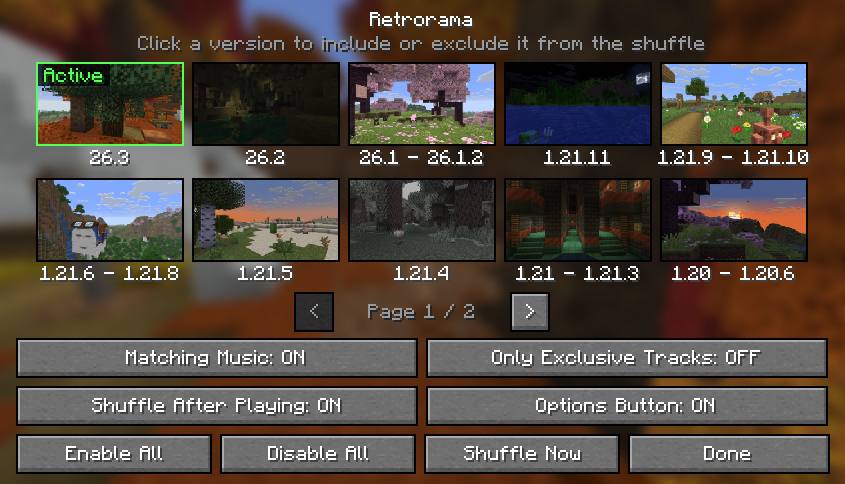
- A config screen with a preview of every panorama. Click a preview to include or exclude that version. Changes and the Shuffle Now button apply immediately.
- The config screen opens from Mod Menu on Fabric, the Mods list on NeoForge, and a button on the vanilla Options screen. The Options screen button can be turned off.
- Resource packs and mods that replace the panorama replace the current game version's panorama only. All other versions still show their own panoramas.
- Every version of the mod can show every panorama. A 1.21.1 game can show the 26.3 panorama and play 26.3 music, for example.
Configuration
Open the config screen from Mod Menu (Fabric), the Mods list (NeoForge), or the Retrorama button in the bottom left corner of the Options screen.
| Option | Default | Description |
|---|---|---|
| Version cards | All enabled | Click a card to include or exclude that version from the shuffle. |
| Matching Music | On | Play the selected version's menu music. When off, the current game's normal menu music plays. |
| Only Exclusive Tracks | Off | Skip the shared C418 menu tracks for versions that have tracks of their own. |
| Shuffle After Playing | On | Pick a new panorama when you leave a world or server. |
| Options Button | On | Show the Retrorama button on the Options screen. |
| Enable All / Disable All | Include or exclude every version. With every version disabled, the game's own panorama and music are used. | |
| Shuffle Now | Pick a new panorama from the enabled versions and apply it immediately. |
Settings are stored in config/retrorama.json. The file stores disabled versions, not enabled ones, so panoramas added in future updates are enabled automatically.
Network access and downloads
Retrorama downloads panoramas and music from other versions directly from Mojang's servers, and a list of available versions from its GitHub repository. Only images, audio and the version list are downloaded, nothing else.
The version list contains each version's file hashes, sizes, names and track titles. A copy is bundled with the mod. At most once a day, the mod downloads the latest copy from raw.githubusercontent.com and stores it in .minecraft/retrorama/versions.json, so new versions can be added without a mod update. A downloaded list is only used if it's valid, and it can only point to Mojang's servers - entries that point anywhere else are ignored. If the download fails, the cached or bundled copy is used.
Panoramas from 1.14+ and all music are downloaded from resources.download.minecraft.net, and only the 1.13 panorama is downloaded from piston-data.mojang.com, as it does not exist on the asset server. Every download address is built from the SHA-1 hashes and paths in the version list.
Every file is checked against the SHA-1 hash and size from the version list. Files are stored in .minecraft/retrorama/objects, using the same hash-based layout as the launcher's asset folder. Preview thumbnails are stored in .minecraft/retrorama/previews. Each file is downloaded once and reused on later launches. Delete the retrorama folder to clear the cache - files will be downloaded again when needed.
Retrorama Team

Owner