


Resource Pack Profiles
- By
Resource Pack Profiles



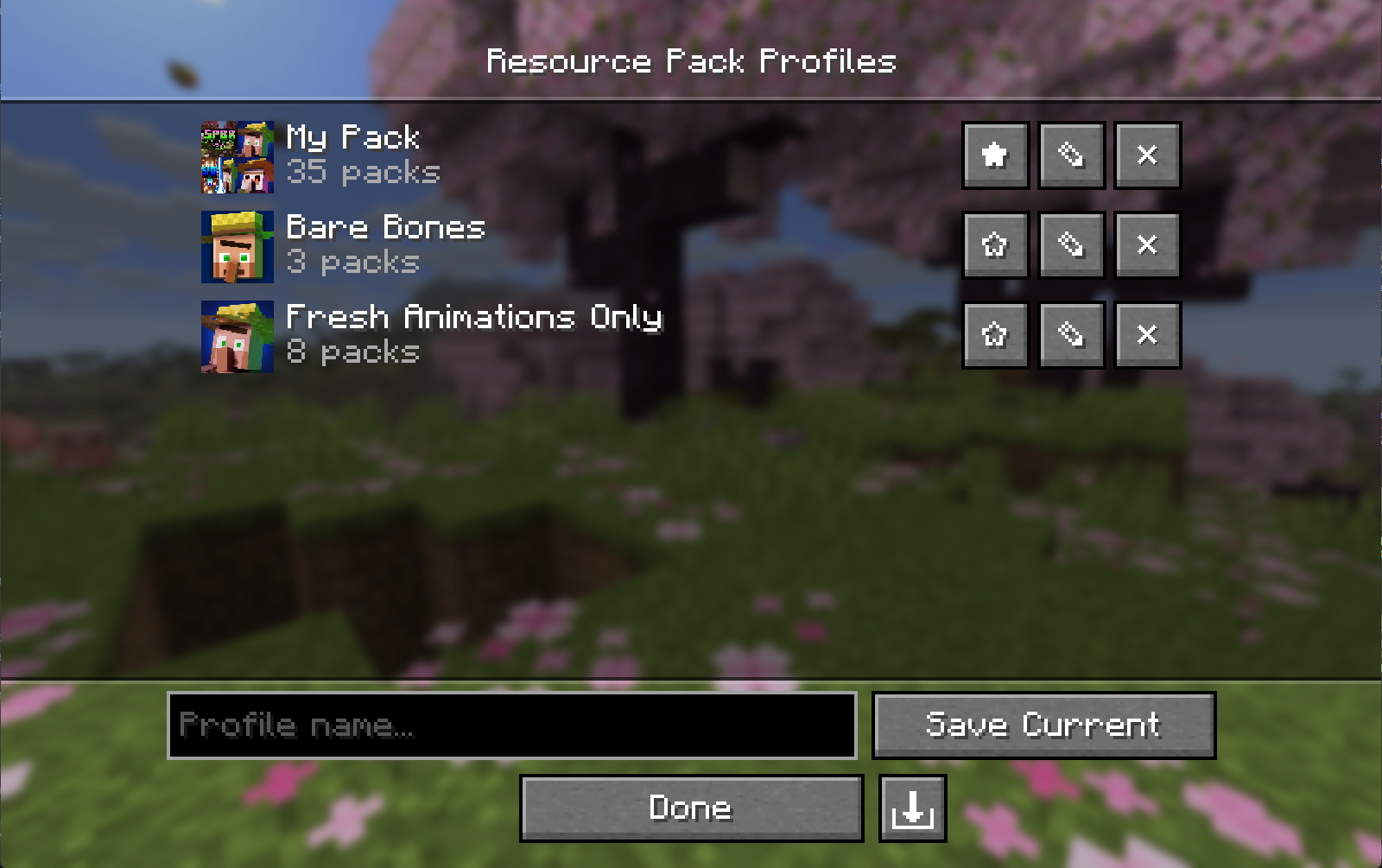
A lightweight client-side Fabric mod that lets you save, manage, and share named resource pack load order profiles — switch between completely different pack setups in seconds, right from the resource pack screen.
Features
- Profile Saving — Snapshot your current resource pack load order as a named profile with a single click.
- Instant Loading — Apply any saved profile and have your packs reload automatically; no restarts needed.
- Profile Editing — Add, remove, and reorder packs within a profile without touching your main load order. Edit the active profile and it re-applies automatically, so your changes stay live.
- Favorites — Star profiles to pin them to the top of the list.
- Custom Icons — Assign a custom image to any profile; auto-generates a composite icon from your pack art if none is set.
- Import / Export — Share profiles as
.rpprofilefiles — a single JSON that includes your pack list and custom icon. - Missing Pack Detection — Profiles with unavailable packs are flagged automatically and can still be applied without the missing packs.
- Keyboard & Narrator Friendly — Built on Minecraft's native widgets, so the profile and pack lists support full keyboard navigation and screen-reader narration.
Download
Installation
- Install Fabric Loader for your Minecraft version.
- Install Fabric API.
- Install Fabric Language Kotlin.
- Drop the mod
.jarinto your.minecraft/modsfolder. - (Optional) Install Mod Menu to open the profiles screen from the mods list.
Client-side only — no server installation needed.
Compatibility
| Dependency | Version |
|---|---|
| Minecraft | 26.1.2 |
| Fabric Loader | 0.19.3+ |
| Fabric API | 0.152.1+26.1.2 |
| Fabric Language Kotlin | 1.13.12+kotlin.2.4.0 |
| Mod Menu | 18.0.0-beta.1 (optional) |
Usage
Open the Resource Pack Profiles screen via the Profiles button on the vanilla resource pack screen (left of Open Pack Folder), or via Mod Menu.
| Action | How |
|---|---|
| Save current load order | Type a name → click Save Current |
| Load a profile | Click anywhere on the profile's row |
| Edit packs in a profile | Click ✎ |
| Delete a profile | Click ✕ |
| Favorite a profile | Click ★ / ☆ |
| Set / change a profile icon | Open Edit (✎) → click Icon… |
| Remove a custom icon | Open Edit (✎) → click ✕ next to the icon |
| Export a profile | Open Edit (✎) → click the export button (bottom right) |
| Import a profile | Click the import button (bottom right of the profile list) |
In the editor, click a pack in the Available column to add it to the top of Selected. Use the arrow overlay on a selected pack's icon to remove it or reorder it. With keyboard focus, use Enter to add/remove and Shift+Up/Down to reorder.
Profile File Format
Profiles are saved to:
config/resourcepackprofiles.jsonCustom icons are stored in:
config/resourcepackprofiles/icons/Exported .rpprofile files are standard JSON:
{
  "name": "My Profile",
  "packIds": ["file/Pack1", "file/Pack2"],
  "favorite": false,
  "customIcon": "<base64 encoded PNG, or null>"
}
Building from Source
git clone https://github.com/ZephByte/ResourcePackProfiles.git
cd ResourcePackProfiles
./gradlew build
The built jar will be in build/libs/.
License
MIT - free to use, modify, and redistribute. See LICENSE.
Author
Made by ZephByte.
The Resource Pack Profiles Team
