QuickPhrases
- By
Press a key to send a chat (Both messages and commands are acceptable) instantly!
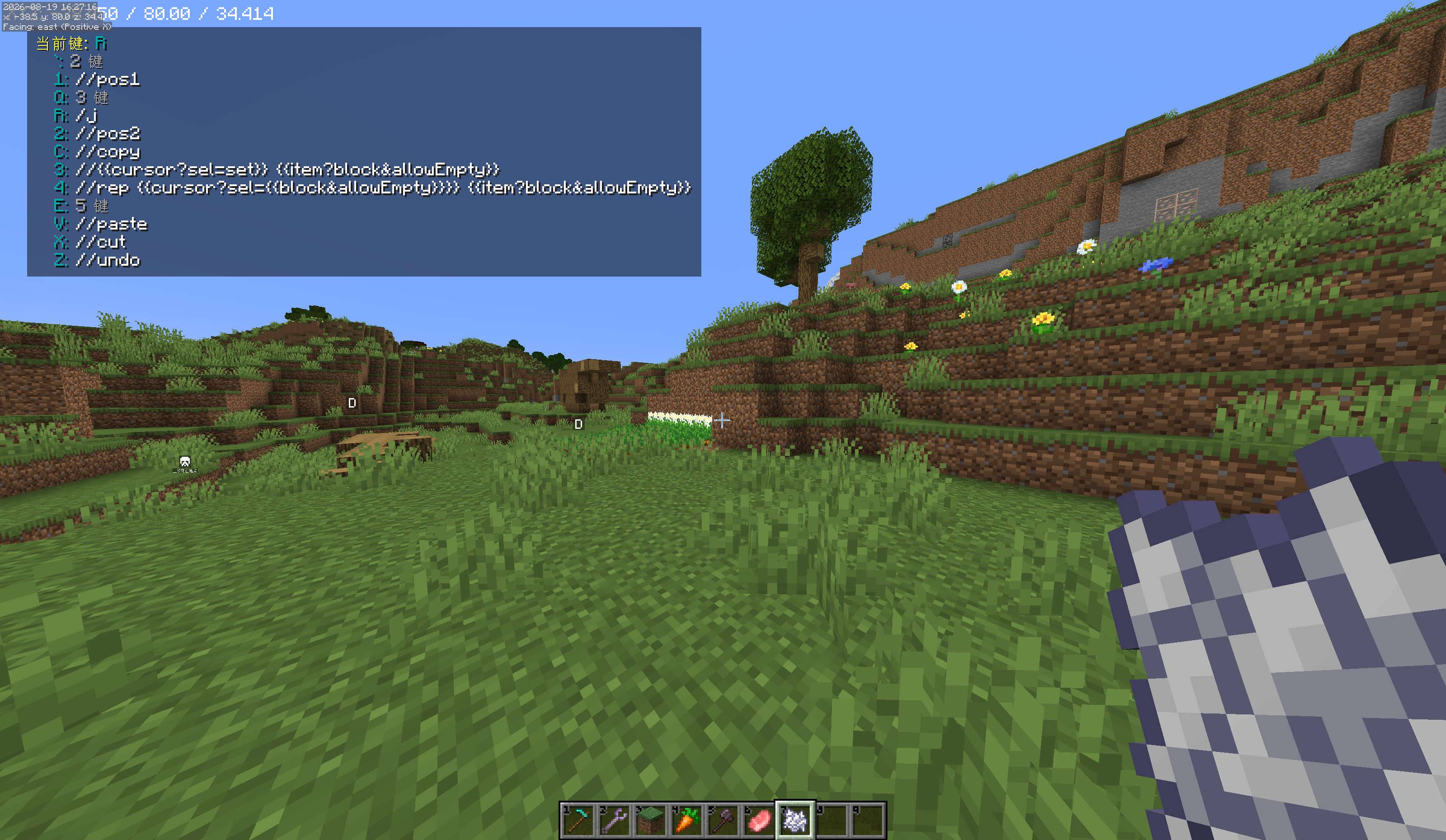
HUD displays the current path and available options
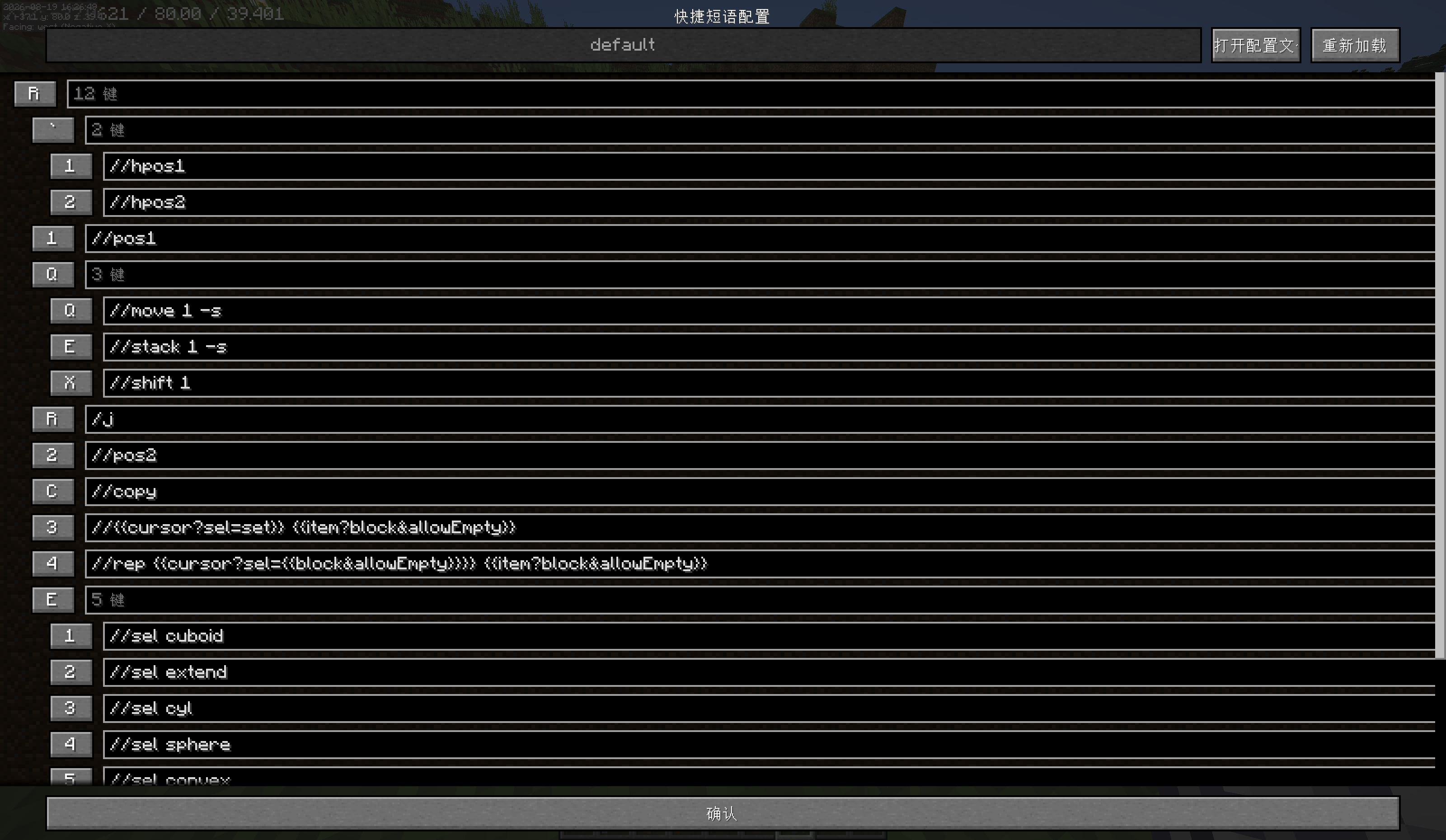
Tree configuration interface
Description
Quick Phrases
English | 中文
English
Introduction
Quick Phrases is a Fabric client-side mod for Minecraft 1.20.4 that lets you send chat messages and commands instantly by pressing keyboard shortcuts. Define your常用 phrases once, then trigger them with a simple key sequence — no more typing the same thing over and over.
Key Features:
- Instant chat & command sending via keyboard shortcuts
- Nested key tree — organize phrases hierarchically (e.g.
K→1= "Come on!") - Placeholders for dynamic content (player position, held item, block under cursor, etc.)
- Chat Edit mode — pre-fill and edit before sending
- Path Lock mode — rapidly send multiple phrases without re-navigating
- In-game visual config screen (press
G) - YAML-based config files — easy to edit by hand or share with others
- Supports both messages and commands (
/prefix) - Multi-line message support (
\n) - English & Simplified Chinese localization
Requirements
- Minecraft 1.20.4
- Fabric Loader ≥ 0.16.14
- Fabric API ≥ 0.97.3+1.20.4
- Java 17+
Installation
- Install Fabric Loader for Minecraft 1.20.4
- Download Fabric API and place it in your
mods/folder - Download the latest
quick-phrasesJAR and place it in yourmods/folder - Launch Minecraft
Quick Start
- Press
Gto open the config screen - Right-click → Insert to add a new phrase
- Click the key button to assign a shortcut key, then click the text field to type your message
- Click Confirm to save
- In-game, press the shortcut key sequence to send your phrase!
Keybindings
| Key | Default | Action |
|---|---|---|
| Config | G |
Opens the phrase configuration screen |
| Path Lock Modifier | Left Alt |
Hold while sending to keep the current key path active |
| Chat Edit Modifier | Left Control |
Hold while sending to open chat with phrase pre-filled for editing |
All keybindings can be reconfigured in Minecraft's Options → Controls.
Usage
Sending Phrases
Simply press the key sequence you configured. For example, if you set up:
J → "hello world!"
K → 1: "Come on!"
→ 2: "Goodbye!"- Press
J→ sends "hello world!" - Press
Kthen1→ sends "Come on!" - Press
Kthen2→ sends "Goodbye!"
While navigating the key tree, a HUD overlay shows your current path and available options on screen.
Navigation Keys
| Key | Action |
|---|---|
Escape |
Clear the current key path |
Backspace |
Remove the last key from the current path |
Chat Edit Mode
Hold Left Control while activating a phrase. Instead of sending immediately, the chat screen opens with the phrase pre-filled. If the phrase contains [[text]] markers, that text is automatically selected for quick replacement.
Example: If a phrase is I need [[water bucket]], the words "water bucket" will be highlighted and ready to type over.
Path Lock Mode
Hold Left Alt while sending a phrase. After the phrase is sent, the current key path stays active so you can immediately press the next key to send another phrase from the same branch — great for rapid-fire trading or greeting messages.
Placeholders
Placeholders use {{name}} syntax (double curly braces) and are replaced with dynamic values at send time.
Available Placeholders
| Placeholder | Description | Example Output |
|---|---|---|
{{pos}} |
Player's precise position (x y z, 2 decimal places) | 128.45 -64.00 256.78 |
{{pos?block}} |
Player's block position (integer x y z) | 128 -64 256 |
{{block}} |
Block ID under the cursor (raycast, 512 blocks range) | minecraft:stone |
{{item}} |
Main hand item ID | minecraft:diamond_sword |
{{item?block}} |
Block equivalent of held item (e.g. water bucket → water) | minecraft:water |
{{item?allowEmpty}} |
Item ID even if hand is empty | minecraft:air |
{{cursor?sel=text}} |
Inserts a selection marker for Chat Edit mode | text (editable) |
Placeholder Examples
Go to {{pos?block}}!
→ Go to 128 -64 256!

I'm holding {{item}}
→ I'm holding minecraft:diamond_sword

/setblock ~ ~ ~ [[{{block}}]]
→ /setblock ~ ~ ~ minecraft:stone  (with Chat Edit, "minecraft:stone" is selected)
Placeholder Arguments
Placeholders support arguments with the ?key=value&key2=value2 syntax:
{{pos?block}}— block position mode for pos{{item?block}}— convert item to block{{item?allowEmpty}}— show item even when hand is empty{{cursor?sel=text}}— set selection text for Chat Edit mode
Commands & Multi-line Messages
- Commands: Prefix your phrase with
/and it will be sent as a command (e.g./home) - Multi-line: Use
\nin your phrase to send multiple messages at once
Configuration Files
Phrases are stored as YAML files at:
.minecraft/config/quick_phrases/phrases/default.yamlExample YAML structure:
J: hello world!
K:
  1: Come on!
  2: Goodbye!
G:
  M: Good morning!
  N: Good night!
  F:
    1: /home
    2: /back
You can edit this file directly with any text editor. Use the Reload button in the config screen (or restart the game) to apply changes.
Config Screen
Press G in-game to open the configuration screen:
- Confirm — Save and close
- Open YML File — Open the YAML file with your system's default text editor
- Reload — Reload phrases from disk (discards unsaved in-game changes)
- Tree view — Browse and edit your phrases with visual indentation
- Right-click menu — Insert, Add Child, or Remove phrases
- Key rebinding — Click any key button, then press a new key to reassign
AI Disclosure
The icon and description are AI-generated.
License
MIT License — Copyright 2025 myworldzycpc
中文
简介
Quick Phrases 是一个 Minecraft 1.20.4 的 Fabric 客户端模组,让你通过键盘快捷键即时发送聊天消息和命令。只需预设好常用语句,按下对应的按键组合即可快速发送——再也不用反复输入同样的内容。
主要功能:
- 通过键盘快捷键即时发送聊天消息和命令
- 嵌套按键树——按层级组织短语(如
K→1= "加油!") - 占位符系统——支持动态内容(玩家坐标、手持物品、准星方块等)
- 聊天编辑模式——发送前可预填充并编辑内容
- 路径锁定模式——快速连续发送多条短语,无需重新导航
- 游戏内可视化配置界面(按
G打开) - 基于 YAML 的配置文件——方便手动编辑或与他人分享
- 同时支持普通消息和命令(
/前缀) - 支持多行消息(
\n) - 支持中文和英文
环境要求
- Minecraft 1.20.4
- Fabric Loader ≥ 0.16.14
- Fabric API ≥ 0.97.3+1.20.4
- Java 17+
安装方法
- 安装适用于 Minecraft 1.20.4 的 Fabric Loader
- 下载 Fabric API,放入
mods/文件夹 - 下载最新版
quick-phrasesJAR 文件,放入mods/文件夹 - 启动 Minecraft
快速上手
- 按
G打开配置界面 - 右键点击 → 插入节点 添加新短语
- 点击按键按钮分配快捷键,再点击文本框输入消息内容
- 点击 确认 保存
- 在游戏中,按下快捷键组合即可发送短语!
按键绑定
| 按键 | 默认值 | 功能 |
|---|---|---|
| 短语配置 | G |
打开短语配置界面 |
| 路径锁定修饰键 | 左 Alt |
按住时发送短语后保持当前按键路径 |
| 聊天编辑修饰键 | 左 Ctrl |
按住时打开聊天框并预填充短语内容进行编辑 |
所有按键绑定都可以在 Minecraft 的 选项 → 控制 中重新配置。
使用方法
发送短语
直接按下你配置好的按键序列。例如,如果你设置了:
J → "你好!"
K → 1: "加油!"
→ 2: "再见!"- 按
J→ 发送 "你好!" - 按
K再按1→ 发送 "加油!" - 按
K再按2→ 发送 "再见!"
在导航按键树的过程中,屏幕上方会显示当前按键路径和可用选项的 HUD 提示。
导航按键
| 按键 | 功能 |
|---|---|
Escape |
清除当前按键路径 |
Backspace |
从当前路径中删除最后一个按键 |
聊天编辑模式
在激活短语时按住 左 Ctrl。短语不会立即发送,而是打开聊天框并将内容预填充。如果短语中包含 [[文本]] 标记,对应文字会自动选中,方便快速替换。
例如,短语为 我需要[[水桶]],那么 "水桶" 会被高亮选中,可以直接输入新内容替换。
路径锁定模式
在发送短语时按住 左 Alt。短语发送后,当前按键路径保持不变,你可以立即按下下一个键发送同分支下的另一条短语——非常适合快速交易或打招呼。
占位符
占位符使用 {{名称}} 语法(双花括号),在发送时会被替换为动态值。
可用占位符
| 占位符 | 说明 | 示例输出 |
|---|---|---|
{{pos}} |
玩家精确坐标(x y z,保留两位小数) | 128.45 -64.00 256.78 |
{{pos?block}} |
玩家方块坐标(整数 x y z) | 128 -64 256 |
{{block}} |
准星指向的方块 ID(射线检测,范围 512 格) | minecraft:stone |
{{item}} |
主手物品 ID | minecraft:diamond_sword |
{{item?block}} |
将手持物品转为对应方块(如水桶 → 水) | minecraft:water |
{{item?allowEmpty}} |
手空时也显示物品 ID | minecraft:air |
{{cursor?sel=text}} |
插入聊天编辑模式的选中标记 | text(可编辑) |
占位符示例
去 {{pos?block}} 找我!
→ 去 128 -64 256 找我!

我拿着 {{item}}
→ 我拿着 minecraft:diamond_sword

/setblock ~ ~ ~ [[{{block}}]]
→ /setblock ~ ~ ~ minecraft:stone  (聊天编辑模式下 "minecraft:stone" 会被选中)
占位符参数
占位符支持使用 ?键=值&键2=值2 语法传入参数:
{{pos?block}}— 方块坐标模式{{item?block}}— 将物品转换为方块{{item?allowEmpty}}— 手空时也显示物品{{cursor?sel=text}}— 设置聊天编辑模式的选中文本
命令与多行消息
- 命令:在短语开头加
/即可作为命令发送(如/home) - 多行消息:在短语中使用
\n可以同时发送多条消息
配置文件
短语存储在以下 YAML 文件中:
.minecraft/config/quick_phrases/phrases/default.yamlYAML 结构示例:
J: 你好!
K:
  1: 加油!
  2: 再见!
G:
  M: 早上好!
  N: 晚安!
  F:
    1: /home
    2: /back
你可以用任意文本编辑器直接编辑此文件。编辑完成后,在配置界面点击 重新加载 按钮(或重启游戏)即可生效。
配置界面
在游戏内按 G 打开配置界面:
- 确认 — 保存并关闭
- 打开配置文件 — 用系统默认文本编辑器打开 YAML 文件
- 重新加载 — 从磁盘重新加载短语(会丢弃未保存的游戏内修改)
- 树形视图 — 以缩进层级浏览和编辑短语
- 右键菜单 — 插入节点、添加子节点、删除节点
- 按键重绑定 — 点击任意按键按钮,再按下新按键即可重新分配
AI 披露
图标和描述由 AI 生成。
许可证
MIT 许可证 — Copyright 2025 myworldzycpc
QuickPhrases Team