Player Time Manager
- By
Adds play time limits per world and per dimension, with automatic refills.
Version 1.X.X
For older versions of the mod, check the wiki.
This Mod limits how long players can play: in the whole world (e.g. 2 hours per day) and in single dimensions (e.g. 1 hour per day in the Nether).
The remaining time is refilled automatically by a schedule in cron format and can be changed per player by command.
If the time in a dimension is used up, the player is teleported to a target point and can't enter the dimension again until the next refill.
If the world time is used up, the player is kicked and can't join again until the next refill.
The Mod is only needed on the server side, but can also be used in singleplayer. Players with a vanilla client can join.
You need a server to play with friends? You don't know how to set up one? Just rent an already configured server!

Click on the picture above, select a plan (with recommended at least 6 GB),
use my code agent to get 25% off your first month and enjoy playing with your friends!
Support
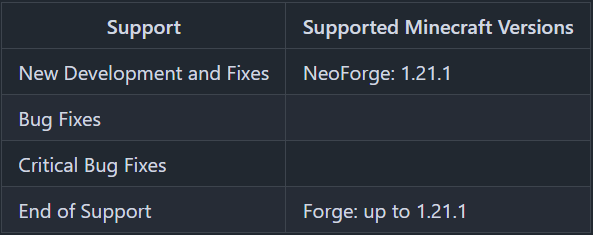
Minecraft versions, for which the mod is not released, are not supported.
You can find a text version here.
Time Limits
There is one time limit for the whole world (all dimensions together) and one time limit for each configured dimension.
Both run in parallel: The world time counts down in all dimensions, the time of a dimension additionally only in this dimension.
All players have the same limits, only their remaining time differs. New players start with the full limit.
The time counts down in real time while a player is online. Server lag does not extend the play time and the time does not count down while a singleplayer world is paused.
After installation, all limits are disabled. Without changes to the config, the mod changes nothing.
Dimension time used up
- The player is teleported to the target point of the dimension and gets a message with the date and time of the next refill.
- The player can't enter the dimension again until the next refill (portals, /tp and other mods).
- If the player logs in in the dimension, the player is teleported to the target point. If the player would respawn in the dimension (e.g. at a respawn anchor), the player respawns at the target point instead.
- Minecraft 1.21.1: A player riding an animal or a vehicle dismounts before the teleport. Starting with Minecraft 1.21.2, the animal or vehicle is teleported together with the player, unless other players are riding it, too.
World time used up
- The player is kicked with a message with the date and time of the next refill.
- The player can't join again until the next refill. In singleplayer, the player returns to the main menu.
Refill
The remaining time is refilled automatically by a refill rule:
- Schedule in cron format (see below). An empty schedule means no automatic refill, the time can then only be given by command.
- Mode SET: The remaining time is set to the limit.
- Mode ADD: The limit is added to the remaining time. A maximum can limit the remaining time after an ADD refill.
The refill rule in [general] applies to the world and all dimensions. The world or a single dimension can use an own rule with "use_custom_refill = true".
Refills missed while the server was offline are made up on the next start (SET once, ADD once per missed refill).
A changed schedule applies from the moment of the change, a changed limit applies with the next refill.
Cron format
A schedule has 5 fields: minute hour day-of-month month weekday.
The schedules work like on crontab.guru, where you can create and check them.
The time zone is set with "time_zone" (default: time zone of the server).
Examples:
0 6 * * *- every day at 06:000 14 * * 1-5- Monday to Friday at 14:000 8 * * 6,0- Saturday and Sunday at 08:000 6 * * 1- every Monday at 06:00 (e.g. a weekly limit)0 */6 * * *- every 6 hours
Target Point
Every dimension has a target point, where players are teleported to, if their time in this dimension is used up.
It consists of a target dimension (default: Overworld) and a target position "x y z" or "x y z yaw pitch".
Without a position, the target is the world spawn in the Overworld (a free place within the spawn radius, like when joining) and the obsidian platform in the End. All other target dimensions need a position.
The easiest way to set the target point is to stand at the position and run /playtime config dimension <dimension> target here.
If the target point is invalid or the player has no time left in the target dimension, the player is teleported to the world spawn in the Overworld.
The Overworld can't be limited as a dimension, use the world limit instead.
Display and Warnings
The remaining time is shown depending on "display_mode":
- NONE: no display, only the command /playtime and the chat warnings
- ACTIONBAR: text above the hotbar
- BOSSBARS: one boss bar per running limit (default)
- BOSSBAR_SHORTEST: one boss bar with the limit that runs out first
Boss bars and action bar show the time like a clock, e.g. "29:59", "1:30:00" or "2d 03:00:00".
The boss bars turn yellow below 50 % and red below 10 % of the limit (configurable).
Chat warnings with sound are sent at 10 minutes, 5 minutes, 1 minute and 10 seconds remaining time (configurable).
All texts are translatable. Players with a vanilla client see English texts.
Exemptions
The time does not count down for:
- Operators, if "ops_exempt" is true (default).
Singleplayer: With cheats allowed, you are an operator. Set "ops_exempt" to false to limit yourself. - Players in creative mode or spectator mode (both configurable).
- Players on the exempt players list.
- Players not on the limited players list, if this list is not empty.
Server Config
The config file can be found in the "config" folder of the server and is named "player_time_manager-server.toml". In singleplayer it is in the "config" folder of the game (".minecraft") and applies to all worlds. If a world already has the file in its "serverconfig" folder ("syncedconfig" starting with Minecraft 26.3), that file is used.
Every value is explained by a comment in the file. Changes to the file are applied while the server is running.
Invalid values never stop the server: You get a warning in the log and as operator in the chat on login, and a safe value is used instead.
Durations are written like "2h", "30m", "1h30m" or "45s".
- general
- command_permission_level: Permission level (0 - 4) required for all admin commands. Default = 3
- ops_exempt: Operators are not affected by any time limit. Default = true
- pause_in_creative / pause_in_spectator: The time does not count down in creative / spectator mode. Default = true
- limited_players: If not empty, only these players are affected by the time limits.
- exempt_players: These players are never affected by the time limits.
- time_zone: Time zone of the schedules, e.g. "Europe/Berlin". Default = "" (time zone of the server)
- refill_cron, refill_mode, refill_max: Refill rule for the world and all dimensions. Default = "0 6 * * *", "SET", ""
- display_mode: NONE, ACTIONBAR, BOSSBARS or BOSSBAR_SHORTEST. Default = "BOSSBARS"
- bossbar_yellow_below_percent / bossbar_red_below_percent: Colors of the boss bars. Default = 50 / 10
- warning_times: Remaining times for chat warnings. Default = ["10m", "5m", "1m", "10s"]
- warning_sound: Play a sound with each chat warning. Default = true
- world
- enabled: Is the world time limit active? Default = false
- limit: Time per refill. Default = "2h"
- use_custom_refill, refill_cron, refill_mode, refill_max: Own refill rule for the world.
- dimensions (one entry per dimension, the config contains disabled entries for the Nether and the End)
- dimension: Name of the dimension, e.g. "minecraft:the_nether"
- enabled, limit, use_custom_refill, refill_cron, refill_mode, refill_max: like in world
- target_dimension, target_position: Target point (see above)
Commands
Players are selected like for /whitelist: names (also of offline players, who have already been on the server) or selectors.
<scope> is world or dimension <dimension>.
Commands without a value show the current value. Values set by command are saved to the config file.
- /playtime
Shows your own remaining times and the next refills. Available for all players. - /playtime time get <players\> [<scope\>]
Shows the remaining times of the players. - /playtime time add|remove|set <players\> <scope\>|all <duration\>
Changes the remaining time of the players. - /playtime time refill <players\> <scope\>|all
Refills the remaining time of the players now. - /playtime time overview [<scope\>]
Shows the remaining times of all known players, sorted ascending. - /playtime config general refill_cron|refill_mode|refill_max|ops_exempt [<value\>]
Shows or sets a value in [general]. The schedule is written without quotes at the end, e.g./playtime config general refill_cron 0 8 * * 6,0. "none" clears refill_cron or refill_max. - /playtime config world enabled|limit|use_custom_refill|refill_cron|refill_mode|refill_max [<value\>]
Shows or sets a value of the world limit. - /playtime config dimension <dimension\>
Shows the settings of the dimension and problems with them. - /playtime config dimension <dimension\> add|remove
Adds or removes the time limit entry of the dimension. - /playtime config dimension <dimension\> enabled|limit|use_custom_refill|refill_cron|refill_mode|refill_max [<value\>]
Shows or sets a value of the dimension limit. - /playtime config dimension <dimension\> target here
Sets the target point to your current position and viewing direction. - /playtime config dimension <dimension\> target <target dimension\\\\\\\\> <x y z\\\\\\\\> [<yaw pitch\\\\\\\\>]
Sets the target point. - /playtime config dimension <dimension\> target default
Resets the target point (Overworld, world spawn). - /playtime players limited|exempt list|add|remove [<players\>]
Shows or changes the limited players list or the exempt players list.
Thanks for the logo to Muse31.
You can use this mod in non-commercial modpacks without asking.
You can find more mods from me on CurseForge and Modrinth.

Player Time Manager Team

Owner