PerformanceHUD
- By
Lightweight client-side HUD showing FPS, RAM, entities, chunks, ping, and CPU in one customizable corner overlay.


Description


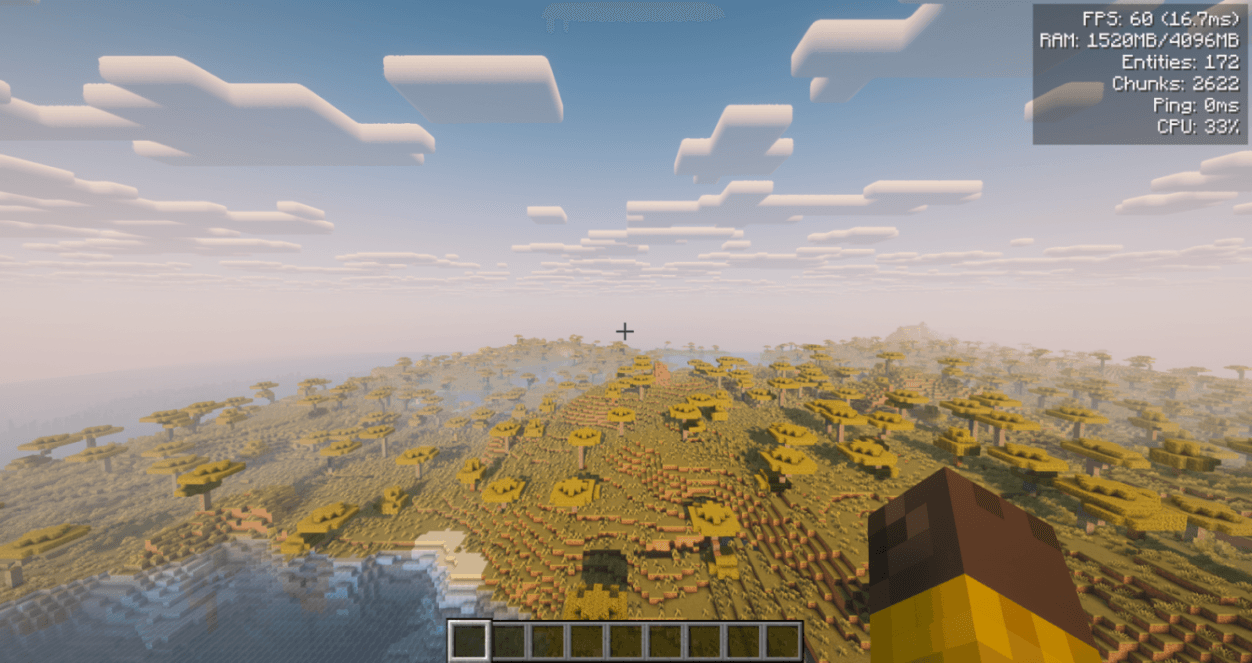
A lightweight client-side performance HUD that shows FPS, RAM, entities, loaded chunks, ping, and CPU usage in a single clean corner overlay. No more screenshots cluttered with three different mods — one toggleable panel, one hotkey, done.
Client-side only — do not install on the server. A dedicated server does not need this mod and will not write config/performancehud.json if the jar is present anyway. Works in singleplayer — just drop it in your mods folder.
Fabric needs Fabric API and Architectury API. NeoForge needs Architectury API. Forge needs no additional dependencies.
Free to use in any modpack — public or private, no permission needed.
What it does
- One overlay — a compact HUD in the top-right corner with up to 6 live metrics.
- Toggle with
F8— hide or show the whole panel with one keybind (changeable in Controls). The HUD also hides whenF1hides the rest of the interface. - Per-metric switches — turn individual lines on or off so you only see what you care about.
- Safe with other HUDs — client overlay only; does not change world or server logic, and is safe to remove at any time.
Metrics shown
- FPS — current frame rate with frame time in ms (e.g.
120 (8.3ms)). - RAM — used / max heap in MB.
- Entities — entity count in the loaded world.
- Chunks — currently loaded client chunks.
- Ping — your latency in ms when available; otherwise
-. - CPU — system CPU load percentage when available.
- If a value cannot be read, that line shows
-and the reason is logged once.
Configuration
- In-game screen:
/phud openor/performancehud open. On Forge/NeoForge it is also available from the Mods menu. - Customization: background opacity, screen margins (X/Y), and line spacing.
- File:
config/performancehud.json. A typo’d file is kept asconfig/performancehud.json.bakbefore defaults are written, so settings are not silently lost. - Keybind: default
F8toggle in the vanilla Controls menu.
Commands
Use /performancehud or the short alias /phud.
/phud open— open the config screen/phud status— print current settings to chat/phud reload//phud reset— manage the config file/phud <setting> <value>— toggle metrics or adjust visuals from chat (e.g./phud showFps false,/phud xMargin 10,/phud textColor 16777215)
Details
- Available in English, Russian, German, Spanish, French, Italian, Japanese, Korean, Brazilian Portuguese, and Simplified Chinese.
Feedback
Please report any bugs, errors, or feature suggestions on Discord: https://discord.gg/HTkn94BXmA
More mods by Nikrecs: DynamicRenderDistance · CropGrowthHUD
My other mods that I recommend.
PerformanceHUD Team

Owner