Easy Factions - Port
- By
A configurable server-side faction system: found factions, claim chunk territory, forge alliances, and battle over King-of-the-Hill objectives.
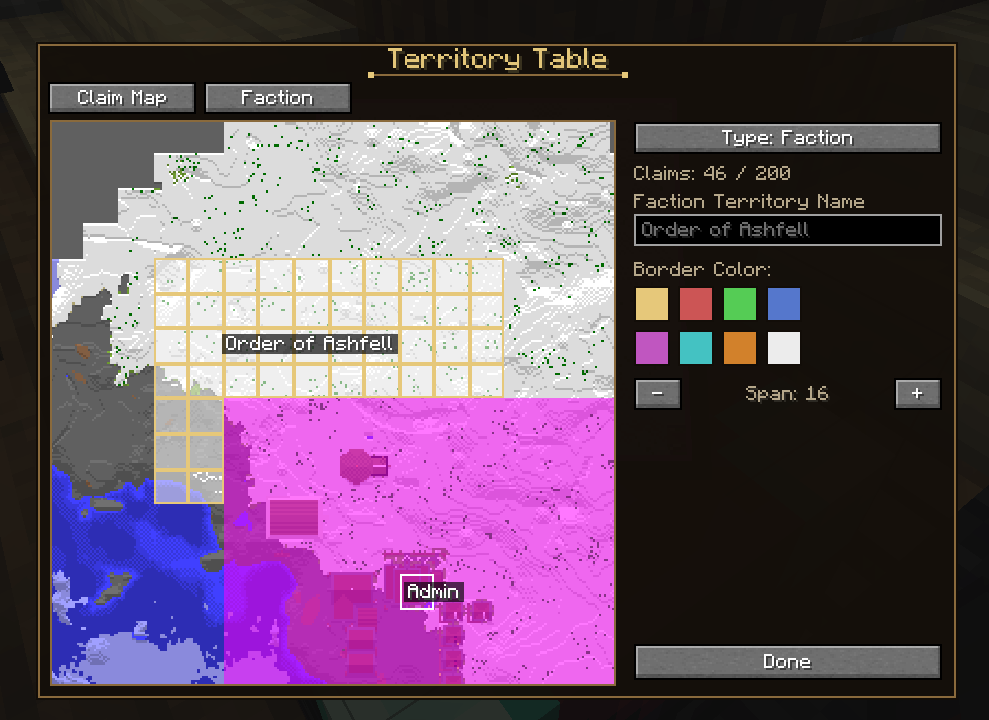
Screenshot 2026-06-26 155204.png
Description
Easy Factions - Unofficial Port
Source: github.com/teamdemivfxfish-dev/easy-factions-unofficial-port
Full guide: github.com/teamdemivfxfish-dev/easy-factions-warborn-wiki
Found a faction, plant your banner, and fight over every chunk of the map.
Easy Factions is a server-side territory system for NeoForge 1.21.1. Raise a faction, claim the land under your feet, forge alliances, and contest King-of-the-Hill objectives for standing and reward. This is the ground your server stands on: Easy Factions owns who holds what, from the claims and the borders to the allies and the wars over them. It is the land layer the rest of the Warborn Realm builds its politics on.
This build is an unofficial NeoForge 1.21.1 port of Easy Factions, carrying the original faction, alliance, and territory systems forward and reimplementing the King-of-the-Hill objectives. Bundled alongside it are two companions that make the land layer whole: the Territory Table, a pannable claim map you paint your borders onto, and the Warborn add-ons, which let a faction at its cap buy more ground with in-game money. One download, one install.
New here? Open the faction menu with G. A full command and configuration reference is below.
Found Your Faction
A faction is a name, a color, and everyone who answers to it. Start one, bring people in, and give them rank.
- Found a faction, invite players, and organize them with owners, officers, and members.
- Toggle faction-wide friendly fire on or off so your own members stop trading blows.
- Set an optional abbreviation and color that follow your faction everywhere it appears.
- Open the whole faction menu with a keybind (default G); no commands to memorize.
- A faction must reach a minimum size before it may claim at all (default 3 members), so nobody founds a throwaway banner purely to fence off chunks. Releasing land is never gated, so a shrinking faction can always let go of what it holds.
- Prefer typing? Manage everything by slash command as well.
Forge Alliances
No faction stands alone for long. Set your relations, then decide who fights beside you.
- Mark other factions and alliances as friendly, neutral, or hostile.
- Form an alliance to share friendly-fire protection across every member faction.
- Give an alliance its own membership, abbreviation, and relationship set.
- Run it all from the Alliance tab or through alliance commands, from the first pact to the final betrayal.
Claim the Map
Land is won a chunk at a time, and claiming is driven by a point economy rather than a spending free-for-all.
- Factions earn claim points over time (per online member) and from combat, then spend them to take ground.
- Take a chunk off a rival faction and it costs them; you gain points for the capture.
- A faction's claim cap scales with its roster:
factionBaseClaimLimit + factionAdditionalClaimLimitPerMember x members. - Beyond faction land there are core (personal) claims for individual players and admin claims for server-owned ground.
- Claims are bought in sets of ten and placed for nothing. The price climbs in a straight line with how many your faction has already bought: at the defaults a set of ten costs a thousand, plus one for every claim the faction already owns. That is 1005 for a first set, 2005 at a thousand bought and 4005 at three thousand. Growing wide is meant to cost more than staying home without pricing an old faction off the map, and the ground itself is free to put down once the claim is yours.
- Claims stay two chunks clear of another owner's land. Claiming the ring around somebody's border takes nothing worth having and makes their land worth less, which is exactly why people do it. Your own faction's land and your own members' claims never push you away.
What a Claim Actually Stops
A claim is a border, not a dome. By default it stops outsiders breaking and placing blocks, and stops there.
- Anyone can still walk your roads, open your doors, press your buttons, sleep in your beds, use your animals and open your chests. Your land is yours to shape; it is not a sealed box.
- Personal claims protect their owner properly. Upstream asks whether the chunk belongs to the claim's owner, which is true of any claimed chunk, so it never compares the player standing in it and every personal claim permitted everybody. This build asks the question the other way round.
- One list,
restrictedInteractions, decides what a claim protects, and it works in both directions: addRIGHT_CLICK_BLOCKto lock doors and chests down, or leave it out and they stay open even though upstream would have refused them. - Want the doors open but the chests shut?
protectContainerslocks chests, barrels, shulkers, hoppers, furnaces and brewing stands while everything else stays usable. Containers are told apart by whether the block really stores items, so a crafting table is never caught by it. - /territory diagnose prints, for the chunk you are standing in, the claim and its owner, your faction and permission level, both mods' live settings, and the verdict for each kind of interaction. When protection looks broken, this is the first thing to run.
Colonies Come First
If MineColonies is installed, a colony outranks every claim drawn over it. The two systems claim the same chunks and neither was built knowing the other existed, which left a faction free to fence off a town it had never set foot in.
- You cannot claim somebody else's colony. Claiming names the town that stopped you rather than quietly dropping the chunk. Your own colony stays claimable, because putting a border round your own town is the point of the feature.
- Inside your colony you are left alone. A rival border across your town does not make you a trespasser in it: you keep building, opening and using everything you own, however much land they have taken around you.
- A colony's refusal is never undone. Claims work by putting back the interactions Easy Factions refuses, and that had been indiscriminate enough to hand a raider a chest the colony had already closed to them. Refusals coming from the colony now stand.
- Being ranked hostile by a colony is not the same as belonging to it. The owner and every rank above neutral are covered; a stranger and a declared enemy are not.
- Colonies are drawn on the claim map. Every chunk a town holds is shaded, its outside edge is outlined and the town is named on it, so a colony is something you see before you drag rather than something you discover from a refusal. A colony you belong to is drawn brighter and stays yours to claim.
- A colony that grows takes the ground back. A town is not a fixed shape, and land that was free when you claimed it can be somebody's market square a week later. The claim comes off, the faction is told which town took it, and the money it cost is refunded, because that one was nobody's move against you.
- Already been raided this way? Claims sitting on colonies are cleared on the first startup after installing this, and /territory colony-overlaps lists any that appear later, with
releaseto hand the land back. - Admin territories are deliberately exempt. An operator painting spawn or an arena over a colony meant to.
Paint Your Borders: The Territory Table
Claiming chunk by chunk from where you happen to be standing is how you take one field. It is not how you draw a country. Craft a Territory Table and claim from a map instead.
- A pannable, zoomable claim map of the world around you: drag across it to paint the chunks you want and commit them in one go.
- Every claim is drawn in its owner's colour and labelled with the owner's name, so a glance at the table tells you where your neighbours end and you begin.
- Switch between faction, personal, and admin claim types in the same interface.
- Name your personal territory and pick its colour, so your holdings read as a place rather than a colour blob.
- MineColonies towns are drawn on the same map, outlined and named, and refuse to be selected. What you see outlined is exactly what the server will refuse.
- Painting the map costs nothing. Claims are paid for once at the Buy Claims button and spent on the map whenever and wherever you like, so the only bill is the one you already agreed to.
- Buy extra claim capacity for your faction straight from the Faction tab when you have the coin.
Rule Your Ground: Admin Territories
Server-owned land is not one anonymous mass. Spawn, the dungeon approach, and the neutral trade road are different places and should look it.
- Give each admin region its own name and its own colour, typed in before you paint it.
- Colours are staged per region, so two admin territories can sit side by side and read as separate places.
- Operator only. Whether the claimer must also be in creative mode is a config switch, off by default.
Take It by Force
Borders that only move when somebody presses a button are not borders. Kill a member of a rival faction and their ground answers for it.
- A qualifying kill costs the victim's faction claim capacity, and half of what they lose is paid into the killer's faction pool. Land is contested, not simply destroyed.
- The pool belongs to the faction, not the player who swung, so a good war funds the whole banner.
- Capacity falls before chunks do. A faction with room to spare only loses ceiling; real chunks start coming off the map once the ceiling drops below what they actually hold, and the chunks that fall are the ones nearest where the victim died.
- Losses heal over time (one slot back every ten minutes by default), so a bad night bleeds a faction without ending it. Servers can make losses permanent instead.
- The whole system is one config switch if you would rather run a builder server.
Buy More Land
Sometimes you have the coin but not the claim cap. Two paid routes exist, and both are overflow valves rather than shortcuts.
- Faction owners and officers use /factionbuy to purchase the chunk they are standing on with in-game money.
- The Territory Table's Buy Claims button instead raises the faction's cap permanently, in fixed sets of ten slots.
- Payment runs through SDM Economy when that mod is installed. Without it,
/factionbuyreports paid claims as unavailable, and the Territory Table falls back to charging emeralds. - If a claim fails after you are charged, the money is refunded.
- Land you give up hands the claim back, not the money. What you bought was the ceiling, and the ceiling is still yours to spend on ground somewhere else the same minute. Releasing a claim returns the slot, and so does losing land to a growing colony. Land taken from you in war is not returned; that is what losing means.
- Servers coming from 1.1.5 get every chunk the old rule charged for paid back on the first start, held until somebody who can receive it is online. /territory refunds says what is waiting and
/territory refunds claimhands it over. A faction's refunds are collected by its owner. - Price, how fast it climbs, currency, set size, and the at-cap requirement are all config, so every server tunes its own economy of land. Set
chunkprice.enabled = falsefor a flat price per set instead of a rising one.
King of the Hill
Claiming is quiet. Objectives are loud. Contest fixed points on the map and hold them under fire.
- Each objective defines a core area to hold and a kill zone around it.
- Factions holding the core are awarded control points on a timer; each point decays, so a score fades unless the objective is held.
- Dying in the kill zone costs your faction a share of its points, and part of that loss transfers to the killer's faction.
- Operators configure item rewards with individual drop chances, and factions and alliances climb the leaderboards.
Know Friend from Foe
In a claimed world, the most important thing to know is who is standing next to you.
- Color-coded name and head tags show each player's relationship to you at a glance: ally green, neutral yellow, enemy red.
- Claims are drawn in full on the Territory Table, which is where this build expects you to read the map.
- You are told whose land you have walked into, and when you leave it. A border is invisible from the ground, and the old way to find out was to be refused something.
- A faction's friendly fire setting covers everything that fights for it. A summoned skeleton, a spell construct or a tamed wolf no longer mauls the person its owner is allied to, and no longer picks them as a target in the first place, so it goes and fights the enemy instead of standing in a friend's way swinging at them.
- One look tells you whose ground you are on and whether you should have brought friends.
Commands
The in-game menu (default G) is the primary interface; these commands mirror and extend it.
| Command | Who | What it does |
|---|---|---|
/factionbuy |
Owner or officer | Buys the chunk you are standing on for in-game money once your faction is at its claim cap (Warborn add-on). |
/territory refunds |
Anyone | What you are owed for land that stopped being yours. |
/territory refunds claim |
Anyone | Collects it. A faction's refunds are collected by its owner. |
/territory diagnose |
Operators | Explains what the chunk you are standing in allows, and why. |
/territory colony-overlaps |
Operators | Lists every claim sitting on a MineColonies colony its owner has no part in. |
/territory colony-overlaps release |
Operators | Releases those claims and hands the land back to the colonies. |
/territory faction list |
Operators | Every faction with its owner and member count. |
/territory faction add |
Operators | Puts a player into a faction whether or not they were invited. They must be online. |
/territory faction remove |
Operators | Takes a player out of their faction. They must be online. |
/territory faction disband |
Operators | Ends a faction, with nobody online required. |
| Faction commands | Members by rank | Create a faction, invite, join, leave, kick, manage officers, set color and abbreviation, toggle friendly fire, and set relationships. |
| Claim commands | Members by rank | Claim and unclaim faction, core, and admin chunks, plus a lookup for the current chunk's owner. |
| Alliance commands | Members by rank | Create an alliance, invite factions, join or leave, set an abbreviation, and set alliance relationships. |
| Objective commands | Staff | Create or remove objectives, set core and kill-zone corners, configure item rewards, and view leaderboards. |
Configuration Highlights
Servers tune the land economy through the port's config files; the bundled mods each add one of their own.
easy_factions-server.toml: claim caps and per-member scaling, core chunk counts, point generation and combat rewards, claim restrictions per claim type, dimension limits, abbreviation rules, and the King-of-the-Hill objective tuning.easy_factions-client.toml: claim overlay opacity, border width and opacity, claim merge grid size, and whether nameplates show abbreviations.efwarborn-server.toml:chunkPrice(cost per bought chunk),currencyKey(which SDM Economy currency to charge), andrequireAtCap(whether/factionbuywaits until the faction is at its cap).territory-server.toml: the[chunkprice]block (enabled,basePrice,scalePercentPerChunk,maxPrice),claimBufferChunks(default 2),colonySweepSeconds, the[notices]and[friendlyfire]blocks, the Buy Claims price and set size,minFactionMembers(default 3), the conquest values (claimsLostPerKill,killerSharePercent,penaltyRegenSeconds), the admin claim colour and permissions, and the whole[protection]block:restrictedInteractions,overrideEasyFactions,protectContainers,useOwnRestrictions,bypassPermissionLevel, and the two colony switchesrespectColonyClaimsandcolonyMembersKeepTheirLand(both on by default).
Required setting: set pointsPerKill = 0 in easy_factions-server.toml. Easy Factions has its own kill-takes-land rule, and left on it doubles up with the one above and removes chunks near world spawn rather than near the fight. The server logs a warning at startup if it is still set.
Upgrading from an earlier build? restrictedInteractions now defaults to breaking and placing only, but a config file that already exists keeps the values it already has. Edit it by hand, or delete territory-server.toml and let it regenerate.
Read before the first boot of 1.1.7: land is paid for at the Buy Claims button and placed for free, and basePrice now means the price of one BOUGHT claim. An existing territory-server.toml keeps the numbers it already has, so a server upgrading from 1.1.5 should set chunkprice.basePrice to 100 and chunkprice.scalePercentPerChunk to 0.1 (or delete the [chunkprice] block and let it regenerate) unless it wants the old land prices charged for claim sets instead. freeChunks, refundPercent, refundOnRelease, legacyRefundPerChunk and colonyRefundEnabled no longer exist and drop themselves on the next start.
Where settings go to die: both mods read SERVER configs, and a save carrying its own copy under <world>/serverconfig/ silently replaces the one in config/. A world that moved between hosts, or came out of a pack template, therefore ignores every edit you make and logs nothing about it. The startup report and /territory diagnose both call this out when they see it.
Recommended Warborn server values: coreChunks = 9, factionBaseClaimLimit = 0 with factionAdditionalClaimLimitPerMember = 100 (three members give a 300 cap), and the stock restrictedInteractions = ["BREAK_BLOCK", "PLACE_BLOCK"] for build-only protection. You no longer need to edit factionClaimRestrictions to match, since overrideEasyFactions reconciles the two.
Requirements & Compatibility
| Mod | Needed | Why |
|---|---|---|
| NeoForge 1.21.1 | Required | The mod runs on client and server. |
| SDM Economy | Optional | Powers paid claims; without it /factionbuy reports as unavailable and the Territory Table charges emeralds instead. |
| MineColonies | Optional | Colonies outrank claims: their chunks cannot be claimed by outsiders and their members stay free inside them. Without it the rule simply never applies. |
Do not also install a standalone MineTerritory / Territory jar. This download already contains it. A second copy is a duplicate mod id, which fails at mod discovery and stops the game from starting.
Supported Versions
| Component | Loader | Minecraft | Version |
|---|---|---|---|
Easy Factions port (easy_factions) |
NeoForge | 1.21.1 | 1.1.7 |
Warborn add-ons (efwarborn) |
NeoForge | 1.21.1 | 1.1.7 |
MineTerritory / Territory Table (territory) |
NeoForge | 1.21.1 | 1.1.7 |
All three ship bundled in the port jar, so the download is a single file that lists three mods. Neither companion injects code into the port's classes; each registers its own content and reads the port's public state.
Credits & License
This is an unofficial port and is not affiliated with or endorsed by the original authors.
Easy Factions was created by Jonathan Michael Preiss (GitHub kard3n/easy_factions; Easy Factions on CurseForge) and released under the Mozilla Public License 2.0. It was ported to NeoForge 1.21.1 with permission and keeps the same MPL-2.0 license.
MineTerritory (the Territory Table) was created by Leon (leon_mout) with cnlimiter, and is released under the GNU General Public License v3.0. The NeoForge 1.21.1 revival and the Easy Factions integration are by NewtL and carry the same GPL-3.0 license. The two mods are bundled in one jar for a single install but remain separate mods under separate licenses.
If you redistribute, please preserve the upstream attribution for both.
Support the Mods
These mods are free and they stay free. If one of them runs on your server, you can back the next version, the next port, and the next mod at patreon.com/epicwarborn. Patrons get their name in the credits, a direct line to me for bugs, early builds, and a vote on what gets built next.
Found it. Claim it. Hold it. Find the rest of the Warborn Realm suite on barunn's CurseForge page.
Part of The Warborn Realm, by barunn
The Easy Factions - Port Team