OfflineSkins Reloaded
- By
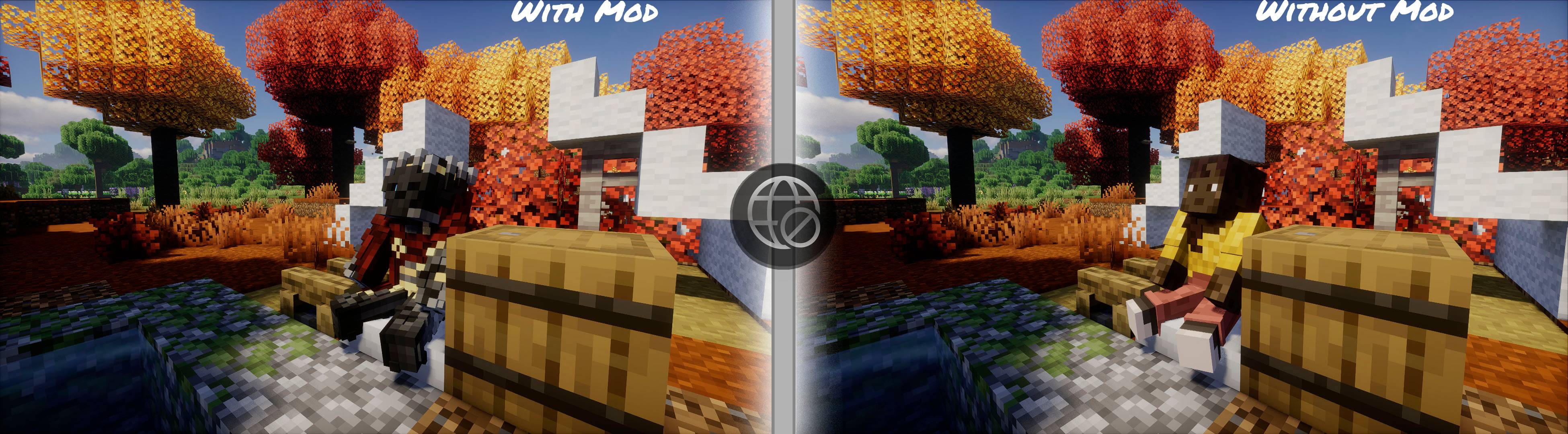
The showcase how OfflineSkins Reloaded mod shows skins without an internet connection
Description
OfflineSkins Reloaded — a quality-of-life mod that lets you cache and load custom skins and capes in Minecraft, even when you're offline. ✨
The mod offers a wide range of settings to customize, manage, and optimize how skins and capes appear in your game.
THE 1.2.0 🧣 UPDATE
This update takes OfflineSkins Reloaded to the next level, bringing new features and an even better experience.
Key Features
-
Dressing Room — Added a fully functional Dressing Room where you can select your cached skins and capes.
-
OfflineSkins Reloaded Network 🛜 — Added full support for a third-party skins and capes system.
-
Mod Compatibility — Support for 3D skin layers, waving capes, and other mods.
-
17 Languages 🌍 — The mod is now translated into 17 languages.
🌍 Supported languages: English, Russian, Spanish, German, French, Italian, Japanese, Korean, Polish, Portuguese (Brazil), Simplified Chinese, Ukrainian, Azerbaijani, Turkish, Czech, Dutch, and Swedish.
🛠️ How to Use the Mod
OfflineSkins Reloaded lets you load your custom skins and capes in various situations, including when you have no internet connection or are playing on offline-mode servers.
To get started, open the OfflineSkins Reloaded menu by clicking the button in Minecraft's main menu or pause menu. You can also press U or use the /offlineskins menu command.
-
Click Open Cached Images to open the folder containing your cached images.
-
Open the appropriate directory:
-
cachedImages/skins— Put your skin files here. -
cachedImages/capes— Put your cape files here.
-
Just like in the original OfflineSkins, you can name your files after Minecraft player usernames.
Once your files are in place, return to Minecraft and click Update Menu in OfflineSkins Reloaded. Enable Remember Skin if needed, then select the skin or cape you want to use.
Still have questions? Check out the in-game FAQ! ❓📖
🐞 Bug Fixes
-
Skull block rendering
-
OfflineSkins Reloaded Network
-
Player list HUD
-
Incorrect HD player detection
-
Excessive network logging
-
Slow recaching
-
URL validation issues
Credits
Special thanks to zlainsama (LainMI), the original creator of OfflineSkins.
Original project: https://www.curseforge.com/minecraft/mc-mods/offlineskins
This CurseForge page is a mirror of the main OfflineSkins Reloaded project on Modrinth. The latest builds are published exclusively on Modrinth.
Modrinth: https://modrinth.com/mod/offlineskins-reloaded
OfflineSkins Reloaded Team