🧮 Not Enough Calculator
A NEU-style calculator, works completely standalone or hooks into Roughly Enough Items (REI). Type calculations directly in the search bar and get instant results.
Inspired by NotEnoughUpdates calculator. Recreated for newer Minecraft versions where NEU isn't available.

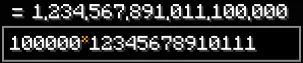
What does this mod do?
Type calculations directly in the search bar and get instant results! If REI is installed it uses REI's search bar, otherwise it shows its own standalone bar at the bottom of inventory screens. If you played with NEU on older versions, you already know how this works.
Example: Type 100m - 50m in the search bar → See = 50,000,000 instantly
Key Features
Basic Math & Functions
- Addition, subtraction, multiplication, division (
+,-,*orx, X,/) - Exponents and modulo (
^,%) - Bitwise operators:
&(AND),|(OR),~(NOT),<<(Left Shift),>>(Right Shift),xor(a, b) - Factorial:
5!= 120,10!= 3,628,800 - Number Literals: Binary (
0b1010= 10), Hexadecimal (0xFF= 255), Octal (0o77= 63) - Base Conversions:
hex(255)= 0xFF,bin(10)= 0b1010,oct(63)= 0o77 - Parentheses and implicit multiplication:
2(3+4),(3)(4),2sqrt(4) - Smart percentage operator:
10%= 0.1,100 + 10%= 110 - Constants:
pi(3.14159…),e(2.71828… standalone, enchanted unit after a number) - Expanded Functions:
sqrt(),abs(),floor(),ceil(),round(),log(),ln(),sin(),cos(),tan(),rad(),deg(),min(),max(),avg(),pct(),gcd(),lcm(),clamp(),xor(),fmt(),hex(),bin(),oct() - SkyBlock Tax Calculators:
bz(price)(Bazaar net profit accounting for Bazaar Flipper perk level),ah(price, [hrs])/ahbin(price, [hrs])(AH BIN net profit after listing fee & collection claim tax)
Hypixel Skyblock Units
- Currency:
k,m,b,t(thousand, million, billion, trillion) - Items:
s(stack = 64),e(enchanted = 160) - Storage:
h(shulker = 1,728),sc(small chest = 1,728),dc(double chest = 3,456),eb(ender chest = 2,880)
Variables (Persistent)
ans-- Automatically stores last calculation resultpi-- Pi constant (3.14159265…)e-- Euler's number (2.71828182…) when standalone; enchanted unit (160) after a number- Custom variables with
/calcset <name> <value>(saved automatically to config & persist across restarts) - Chain calculations easily with
ans
History, Shortcuts & Interactive Chat
- Press
Ctrl+Z/Cmd+Zin the search bar to recall previous calculations (undo) - Press
Ctrl+Y/Cmd+Yto redo/go forward in history - Press
Ctrl+C/Cmd+Cin the search bar to copy the full equation (e.g.1+1 = 2) to clipboard - Press
Ctrl+X/Cmd+Xin the search bar to cut the full equation to clipboard and clear the search bar - Partial text selection: if you highlight a specific portion of text,
Ctrl+C/Ctrl+Xcopies/cuts only the selected snippet - Full Numpad Enter support (
GLFW_KEY_KP_ENTER) - Interactive Chat: Click any
/calcresult in chat to copy it directly to your clipboard - View full history with
/calchist(shows last 15 entries) - Session-based: Search history clears automatically when you leave a world/server
Customization & Settings GUI
- Open in-game settings GUI screen via
/calcconfigor ModMenu - Custom Variables Manager: Dedicated tab in
/calcconfigto easily add, edit, delete, and paginate (</>) custom variables directly in-game - Native Minecraft hover tooltips on all settings
- Bazaar Flipper Perk selector pills (
Lvl 0= 1.25%,Lvl 1= 1.125%,Lvl 2= 1.0%) - Shorthand Results toggle to convert default calculation results to SkyBlock units (
1.5m) - Syntax Highlighting toggle to color-code numbers, units, functions, and variables in the search bar
- Configurable decimal precision (default: 10 digits)
- Toggle inline results, unit suggestions, comma formatting, and history navigation
- All settings persist automatically in
config/notenoughcalculator.json
Dependencies (Required):
- Fabric API (0.134.1 or newer according to the Minecraft version you play on)
- Minecraft (1.21.11, 26.1.x, 26.x)
Dependencies (Optional / Recommended):
- Roughly Enough Items (REI) (21.9.812 or newer according to the Minecraft version you play on)
Note: Standalone mode was introduced in v2.7.0-beta. All previous versions from v1.0.0 to v2.6.1 still require REI to be installed.
- ModMenu (16.0.0 or newer according to the Minecraft version you play on)
How to Install
- Download the required mods and place them into your Minecraft
mods/folder:- Fabric API
- Roughly Enough Items (REI) (Optional)
- ModMenu (Optional)
- Not Enough Calculator (this mod)
- Launch Minecraft using the Fabric loader
- Open any inventory screen (chest, crafting table, etc.)
- Start typing calculations into the search bar (REI's search bar if REI is installed, or the standalone calculator bar at the bottom of the screen)
Examples
Auction House & Trading
100m - 75m = 25,000,000 (profit calculation)
100m * 0.05 = 5,000,000 (5% auction tax)
50m * 1.1 = 55,000,000 (10% markup)
(100m - 60m) * 0.95 = 38,000,000 (profit after tax)
1b / 100 = 10,000,000 (price per item)
250m + 150m + 75m = 475,000,000 (total spending)
Inventory & Storage Management
640 / 64 = 10 (stacks needed)
5s * 2 = 640 (10 stacks)
3h = 5,184 (3 shulkers total items)
2dc + 5sc = 15,552 (storage capacity)
10000 / 64 = 156.25 (156 stacks + 16 items)
27s = 1,728 (full shulker)
Crafting & Resources
160 * 5 = 800 (5 enchanted = 800 items)
5e * 3 = 2,400 (crafting cost)
64 * 27 = 1,728 (shulker capacity)
1728 / 160 = 10.8 (enchanted items per shulker)
9 * 160 = 1,440 (enchanted block crafting)
Mining & Farming
500 + 300 + 200 = 1,000 (total ores mined)
1000 / 3 = 333.33 (average per hour)
dc / 333 = 10.38 (hours to fill double chest)
64 * 100 = 6,400 (100 stacks)
6400 / 160 = 40 (enchanted items)
Money & Profits
1000m - 800m = 200,000,000 (200m profit)
500m * 0.20 = 100,000,000 (20% profit margin)
(1000m - 500m) / 500m = 1 (100% ROI)
100m * 2.5 = 250,000,000 (2.5x flip)
50m * 30 = 1,500,000,000 (bulk buying)
Advanced Math & Functions
sqrt(144) = 12 (square root)
2^10 = 1,024 (exponents)
100 % 7 = 2 (modulo)
5! = 120 (factorial)
10! = 3,628,800 (large factorial)
abs(-50) = 50 (absolute value)
floor(3.9) = 3 (round down)
ceil(3.1) = 4 (round up)
round(3.5) = 4 (round nearest)
log(100) = 2 (base-10 logarithm)
ln(e) = 1 (natural logarithm)
sin(90) = 1 (sine in degrees)
cos(0) = 1 (cosine in degrees)
tan(45) = 1 (tangent in degrees)
min(10k, 5m) = 10,000 (minimum of values)
max(10k, 5m) = 5,000,000 (maximum of values)
pi * 2 = 6.283... (using pi constant)
e^2 = 7.389... (using Euler's number)
0b1010 = 10 (binary literal)
0xFF = 255 (hexadecimal literal)
0b10 + 0xA = 12 (arithmetic with literals)
Base Conversions
hex(255) = 0xFF (decimal to hexadecimal wrapper)
bin(10) = 0b1010 (decimal to binary wrapper)
oct(63) = 0o77 (decimal to octal wrapper)
hex(0b1010 + 0o10) = 0x12 (expression base conversion)
0b1010 = 10 (binary literal input)
0xFF = 255 (hexadecimal literal input)
0o77 = 63 (octal literal input)
0b10 + 0xA = 12 (arithmetic with literals)
Bitwise Operators & Functions
0b1010 & 0b1100 = 8 (bitwise AND)
0b1010 | 0b0101 = 15 (bitwise OR)
~0 = -1 (bitwise NOT)
~5 = -6 (bitwise NOT value)
1 << 4 = 16 (bitwise left shift)
16 >> 2 = 4 (bitwise right shift)
0x0F << 4 = 240 (hex bitwise left shift)
xor(0b1010, 0b1100) = 6 (bitwise XOR function)
Math Helpers
avg(10, 20, 30) = 20 (variadic average)
pct(50, 200) = 25 (ratio percentage: 50 is 25% of 200)
gcd(12, 18) = 6 (greatest common divisor)
lcm(12, 18) = 36 (least common multiple)
clamp(15, 0, 10) = 10 (clamp value to maximum bound)
clamp(-5, 0, 10) = 0 (clamp value to minimum bound)
Implicit Multiplication & Smart Percentage
2(3+4) = 14 (implicit multiplication)
(3)(4) = 12 (nested parentheses)
2sqrt(144) = 24 (implicit math function)
10k(2+3) = 50,000 (implicit unit multiplication)
10% = 0.1 (standalone percentage)
100 + 10% = 110 (add 10% of 100)
200 - 25% = 150 (subtract 25% of 200)
Compound Calculations
100m * (1.05 ^ 10) = 162,889,462.68 (10 weeks compound)
(50 + 25) * 1000 = 75,000 (grouped operations)
(sqrt(2500) + abs(-100)) / 2 = 75 (complex formula)
((100 + 50) * 2) - 50 = 250 (nested parentheses)
Price Per Item
1b / 1000 = 1,000,000 (price per unit)
500m / 64 = 7,812,500 (price per stack)
100m / 160 = 625,000 (price per enchanted)
50m / 27 = 1,851,851.85 (price per slot)
Material Conversions
160 * 64 = 10,240 (1 stack enchanted blocks)
9 * 9 * 160 = 12,960 (1 enchanted block breakdown)
64 * 64 = 4,096 (double compressed)
1728 / 64 = 27 (stacks per shulker)
Business & Investment
1000m * 0.02 = 20,000,000 (2% daily interest)
20m * 365 = 7,300,000,000 (yearly earnings)
(1000m + 200m) / 2 = 600,000,000 (average investment)
500m * 1.5 = 750,000,000 (50% growth)
Combat & Stats
(100 + 50 + 25) / 3 = 58.33 (average damage)
sqrt(10000) = 100 (damage calculation)
200 * 1.5 = 300 (crit damage)
(500 - 100) * 1.2 = 480 (defense reduction)
Bulk Operations
50 * 100m = 5,000,000,000 (buying 50 items)
1000 * 500k = 500,000,000 (bulk crafting cost)
64 * 15625 = 1,000,000 (precise calculations)
27 * 64 * 100 = 172,800 (mass storage)
Using Variables
/calcset buy 50m
/calcset sell 75m
$sell - $buy = 25,000,000 (profit using variables)
/calcset stacks 10
$stacks * 64 = 640 (items from stacks)
100 + 50 = 150
ans * 2 = 300 (using last result)
ans + 100 = 400 (chain calculations)
SkyBlock Tax & Shorthand Calculators
bz(100m) = 98,750,000 (net Bazaar payout after tax)
ah(50m) = 46,999,955 (net Auction payout after 5% fee + 1% claim tax + 6h duration fee)
ahbin(50m, 24) = 48,499,650 (net BIN payout after 2% fee + 1% claim tax + 24h duration fee)
fmt(1500000) = 1.5m (shorthand number formatter)
rad(180) = 3.14159... (degrees to radians)
deg(pi) = 180 (radians to degrees)
Commands
Basic Commands
/calc <expression>- Calculate in chat/calchist- View calculation history (shows last 15)/calcclear- Clear calculation history
Variable Commands
/calcset <var> <value>- Set custom variable- Example:
/calcset profit 100m-50m - Example:
/calcset stacks 10
- Example:
Help Commands
/calchelp- Show main help menu/calchelp operators- Learn about +, -, *, x, /, ^, %, !, &, |, ~, <<, >>, literals (0b, 0x, 0o)/calchelp functions- Learn about sqrt, abs, floor, ceil, round, log, ln, sin, cos, tan, min, max, hex, bin, oct, pct, gcd, lcm, clamp, avg, xor, bz, ah, ahbin, fmt, rad, deg/calchelp units- Learn about k, m, b, t, s, e, h, sc, dc, eb/calchelp variables- Learn about ans and custom variables/calchelp examples- See practical examples/calchelp config- Learn about configuration
Configuration Commands
/calcconfig- Open native settings GUI screen
Configuration
Config file: config/notenoughcalculator.json
Available Settings
{
"decimalPrecision": 10,
"showUnitSuggestions": true,
"enableHistoryNavigation": true,
"showInlineResults": true,
"enableCommaFormatting": true,
"enableShorthandResults": false,
"enableSyntaxHighlighting": true,
"enableFullEquationCopy": true,
"bazaarFlipperLevel": 0,
"customVariables": {}
}
Settings Explained
- decimalPrecision (Default: 10) - Number of decimal places
- showUnitSuggestions (Default: true) - Show unit hints like "(50m)" in commands
- enableHistoryNavigation (Default: true) - Enable Ctrl+Z/Y shortcuts
- showInlineResults (Default: true) - Show results in the search bar
- enableCommaFormatting (Default: true) - Format large numbers with commas
- enableShorthandResults (Default: false) - Format default calculation results in shorthand notation
- enableSyntaxHighlighting (Default: true) - Color-code numbers, units, functions, and variables in the search bar
- enableFullEquationCopy (Default: true) - Copy full equation (
expression = result) when pressing Ctrl+C with no text selected - bazaarFlipperLevel (Default: 0) - Bazaar Flipper Perk level (0 = 1.25%, 1 = 1.125%, 2 = 1.0%)
- customVariables (Default: empty) - Stores your saved custom variables (automatically created when you add your first variable)
Keybinds & Shortcuts
Search Bar Shortcuts
Ctrl + Z/Cmd + Z- Recall previous calculation (undo)Ctrl + Y/Cmd + Y- Go forward in history (redo)Ctrl + C/Cmd + C- Copy full equation (1+1 = 2) when no text is selected; copies only selected text when text is highlighted (can be toggled in/calcconfig)Ctrl + X/Cmd + X- Cut full equation to clipboard when no text is selected; cuts only selected text when text is highlightedCtrl + A/Cmd + A- Select all text in the search barCtrl + Left/Right- Jump cursor by wordCtrl + Backspace/Delete- Delete entire word to the left or rightHome/End- Jump cursor to start or end of textEnter/Numpad Enter- Commit calculation into history and keep focus
Notes
- History is session-based and automatically clears when you leave a world or server
- This ensures a fresh start each time you play!
- Use
/calchistto view your calculation history in chat
Pro Tips
Use ans for quick follow-up calculations
100 + 50 = 150
ans * 2 = 300
ans + 1000 = 1,300
SkyBlock Tax Calculators (bz & ah)
bz(50m) = 49,375,000 (Bazaar net profit accounting for your Flipper perk level)
ah(10m, 24) = 9,600,000 (Auction House BIN net profit after listing fee & claim tax)
Hexadecimal, Binary & Octal Conversion (hex, bin, oct)
0xFF + 0b1010 = 265 (Mix base prefixes directly in math expressions)
hex(255) = 0xFF (Convert decimal result to hex)
bin(42) = 0b101010 (Convert decimal result to binary)
Save common values as custom variables
/calcset hourly 500k
/calcset daily $hourly * 24
$daily * 30 = 360,000,000 (monthly)
Mix SkyBlock units & auto-formatting
100m + 500k = 100,500,000 (k, m, b, t, s, e, h, sc, dc, eb multipliers)
fmt(1500000) = 1.5m (Format large numbers to SkyBlock shorthand)
2dc + 5h = 18,432 (Double chest & shulker stack math)
Clipboard & Equation Shortcuts
Ctrl + C / Cmd + C (Copy full equation e.g. "1+1 = 2" to clipboard; copies snippet if highlighted)
Ctrl + X / Cmd + X (Cut full equation to clipboard and clear search bar)
Ctrl + Z / Ctrl + Y (Recall previous calculations / redo history)
Ctrl + Left / Right (Jump cursor by word)
Ctrl + Backspace / Delete (Delete entire word)
Chain complex calculations & parentheses
(100m - 50m) * 1.1 / 64 = 859,375 (per stack after markup)
(5 + 3) * 2 = 16 (not 11)
2^(10-3) = 128 (not 1017)
Flexible multiplication syntax
10 * 5 = 50 (traditional)
10 x 5 = 50 (also works)
10x5 = 50 (no spaces needed)
Support
Important Version Notice:
Following Hypixel SkyBlock’s Modern Update, only the latest two major Minecraft versions are supported. This mod will not receive updates for older versions. Please ensure you are using a supported version to avoid issues.
Need help or found a bug?
Please report issues on GitHub: Issues
Or join our Discord for support: Discord
Common Issues
- Calculator search bar not showing up?
- Standalone Mode (REI Not Installed): Open any inventory screen (chest, crafting table, inventory). The standalone search bar renders automatically at the bottom of the screen.
- REI Integration (REI Installed): Click inside REI's search bar at the bottom of your screen to activate calculation parsing.
- Calculator is unresponsive or not parsing inputs?
- Make sure the search bar (standalone or REI) is actively in focus (clicked into). If you click elsewhere on the screen, focus is lost.
- Bazaar / AH tax calculation rate is inaccurate?
- Open settings screen (
/calcconfig) or ModMenu. You can configure your Bazaar Flipper Perk Level (Lvl 0= 1.25%,Lvl 1= 1.125%,Lvl 2= 1.0%) sobz()calculations match your exact profile perk rate.
- Open settings screen (
- How to copy the result or full equation?
- Press
Ctrl+Cinside the search bar to copy the full equation (1+1 = 2) to your system clipboard, or click any/calcresult printed in chat to copy the full equation (1+1 = 2) with instant chat confirmation.
- Press
- History navigation (
Ctrl+Z/Ctrl+Y) not recalling calculations?- Make sure
enableHistoryNavigationis set totruein/calcconfig. Note that calculation history is session-based and resets when joining a new world or server for a fresh start.
- Make sure
- Custom variables disappeared after restarting game?
- Custom variables defined via
/calcconfigGUI or/calcset var exprare saved permanently toconfig/notenoughcalculator.json. Make sure you click Save when editing variables in/calcconfig.
- Custom variables defined via
Why This Mod?
NEU (NotEnoughUpdates) had a great calculator built into its search bar. NEU doesn't exist for newer Minecraft versions though, so this mod fills that gap. Works with Roughly Enough Items (REI) if you have it, or runs standalone if you don't.
Credits
Original calculator concept from NotEnoughUpdates (NEU). This mod recreates that for newer versions.
License
License Update Notice
This project was previously licensed under All Rights Reserved.
As of February 2nd, 2026, the project has been relicensed under the
GNU Lesser General Public License v3.0 or later (LGPL-3.0-or-later).
What this means
- Open Source: The project is now free and open source.
- Modifications: Any modifications or forks of this project's code must be released under LGPL-3.0-or-later.
- Linking and Compatibility: Other projects (including proprietary mods, closed-source plugins, or modpacks) may link to, depend on, or interoperate with this mod without being required to adopt the LGPL, provided they do not modify this project's source code.
- Ecosystem Integration: This improves compatibility with the wider Minecraft modding ecosystem.
Versioning and Legacy
- Previous Versions: All versions released before February 2nd, 2026 (v1.0.11 and earlier) remain under All Rights Reserved.
- Current and Future Versions: All versions released on or after February 2nd, 2026 (starting with v1.0.12) are licensed under LGPL-3.0-or-later.
This mod is licensed under the GNU Lesser General Public License v3.0 or later (LGPL-3.0-or-later).
You are free to:
- Use, modify, and redistribute this mod
- Include it in modpacks (commercial or non-commercial)
Under the following conditions:
- Modifications to this mod must be released under the same license
- You must provide appropriate credit and include a copy of the license
- You must state any changes you make
View the full license text:
View License
Maintained by Laze & Rijz
Type. Calculate. Profit.
Last updated: 15-08-2026