Nexus Storage: Wireless Storage Network
- By
Turn ordinary chests into one intelligent storage network. Automatically sort items, access everything through one terminal, craft directly from shared storage, and automate furnaces — all without cables or power.
Gemini_Generated_Image_pfb2bnpfb2bnpfb2 (1).jpg
Gemini_Generated_Image_oiaa6roiaa6roiaa (1).jpg
Gemini_Generated_Image_bypqn5bypqn5bypq (1).jpg
Gemini_Generated_Image_i69sumi69sumi69s (1).jpg
Description
Nexus Storage: Wireless Storage Network
One Network. Every Item. No Cables.
What if every chest in your Minecraft world could work as one intelligent storage system?
Nexus Storage transforms ordinary Minecraft chests into a connected storage network. Store your resources, organize your items automatically, craft directly from shared storage, and control your furnaces through a single network.
No complicated cables. No energy requirements. No expensive progression.
Build your storage network, connect your machines, and let Nexus Storage handle the organization.
KEY FEATURES
1. Nexus Chest – Your Storage Network Core
Turn ordinary storage into an intelligent network.
Every Nexus Chest acts as a network core with the familiar functionality of a vanilla chest.
-
Standard 27-slot chest inventory.
-
Compatible with vanilla hoppers and comparators.
-
Automatically connects to nearby Nexus Chests.
-
Supports horizontal and vertical connections.
-
Placing a chest between two networks merges them automatically.
-
Breaking a connecting chest separates the network again.
Intelligent Auto-Sorting
Items deposited into a Nexus Chest are automatically organized across linked storage.
-
Items of the same type are assigned to the same storage chest.
-
New item types can receive their own empty chest.
-
Mixed storage chests are gradually reorganized.
-
Wood, stone, ores, and other resources stay organized.
Spend less time managing chests and more time playing Minecraft.
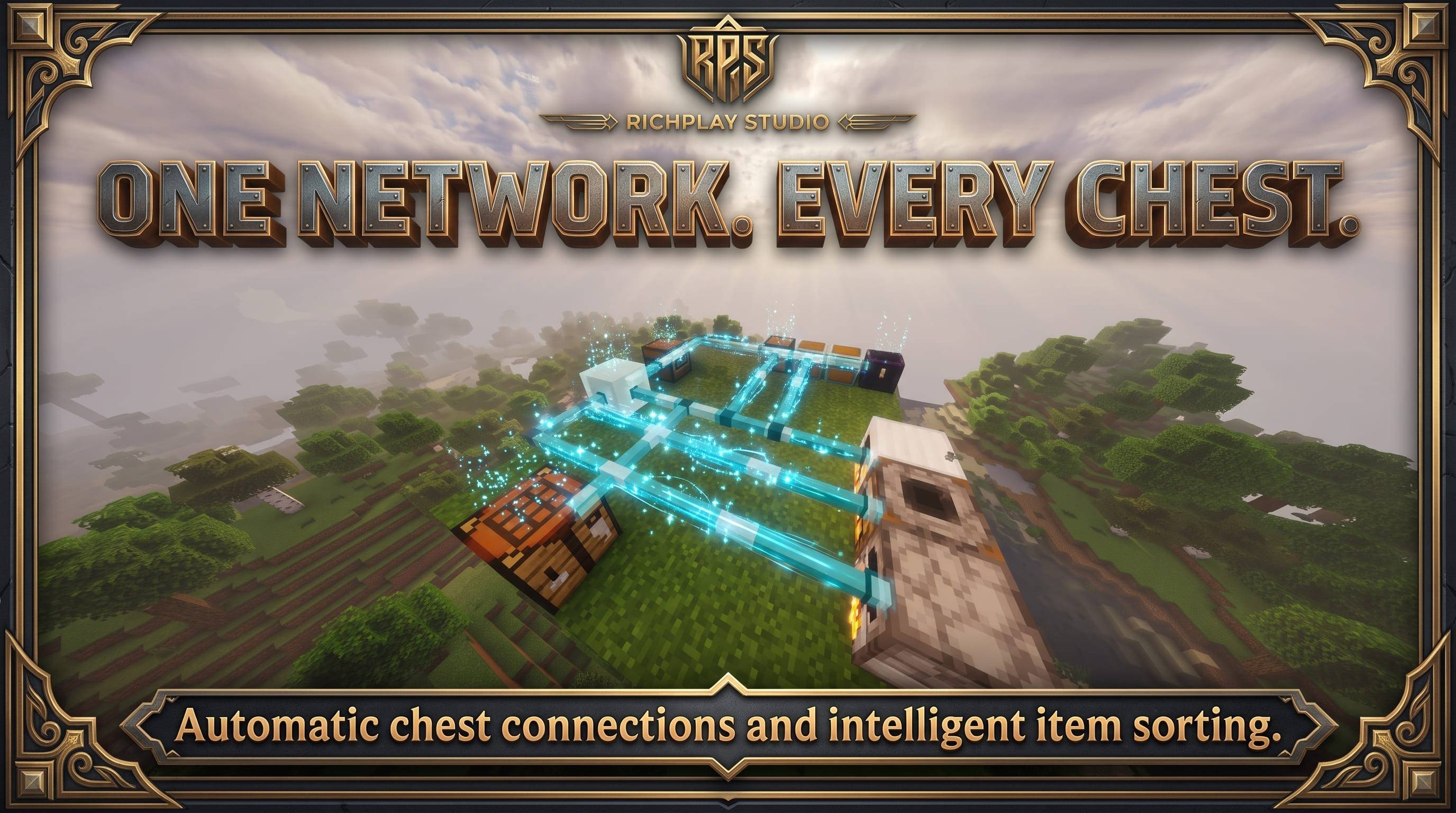
2. Nexus Wand – Wireless Network Connections
Connect your storage and machines without building physical cables.
The Nexus Wand allows you to select a storage network and connect additional blocks to it.
How it works:
-
Right-click a Nexus Chest to select its network.
-
Right-click another supported block to create a connection.
-
Hold the wand to visualize network connections.
-
Shift + Right-click removes an existing connection.
Supported connections include:
-
Vanilla Chests
-
Double Chests
-
Barrels
-
Modded Chests, including Iron Chests
-
Crafting Tables
-
Furnaces
-
Nexus Terminal
Virtual connection lines can pass through walls, making it easy to visualize your entire storage network.
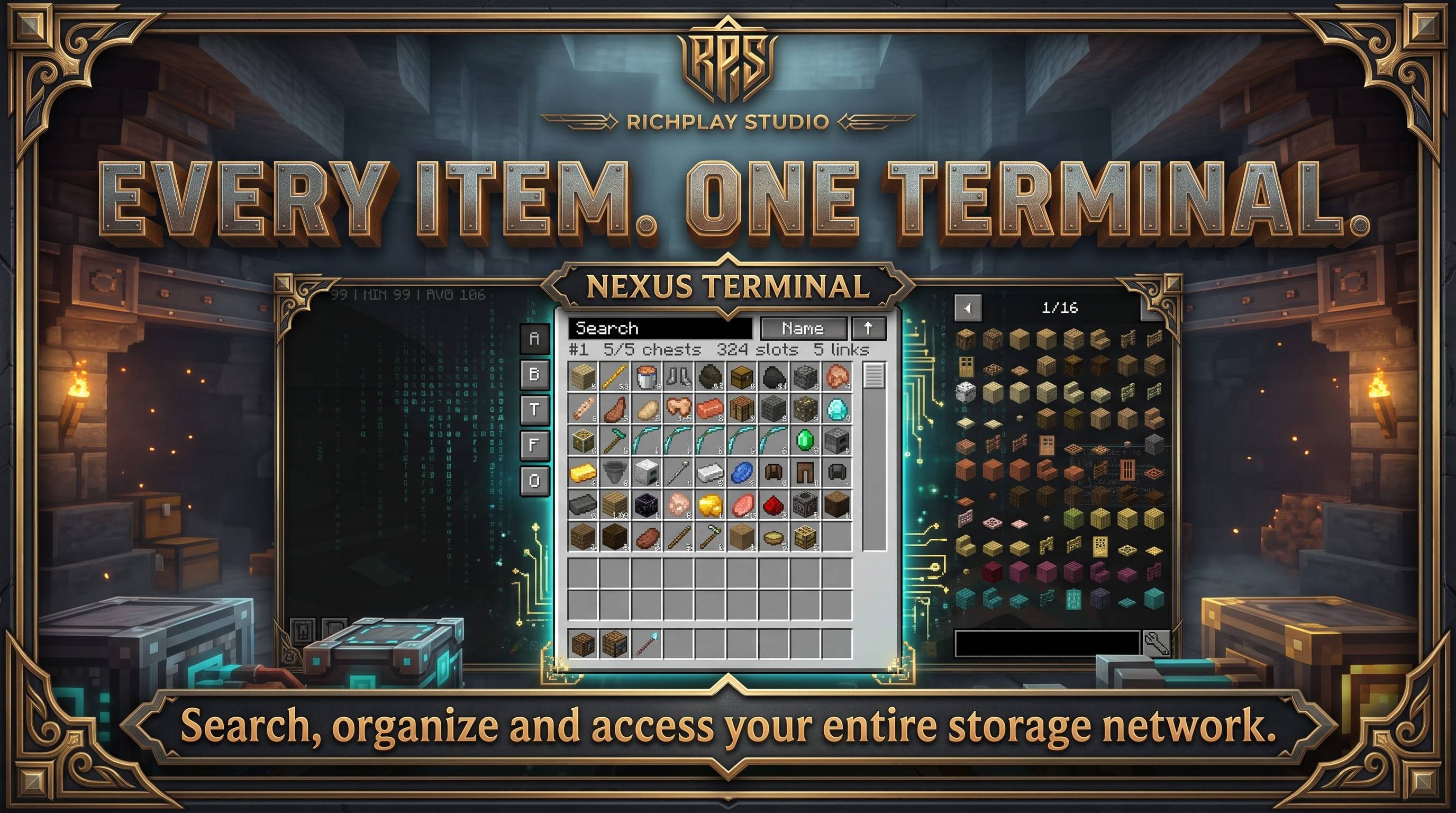
3. Nexus Terminal – Everything in One Place
Access every connected storage inventory from one interface.
The Nexus Terminal combines your network's contents into a single organized inventory.
Features:
-
View all network items in one interface.
-
Search items by name.
-
Search supports Turkish characters.
-
Filter by Blocks, Tools and Armor, Food, and Other.
-
Sort items by name or quantity.
-
Take or deposit items directly through the interface.
Inventory Controls
-
Left Click: Take an entire stack.
-
Right Click: Take one item.
-
Shift + Click: Send the selected stack to your inventory.
-
Double Click: Fill your inventory with the selected item.
-
Click while holding an item: Deposit it into the network.
-
Shift + Click from inventory: Deposit items into storage.
Your resources stay safe. When the network is full, items are not silently deleted.
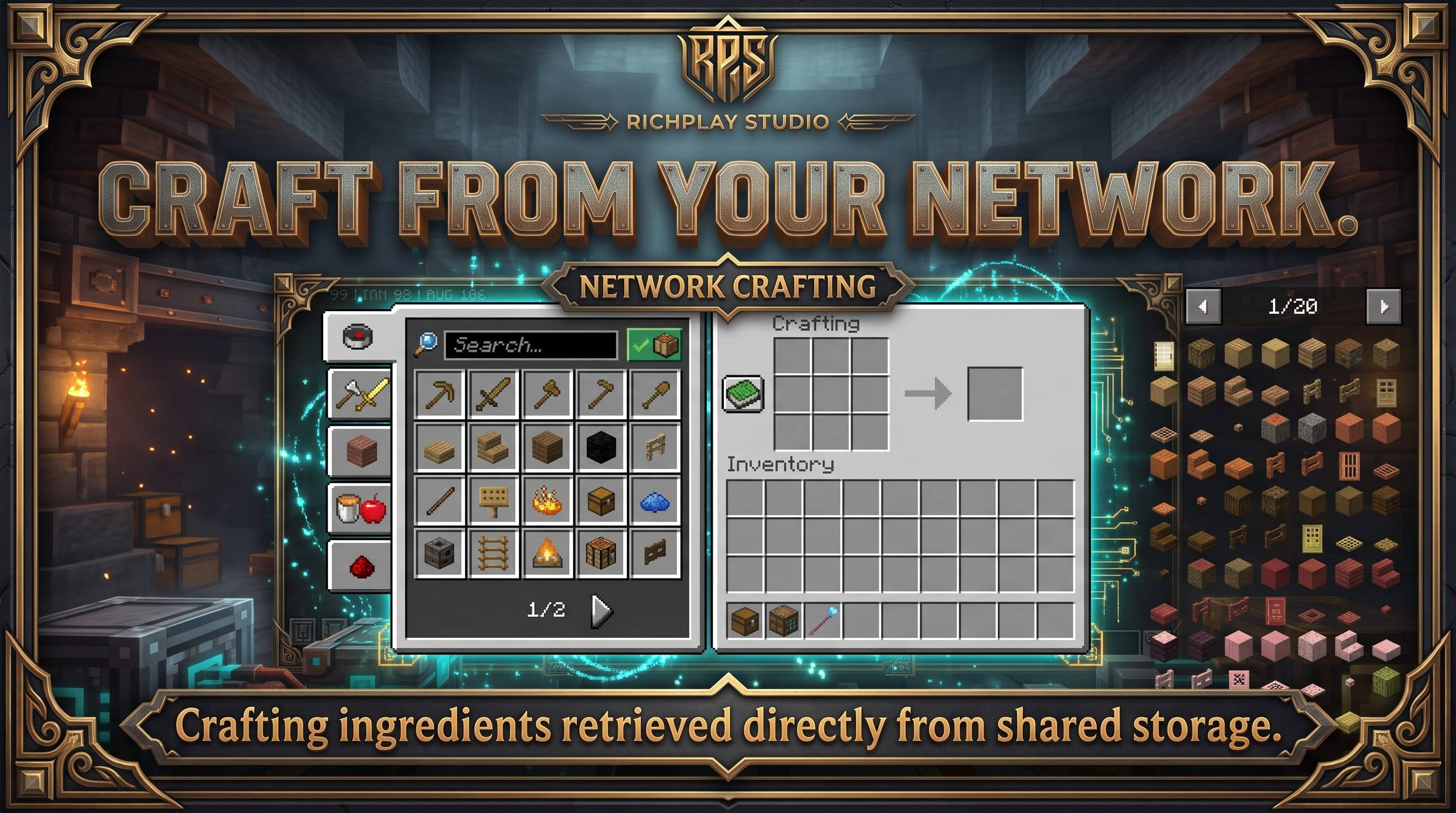
4. Network Crafting – Craft Directly from Storage
Stop searching through multiple chests for crafting ingredients.
Connect a crafting table to your Nexus network and use the shared inventory while crafting.
Features:
-
Opens the familiar vanilla 3x3 crafting interface.
-
Recipe Book can access ingredients from the entire network.
-
Ingredients are taken from your player inventory first, then network storage.
-
Shift + Click fills recipes for bulk crafting.
-
Leftover crafting ingredients return to the network when the interface closes.
JEI Integration
With Just Enough Items installed:
-
The JEI '+' button can retrieve required ingredients from network storage.
-
Shift + '+' transfers the maximum available amount.
Crafting becomes a natural extension of your storage system.
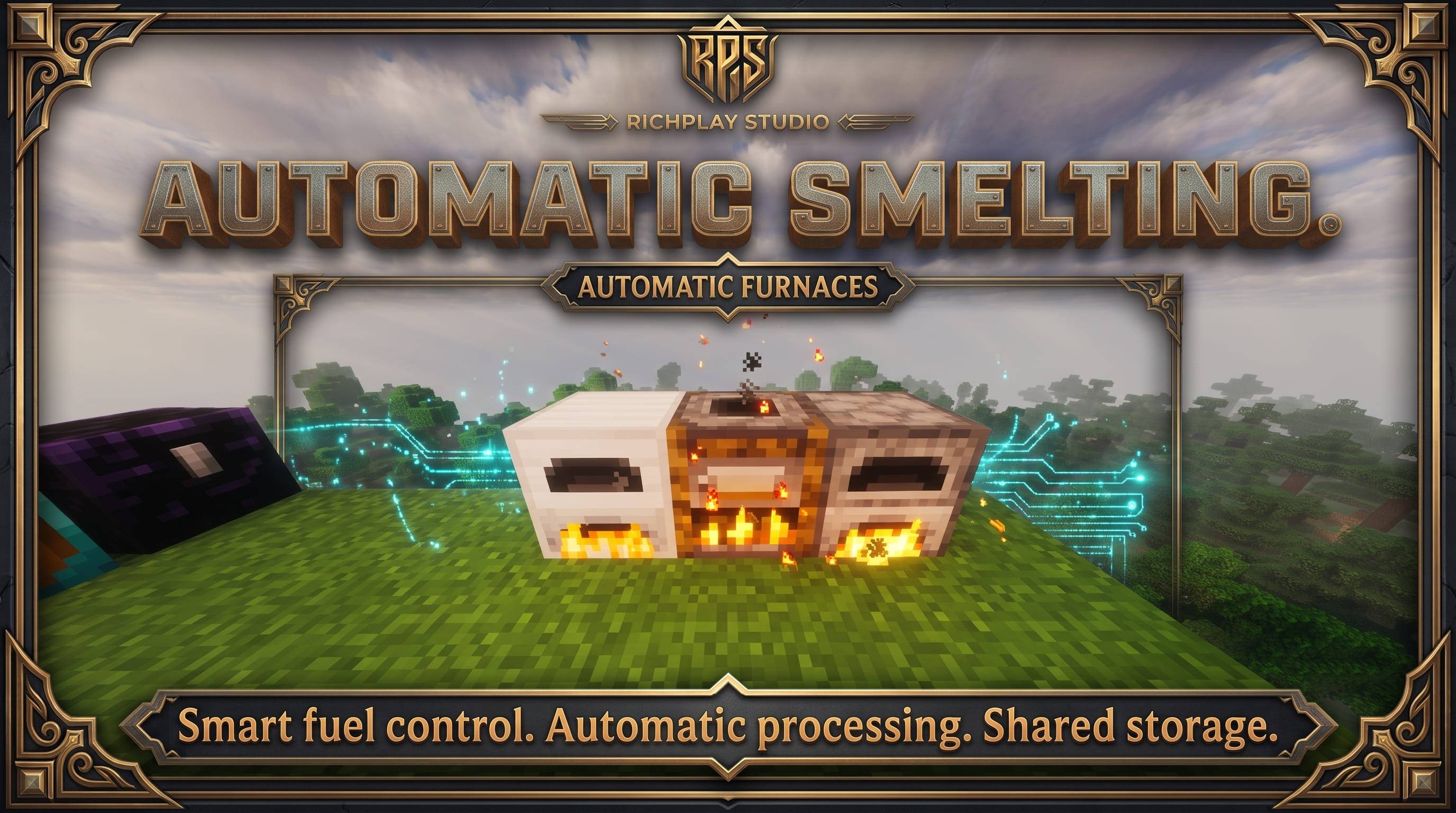
5. Automatic Furnaces – Smart Machine Automation
Connect your furnaces to the Nexus network and automate resource processing.
Supported vanilla machines:
-
Furnace
-
Blast Furnace
-
Smoker
Connected machines automatically:
-
Retrieve suitable items from network storage.
-
Retrieve fuel from network storage.
-
Process items normally.
-
Return finished products to the network.
Individual Fuel Settings
Each furnace has its own fuel configuration panel.
Available fuel options:
-
Coal
-
Charcoal
-
Blaze Rod
-
Dried Kelp
-
Wood
-
Lava
Dried Kelp is enabled by default. Wood and Lava are disabled by default.
Lava buckets are handled automatically, with empty buckets returned to the network.
Smart Processing Protection
Nexus Storage is designed to prevent accidental item loss.
-
Tools, logs, cobblestone, and other unsuitable items are not automatically smelted without an example item in the input slot.
-
Fuel is only consumed when there is something to process.
-
Furnaces stop when the network has no available output space.
-
Items are not deleted when storage is full.
-
Experience remains stored in the furnace as usual.
Configure each furnace individually and let your machines work automatically.
6. Mod Compatibility
Nexus Storage is designed to work with different storage and machine mods.
Current Compatibility
-
Iron Furnaces: Built-in machine profile for version 4.1.8.
-
JEI: Optional integration for network-based ingredient retrieval.
-
Vanilla chests, barrels, crafting tables, and furnaces.
Custom Machine Profiles
Additional supported machines can be configured through datapacks.
Machine profile directory:
data/<namespace>/machine_profiles/<file>.json
Machines with complex internal logic, such as Mekanism, Create, and Tinkers' Construct, are intentionally not supported through automatic processing rather than risking item loss.
7. Multiplayer Support
Nexus Storage is designed for multiplayer environments.
-
Server-safe storage network management.
-
Multiple players can use the same terminal simultaneously.
-
Shared network access.
-
Wand connections respect protected areas, including spawn protection.
Build a shared storage system for your entire team.
RECIPES
Nexus Chest
-
Planks in the crafting recipe.
-
Hopper in the center.
-
Redstone along the bottom.
Nexus Wand
-
Ender Pearl
-
Lapis Lazuli
-
2 Sticks
Nexus Terminal
-
Nexus Chest in the center.
-
Iron Ingots in the corners.
-
Redstone at the top and bottom.
-
Glass along the sides.
All recipes are available in JEI and the vanilla Recipe Book.
CONFIGURATION
Server / Common Configuration:
config/nexusstorage-common.toml
Available settings:
-
maxChestsPerNetwork– Maximum connected Nexus Chests (default: 256). -
autoConnect– Automatically connect nearby Nexus Chests (default: true). -
sixWayConnect– Enable connections in all six directions (default: true). -
autoMachines– Enable automatic machine processing (default: true).
Client Configuration:
-
showPipes -
alwaysShowPipes -
pipeParticles
Customize your network visualization and machine automation.
INSTALLATION
-
Install Minecraft 1.20.1.
-
Install Minecraft Forge 47.4.0 or newer.
-
Make sure Java 17 is available.
-
Install Nexus Storage into your
modsfolder. -
Install the mod on both the client and server.
-
Launch Minecraft and start building your network.
JEI and Iron Furnaces are optional integrations.
CURRENT DEVELOPMENT STATUS
Nexus Storage 0.9.0 is an early beta release.
Please keep in mind:
-
Bugs and unexpected behavior may occur.
-
Mod compatibility is still being expanded.
-
Machine integrations may have limitations.
-
Features and mechanics may change in future updates.
Please back up your Minecraft worlds before using the beta version.
Bug reports, suggestions, and compatibility feedback are welcome.
ABOUT RICHPLAY STUDIO
Nexus Storage is developed by RichPlay Studio.
Our goal is to create practical Minecraft systems that improve gameplay through thoughtful automation, intelligent interfaces, and seamless integration.
Organize your world. Connect your storage. Let Nexus do the work.
TÜRKÇE AÇIKLAMA
Nexus Storage – Kablosuz Depolama Ağı
Tek Ağ. Bütün Eşyaların. Kablo Yok.
Minecraft dünyandaki bütün sandıkların tek bir akıllı depolama sistemi gibi çalışabilseydi?
Nexus Storage, sıradan sandıkları birbirine bağlı tek bir depolama ağına dönüştürür. Eşyalarını otomatik olarak düzenle, bütün depolarına tek terminalden eriş, ortak depolama sisteminden crafting yap ve fırınlarını otomatikleştir.
Karmaşık kablolar yok. Enerji ihtiyacı yok. Pahalı geliştirme aşamaları yok.
Depolama ağını kur, makinelerini bağla ve organizasyonu Nexus Storage'a bırak.
ÖNE ÇIKAN ÖZELLİKLER
1. Nexus Sandığı – Depolama Ağının Merkezi
Sıradan depolarını akıllı bir ağa dönüştür.
-
Vanilla sandık gibi 27 slot envanter.
-
Hopper ve comparator desteği.
-
Birbirine temas eden Nexus Sandıkları otomatik bağlanır.
-
Yatay ve dikey bağlantı desteği.
-
İki ağ arasına yerleştirilen sandık ağları birleştirir.
-
Bağlantı sandığı kırıldığında ağlar ayrılır.
Akıllı Otomatik Sıralama
Nexus Sandığına bırakılan eşyalar bağlı depolara otomatik dağıtılır.
-
Aynı tür eşyalar aynı sandıkta tutulur.
-
Yeni eşya türleri için boş sandıklar kullanılabilir.
-
Karışık sandıklar zamanla düzenlenir.
-
Tahta, taş, maden ve diğer kaynaklar kendi türlerine göre organize edilir.
2. Nexus Asası – Kablosuz Bağlantılar
Depolarını ve makinelerini fiziksel kablolara ihtiyaç duymadan bağla.
-
Nexus Sandığına sağ tıklayarak ağını seç.
-
Bağlamak istediğin bloğa sağ tıkla.
-
Asa elindeyken sanal bağlantı çizgilerini görüntüle.
-
Shift + Sağ Tık ile mevcut bağlantıyı kaldır.
Desteklenen bloklar:
-
Vanilla sandıklar ve çift sandıklar.
-
Variller.
-
Iron Chests gibi modlu sandıklar.
-
Crafting masaları.
-
Fırınlar.
-
Nexus Terminali.
Sanal bağlantı çizgileri duvarların içinden geçebilir.
3. Nexus Terminali – Her Şey Tek Ekranda
Ağındaki bütün eşyaları tek arayüzden yönet.
-
Tüm ağdaki eşyaları birleştirilmiş şekilde görüntüle.
-
İsimle arama yap.
-
Türkçe karakter desteği.
-
Bloklar, Aletler ve Zırhlar, Yiyecekler ve Diğer kategorileri.
-
İsme veya miktara göre sıralama.
-
Hızlı eşya alma ve depolama.
Kontroller
-
Sol Tık: Bir stack al.
-
Sağ Tık: Bir adet al.
-
Shift + Tık: Stack'i envanterine aktar.
-
Çift Tık: Envanterini seçilen eşya ile doldur.
-
Elinde eşya varken tıkla: Depolama ağına bırak.
-
Envanterinden Shift + Tık: Depolama ağına aktar.
Depolama alanı dolduğunda eşyaların kaybolmaz.
4. Ağdan Crafting
Crafting malzemelerini bulmak için sandıkları tek tek aramayı bırak.
Bağlı crafting masası sayesinde tarif kitabı bütün depolama ağını kullanabilir.
-
Normal 3x3 crafting ekranı.
-
Tarif kitabı bütün ağdaki malzemeleri görebilir.
-
Önce oyuncu envanteri, ardından ağdaki depolar kullanılır.
-
Shift + Tık ile toplu crafting.
-
Kullanılmayan malzemeler ekran kapatıldığında ağa geri döner.
JEI Desteği
JEI yüklüyse:
-
'+' düğmesi ağdaki malzemeleri de kullanabilir.
-
Shift + '+' ile mümkün olan maksimum miktar aktarılabilir.
5. Otomatik Fırınlar
Fırınlarını depolama ağına bağla ve kaynak işleme işlemlerini otomatikleştir.
Desteklenen vanilla makineler:
-
Fırın
-
Yüksek Fırın
-
Tütsülük
Bağlı makineler otomatik olarak:
-
İşlenecek eşyaları ağdan alır.
-
Yakıtı ağdan temin eder.
-
İşlemi gerçekleştirir.
-
Sonuçları tekrar depolama ağına gönderir.
Yakıt Ayar Paneli
Her fırının kendine ait yakıt ayarları bulunur.
Desteklenen yakıtlar:
-
Kömür
-
Odun Kömürü
-
Blaze Çubuğu
-
Kurutulmuş Yosun
-
Tahta
-
Lav
Kurutulmuş yosun varsayılan olarak açık, tahta ve lav kapalıdır.
Lav kovaları kullanıldığında boş kovalar depolama ağına geri gönderilir.
Güvenli İşleme Sistemi
-
Uygun olmayan eşyalar örnek eşya olmadan otomatik işlenmez.
-
İşlenecek eşya bulunmadan yakıt tüketilmez.
-
Depolama ağı dolduğunda fırın durur.
-
Eşyalar silinmez.
-
Deneyim fırında normal şekilde saklanır.
6. Mod Uyumluluğu
-
Iron Furnaces 4.1.8 için hazır makine profili.
-
JEI entegrasyonu.
-
Vanilla sandıklar, variller ve makineler.
-
Datapack üzerinden yeni makine profilleri ekleme desteği.
Mekanism, Create ve Tinkers' Construct gibi karmaşık makine sistemleri, eşya kaybını önlemek amacıyla otomatik işleme kapsamına alınmamıştır.
7. Çok Oyunculu Destek
-
Sunucu uyumlu ağ yönetimi.
-
Birden fazla oyuncunun aynı terminali kullanabilmesi.
-
Paylaşımlı depolama sistemi.
-
Koruma alanlarına saygılı Nexus Asası bağlantıları.
TARİFLER
Nexus Sandığı: Tahta, Hopper ve Redstone.
Nexus Asası: Ender Pearl, Lapis Lazuli ve 2 Stick.
Nexus Terminali: Ortada Nexus Sandığı, köşelerde demir külçeleri, üst ve altta Redstone, yanlarda cam.
Tarifler JEI ve vanilla Tarif Kitabı üzerinden görüntülenebilir.
AYARLAR
config/nexusstorage-common.toml
-
maxChestsPerNetwork: Varsayılan 256. -
autoConnect: Otomatik bağlantı. -
sixWayConnect: Altı yönlü bağlantı. -
autoMachines: Otomatik makine işleme.
İstemci ayarları:
-
showPipes -
alwaysShowPipes -
pipeParticles
GELİŞTİRME DURUMU
Nexus Storage 0.9.0 erken beta sürümüdür.
Hatalar, uyumluluk sorunları ve beklenmeyen davranışlar oluşabilir. Yeni makine destekleri ve geliştirmeler sonraki sürümlerde genişletilecektir.
Beta sürümünü kullanmadan önce dünyanızın yedeğini almanızı öneriyoruz.
RICHPLAY STUDIO HAKKINDA
Nexus Storage, RichPlay Studio tarafından geliştirilmektedir.
Amacımız Minecraft deneyimini akıllı otomasyonlar, kullanışlı arayüzler ve farklı modlarla uyumlu sistemlerle geliştirmektir.
Dünyanı düzenle. Depolarını birleştir. İşleri Nexus'a bırak.
Nexus Storage: Wireless Storage Network Team