Music Player Reborn · 音乐机重生
- By
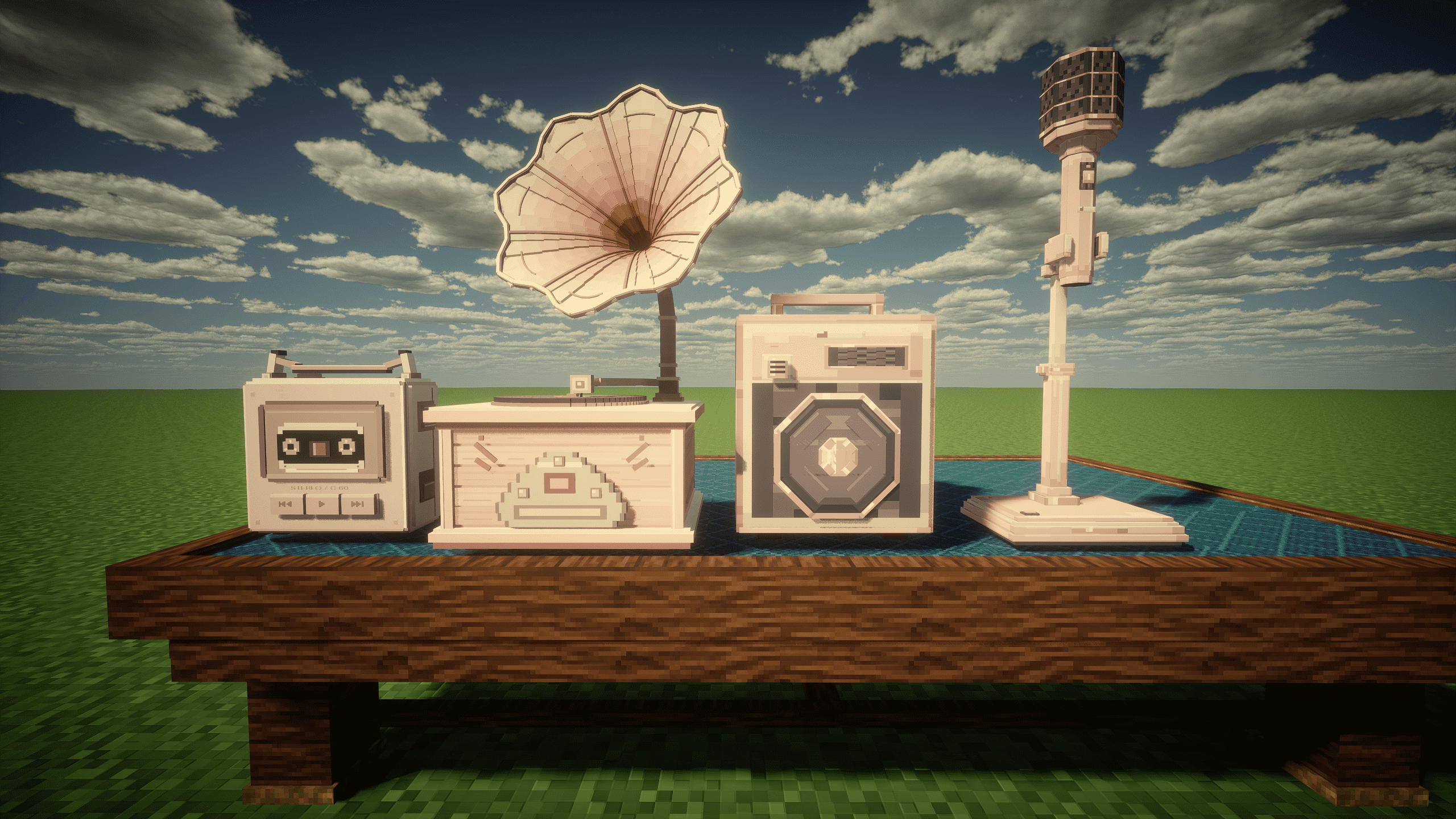
Bring music into your Minecraft home, take your favorite tracks on an adventure, or set up a karaoke corner with friends. Music Player Reborn adds pink-and-cream music devices, private listening, earphone sharing, and an animated lyrics HUD.
2026-09-28_11.43.47.png
2026-09-28_11.43.57.png
2026-09-28_11.44.07.png
2026-09-28_11.44.13.png
Description
Music Player Reborn · 音乐机重生
By niumadadi520 | Forge 1.20.1 & NeoForge 1.21.1
English
Bring music into your Minecraft home, take your favorite tracks on an adventure, or set up a karaoke corner with friends. Music Player Reborn adds pink-and-cream music devices, private listening, earphone sharing, and an animated lyrics HUD.
Music wherever you go
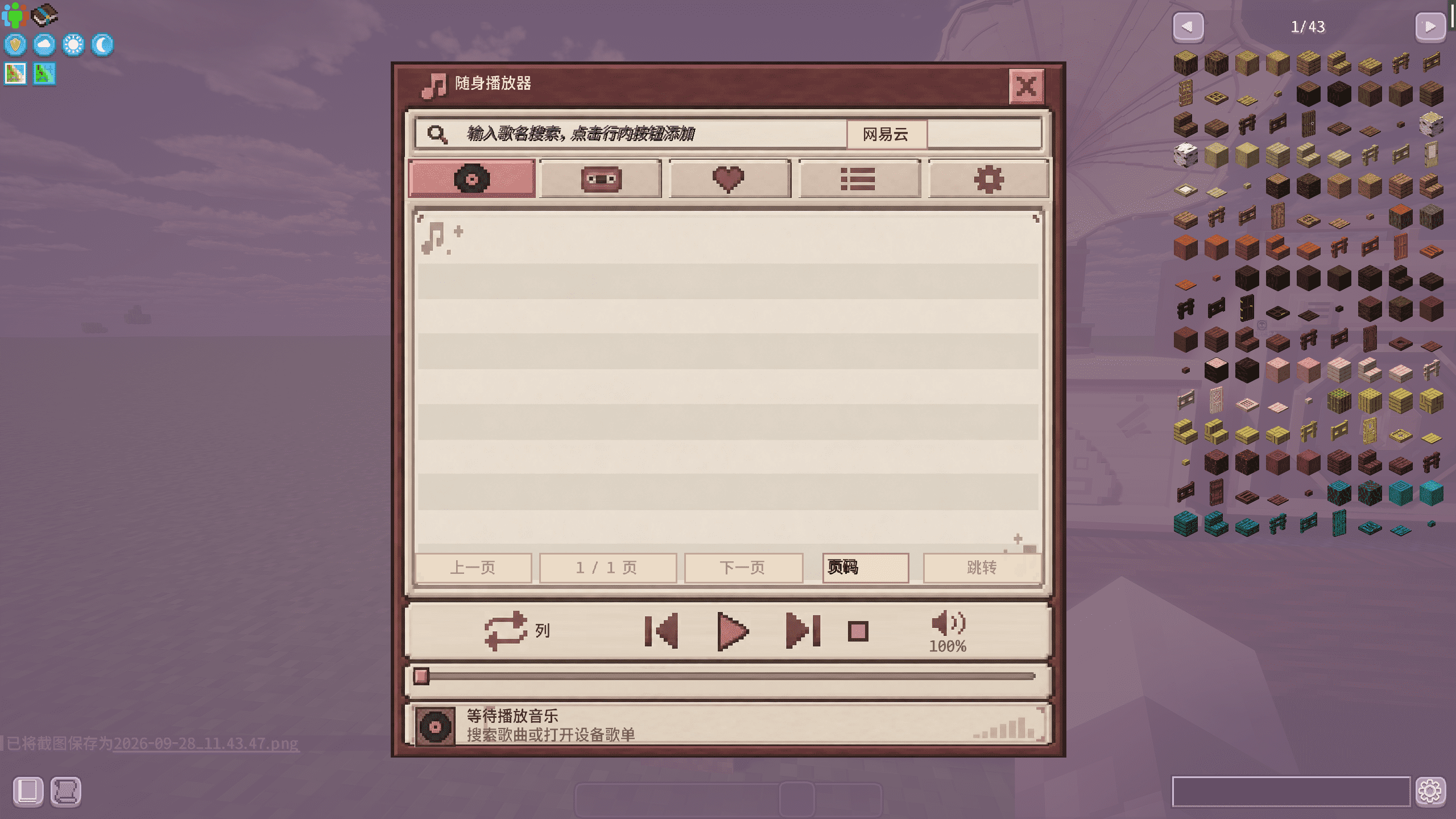
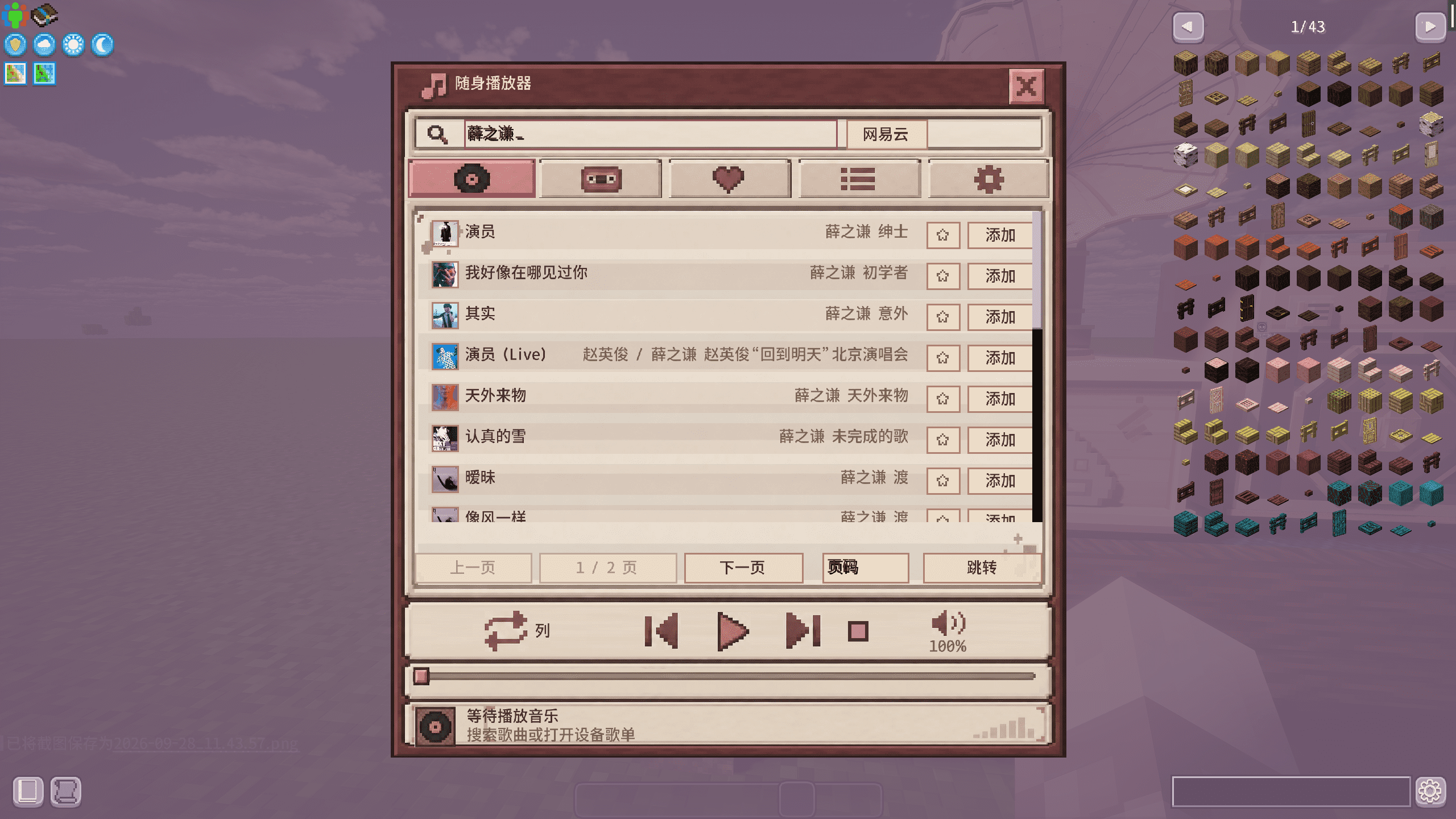
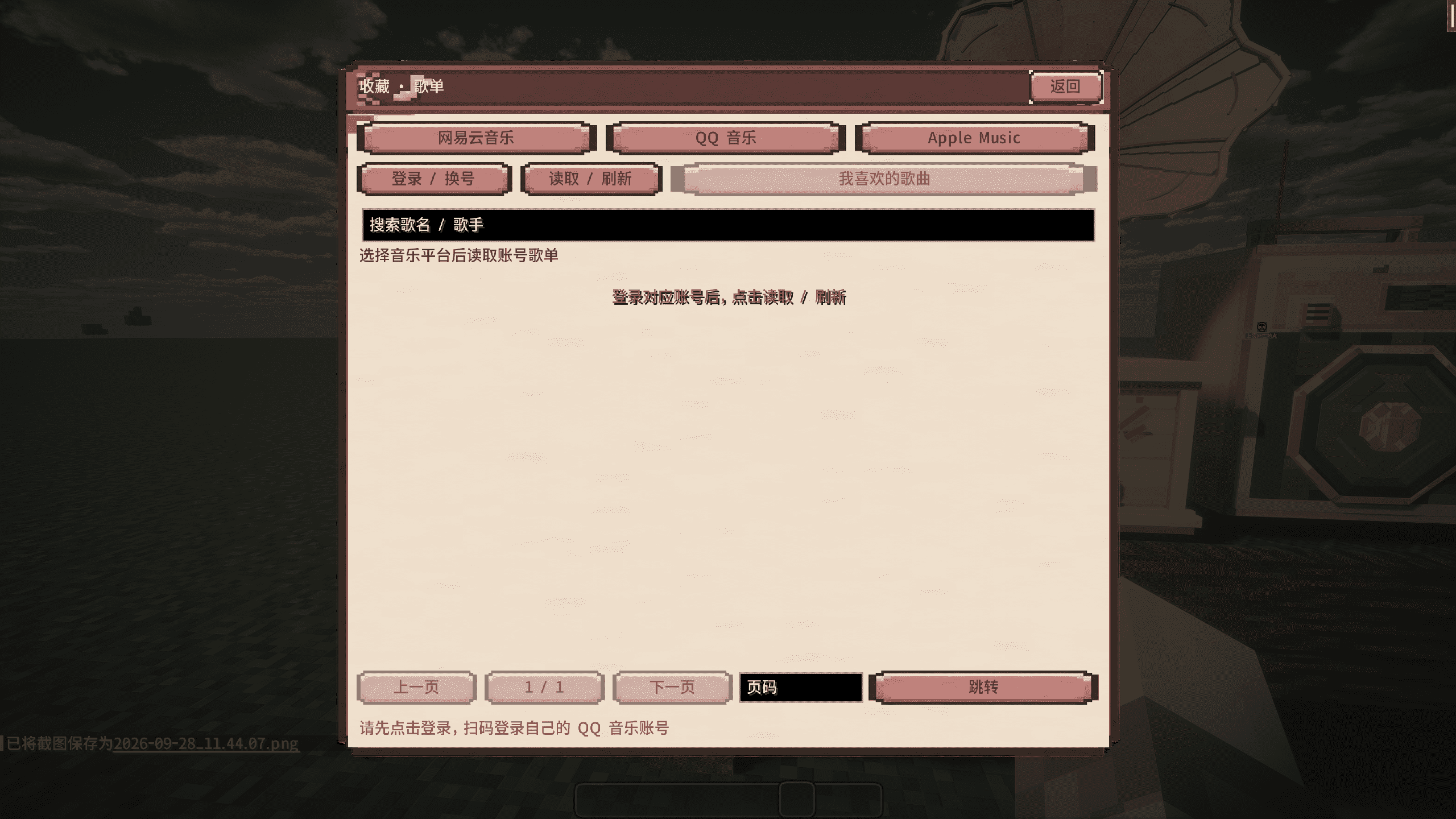
Place a gramophone in your base or carry a portable music player. Search for songs, manage device playlists and favorites, pause playback, change tracks, and seek through a song. Lists display up to 20 tracks per page, with page buttons and direct page navigation.
Devices feature models and playback animations. A placed portable player also has physical controls: Shift + right-click its buttons to change tracks or pause, or right-click normally to open its interface.
Account playlists
Sign in to QQ Music or NetEase Cloud Music using a QR code to access your liked songs. Music, lyrics, artwork, and account playlists depend on the respective services and your account permissions. Availability may vary by region, network conditions, and platform changes; signing in does not bypass paid access restrictions.
Listen privately or share with a friend
The portable player's earphone menu provides slots for wired earphones and separate left/right Bluetooth earbuds. Right-click the Bluetooth case to play its opening animation and access the earbuds.
Hold your player, aim at a friend, and hold the middle mouse button to invite them to share an earphone. Sharing begins only after they accept; other players cannot hear that device's private audio.
- Wired sharing: up to 4 blocks, with a visible cable.
- Bluetooth sharing: up to 32 blocks.
- Distance warnings appear near the limit, and sharing disconnects beyond it.
Build a karaoke corner
Use a placeable vintage microphone, a handheld microphone, a microphone stand, and speakers. Each microphone has its own connection code. Enter codes into a speaker to connect multiple microphones, then adjust each speaker's volume independently.
Shift + right-click a microphone to open its settings. Handheld microphones can be mounted on stands but cannot be placed directly on the ground.
Karaoke voice transmission requires Simple Voice Chat. Ordinary music playback does not.
Lyrics, themes, and listening rankings
- An upper-left HUD shows track information, artwork, progress, and two lines of lyrics with animated transitions.
- Press F6 to choose which HUD elements to display.
- Switch between multiple pixel-art menu themes.
- World/server rankings track song play counts and player listening time. Paused playback is excluded, and simultaneous devices do not multiply a player's listening time.
【Image slot 3 / 图片位置 3:插入播放器界面或歌词 HUD 截图,随后删除此提示。】
Installation
- Minecraft 1.20.1: Forge, Java 17, and matching GeckoLib 4.x.
- Minecraft 1.21.1: NeoForge, Java 21, and matching GeckoLib 4.x.
Install the matching mod JAR and required dependencies in your mods folder. In multiplayer, install the same branch and required dependencies on clients and the server. Forge and NeoForge files are not interchangeable.
Optional integrations
- Sophisticated Backpacks / Sophisticated Core: portable player upgrade, animated backpack attachment, player access, and HUD support.
- Curios: earphones in supported accessory slots.
- Simple Voice Chat: karaoke voice transmission.
- Touhou Little Maid: maid-related device integration.
- Jade: device information tooltips.
- Cloth Config: configuration screen support.
Install optional integrations and their dependencies only for the features you want, using compatible game and loader versions.
Quick controls
- Right-click a music player: open its interface.
- Shift + right-click a placed portable player's button: previous/next track or pause.
- Earphone button in the player interface: manage earphones.
- Hold the middle mouse button while holding a player and aiming at a friend: send a sharing invitation.
- Shift + right-click a microphone: open microphone settings.
- F6: configure the lyrics HUD.
Credits and notices
GeckoLib provides model and animation support; ZXing generates NetEase login QR codes; the bundled audio libraries provide format support. Optional integrations indicate compatibility, not authorship of this mod.
Historical sources, replaced implementations, third-party credits, and authorization limitations are documented in THIRD-PARTY-NOTICES.txt in the source distribution. Code, assets, and dependencies have different licenses; see LICENSE.md. Some interface artwork and icons use generative-tool assistance.
This project is not affiliated with or endorsed by QQ Music or NetEase Cloud Music, and does not grant rights to music or paid content.
简体中文
在小屋里放一台唱片机,带着随身听出门探索,或者和朋友搭建一个 K 歌角落。音乐机重生围绕音乐播放与多人分享,加入粉色、奶油色的音乐设备,以及耳机私听、双行歌词和多主题界面。
唱片机与随身听
唱片机可以放在建筑里播放音乐,随身听可以手持使用或放置。界面提供歌曲搜索、设备歌单、收藏、暂停、切歌和进度控制。歌曲列表每页最多显示 20 首,支持上下页和指定页码跳转。
设备配有模型与播放动画。放置的随身听支持实体按钮操作:Shift + 右键对应按钮可切歌或暂停,普通右键打开界面。
账号歌单
支持 QQ 音乐和网易云音乐扫码登录,登录对应账号后可以读取喜欢的歌曲。
歌曲、歌词、封面和账号歌单依赖平台服务与账号权限,可能受到地区、网络或接口变化影响;登录不会解除付费限制。
耳机私听与双人共享
随身听的耳机界面提供有线耳机、蓝牙左耳和蓝牙右耳三个槽位。蓝牙耳机盒右键后先播放开盒动画,再打开取放界面。
手持随身听对准朋友,按住鼠标中键发起共享邀请。对方同意后,两人共同收听,其他玩家不会听到该设备的私听音频。
- 有线共享范围为 4 格,并显示连接线。
- 蓝牙共享范围为 32 格。
- 接近距离上限时提示,超出范围后断开共享。
K 歌与音响
模组提供可放置的老式麦克风、手持麦克风、麦克风架和音响。每个麦克风拥有独立连接码,音响可连接多个麦克风,并单独调整音量。
Shift + 右键麦克风打开设置。手持麦克风可安装到架子上,不能直接放在地面。
K 歌语音传输需要 Simple Voice Chat;普通听歌不需要该语音模组。
歌词、主题与排行榜
左上角 HUD 可显示歌曲信息、封面、播放进度和双行歌词,并带有歌词切换动画。按 F6 可调整各部分的显示,菜单支持多套像素风主题切换。
听歌排行榜按当前存档或服务器统计歌曲播放次数与玩家听歌时长。暂停不累计时长,同时收听多个设备不会重复累计同一玩家的时间。
安装要求
- Minecraft 1.20.1:Forge、Java 17、对应版本的 GeckoLib 4.x。
- Minecraft 1.21.1:NeoForge、Java 21、对应版本的 GeckoLib 4.x。
将对应版本的完整模组 JAR 与必需前置放入 mods 文件夹。多人游戏客户端与服务端应安装相同分支及必需前置,两个加载器的文件不能混用。
可选联动
- 精妙背包及其前置:随身听插件、背包挂件动画、播放器入口与 HUD 支持。
- Curios:耳机饰品槽支持。
- Simple Voice Chat:K 歌语音传输。
- 车万女仆:女仆相关设备联动。
- Jade:设备信息提示。
- Cloth Config:配置界面支持。
按需安装对应游戏版本与加载器的联动模组及其前置即可。
常用操作
- 普通右键播放器:打开界面。
- Shift + 右键放置随身听的实体按钮:上一首、下一首或暂停。
- 随身听界面的耳机按钮:管理耳机。
- 手持随身听对准玩家并按住鼠标中键:发送共享邀请。
- Shift + 右键麦克风:打开麦克风设置。
- F6:调整歌词 HUD。
致谢与声明
GeckoLib 提供模型与动画支持,ZXing 用于生成网易云登录二维码,内置音频库提供格式支持。可选联动表示兼容关系,不表示对应模组作者为本项目编写了代码。
历史来源、已替换实现、第三方贡献与授权状态见源码中的 THIRD-PARTY-NOTICES.txt,代码、资源和依赖的许可见 LICENSE.md。部分界面与图标使用生成式工具辅助制作。
本项目与 QQ 音乐、网易云音乐无官方隶属或背书关系,不提供音乐版权或付费内容权限。
Music Player Reborn · 音乐机重生 Team