MultiCrosshair
- By
Add as many crosshairs as you like and break, place, attack and throw with all of them at once.
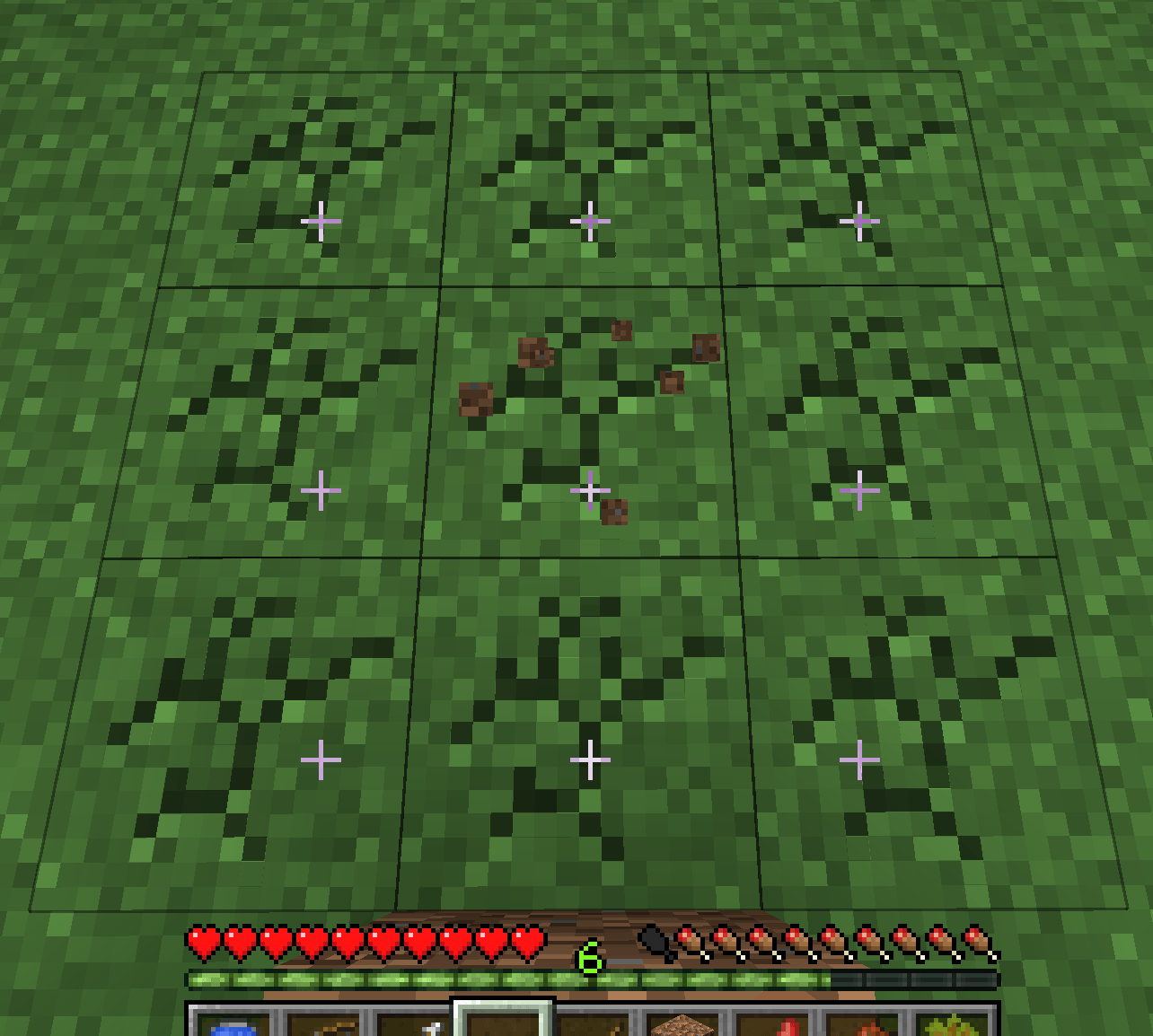
ã¹ã¯ãªã¼ã³ã·ã§ãã 2026-07-28 161404.png
Description
MultiCrosshair
Nothing says you only get one crosshair.
MultiCrosshair multiplies the crosshair on your screen and lets you break, place, attack and throw with every one of them at the same time. Dig a clean 3×3 tunnel, tile a wall in a single click, or ring your screen with eight crosshairs and throw a wall of snowballs — all of it is a couple of minutes in the settings screen.
Features
As many crosshairs as you want
Four layouts, each adjustable down to the pixel.
- Grid — rows and columns. Single rows and columns are just a 1-wide grid
- Ring — a circle around the center, with your choice of count and radius
- Block face — laid out in block units along the face you are looking at, so the crosshairs always land on neighbouring blocks no matter how far away you stand. The cleanest way to carve an exact 3×3
- Free — click anywhere in the settings screen to drop a crosshair, drag to move it, right click to remove it
Break together
- Survival — every targeted block is mined at the same time, but independently. Progress uses the same formula as vanilla, so each block breaks at the speed its own hardness and your tool dictate (dirt goes before stone). Crack overlays show each block's own progress
- Creative — every targeted block breaks instantly
- Drops, experience and tool durability are handled by vanilla, so your tool wears down once per block broken
Place together
Extra blocks are placed at the exact same moment and on the same input as the vanilla placement at the center crosshair, consuming as many items as you have. Items that never run out — a creative water bucket, for instance — pour from every crosshair at once.
Attack together
Any crosshair can hit a mob. Each one carries its own independent attack cooldown, with the vanilla attack indicator (the bar under the crosshair and the mark shown on a mob) drawn per crosshair.
- You can swing before the cooldown fills, for reduced damage — exactly like vanilla clicking fast
- If several crosshairs sit on the same mob, it takes that many hits
- Damage, criticals, sweeping, knockback and durability all run through vanilla's own attack code
Throw together
Snowballs, eggs, ender pearls, splash potions, bottles o' enchanting and the like are thrown from every crosshair, each along its own direction — and consume that many items.
Bows are supported too. Release the string and one arrow flies per crosshair, all at the draw strength you charged (and yes, that many arrows are consumed).
Looks exactly like vanilla
The added crosshairs use the same texture and the same blending as the vanilla one. Targeted blocks get the same black outline as vanilla's block selection, following the real block shape (stairs and slabs included). Nothing about the look was reinvented.
A settings screen you can use while playing
The settings screen does not dim the background and does not pause the game. Change the count or the spacing and the real crosshairs move behind the screen as you do it — there is no separate preview.
- +/- buttons move by one pixel, hold Shift for ten
- Arrow keys nudge the position by one pixel as well
- Break / place / attack / throw can each be switched on and off independently
How to use
| Key (default) | Action |
|---|---|
N |
Open the settings screen (also from "Config" in the Mods list) |
B |
Toggle the mod on and off |
] |
More crosshairs |
[ |
Fewer crosshairs |
All keys can be rebound under Options → Controls.
Thoughtful details
- What you see is what you hit. Targeting uses the field of view actually being rendered, so nothing drifts when you change your FOV or sprint
- Works in third person, though the crosshairs themselves are only drawn in first person, matching vanilla. The block outlines still show you what is targeted
- Disabled in spectator mode
- The packets sent are the vanilla ones. Placing blocks and breaking in creative are indistinguishable from normal play on the server side
- Settings live in
config/multicrosshair/settings.json, a single file you can copy between instances - Available in English and Japanese
Compatibility
- In singleplayer this mod alone does everything — the integrated server loads it automatically
- Placing blocks and breaking in creative are client-side only and work on any server
- Survival multi-breaking, multi-attacking and multi-throwing need the mod on the server. This is a Minecraft limitation: the server tracks only one mined block and one attack charge per player. Install it server-side to use these in multiplayer
- You can still join servers without the mod. Survival breaking falls back to mining each targeted block in turn, and multi-attack/multi-throw switch off
A note
Some multiplayer servers treat breaking or placing several blocks in one action as cheating, and anti-cheat plugins may flag it. Check the rules of your server before using it.
Video referenced
The MultiCrosshair Team