Mod Doctor
A lightweight developer tool that scans Minecraft mods for missing, broken, or suspicious registrations, assets, recipes, tags, and data files.
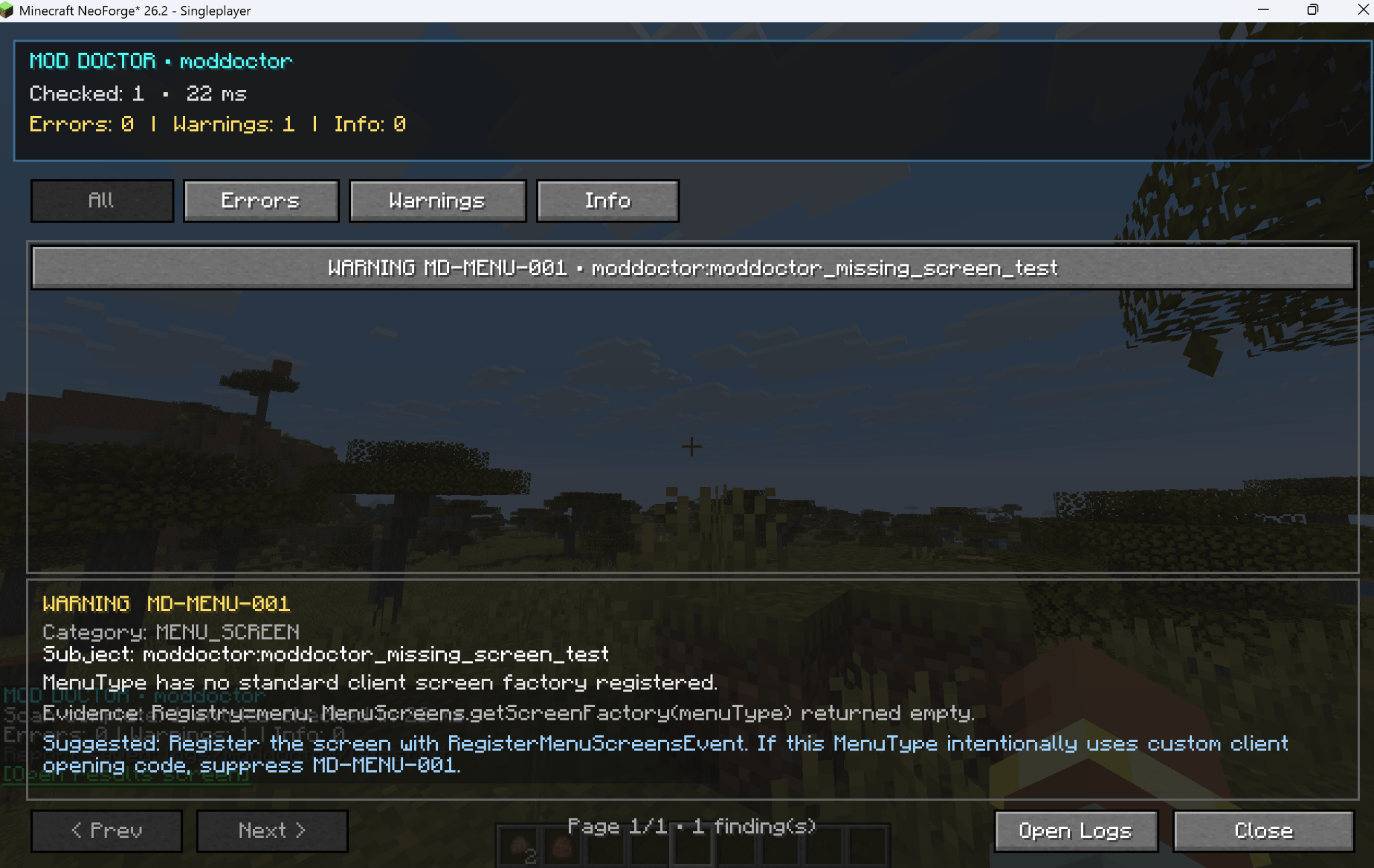
The Mod Doctor results screen in action — showing a detected warning with its rule ID, evidence, severity, and suggested fix.

A full modpack scan completed successfully — 10,152 entries checked across 4 mods, with a generated report ready for review.
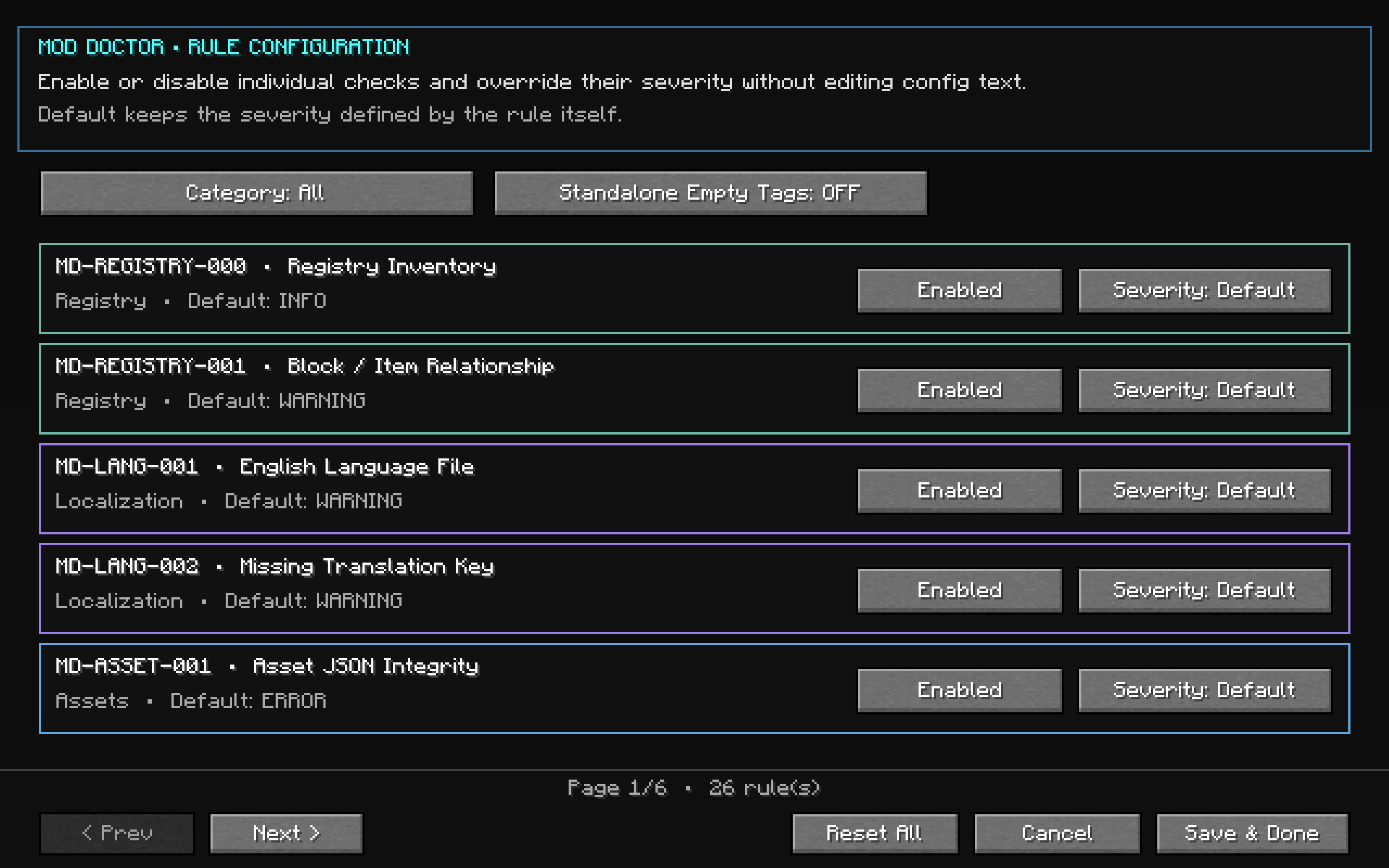
Customize Mod Doctor's diagnostic rules directly in-game — enable or disable individual checks, change severity levels, filter by category, and save your preferred configuration.
Description
🩺 Mod Doctor
Ever had a mod that builds perfectly... but something still feels wrong?
Mod Doctor is a lightweight developer utility for NeoForge 26.2 that helps you find missing, broken, inconsistent, or suspicious registrations and resources before they turn into harder-to-debug problems.
Instead of digging through logs, checking dozens of JSON files manually, or wondering why something silently refuses to work, you can let Mod Doctor take a look. 🔍
✨ What can Mod Doctor check?
🔹 Registries
Detect suspicious registrations, namespace inconsistencies, missing relationships, and other registration problems.
🔹 Assets
Check blockstates, models, item models, textures, and resource references for missing or suspicious paths.
🔹 Localization
Find missing or suspicious translation keys.
🔹 Loot Tables
Detect blocks with missing or potentially incorrect loot table relationships.
🔹 Recipes
Inspect recipes for unresolved ingredients, invalid results, empty ingredient groups, and other suspicious data.
🔹 Tags
Check empty tags, unresolved entries, required references, and suspicious tag structures.
🔹 Developer Diagnostics
Every finding is classified as:
❌ ERROR — Something is very likely broken.
⚠️ WARNING — Something looks suspicious and may need attention.
ℹ️ INFO — Useful information that may help during development.
🚀 Quick Start
Run:
/moddoctor scan <modid>
Example:
/moddoctor scan mymod
Mod Doctor will scan the selected mod and show the results in-game.
🧰 Developer-Friendly Features
✔ In-game scan results
✔ ERROR / WARNING / INFO severity levels
✔ Unique rule IDs for easier debugging
✔ JSON report export
✔ Rules can be disabled when needed
✔ Mod-specific scanning
✔ Designed to reduce false positives
✔ Lightweight when not actively scanning
✔ Read-only diagnostics — Mod Doctor does not modify your world or your mod
⚠️ A small note about warnings
A WARNING does not always mean your mod is broken.
Minecraft and NeoForge mods can intentionally use unusual setups, so Mod Doctor tries to explain why something looks suspicious instead of simply declaring everything an error.
The goal is to help you investigate problems — not create more of them. 🙂
⚡ Lightweight by Design
Mod Doctor does not continuously scan your game in the background.
Scans are performed when you request them, keeping the mod lightweight when you're not using it.
🧪 Built for Mod Developers
Mod Doctor is a development and diagnostic tool rather than a gameplay mod.
It's especially useful while:
• Testing a new feature
• Preparing a release
• Debugging missing assets
• Tracking down broken recipes or tags
• Checking registrations
• Testing larger mod environments
💬 Feedback is welcome!
Found a false positive?
Found something Mod Doctor missed?
Having compatibility trouble with another mod?
Feel free to leave a comment with the details. Feedback helps make the scanner more accurate over time. ❤️
📦 Platform
Minecraft: 26.2
Mod Loader: NeoForge
Java: 25
🩺 Diagnose. Fix. Release.
Mod Doctor Team