MapScribble
- By
Draw handwritten outlines, lines, and text notes directly on your JourneyMap fullscreen map.
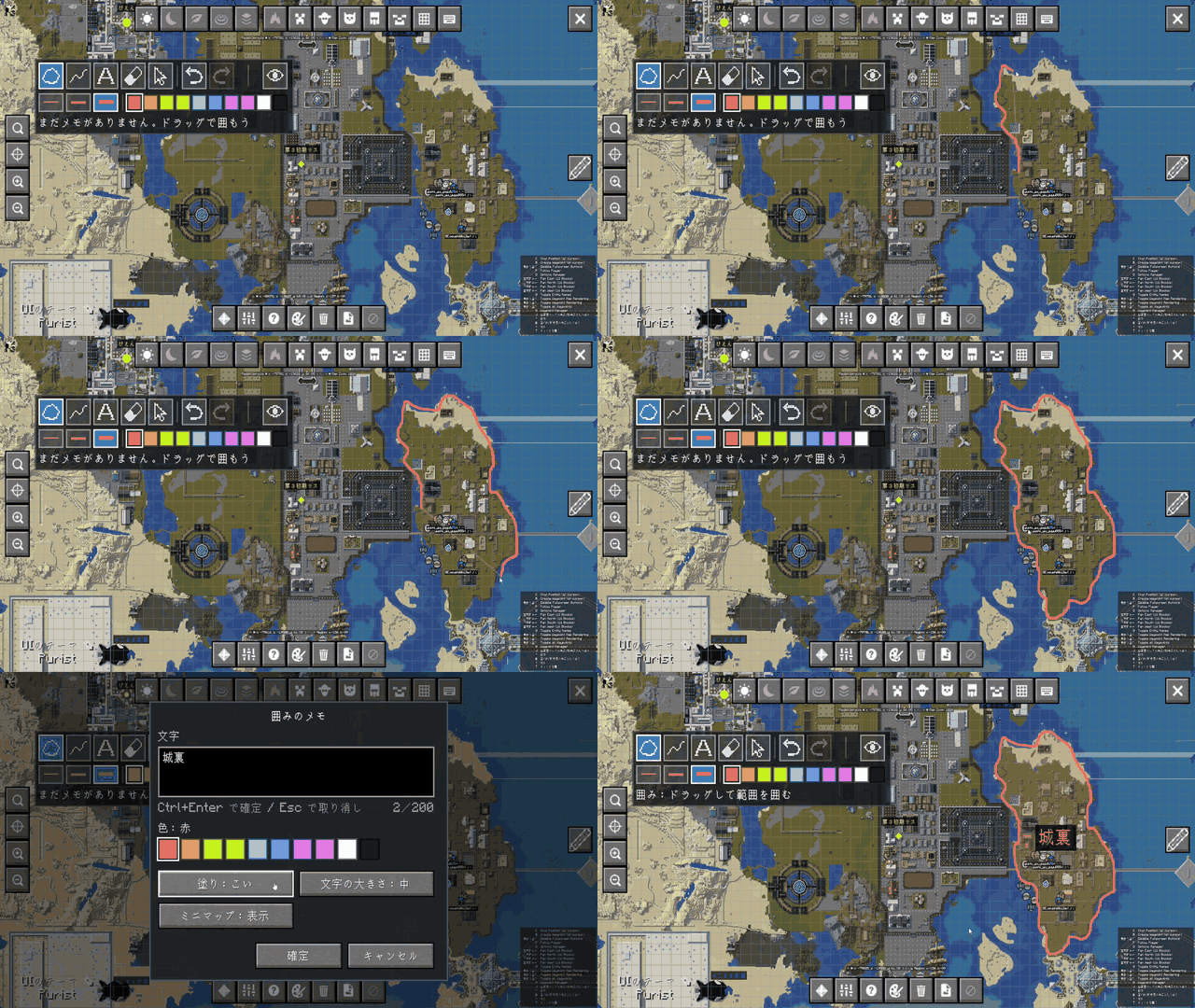
MapScribble_converted.gif
Description
MapScribble
MapScribble is a client-side Fabric mod that lets you draw handwritten notes, outline areas, and place custom text markers directly on JourneyMap's fullscreen map.
Whether you want to mark territorial claims, plan builds, trace exploration routes, or simply jot down quick reminders, MapScribble brings intuitive drawing tools right into your map.
🌟 Key Features
- Area Outlines (Main Feature): Trace any boundary on the map with your mouse. When you release, the shape closes automatically, displays a smooth semi-transparent fill, and lets you attach a centered text label.
- Freehand Lines: Draw paths, roads, or borders across the terrain.
- Text Markers: Click anywhere on the map to place standalone text notes.
- Smooth Vector Rendering: Drawing paths are stored in sub-block world coordinates, keeping lines smooth and crisp even when zooming all the way in.
- Rich Customization:
- 10 Colors: Red, Orange, Yellow, Lime, Cyan, Blue, Purple, Pink, White, Black.
- 3 Line Widths: Thin, Medium, Thick.
- 4 Fill Opacities (Outlines): None, Light, Normal, Heavy.
- 3 Text Sizes: Small, Medium, Large.
- Minimap Support: Choose whether each note is displayed on JourneyMap's minimap (enabled by default).
- Undo & Redo: Full undo/redo support up to 100 history steps (
Ctrl+Z/Ctrl+Y). - 100% Client-Side & Private: Notes are saved locally per dimension and per server under JourneyMap's data folder (
addon-data/mapscribble/). Nothing is sent to the server, and other players cannot see your notes.
🎮 How to Use
Entering Scribble Mode
- Open JourneyMap's fullscreen map (default
M). - Click the Pencil button on the right toolbar to toggle Scribble Mode on/off.
- (Optional) You can also assign a shortcut key in
Options -> Controls -> Key Binds -> MapScribble.
Tools
| Tool | Keybind | Description |
|---|---|---|
| Outline | 1 |
Drag to draw a boundary. Closes automatically to create a filled zone with text. |
| Line | 2 |
Drag to draw a freehand path or line. |
| Text | 3 |
Click anywhere to place a standalone text label. |
| Eraser | 4 |
Click an existing note to delete it (reversible with Undo). |
| Edit | 5 |
Click an existing note to edit its text, color, style, or delete it. |
- Undo / Redo:
Ctrl + Z/Ctrl + Y(orCtrl + Shift + Z). - Toggle Visibility: Click the eye icon on the top-left toolbar to temporarily show/hide your scribbles.
⚙️ Requirements
- Minecraft:
26.1.2/26.2/26.3 - Mod Loader: Fabric Loader (
0.19.5or higher) - Java:
Java 25 - Dependencies:
- Fabric API
- JourneyMap (
6.0.10or higher)
- Client-side only: Do NOT install on dedicated servers. Works seamlessly when connecting to vanilla, Fabric, Forge, Paper, or Velocity servers.
🇯🇵 日本語説明 (Japanese)
MapScribble は、JourneyMap の全画面マップ上にフリーハンドでメモや区画を描き込める、クライアント専用の Fabric MOD です。
主な機能
- 囲み(主機能): マウスドラッグで範囲をなぞると自動的に閉じた図形になり、半透明の塗りと中央ラベルを配置できます。
- 線: ドラッグした軌跡をそのまま線として残します(ルートや境界の記録に便利です)。
- 文字: 地図上のクリックした地点に文字メモだけを置くことができます。
- 滑らかな描画: 小数のワールド座標で保持するため、地図をズームインしても滑らかな線のまま表示されます。
- カスタマイズ: 10色、太さ3段階、塗りの濃さ4段階、文字サイズ3段階から選択可能。
- ミニマップ連動: メモごとにミニマップ上に表示するかどうかを個別に設定できます。
- 完全クライアント保存: メモは自分の PC 内(JourneyMap の保存フォルダ内)にのみ保存され、サーバーへの送信や他プレイヤーへの共有は行われません。
操作方法
- JourneyMap の全画面マップを開きます。
- 画面右のツールバーにある「鉛筆アイコン」を押して手書きモードを開始します(もう一度押すと通常操作に戻ります)。
- 画面左上のツール帯、または数字キー(
1: 囲み、2: 線、3: 文字、4: 消しゴム、5: 編集)でツールを切り替えて描画します。 Ctrl + Zで元に戻す、Ctrl + Yでやり直すが可能です。
MapScribble Team