Lapis Enhancements
- By
Craft enchanted Lapis gear, then use it or sacrifice it to influence Enchanting Table results for matching equipment.
Lapis Enhancements
Current release: 1.2.5 · Minecraft 26.3 · Fabric + Fabric API · Java 25
Enchanted gear—or an ingredient for your next upgrade?
Every crafted Lapis tool or armour piece starts with a random Level I enchantment. Keep it for your adventures, or use it as an Enchanting Table catalyst for another item of the same equipment type. Completing the enchantment consumes the crafted Lapis piece and favours its enchantment on your new gear.
- Craft the familiar tool and armour set, including a Lapis Spear.
- Use a Lapis Pickaxe to influence another Pickaxe, a Helmet for another Helmet, and so on.
- Each offer has a 90% chance to prefer the catalyst enchantment when it is eligible. This is a weighted choice, not a guaranteed enchantment or a guaranteed maximum level.
- Normal enchanting requirements and compatible extra enchantments still apply.
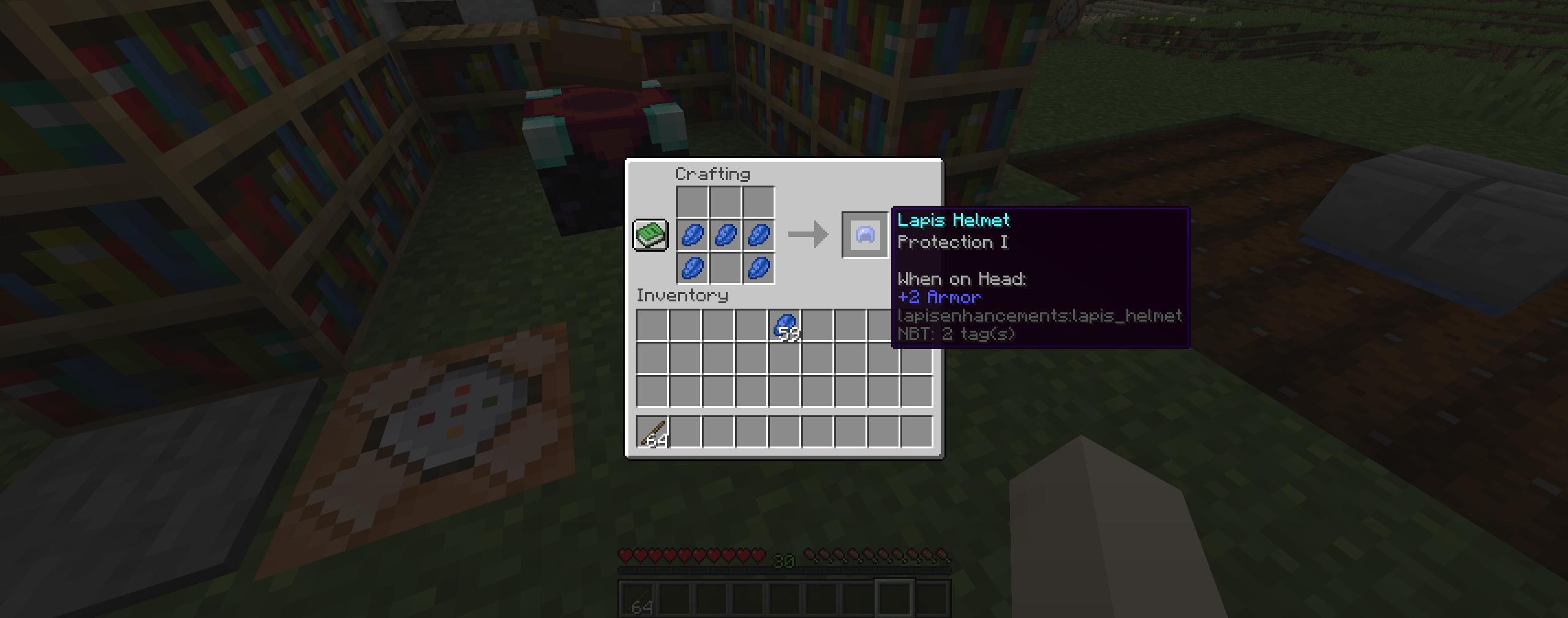
Craft Lapis equipment to receive a random enchantment. This existing gallery image is an equipment example, not a probability demonstration.
Lapis Armour
Lapis Armour has the same protection and durability as Iron Armour.
| Armour Piece | Durability | Armour Points |
|---|---|---|
| Lapis Helmet | 165 | 2 |
| Lapis Chestplate | 240 | 6 |
| Lapis Leggings | 225 | 5 |
| Lapis Boots | 195 | 2 |
Lapis Tools
The Lapis equipment set includes the Sword, Spear, Axe, Pickaxe, Shovel, Hoe, and four armour pieces. The statistics below cover the standard tools; use the in-game Spear tooltip for its attack-specific properties.
The standard Lapis tools listed below have:
- Iron-level mining speed
- 220 durability, which is 30 fewer uses than Iron
- An attack speed 0.1 lower than its Iron equivalent
- A random Level I enchantment when crafted
Tool Statistics
| Tool | Durability | Attack Damage | Attack Speed | Comparison to Iron |
|---|---|---|---|---|
| Lapis Sword | 220 | 6 | 1.5 | Same damage, -0.1 speed |
| Lapis Axe | 220 | 9 | 0.8 | Same damage, -0.1 speed |
| Lapis Pickaxe | 220 | 4 | 1.1 | Same damage, -0.1 speed |
| Lapis Shovel | 220 | 4.5 | 0.9 | Same damage, -0.1 speed |
| Lapis Hoe | 220 | 2 | 2.9 | +1 damage, -0.1 speed |
Automatic Crafting Enchantments
Whenever you craft a Lapis tool or piece of Lapis Armour, it automatically receives one random Level I enchantment valid for that item.
Curses, Mending, and Infinity are excluded from the automatic crafting enchantments.
Enchanting Table Catalyst
An enchanted Lapis item can be placed into the Enchanting Table's existing Lapis Lazuli slot and used as a catalyst.
To use it:
- Craft a Lapis tool or piece of armour and receive its random enchantment.
- Place the Lapis item into the Lapis Lazuli slot.
- Place another item of the same equipment type into the normal enchanting slot.
- Select one of the available enchantment options.
When the catalyst's enchantment is valid for the target item and available enchanting power, each Enchanting Table offer has a 90% chance to prefer that enchantment. Available levels still depend on enchanting power; 90% preference does not mean a guaranteed result. Other compatible enchantments may still accompany it as part of the normal Enchanting Table result.
The catalyst cannot influence Enchanted Books.
Example
Suppose you craft a Lapis Sword and it receives Sharpness I.
Place that sword into the Lapis Lazuli slot and place another sword—such as an Iron, Golden, or Diamond Sword—into the normal item slot. The available offers will each have a 90% chance to prefer Sharpness.
Catalyst Cost
One Lapis tool or armour piece provides enough catalyst power to access any of the Enchanting Table's three offer tiers.
The Lapis item is consumed when you complete the enchantment, making every crafted piece a choice:
- Keep and use the automatically enchanted Lapis gear, or
- Sacrifice it to influence a stronger item's enchantment.
Anvil and Grindstone Restrictions
To keep the automatic enchantment and catalyst systems balanced, Lapis equipment cannot be:
- Repaired in an Anvil
- Combined with another item in an Anvil
- Combined with an Enchanted Book
- Disenchanted in a Grindstone
- Used to collect enchantment experience from a Grindstone
Lapis equipment can still be renamed in an Anvil.
Crafting
All Lapis equipment uses familiar Vanilla tool and armour recipe shapes, with Lapis Lazuli serving as the primary crafting material.
Make sure to see the Images tab for crafting recipes and a thorough preview of the complete set!
Installation
Install Lapis Enhancements and a matching Fabric API build on both the client and Fabric server. In single-player, install them in the client's mods folder.
Choose the file for your exact Minecraft version in the Files tab. Match the server's mod versions when playing multiplayer.
Recommended shaders — IterationT
IterationT fits the Vanilla Enhancements collection perfectly, and I strongly recommend playing with it! It completes the look of the pack while keeping Minecraft feeling like Minecraft. I'd love to include it in the pack, but I legally cannot redistribute it. Please download IterationT separately.
IterationT is not made by me and is not bundled with the mods or modpack. With a compatible shader loader installed, place the downloaded shader pack in your profile's shaderpacks folder and select it in-game. Shaders are optional; check compatibility with your Minecraft version and shader loader, and play without them if you need more performance.
Community and support
Explore the Vanilla Enhancements website for the full collection and guides, or join r/VanillaEnhancements to share your builds, ask questions, and follow updates.
Want the collection together? Get the Mineral Enhancements modpack and check its supported Minecraft version. The mods are also available individually.
These mods are developed by FireDragon1 as the Vanilla Enhancements collection.
Join mc.FireCrafting.net to play, or join the Discord for updates, questions, and bug reports.
For a bug report, include your Minecraft version, mod version, Fabric Loader version, the steps to reproduce it, and a relevant log or screenshot. Remove personal information and credentials from logs before sharing them.
Lapis Enhancements Team