Just Enough Calculation EX
- By
JECaEX.png
Description
Just Enough Calculation EX
A full-screen crafting tree addon for Just Enough Calculation, with optional GregTech CEu recipe-import compatibility.
Minecraft 1.12.2 | Forge | Version 0.2.2 | GNU LGPL-3.0
Transparency note: this project was developed with AI assistance (design, coding, and debugging).
What this mod does
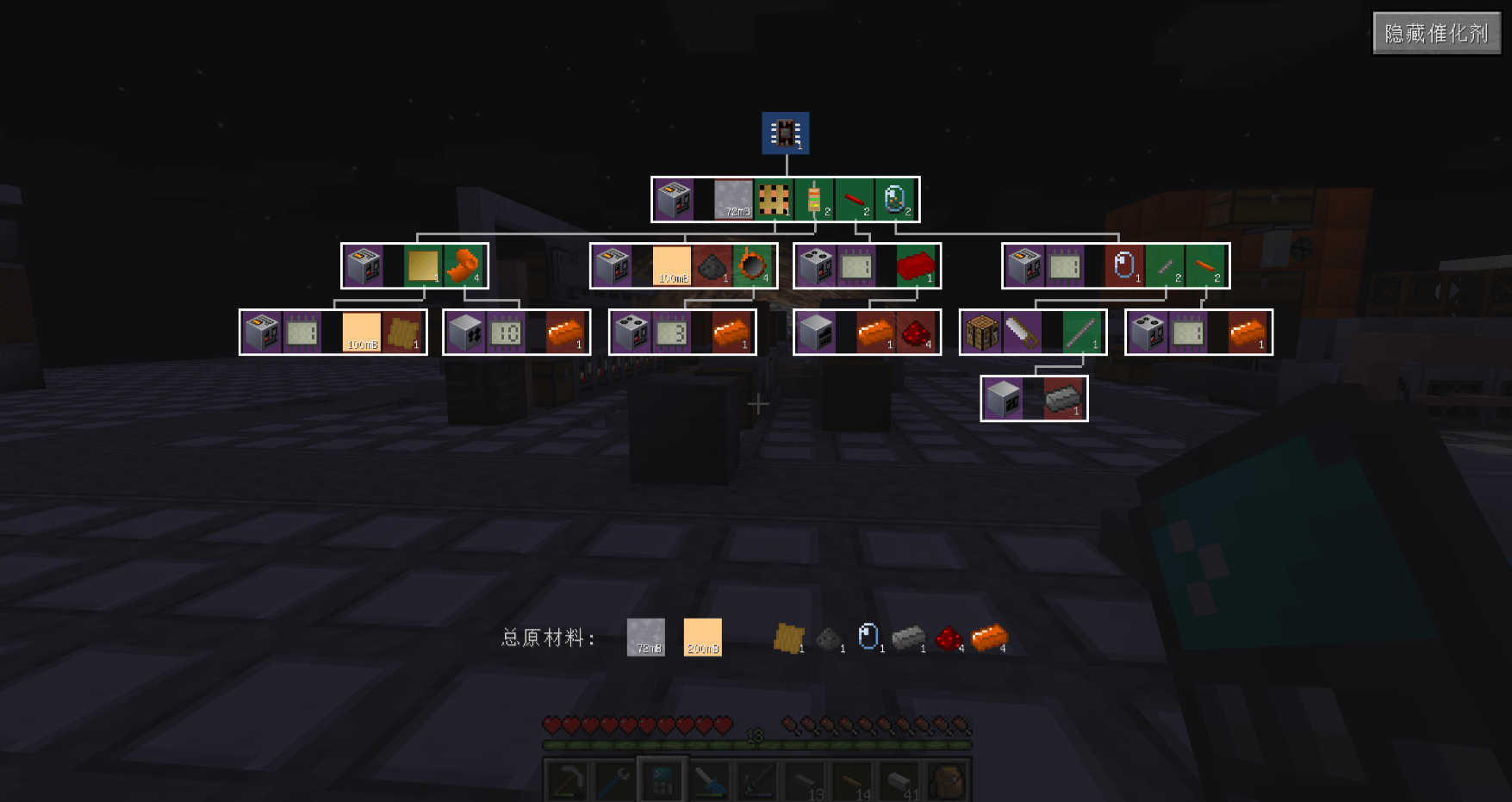
The main feature of Just Enough Calculation EX (JEC EX) is the Crafting Tree, a full-screen Bill-of-Materials style recipe tree for JEC. GregTech CEu support is optional: when GTCEu is installed, this mod also improves how GTCEu recipes are imported from JEI/HEI.
Crafting Tree view (main feature)
Open the JEC crafting calculator and click the Crafting Tree button.
- Compact, top-down layout: parent recipe inputs point directly to their child recipes, with no redundant intermediate output boxes.
- Clear quantity display: every node shows the required amount, and a fixed bottom bar summarizes the total raw material quantities for items and fluids.
- Color-coded nodes:
- Blue - target item
- Purple - catalysts
- Green - craftable inputs
- Red - raw materials
- Pan by dragging and zoom with the mouse wheel.
- Shift + left-click a recipe card to open the JEC recipe editor pre-filled with that recipe, then save it to add the recipe to your calculator.
- Toggle catalysts on and off with the button in the top-right corner; the layout reflows automatically.
- Large trees are rendered with caching and viewport culling for better performance.
- Works for regular JEC recipes even without GregTech installed.
Optional GregTech CEu recipe import compatibility
This part only activates when GregTech CEu is installed. When you click the + button in JEI/HEI to import a GTCEu machine recipe into JEC:
- Machines no longer appear as "Unnamed" blank blocks caused by fuzzy-meta folding.
- Non-consumed inputs (circuits, molds, lenses, tools, and similar items) are routed into the catalyst slot instead of the ingredient slot.
- The correct machine is selected by voltage tier - for example, an MV recipe shows the MV machine, and steam machines are skipped.
Without GregTech, this mod still loads normally and the Crafting Tree remains fully usable.
Requirements
| Mod | Status | Notes |
|---|---|---|
| Minecraft Forge 1.12.2 | Required | |
| Just Enough Calculation | Required | Version 3.2.7 is tested |
| Just Enough Items (JEI) | Required | HEI is a supported runtime drop-in replacement |
| MixinBooter | Required | Provides the late mixin loader used by this mod |
| GregTech CEu | Optional | Only needed for the GTCEu recipe import fixes; the Crafting Tree works without it |
Installation
- Install Forge for Minecraft 1.12.2.
- Install Just Enough Calculation, JEI (or HEI instead of JEI), and MixinBooter.
- Install GregTech CEu only if you want the optional GTCEu recipe import fixes.
- Download
Just Enough Calculation EX-<version>.jarfrom the Files tab. - Put the jar into your
modsfolder. - Launch the game and open the JEC crafting calculator to see the Crafting Tree button.
Usage
- Open the crafting tree: open the JEC crafting calculator and click Crafting Tree.
- Navigate: drag to pan, scroll to zoom.
- Add a recipe to the calculator: Shift + left-click a recipe card, review the pre-filled recipe editor, then save.
- Show/hide catalysts: use the button in the top-right corner of the crafting tree.
- Import a GTCEu recipe (optional): with GTCEu installed, open a GTCEu machine recipe in JEI/HEI and click +.
Compatibility
- Works without GregTech; GTCEu support is optional.
- Tested environment:
- Nomifactory CEu
- JEC 3.2.7
- HEI (Had Enough Items) 4.30.3
- GTCEu 2.8.10-beta (optional)
- MixinBooter 10.7
Technical notes
- Uses an ILateMixinLoader because the mixin targets JEC GUI classes.
- GregTech CEu is accessed through reflection, with no compile-time dependency and no hard runtime requirement.
- The crafting tree design is inspired by EMI's
BoMScreen. - JEC is LGPL-3.0 licensed and is installed separately; this mod does not bundle JEC.
Source and license
- GitHub: LeafHui/JustEnoughCalculationEX
- License: GNU LGPL-3.0
- Third-party notices: THIRD_PARTY_NOTICES.md
Just Enough Calculation EX Team