Integrated UI
- By
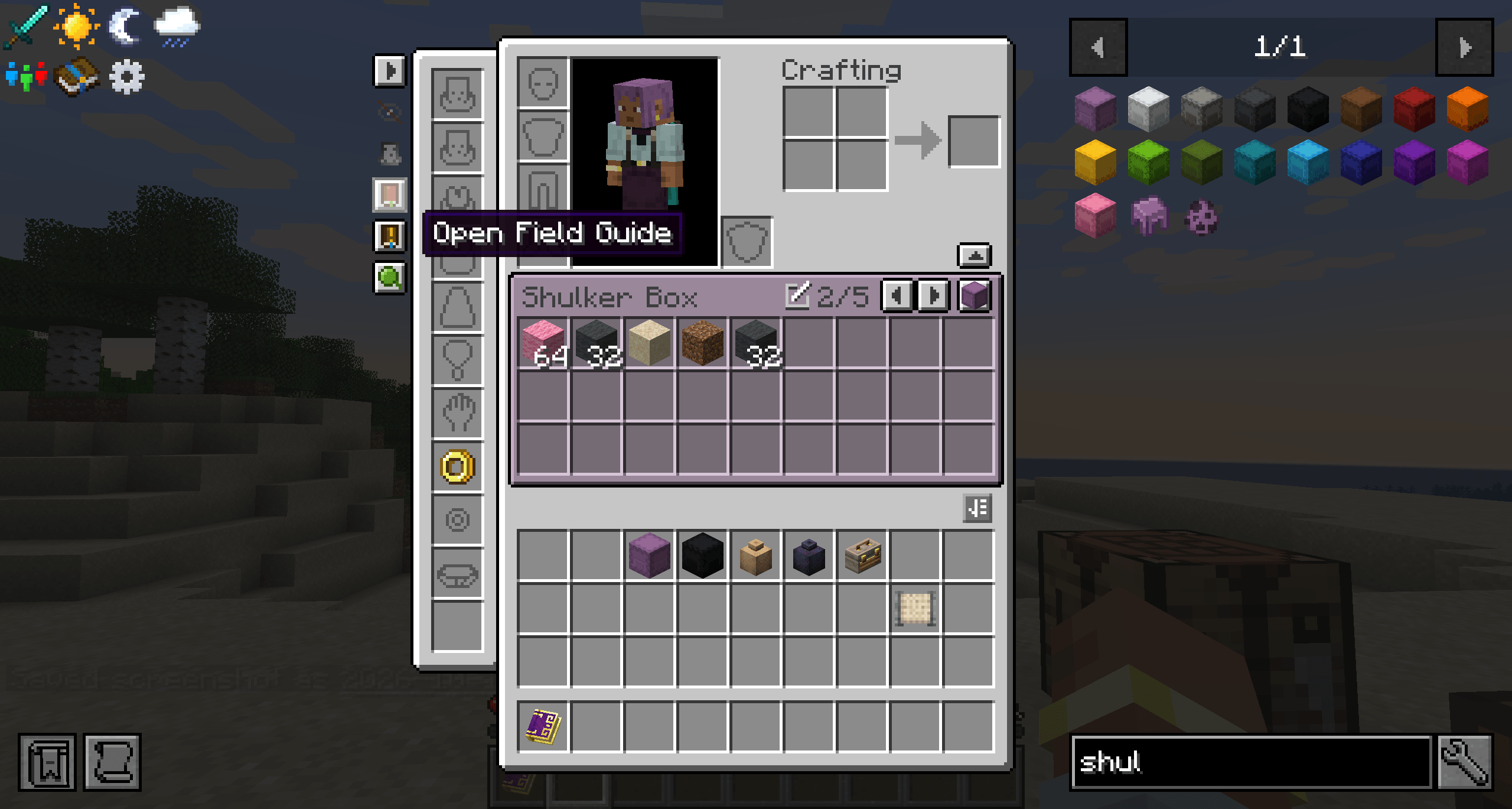
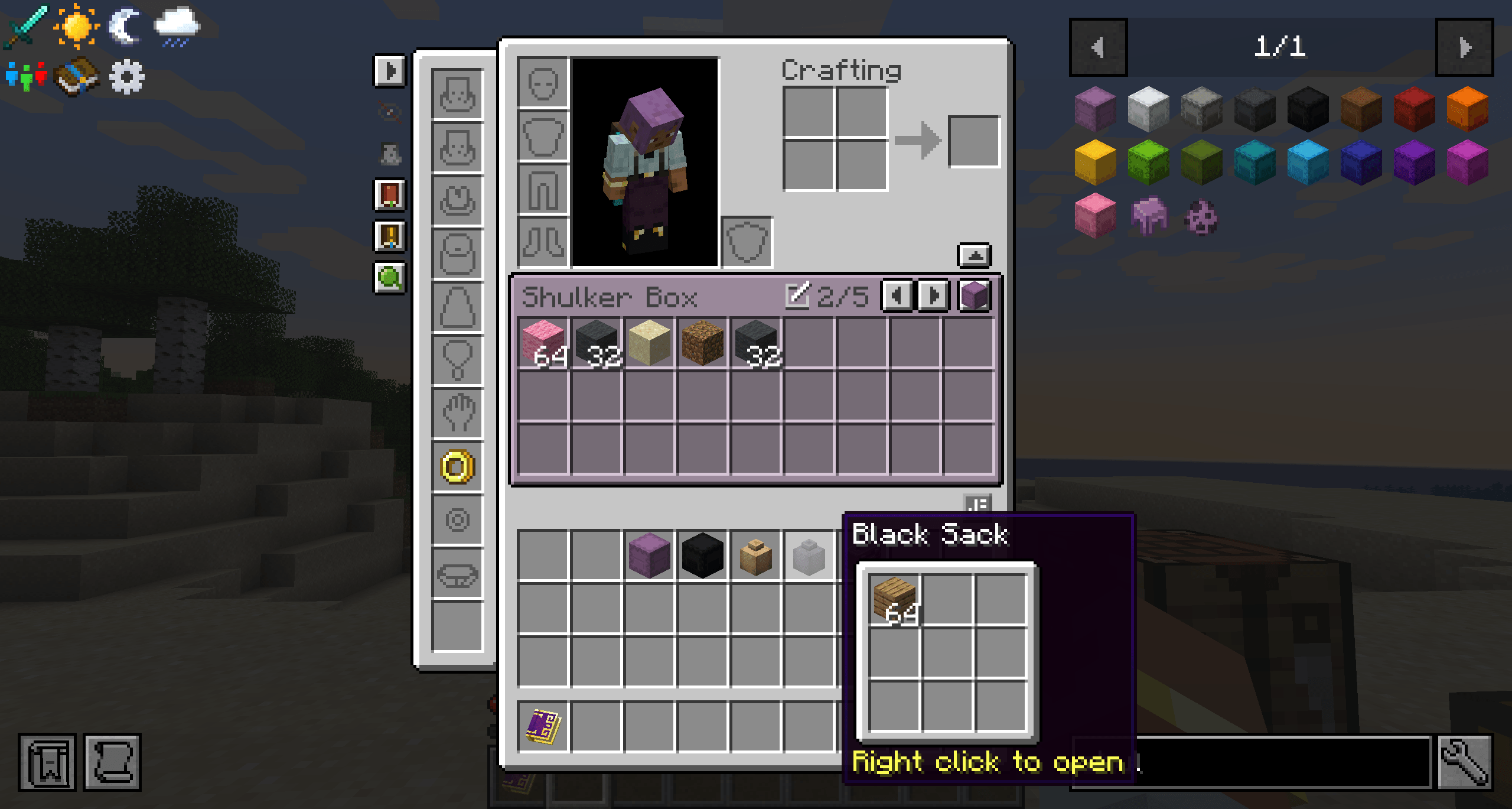
UI Integration mod that adds a container bar to your inventory displaying backpacks and shulker boxes while integrating the ui elements of all of your favorite mods into a cohesive and userfriendly window.
2026-10-13_22.07.23.png
2026-10-13_22.07.14.png
Description
Integrated UI
A NeoForge mod for Minecraft 1.21.1 that adds backpacks, carried container items (shulker boxes, sacks, and similar) and Curios/Accessories slots to the survival inventory screen.
This mod integrates a variety of different inventory UI elements from different mods into a unified and cohesive user interface. while the emphasis is on cross mod compatibility, this can be used without any of the mentioned optional dependencies. When used in an otherwise vanilla environment it will still add the functionality to view shulker box inventories along side your main inventory.
Requirements
- Minecraft 1.21.1
- NeoForge 21.1.214 or later
- Required on both the client and the server, except for the client-only integrations listed under Optional dependencies.
Features
Integrated inventory screen
- Replaces the vanilla survival inventory screen.
- Keeps the 2x2 crafting grid, armor slots, offhand slot, recipe book and status effects. Other mods still see it as the player's inventory menu.
- Adds a band of extra slots between the crafting area and the main inventory to display held containers and backpacks.
- Adds an equipment panel on the left for Curios or Accessories slots.
- Status effects move right to make room for the band's scroll tab. They switch to compact mode or are hidden when there isn't enough space.
The band
Shows one of the following at a time:
1.  Equipped Backpacked backpacks, in Backpacked's order.
2.  A Quark backpack worn in the chest slot.
3. Container items in the player's inventory. These are grouped by kind (shulker boxes before sacks), then by color (undyed first, then in dye order), then by position in the inventory.- Previous/next buttons and a position counter (such as
2/5) appear in the band header when there is more than one thing to show. - Keybinds for previous/next: Page Up and Page Down by default. They work only inside the inventory screen and can be rebound under the "Integrated UI" category.
- The band remembers what each player last looked at and shows it again the next time they open their inventory, including after respawning or changing dimension.
- Grids taller than the visible row limit scroll vertically, using the mouse wheel or the scrollbar tab on the right edge of the window. Grids wider than 9 columns scroll horizontally, using Shift + mouse wheel or the scrollbar.
- The number of visible rows is set in the client config (1 to 11, default 3). Fewer rows are shown if the screen is too short.
- The band is colored to match what it shows:
- Shulker boxes and other dyed items use their dye color, taken from the
c:dyed/<color>tags. - Some undyed items use a fixed color; other undyed items use the color of their block.
- Backpacked backpacks use Backpacked's sprites.
- The Quark backpack uses Quark's leather texture.
- Shulker boxes and other dyed items use their dye color, taken from the
- Rename button in the header: edits the name in place. A blank name removes the custom name, and names are limited to 50 characters.
- Open button in the header: opens the item in its own full screen (Backpacked's backpack screen, or the container item's screen).
Container items
- A container item is any item that stores its contents in the vanilla container data component and keeps them when its block is broken. This includes vanilla shulker boxes, Supplementaries sacks, and any other mod's items built the same way.
- The following are never shown in the band:
- Items with a vanilla lock
- Items in the
integrated_ui:band_excludedtag (by default, the Supplementaries safe) - Items with no more than the configured minimum number of slots (default: 1)
- Optionally, only items on a config whitelist of item ids and
#tagsare shown. - While the item is on the cursor or in the crafting grid (for example, while dyeing it), its slots stay visible but are locked and shaded. If the item leaves the inventory, the band moves on to the next container.
Opening container items in their own screen
- Right-clicking a container item in the player's inventory with an empty cursor opens it in its own screen. This works in any container screen that shows the player's inventory (a chest's, for example) but not in the creative inventory.
- Only items in the
integrated_ui:opens_own_screentag can be opened this way. By default the tag contains#c:shulker_boxesand#supplementaries:sacks. - Each item opens in one of these screens:
- Shulker boxes: the vanilla shulker box screen.
- Sacks: Supplementaries' sack screen.
- Other items: a vanilla chest screen with as many rows as the item needs.
- The item's own inventory slot is locked and shaded while its screen is open, so it can't be moved, dropped or swapped away. The screen closes if the item is lost anyway.
- Closing the screen returns to the inventory if it was opened from there. If it was opened from another container, closing it returns to the world.
- In the inventory, shulker boxes are left to Quark when Quark opens them itself.
Equipment panel (Curios / Accessories)
- A collapsible, scrollable panel of Curios or Accessories slots on the left of the inventory window.
- The show/hide toggle remembers its state across sessions.
- Hovering an empty slot shows the slot's name.
- With Accessories, a button shows or hides unused slots. This uses Accessories' own per-player setting.
- If both Curios and Accessories are installed, Accessories is used, since its compatibility layer already holds the Curios slots.
Robustness
- Calls into other mods' internals go through a guard. If a mod update renames a class, method or field Integrated UI relies on, that mod's integration is turned off for the rest of the session and one error is logged. Integrated UI then behaves as if that mod weren't installed.
- The server sends the equipment slot layout to the client, so both sides always build the same slots.
Optional dependencies
None of these are required. Each integration can be turned off in the config, which makes Integrated UI behave as if the mod weren't installed.
| Mod | Minimum version | Server/Client | What the integration does |
|---|---|---|---|
| Backpacked (requires Framework) | 3.0.5 | Both | Equipped backpacks are shown in the band, using Backpacked's slot unlocking (lock overlay, hold-to-unlock, drag selection, cost tooltips, particles). Unlocking from the inventory costs and stores the same as from Backpacked's screen, and Backpacked's "unlockable slot mode" option is respected. The header has a button to open Backpacked's full screen, drawn as the backpack item, and closing that screen returns to the inventory. Backpacks can be renamed from the band. |
| Quark (requires Zeta) | 4.1-485 | Both | The worn Quark backpack (if enabled in Quark's config) is shown in the band instead of in Quark's backpack screen, drawn with Quark's leather texture. It can be renamed from the band. Quark's player inventory buttons and keybinds (sorting and others) work on the integrated inventory, with space left above the main inventory for Quark's sort button. When the Quark integration is off, a worn Quark backpack is left to Quark's own screen. |
| Curios API | 9.5.1 | Both | Curios slots appear in the equipment panel, with a button to open Curios' own screen. The menu reopens when slot counts change. |
| Accessories | 1.1.0-beta.53 | Both | Accessories slots appear in the equipment panel, matching Accessories' own screen, with the unused-slots toggle and a button to open Accessories' screen. Accessories takes precedence over Curios. |
| Supplementaries | 1.21.1-3.9.9 | Both | Sacks open in Supplementaries' own sack screen, with the sack's slot locked, and closing it returns to the inventory. Sacks are also shown in the band through the general container item support. With this integration off, sacks are treated like any other container item. The safe is excluded from the band by default. |
| Ars Nouveau | 5.13.2 | Both | Right-clicking a spell book in the inventory with an empty cursor opens its spell crafting screen, from any container screen. The book is swapped into the main hand while the screen is open and swapped back when it closes or the player logs out. Closing the book returns to the screen it was opened from (the inventory or a container). |
| Create | 6.0.10 | Both | Right-clicking a filter (list, attribute or package filter) in the inventory with an empty cursor opens its screen, from any container screen, and its tooltip says so. The filter is swapped into the main hand while the screen is open and swapped back when it closes or the player logs out. Closing the filter returns to the screen it was opened from (the inventory or a container). |
| The Aether | 1.5.10 | Both | Adds the Aether's accessories button (the cloud on the player portrait) to the integrated inventory, at the position set in the Aether's client config, and following the window when the recipe book moves it. If the Aether uses its own accessories menu instead of Accessories' default one, the equipment panel is left out. |
| Field Guide | 1.21.0+1.21.1 | Client | Adds a small button that opens the Field Guide to the column of buttons beside the equipment panel, below the Curios/Accessories button (or in its place without either mod). As with Field Guide's own inventory button, it does nothing if the guide can't be opened yet, such as when Field Guide's server config requires the item. |
| FTB Quests | 2101.1.36 | Client | Adds a small button that opens the quest book to the same column, below the Field Guide button (or in its place without Field Guide). |
| JEI | 19.51.0 | Client | JEI's overlays stay clear of the band tab, equipment panel and status effects. JEI's "+" button fills the 2x2 crafting grid, taking ingredients from the inventory and from the band (except from locked slots). The recipe book button is hidden, since JEI replaces it. A button left of the equipment panel shows/hides JEI, and turns grey while it is hidden. |
| Mouse Tweaks | 2.26.1 | Client | Mouse Tweaks is told which slots are visible, so it never moves items into band rows scrolled out of view, a collapsed equipment panel, or hidden slots. It fills slots in this order: inventory, band, crafting grid, equipment. When Mouse Tweaks' wheel tweak is on, the mouse wheel over a slot moves items, and the band and panel scroll from their edges instead. |
Configuration
Client (config/integrated_ui-client.toml)
| Option | Default | Description |
|---|---|---|
replaceInventoryScreen |
true |
Use the integrated inventory in place of the vanilla inventory screen. |
maxVisibleRows |
3 |
Maximum band rows shown at once (1 to 11). Larger grids scroll. |
equipmentPanelOpen |
true |
Whether the equipment panel is open. Updated automatically when toggled in game. |
rightClickOpensSpellBooks |
true |
Right-clicking an Ars Nouveau spell book opens it. |
rightClickOpensContainers |
true |
Right-clicking a container item opens it in its own screen. |
rightClickOpensFilters |
true |
Right-clicking a Create filter opens it. |
compat.jei |
true |
JEI integration. |
compat.aether |
true |
Aether accessories button. |
compat.fieldGuide |
true |
Field Guide button. |
compat.ftbQuests |
true |
FTB Quests quest book button. |
compat.overrideQuarkShulkerBoxes |
true |
Open shulker boxes in the inventory in Integrated UI's screen rather than Quark's. |
Server (serverconfig/integrated_ui-server.toml, per world, synced to clients)
Changes take effect the next time the inventory is opened.
| Option | Default | Description |
|---|---|---|
features.containerItemsInBand |
true |
Show carried container items in the band. |
features.containerItemWhitelistEnabled |
false |
Show only whitelisted container items. While this is on, the band_excluded tag is ignored. Backpacks are not affected. |
features.containerItemWhitelist |
["#c:shulker_boxes"] |
Item ids, or item tags prefixed with #. |
features.ignoreContainerItemsUpToSlots |
1 |
Container items with this many slots or fewer are not shown in the band and can't be opened in their own screen. 0 includes all of them. Whitelisted items are always shown. |
features.containerItemScreens |
true |
Allow container items to be opened in their own screen. |
features.renaming |
true |
Show the rename button in the band header. |
features.equipmentSlots |
true |
Show the Curios/Accessories equipment panel. |
compat.backpacked |
true |
Backpacked integration. |
compat.quark |
true |
Quark integration. |
compat.curios |
true |
Curios integration. |
compat.accessories |
true |
Accessories integration. |
compat.supplementaries |
true |
Open sacks in Supplementaries' screen. |
compat.arsNouveau |
true |
Ars Nouveau spell book integration. |
compat.create |
true |
Create filter integration. |
Every option has a translated name, so config screen mods such as Configured show readable labels.
Item tags
| Tag | Default contents | Purpose |
|---|---|---|
integrated_ui:band_excluded |
supplementaries:safe |
Container items never shown in the band. |
integrated_ui:opens_own_screen |
#c:shulker_boxes, #supplementaries:sacks |
Container items that can be opened in their own screen. |
Both tags can be extended with datapacks.
License
GPL-3.0-only. See LICENSE.
Integrated UI Team