GUI Debug Mode
A lightweight in-game GUI debugging tool for NeoForge developers to inspect coordinates, slots, widgets, bounds, and overlaps in real time.
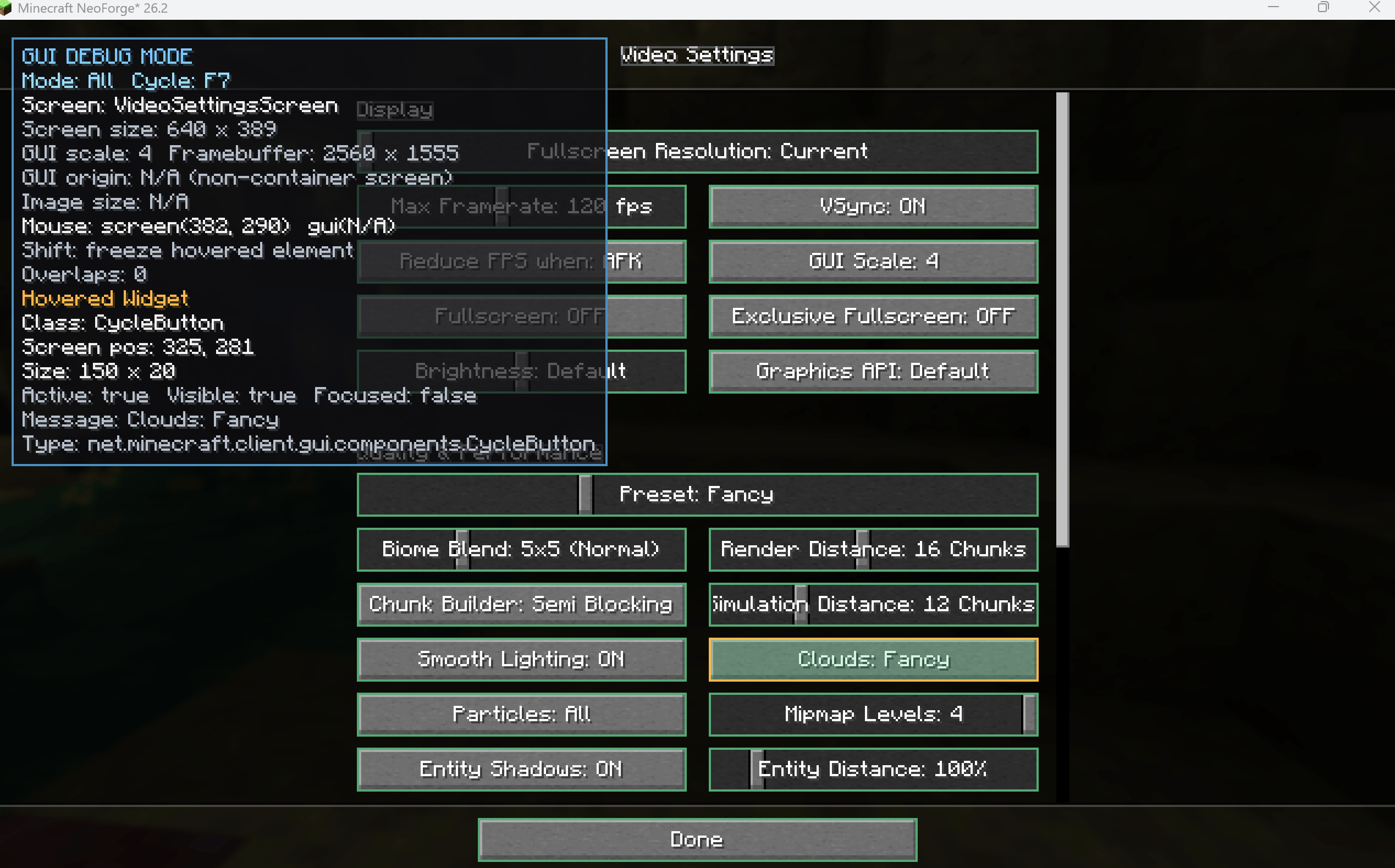
Live Widget Inspector — view widget classes, positions, sizes, states, and hitboxes directly inside Minecraft.
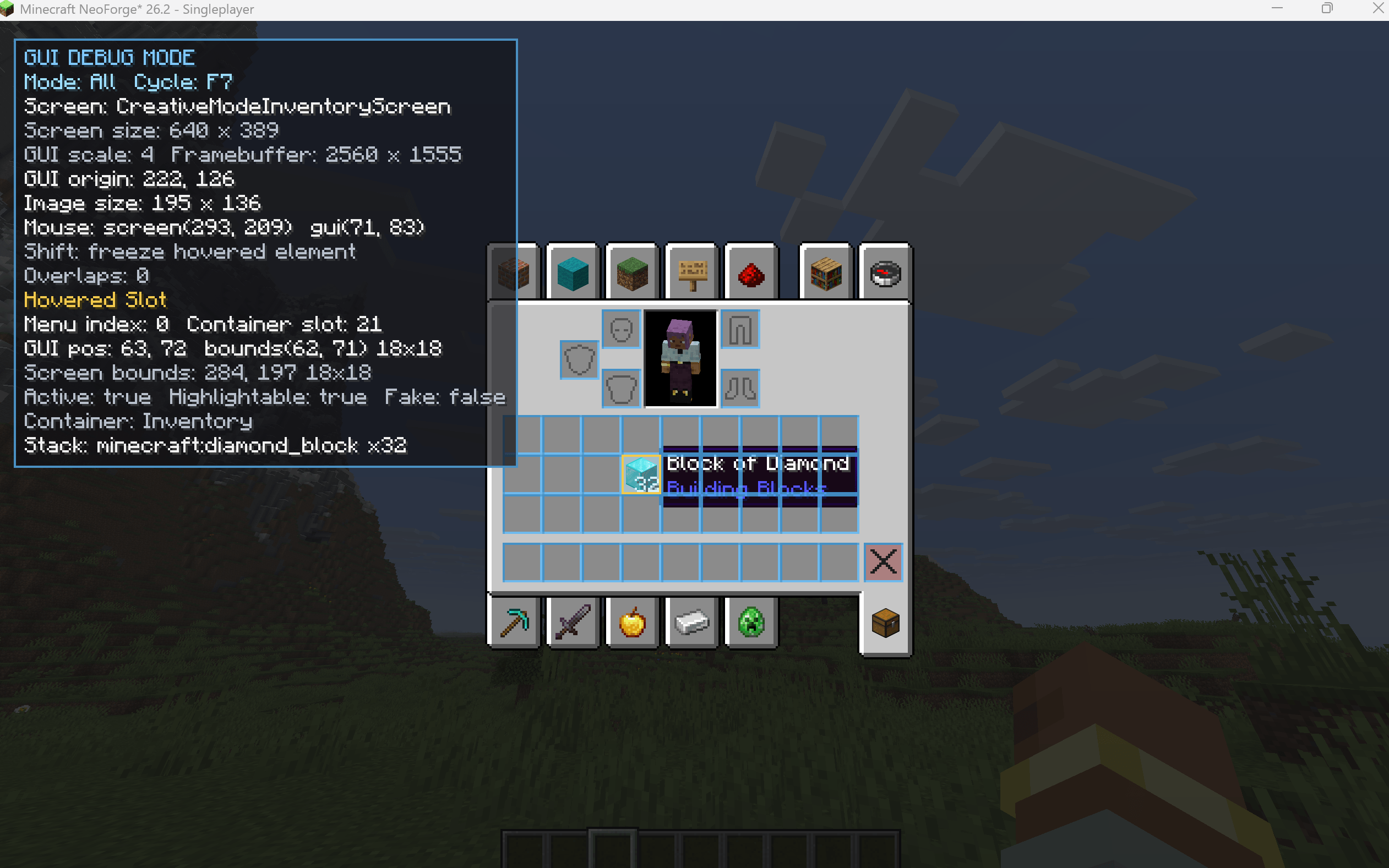
Live Slot Inspector — inspect slot indices, positions, bounds, container data, and ItemStack contents directly in-game.
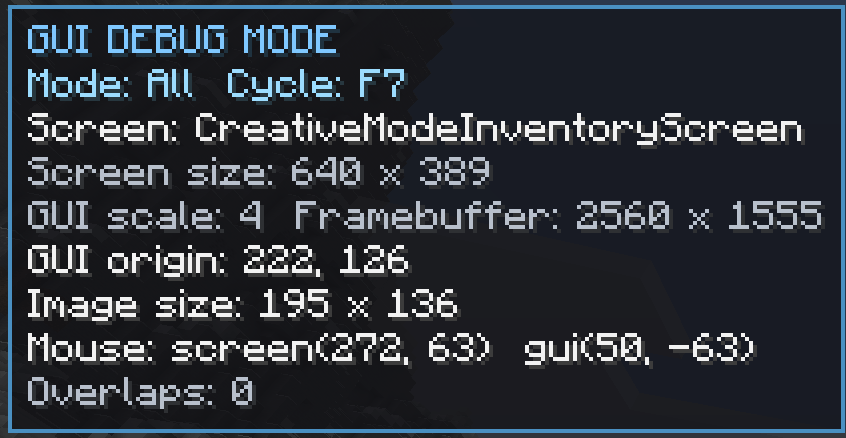
Live Coordinate Overlay — track screen size, GUI origin, GUI scale, framebuffer size, and mouse coordinates in real time.
Description
🔍 GUI Debug Mode
A lightweight in-game GUI debugging and inspection tool built for NeoForge developers.
Stop guessing coordinates, adding temporary debug text, or constantly restarting your game just to understand where a GUI element is located.
GUI Debug Mode lets you inspect screens, slots, widgets, bounds, coordinates and overlaps directly inside Minecraft — in real time.
✨ FEATURES
📐 Live Coordinate Overlay
See important GUI positioning information while the screen is open:
• Screen X / Y
• GUI-relative X / Y
• GUI origin
• Screen dimensions
• GUI image dimensions
• GUI scale
• Framebuffer resolution
📦 Slot Inspector
Inspect real container slots directly in-game:
• Menu slot index
• Container slot index
• GUI position
• Screen position
• 18×18 interaction bounds
• Current ItemStack
• Active state
• Highlightable state
• Container information
🧩 Widget Inspector
Hover supported GUI widgets to inspect:
• Java class
• Screen position
• GUI-relative position
• Width and height
• Active state
• Visible state
• Focused state
• Widget message / label
Nested widgets inside screens such as option lists are also supported.
🟦 Bounds Visualization
Visualize the actual interactive bounds of slots and widgets directly over the GUI.
This makes it much easier to spot:
• Incorrect positioning
• Unexpected hitboxes
• Misaligned controls
• Oversized widgets
• Layout problems
⚠️ Overlap Detection
GUI Debug Mode can detect real intersections between supported elements:
• Slot ↔ Slot
• Slot ↔ Widget
• Widget ↔ Widget
Detected intersections can be highlighted and inspected to see exactly which elements are overlapping.
📌 Freeze Selection
Found something you want to inspect more closely?
Press Shift while hovering a supported slot or widget to freeze the selection.
The selected element remains highlighted even after moving your mouse away.
📋 Clipboard Export
Press Ctrl + C while an element is frozen to copy detailed debug information directly to your clipboard.
Copied information can include:
• Element type
• Java class
• Coordinates
• Bounds
• Slot information
• Widget state
• ItemStack information
• Related overlap diagnostics
Useful for bug reports, development notes and quickly moving coordinates back into your code.
🎛️ DEBUG VIEWS
Cycle between multiple focused inspection modes:
📐 Coordinates
📦 Slots
🧩 Widgets
⚠️ Overlaps
🛠️ All
You don't have to display every debug layer at the same time.
⌨️ DEFAULT CONTROLS
F8
Toggle GUI Debug Mode
F7
Cycle Debug View
Shift
Freeze / unfreeze the hovered element
Ctrl + C
Copy frozen element information
All keybinds can be changed from Minecraft's Controls menu.
⚡ LIGHTWEIGHT BY DESIGN
GUI Debug Mode is designed as a developer utility, not a gameplay mod.
• Client-side focused
• Read-only
• Does not move or modify GUI elements
• Does not modify inventories or machine data
• Debug overlay is disabled by default
• Expensive inspection systems only run when required
• When disabled, rendering overhead is designed to be practically negligible
🛡️ SAFE INSPECTION
The mod prefers Minecraft and NeoForge's accessible GUI structures instead of aggressively inspecting private implementation details.
Unsupported custom elements should simply remain untracked rather than causing the game to crash.
⚠️ CURRENT LIMITATIONS
Some modded interfaces draw elements manually using direct rendering calls instead of standard Minecraft widgets.
Because of this, custom elements such as manually rendered:
• Text
• Textures
• Animated sprites
• Custom render regions
may not always be detected as individual widgets.
This does not mean the GUI is broken — it simply means that the element is outside the currently supported inspection system.
🚧 PLANNED FEATURES
Future versions may expand GUI inspection with:
• Texture / UV inspection
• Text bounds and baseline debugging
• Scissor / clipping visualization
• Targeted render-call inspection
• Optional recipe-viewer compatibility
• Layout snapshot export
💬 FEEDBACK & COMPATIBILITY REPORTS
Found a GUI that is not inspected correctly?
Please leave a comment with:
• Mod name
• Minecraft version
• NeoForge version
• Screenshot if possible
• Short description of what GUI Debug Mode detected incorrectly
Reports from custom modded screens are especially useful for improving compatibility.
🧰 PART OF THE KIYOSHIBARA DEVELOPER TOOLS FAMILY
GUI Debug Mode is completely independent.
You do NOT need to install any of the other Kiyoshibara developer tools to use it.
GUI Debug Mode Team