Gravity Rooms
- By
A gravity generator block that turns "down" any way you like inside a box: walk on ceilings and walls.
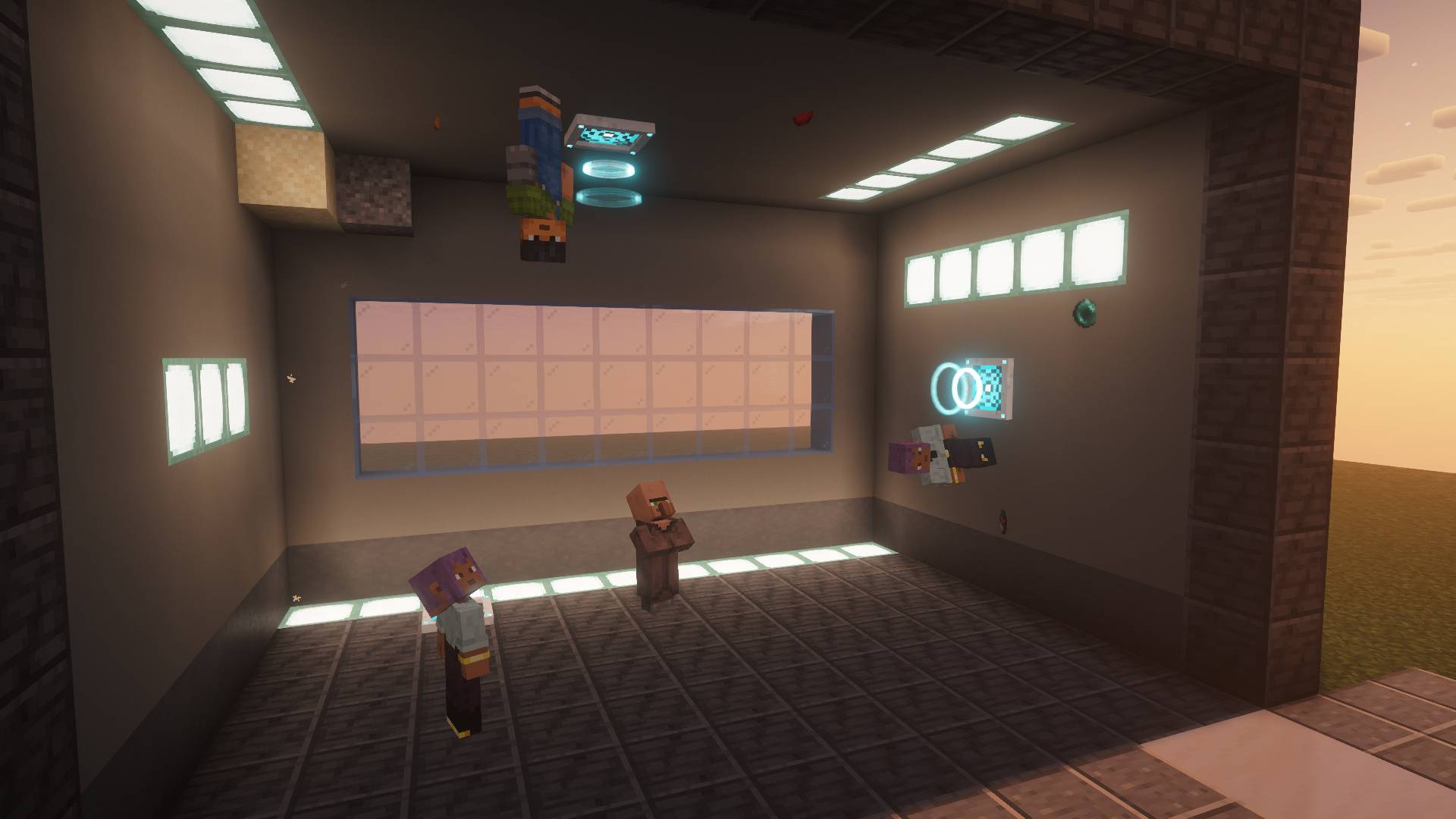
A showroom at sunset: one player stands on the ceiling, one on the wall, one on the floor. Shot with the Complementary Reimagined shader pack (by EminGT, not included).
Description
Gravity Rooms
A gravity generator block that turns "down" any way you like inside a box: rooms where you walk on the ceiling or on a wall.
Place a Gravity Generator on a ceiling and walk upside down in the room below it. Put one on a wall and the wall becomes your floor. Make a room where you jump three blocks high, or one where every fall hurts twice as much. Step out of its box and normal gravity comes back. No energy, no redstone, no commands.
The generator
- The look: a thin white plate with a glowing panel. While it runs, glowing rings travel over it the way gravity pulls (more of them and tighter when it is stronger, none when it is off). Plate and rings stay inside the generator's own block.
- A box of gravity from the generator out, in front of the face it sits on: 1 to 32 blocks on each axis, 9 x 9 x 9 by default.
- Any of six directions: down, up, north, south, west or east. By default, toward the generator.
- Strength: 0.1x to 2x normal gravity, in steps of 0.1 (1x by default). In a light zone you jump higher, fall slower and take less fall damage; in a heavy one jumps are short and falls hurt more (at 2x you can no longer jump onto a full block).
- Priority: where boxes overlap, the highest wins; at equal priority, the nearest generator.
- On / off from its settings (right click with an empty hand). Only players allowed to build there can change it.
- See the field: hold a generator, or sneak with an empty hand while looking at one, to see the box's edges, an arrow pointing down and drifting sparks.
Walking on walls
- Your body turns with the gravity: walk, run, jump, sneak and fly (creative) on a ceiling or a wall. Step-up works there too.
- The switch is instant for your body and smooth for your camera, and you keep looking at the same spot.
- You are never pushed inside a block: the switch finds the nearest free spot, or waits when there is no room.
- Fall damage counts along the zone's down. No damage just from switching.
- No flicker on a border: you stay in a zone until you are clearly out of it.
- Leave the zone (walking, teleport, death, logout) and your own gravity is back at once. Log out on a ceiling and you come back standing, never stuck in it.
Multiplayer
- Other players see you standing on the ceiling or lying along the wall.
- When you switch, they see your body turn smoothly, not snap; your name tag stays upright.
The world follows
- Dropped items, experience, arrows and thrown things fall toward the zone's down, at the zone's strength.
- Sand and gravel fall "up" in a ceiling room and settle on the ceiling.
- Mobs keep normal gravity.
Recipe
- Gravity Generator: quartz, prismarine crystals, iron ingots and an eye of ender.
Settings
- Server: largest zone size, generators per chunk, what follows zones, fall damage.
- Client: how long the camera (and other players' bodies) take to turn, when the field shows, the hum's volume, and Generator visual effects (on by default): turn it off to see the plates without their rings.
- In-game config screen: Mods > Gravity Rooms > Config.
Modpacks
Feel free to include Gravity Rooms in any modpack, public or private. The recipe is a plain data file (data/gravityrooms/recipe) and can be changed or removed with a datapack or KubeJS/CraftTweaker; client and server settings are in the config files.
Details
- Minecraft 26.3 and 1.21.1, NeoForge. Install on both the client and the server.
- No other mod required. JEI shows an information page (optional).
- Elytra flight keeps normal gravity. Sneaking does not stop you at the edge of a drop while you are turned.
- English and French.
NOT AN OFFICIAL MINECRAFT PRODUCT. NOT APPROVED BY OR ASSOCIATED WITH MOJANG OR MICROSOFT.
Gravity Rooms Team