Holoscreens
- By
Sci-fi screens and holographic panels that show your own text and live values from any block.
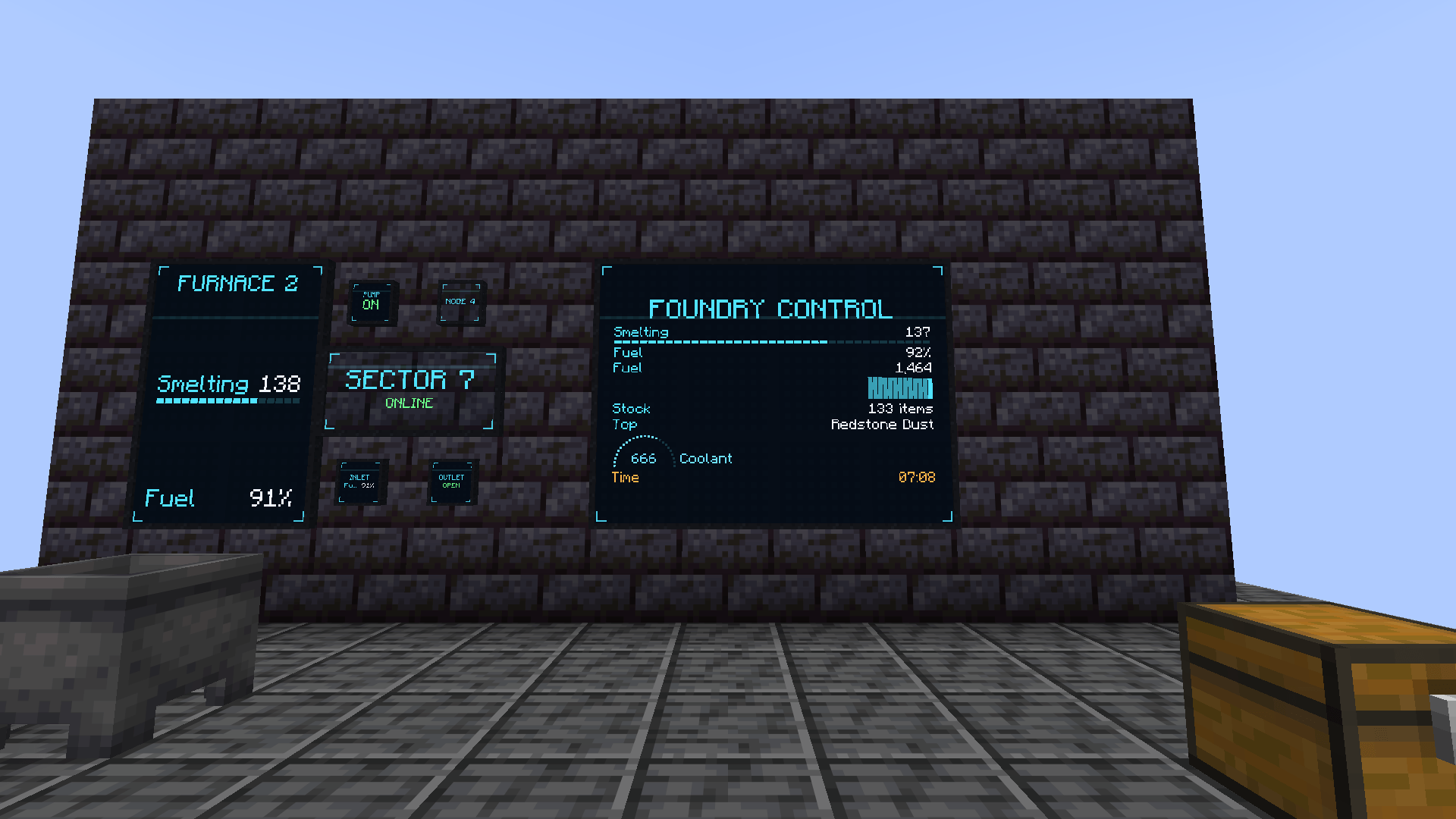
A 4 x 3 display reading a furnace, a chest, a cauldron and the time of day, live.
Description
Holoscreens
Sci-fi screens and holographic panels that show your own text and live values from any block.
Build a control room. Put screens on a wall and they merge into one big display. Write titles and notes on it, then link it to your chests, furnaces, tanks and machines: their energy, fluids, items and state show up live as numbers, bars, gauges and graphs.
Displays
- Display Screens merge into one display up to 16 x 12 blocks (configurable). Holographic Panels do the same, see-through and glowing.
- Several lines per display: titles, notes and values, each with its own colour, size and alignment.
- Place the lines: from the top, centred, at the bottom or spread over the whole height, and Fill to make them as big as the display allows.
- Small Display Screens and Small Holographic Panels: half-block plates for a label or a single value.
- Black or white frame per display: one click in the editor, or a dye.
- Seven themes, scan lines, a scan sweep and corner brackets. Displays glow in the dark.
- Editor with a live preview: right-click a display with an empty hand.
- Layouts are never lost when you add, split or break screens.
Linking values
- Take the Data Linker, right-click a display, then right-click any block.
- A list shows every value that block offers, with its current reading. Click one and it appears on the display.
- Show it as a number, a percentage, a bar, a gauge, a graph over time or text, with a unit and decimals.
What it reads
- Energy, fluids and items of any block, through NeoForge's standard capabilities: other mods' machines work with no add-on.
- Furnaces (cooking, fuel), redstone (signal, comparator), block states (a cauldron's level, a beehive's honey, a crop's growth...).
- The world: time, day, weather.
- A small API lets other mods add their own values.
Server-friendly
- Wireless links: a display reads blocks up to 64 blocks away (range in the config), nothing to wire.
- Values are read every half second, only while a player is near, and only the changed ones are sent.
- A display never loads chunks: an unloaded block shows OFFLINE.
- Every link and edit is checked by the server.
Modpacks
Modpacks: feel free to include Holoscreens in any modpack, public or private. All recipes are plain data files (data/holoscreens/recipe) and can be changed or removed with a datapack or KubeJS/CraftTweaker; client and server settings are in the config files.
Details
- No extra mod required. Install on both client and server.
- Minecraft 26.3 and 1.21.1 (NeoForge; 21.1.259 or newer on 1.21.1).
- Shader packs keep the displays.
- English and French. In-game config screen.
NOT AN OFFICIAL MINECRAFT PRODUCT. NOT APPROVED BY OR ASSOCIATED WITH MOJANG OR MICROSOFT.
Holoscreens Team