Fill Sight adds a live, in-world preview while typing "/fill" commands in chat.
No more guessing coordinates, miscounting blocks, or accidentally filling 32,768 blocks.
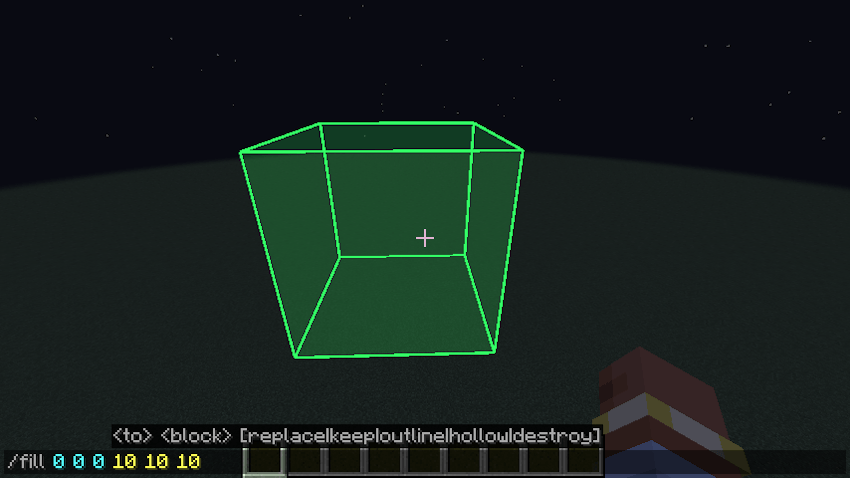
Just open chat and type "/fill 0 0 0 10 10 10". A box appears in the world, showing you exactly which region your command will affect.
Features
- Live Preview: The selection updates as you type, edit, or delete coordinates.
- Absolute Coordinates Only: Previews commands using absolute coordinates ("0 0 0"). Relative ("~") and local ("^") coordinates are ignored.
- Smart Color: Green outline and translucent fill for valid selections; red when the selection exceeds the world's "commandModificationBlockLimit".
- Respects Game Rules: Reads the world's actual block modification limit, including customized values.
- Client-Side: Works on multiplayer servers without requiring a server-side mod.
Usage
1. Open chat ("T").
2. Type "/fill <x1> <y1> <z1> <x2> <y2> <z2>".
3. Watch the preview update as you enter the coordinates.
Simple. Clean. Does one thing perfectly.
Fill Sight Team