Preview Structures
- By
Preview, rotate, and place your structures with a custom-built interface that brings greater control and flexibility.
Preview, rotate, and place structures with total control.
Preview Structures adds a dedicated Preview Structure Block (found in the Redstone Tab) that gives you a proper workflow for working with structures in Minecraft Java Edition.
Load any .nbt structure and see it in-world before you place it. Rotate it, check the fit, and commit when it's perfect.
Features
Custom Interface:
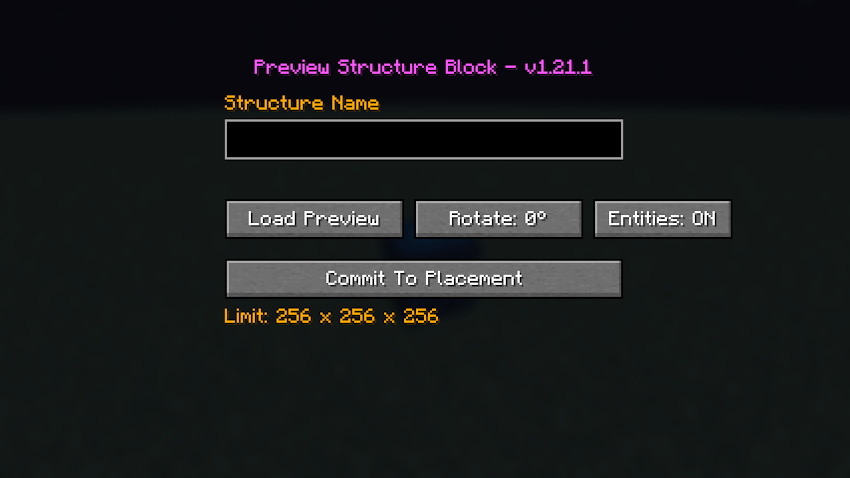
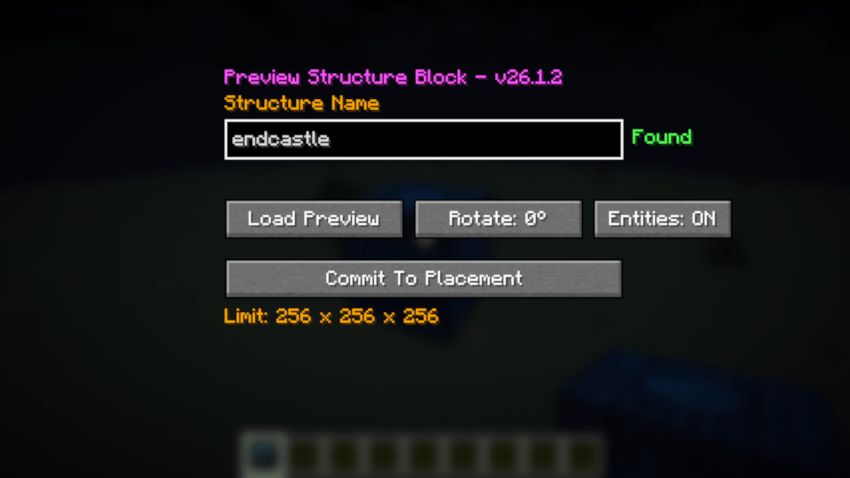
A purpose-built GUI for managing structure previews and placement. Independent from the vanilla Structure Block - no workarounds, just a direct workflow.
Live Structure Preview:
Inspect your structure in the world before placing. Make sure you have the space, the position, and the look you want.
Rotation Controls:
Rotate the preview to find the correct orientation before placement.
Command Block Support:
Fully preserves command blocks, including their commands and settings, when placing with Entities: ON.
Entity Placement:
Places saved entities along with your structure, including paintings and item frames.
Entities are placed when the structure is committed to the world and are not shown in the block preview. This keeps the preview focused and clean.
Details:
Structure Size: Up to 256 x 256 x 256 blocks per dimension.
File Location: Loads .nbt files from:
*/minecraft/saves/%worldname%/generated/minecraft/structures (1.21.1)
*/minecraft/saves/%worldname%/generated/minecraft/structure (26.1.2)
Preview Structures is a focused, lightweight tool for builders, map makers, and technical players who want precise control over structure placement.
Usage:
Load .nbt from the generated\minecraft\structures folder in your 1.21.1 world save.
Load .nbt from the generated\minecraft\structure folder in your 26.1.2 world save.
Preview Structures Team