Field Report
- By
In-game bug reports with a screenshot, log errors, versions and position attached, saved on the server or sent to Discord.
2 Crash report prompt.png
Description
Field Report lets players report bugs without leaving the game. They press F7 (or click Report a bug on the pause menu), write what happened, and send it. The report arrives with everything a developer asks for first, so nobody has to explain how to find their log file.
What a report contains
- The player's title and description, and whether it's a bug, a crash or freeze, or a suggestion.
- A screenshot of the game just before the menu opened (the player can untick it).
- Recent warnings and errors from the player's game log, with the top of each stack trace (also optional).
- Versions and hardware: Minecraft, NeoForge, number of mods, Java, operating system, CPU, graphics card, memory, FPS, render distance.
- From the server: who and where (dimension, coordinates, biome, game mode), the pack name and version you set, players online, server tick time, and the full server mod list.
Crashes too
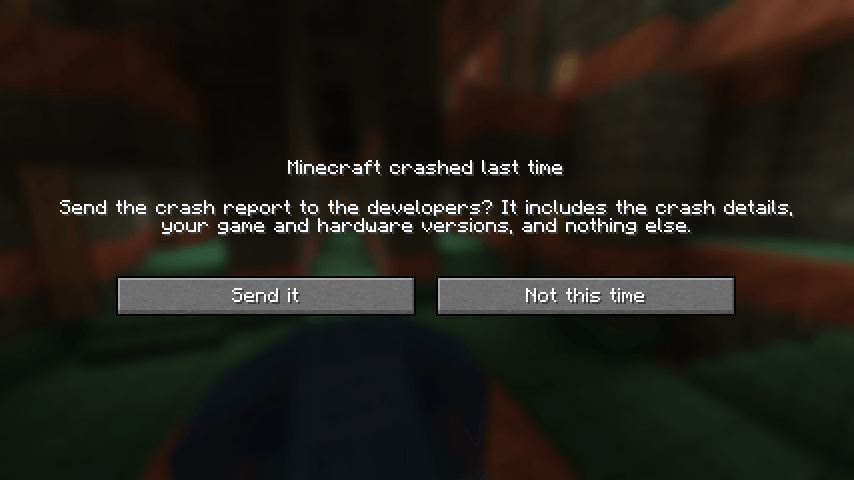
- After a game crash, the next time Minecraft starts it asks the player whether to send the crash report. One click and it goes the same way as a bug report (to your form, or to your server the next time they join).
- After a server crash, the server files its own crash report when it starts again: saved with the other reports and posted to your Discord channel. Old crash reports from before Field Report was installed are never sent.
Where reports go
- Saved on the server under
fieldreports/<date>/as a readablereport.mdandscreenshot.jpg. - Optionally posted to a Discord channel through a webhook, with the screenshot and the full report attached. The webhook address stays in the server config and never reaches players. Reports can't ping
@everyoneor roles. - In singleplayer, or on a server without Field Report, the report is saved on the player's own computer, so it's never lost.
- Modpack makers: point singleplayer reports at a Google Form you already use. Set
fallbackFormUrlandfallbackFormFieldsinconfig/fieldreport-client.toml(for exampleentry.123={title}orentry.456={description}\n\n{log}), and reports from players' own worlds land in your form's spreadsheet. No secrets ship with your pack.
For server owners
Server config (serverconfig/fieldreport-server.toml):
discordWebhook: paste a Discord webhook URL to get reports in a channel.saveToDisk: keep a copy of every report on the server (on by default).cooldownSecondsanddailyLimit: stop spam (60 seconds and 15 a day by default).packNameandpackVersion: shown on every report.reportServerCrashes: file the server's own crash reports on the next start (on by default).
/fieldreport test (operators) sends a sample report so you can check your setup.
Players can hide the pause menu button or turn off the crash question (askToSendCrashes) in config/fieldreport-client.toml, and change the key in Controls.
Compatibility
Minecraft 1.21.1, NeoForge 21.1. Install it on both the client and the server. It works in singleplayer too (reports are saved in the game folder). No other mods needed.
Modpacks
You may include Field Report in any modpack, as long as the pack downloads it from this page (or Modrinth). No need to ask.
Run your own server
Want a modded server for you and your friends? BisectHosting hosts modded Minecraft servers, and this affiliate link gives you 25% off your first month while supporting the developer.
Field Report Team