



File Details
epicfight_extended_datapacks-1.9+1.21.1-NeoForge.jar
- R
- Mar 13, 2026
- 171.31 KB
- 1.3K
- 1.21.1
- NeoForge
File Name
epicfight_extended_datapacks-1.9+1.21.1-NeoForge.jar
Supported Versions
- 1.21.1
Curse Maven Snippet
General - Changelog
The code has been updated to avoid relying on deprecated methods. This mod now works with the new declaration and policy system of Lazy Utilities 3.0+.
Changes
The LZM: Runner system was implemented in Lazy Utilities 3.3+. Therefore, parameterization files can now be saved within their .jar files using lowcodefml to convert their Datapacks into Mods.
Therefore...
Category Icon:
- for config: .minecraft/config/epicfight_edp/skill_builder/category_icon/your_files.json
- for In-Jar: your_mod.jar/lzm_runner/<your_modid>/skill_builder/category_icon/your_files.json
Guard Skills:
- for config: .minecraft/config/epicfight_edp/skill_builder/guard_skills/your_files.json
- for In-Jar: your_mod.jar/lzm_runner/<your_modid>/skill_builder/guard_skills/your_files.json
Passive Skills:
- for config: .minecraft/config/epicfight_edp/skill_builder/passive_skills/your_files.json
- for In-Jar: your_mod.jar/lzm_runner/<your_modid>/skill_builder/passive_skills/your_files.json
This should be a significant improvement, as it allows you to centralize your configurations within your own datapack... And at the same time, it's the prelude to more interesting things...
Additions
Overlay System
A new system for loading overlays has been added. This system supports loading both static (simple) overlays and animated (array) overlays.
How does it work?
First, go to your folder: assets/<your_namespaces>/overlay_parameters/your_file.json
There you can create a file like this; in this example it's for both one-handed and two-handed modes.
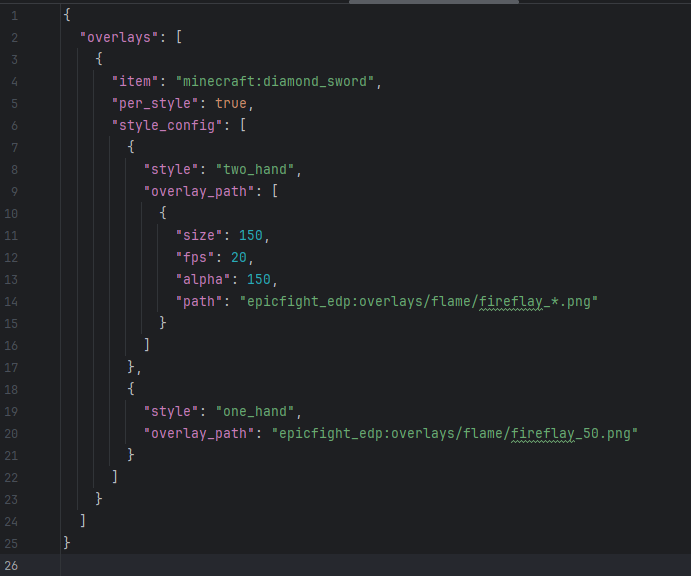
As you can see, if we want to use a simple overlay, that is, a single image, we simply pass it:
"overlay_path": "epicfight_edp:overlays/flame/fireflay_50.png"
In turn, you must always declare the item you want to write to. In the example, it was: "item": "minecraft:diamond_sword",
on the other hand: "per_style": true,
is just bureaucracy; it doesn't do anything currently. If in the future I want the overlay to be launched with different parameters, this will be useful.
The path assigned to the texture is not automatically located in "textures." The image shows: "epicfight_edp:overlays/flame/fireflay_50.png"
This means it is located in: assets/epicfight_edp/overlays/flame/fireflay_50.png
NOT IN: assets/epicfight_edp/textures/overlays/flame/fireflay_50.png
Important: The size MUST match the number of images available for animation. The FPS CANNOT EXCEED the level's evaluation threshold of 20 ticks (20 FPS).
The system counts from 1 -> Infinity, not from 0, and the asterisk (*) must correspond to the number in your image set. Additionally, the notation is straightforward: 0 -> 1 -> 10 -> 11 -> 100, etc.
IT IS NOT COMPATIBLE WITH 000 -> 001 -> 010 -> 11 -> 100...
Creating categories
Another new addition is the ability to create categories, which is relatively simple.
Depending on your preference, you can do the following:
- For config: .minecraft/config/epicfight_edp/weapon_builder/category/your_files.json
- For In-Jar: your_mod.jar/lzm_runner/<your_modid>/weapon_builder/category/your_files.json
And your file should look something like this:
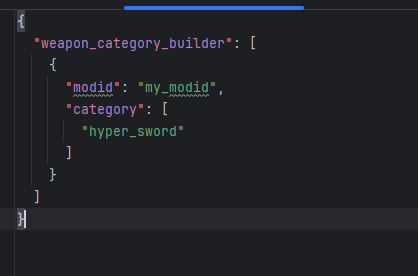
Important: If you register the category from the configuration folder, you must declare a modID.
If you do it using an In-Jar file, you don't need to specify the modID because the namespace where the file itself exists is considered the signer.
To access the LZM: Runner system, read the ChangeLog of Lazy Utilities 3.3 (for NeoForge) or Lazy Utilities 2.9.7 (for Forge).
In both cases, you must use lowcodefml.