



File Details
epicfight_extended_datapacks-1.8-Rev1.1.jar
- R
- Jan 17, 2026
- 157.02 KB
- 40.0K
- 1.20.1
- Forge
File Name
epicfight_extended_datapacks-1.8-Rev1.1.jar
Supported Versions
- 1.20.1
Curse Maven Snippet
Epic Fight EDP - Version 1.8 (Forge 1.20.1) — Shader Pack Update
New Feature: Shader Pack System
A new Shader Pack System has been implemented. It works similarly to a Resource Pack and allows loading ShaderFx from the Lazy Utilities v2.9.3+.
Shader Packs are executed automatically based on defined parameters.
To add Shader Packs, create parameter files under:
assets/<any_namespace>/shader_packet_parameters/*.json
Files in this folder will be loaded as long as they are correctly formatted.
Recommendation: Use the naming convention:
<author>_<function>_<extra>.json
This reduces the chance of name collisions....
Parameter File Structure
Each file defines how and when shaders will run. A typical file looks like:
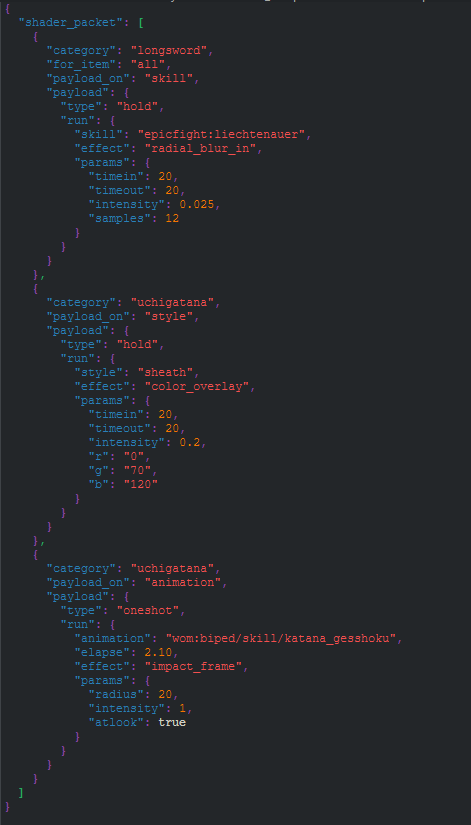
Field Definitions:
| Field | Description |
|---|---|
| shader_packet | Name of the shader packet array |
| category | Target category for shader execution (required) |
| for_item | Target item. Accepts "all" or specific items. If omitted, defaults to "all". |
| payload_on | Execution trigger type. Valid values: Skill, Style, Animation. (Invalid combinations will crash the game.) |
| type | Execution mode based on payload_on. |
Execution Modes (Type)
- Skill → supports: hold
- Style → supports: hold
- Animation → supports: oneshot
Hold: Shader runs while the condition is true
Oneshot: Shader runs once at a specific elapsed time
Run, parameter Format
When payload_on = "Style"
skill: <skill_id>
effect: <ShaderFx type>
Valid effects for Style/Hold:
- Overlay Color
- Radial Blur In
- Radial Blur Out
When payload_on = "Skill"
skill: <skill_id>
effect: <ShaderFx type>
Valid effects for Style/Hold:
Valid effects for Skill/Hold:
- Overlay Color
- Radial Blur In
- Radial Blur Out
When payload_on = "Animation"
animation: <animation_id>
elapse: <time>
effect: <ShaderFx type>
Valid effects for Animation/Oneshot:
- Noise Overlay
- Impact Frame
ShaderFx Parameter Reference
Impact Frame
| Parameter | Description |
|---|---|
| radius | Max radius (0–20). 0 disables the effect. |
| intensity | Effect strength |
| atlook | Triggers only if player is facing the caster |
Noise Overlay
| Parameter | Description |
|---|---|
| timeHold | Duration |
| size | Noise texture size |
| intensity | Effect strength |
| r, g, b | Color values |
Radial Blur (In / Out)
| Parameter | Description |
|---|---|
| timeIn | Smooth fade-in duration |
| timeHold | Duration at full strength |
| timeOut | Smooth fade-out duration |
| intensity | Blur intensity (non-scalar) |
| samples | Quality/performance trade-off |
Color Overlay
| Parameter | Description |
|---|---|
| timeIn | Smooth fade-in duration |
| timeHold | Duration at full intensity |
| timeOut | Smooth fade-out duration |
| intensity | Recolor strength |
| r, g, b | Target color |
Important considerations: not all "intensity" values are the same. This is because most shaders operate with "compatible" parameters in the file, but they interpret them differently. Impact Frame intensity is linear, while Blur intensity is not, which is why it's used at a low level. On the other hand, in Overlays like Noise or Color, it's the Alpha value.