



File Details
epicfight_extended_datapacks-1.7.jar
- R
- Jan 2, 2026
- 126.52 KB
- 55.7K
- 1.20.1
- Forge
File Name
epicfight_extended_datapacks-1.7.jar
Supported Versions
- 1.20.1
Curse Maven Snippet
Additions
A new system has been added to interact with Epic Fight Skills via JSON configuration.
This system provides three main features:
- Add Icon to Skill Builder
- Add Any to Skill
- Add Any to Guard Skill
The following sections explain each feature, from the simplest to the most complex.
Add Icon to Skill Builder
In some cases, a weapon category does not have a clear or defined icon in Epic Fight’s Skill system.
When this happens, opening the related Skill Book may cause an exception due to a missing icon.
(This issue occurred in older versions; it may or may not still happen, but this system exists as a preventive solution.)
How it works
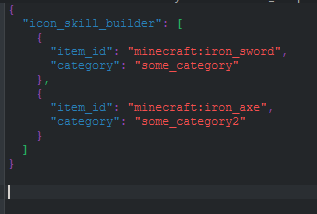
Adding an icon is simple. You only need to define:
- The item to be used as the icon
- The weapon category it belongs to
Configuration Path
Navigate to: ".minecraft/config/epicfight_edp/skill_builder/category_icon"
Create a JSON file in this folder.
Recommended naming format: "your_name_fuction_anycomplement.json"
This helps prevent duplicate files.
Override Behavior
This system allows overrides.
If multiple configurations define an icon for the same category, only one will be used.
Parameters
icon_skill_builder:The array name where all icon entries are stored.item_id:The item ID used as the icon model.category:The weapon category that will receive the icon.
Add Any to Skill
You can now add a Weapon Category to a Passive Skill that requires aWeapon Available Category, entirely via JSON and without writing code.
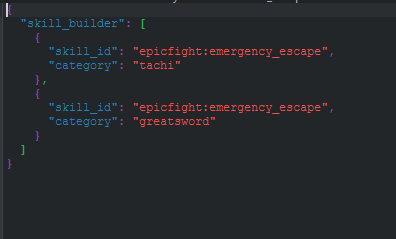
As with the previous system, configuration is simple: you define the target skill and the category.
Configuration Path
Navigate to: ".minecraft/config/epicfight_edp/skill_builder/passive_skills"
Create a JSON file in this folder.
Create a JSON file using the naming format: "your_name_fuction_anycomplement.json"
Override Behavior
This system does NOT allow overrides.
A single category declaration can be used by multiple Passive Skills, but cannot be redefined.
Parameters
skill_builder:The array name where all entries are stored.skill_id:The Epic Fight Skill ID. The target skill must contain a field for storing a weapon category. If the skill does not supportWeapon Available Category, this system will do nothing.category:The weapon category to be added to the skill.
Add Any to Guard Skill
This feature allows you to add a Weapon Category to a Guard-like Skill that requires aWeapon Available Category, fully via JSON.
This system is more complex than the previous ones, as it requires defining:
- The guard skill
- The weapon category
- The animation type
- Whether animations change per style
- Whether animations are single or arrays
- The required animation sets:
- 2 sets:
baseandbreak - 3 sets:
base,break, andadvanced(depending on the skill)
- 2 sets:
Despite this, the configuration remains straightforward.
Configuration Path
Navigate to: ".minecraft/config/epicfight_edp/skill_builder/guard_skills"
Create a JSON file in this folder.
Create a JSON file using the naming format: "your_name_fuction_anycomplement.json"
Override Behavior
This system does NOT allow overrides.
A single category declaration may be reused by multiple Guard Skills.
Core Parameters
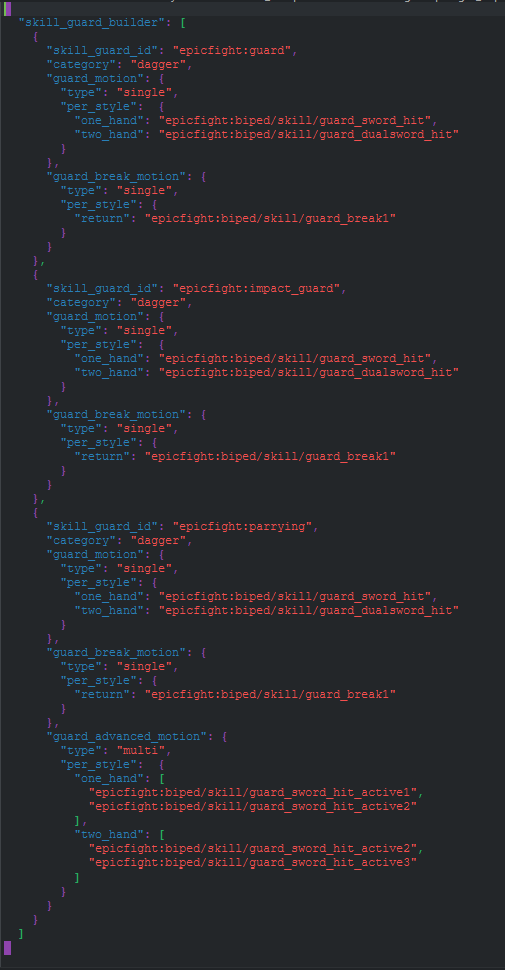
skill_guard_builder:The array name where all guard skill entries are stored.skill_guard_id:The Epic Fight Guard Skill ID. The skill must inherit fromGuard Skilland support animations. Any Guard Skill that meets these requirements is compatible.category:The weapon category to be added to the Guard Skill.
Animation Parameters
Depending on the guard skill type:
- Guard / Impact Guard - Like Skills
guard_motionguard_break_motion
- Parrying-like Skills
guard_motionguard_break_motionguard_advanced_motion
Animation Definitions
guard_motion:Animation played when the player successfully guards an incoming attack.guard_break_motion:Animation played when the player’s posture/stamina is exceeded and the guard breaks, stunning the player.guard_advanced_motion:Special guard interaction animation.- For Parrying exmple: a deflection animation
- For Weapons of Miracle – Counter Attack: an attack animation
Animation Sub-Configuration
Animation entries support additional parameters:
type:Defines whether a single animation or an animation array is used (multi). Onlyguard_advanced_motionsupports arrays (multi). Any value set for guard_motion or guard_break_motion other than single will be considered invalid.per_style:Defines the style in which the animation is used.- Use
"return"to ignore the player’s current style. If you have assigned "return", the system will understand that you do not want to use styles, so DO NOT assign styles if you use return. - To define animations per style, specify values such as:
one_hand,two_hand,etc.
- Use
Other Changes
- The Socket Style Item system limit has been increased from 15 → 50.
- Registration functions and charged attack logic now operate as a
CapabilityRunduring mod startup.- As a result:
- Unexpected exceptions are now contained
- Any failure will be clearly logged
- As a result:
Configuration
The configuration directory has been moved from: ".minecraft/config" -> (to) ".minecraft/config/epicfight_edp"
Capability
Updated to support Lazy Utilities v2.9.